Zebra ZD411 Desktop Printers: Compact Label Printing
Produce precise barcode labels, shipping labels, and identification tags with the Zebra ZD411 series desktop printers, available from DuraFast Label Company with fast Canadian shipping and expert support.
Meet the ZD411 Zebra Printer Series
The Zebra ZD411 is a compact yet powerful 2-inch desktop barcode printer designed for businesses that need reliable label printing in limited workspace environments. Built on Zebra's Link-OS platform and Zebra DNA software suite, these printers offer simple setup, flexible connectivity, and dependable performance for daily label production.
Instead of relying on larger industrial systems, businesses can deploy the ZD411 series to efficiently produce barcode labels, inventory tags, shipping labels, and compliance labels directly from a desktop workstation. The printers deliver strong performance in retail, logistics, healthcare, and manufacturing environments where space efficiency and reliability are essential.
What Makes Zebra ZD411 Label Printers Stand Out?
The ZD411 series combines Zebra's trusted thermal printing technology with a modern compact design engineered for everyday business operations.
Key advantages include:
• Compact desktop design ideal for counters, workstations, and small office environments
• High-quality barcode printing with resolution options up to 300 dpi
• Fast label production with print speeds up to 6 inches per second
• Flexible connectivity options including USB, Ethernet, WiFi and Bluetooth
• Zebra Link-OS platform for easy device management and remote configuration
• Simple media loading with OpenACCESS™ design for faster label changes
• Optional cutter and peeler accessories for automated workflows
The ZD411 printers support direct thermal and thermal transfer configurations depending on the model, making them suitable for both temporary shipping labels and durable barcode tags.
Browse the Zebra ZD411 Printer Models Available in Canada
DuraFast Label Company offers the complete Zebra ZD411 desktop printer series, designed for compact workspaces and reliable barcode labelling.
1. Zebra ZD411d Direct Thermal Desktop Printer
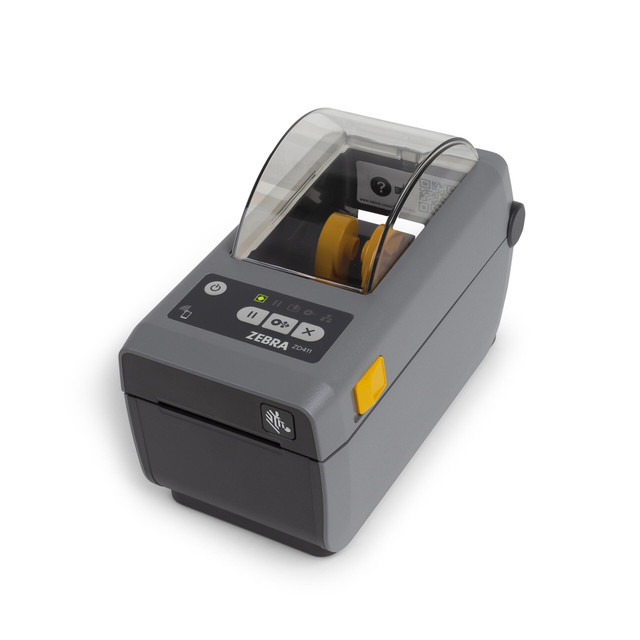
Price: CAD $747
The Zebra ZD411d is a direct thermal desktop printer designed for fast, reliable label printing without the need for ink or ribbons. It is ideal for businesses printing shipping labels, inventory tags, and barcode labels for short-term use.
Available Models:
-
Zebra ZD411d 2" Wide 300 dpi, 4 ips Direct Thermal Label Printer USB/BT4/WIFI | ZD4A023-D01W01EZ
-
Zebra ZD411d 2" Wide 300 dpi, 4 ips Direct Thermal Label Printer USB/BTLE5 | ZD4A023-D01M00EZ
-
Zebra ZD411d 2" Wide 203 dpi, 6 ips Direct Thermal Label Printer USB/BT4/WIFI | ZD4A022-D01W01EZ
-
Zebra ZD411d 2" Wide 203 dpi, 6 ips Direct Thermal Label Printer USB/BTLE5 | ZD4A022-D01M00EZ
With its compact footprint and user-friendly interface, the ZD411d delivers dependable label printing while minimizing operational complexity.
What Are the Technical Specifications of This Printer?
|
Feature |
ZD411D 300 DPI (USB + BT4 + WiFi) |
ZD411D 300 DPI (USB + BTLE5) |
ZD411D 300 DPI (USB + LAN + BTLE5) |
ZD411D 203 DPI (USB + BT4 + WiFi) |
ZD411D 203 DPI (USB + BTLE5) |
|---|---|---|---|---|---|
|
Best For |
wireless environments, mobile workflows |
simple USB + Bluetooth setups |
networked environments (LAN-based ops) |
fast shipping labels with wireless flexibility |
entry-level barcode printing |
|
Print Method |
direct thermal |
direct thermal |
direct thermal |
direct thermal |
direct thermal |
|
Resolution |
300 dpi (great detail) |
300 dpi (great detail) |
300 dpi greatth detail) |
203 dpi (standard) |
203 dpi (standard) |
|
Print Speed |
4 ips |
4 ips |
4 ips |
6 ips |
6 ips |
|
Print Width |
2 inch |
2 inch |
2 inch |
2 inch |
2 inch |
|
Connectivity Options |
USB, BT4, WiFi |
USB, BTLE5 |
USB, LAN, BTLE5 |
USB, BT4, WiFi |
USB, BTLE5 |
|
Network Capability |
WiFi-enabled |
not available |
Ethernet (LAN) enabled |
WiFi-enabled |
not available |
|
Bluetooth Type |
BT4 (classic) |
BTLE5 (low energy) |
BTLE5 (low energy) |
BT4 (classic) |
BTLE5 (low energy) |
|
Speed vs Quality Focus |
quality-focused |
quality-focused |
quality + network control |
speed-focused |
speed-focused |
|
Typical Use Case |
healthcare, retail, mobile printing |
desktop barcode printing |
warehouscentralizedsed printing |
logistics, shipping labels |
basic retail/labelling |
|
Operational Flexibility |
high (wireless + mobile) |
moderate |
high (network integration) |
high (fast + wireless) |
basic |
Who Should Use This Label Printer?
• E-commerce businesses printing shipping labels
• Retail stores producing barcode and price labels
• Offices needing compact desktop barcode printing
• Logistics teams printing package identification labels
• Small warehouses managing inventory labelling
2. Zebra ZD411d-HC Healthcare Desktop Printer
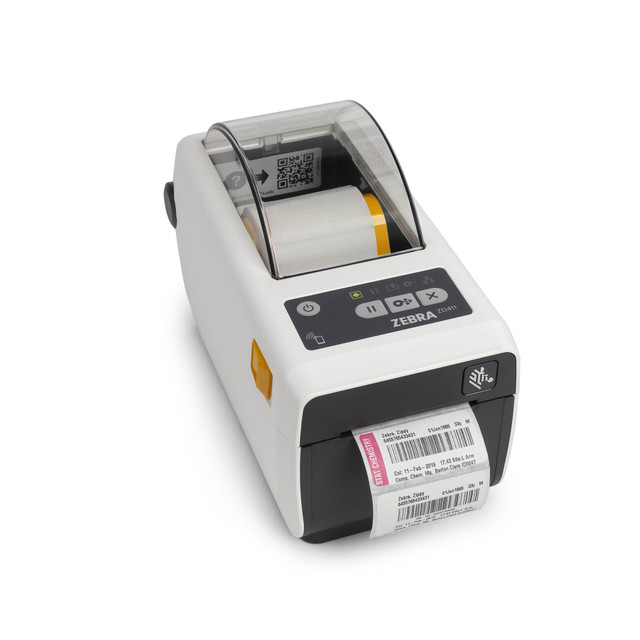
Price: CAD $998
The Zebra ZD411d-HC is a healthcare-specific version of the ZD411 designed for hospitals, laboratories, and medical environments. It features disinfectant-ready plastics and a healthcare-compliant power supply, enabling safe use in clinical settings.
The device supports patient identification labels, laboratory sample labels, and medication tracking labels while meeting healthcare sanitation requirements.
Available Models:
-
Zebra ZD411d-HC 2" Wide 300 dpi, 4 ips Direct Thermal Label Printer USB/WIFI/BT4 | ZD4AH23-D01W01EZ
-
Zebra ZD411d-HC 2" Wide 300 dpi, 4 ips Direct Thermal Label Printer USB/LAN/BTLE5 | ZD4AH23-D01E00EZ
-
Zebra ZD411d-HC 2" Wide 203 dpi, 6 ips Direct Thermal Label Printer USB/BTLE5 | ZD4AH22-D01M00EZ
Compare Zebra ZD411D-HC Printers: Features, Specifications, and Variants
|
Feature |
ZD411D-HC 300 DPI (USB + WiFi + BT4) |
ZD411D-HC 300 DPI (USB + LAN + BTLE5) |
ZD411D-HC 203 DPI (USB + LAN + BTLE5 + Cutter) |
ZD411D-HC 203 DPI (USB + WiFi + BT4, TAA) |
ZD411D-HC 203 DPI (USB + BTLE5) |
|---|---|---|---|---|---|
|
Best For |
mobile healthcare setups, wireless workflows |
hospital networks, centralizing |
automated wristband/label cutting |
government/compliance environments |
simple bedside or desktop use |
|
Print Method |
direct thermal |
direct thermal |
direct thermal |
direct thermal |
direct thermal |
|
Resolution |
300 dpi (high precision) |
300 dpi (high precision) |
203 dpi (standard) |
203 dpi (standard) |
203 dpi (standard) |
|
Print Speed |
4 ips |
4 ips |
6 ips |
6 ips |
6 ips |
|
Print Width |
2 inch |
2 inch |
2 inch |
2 inch |
2 inch |
|
Connectivity Options |
USB, Wi-FiT4 |
USB, LAN, BTLE5 |
USB, LAN, BTLE5 |
USB, Wi-FiT4 |
USB, BTLE5 |
|
Network Capability |
WiFi-enabled |
Ethernet (LAN) enabled |
Ethernet (LAN) enabled |
WiFi-enabled |
not available |
|
Bluetooth Type |
BT4 (classic) |
BTLE5 (low energy) |
BTLE5 (low energy) |
BT4 (classic) |
BTLE5 (low energy) |
|
Cutter Option |
not included |
not included |
standard (integrated cutter) |
not included |
not included |
|
TAA Compliance |
not available |
not available |
not available |
TAA compliant |
not available |
|
Healthcare Design |
disinfectant-ready, sealed buttons |
disinfectant-ready, sealed buttons |
disinfectant-ready, sealed buttons |
disinfectant-ready, sealed buttons |
disinfectant-ready, sealed buttons |
|
Speed vs Quality Focus |
precision-focused |
precision + network control |
speed + automation |
speed + compliance |
speed-focused |
|
Typical Use Case |
specimen labels, pharmacy, mobile carts |
EMR-integrated printing, nurses' stations |
wristbands, high-volume patient ID |
public sector healthcare facilities |
basic label printing |
Who Should Use This Label Printer?
• Hospitals and healthcare facilities
• Medical laboratories and diagnostic centres
• Patient identification and wristband printing
• Pharmacy and medication labelling
• Healthcare supply chain tracking
3. Zebra ZD411t Thermal Transfer Desktop Printer
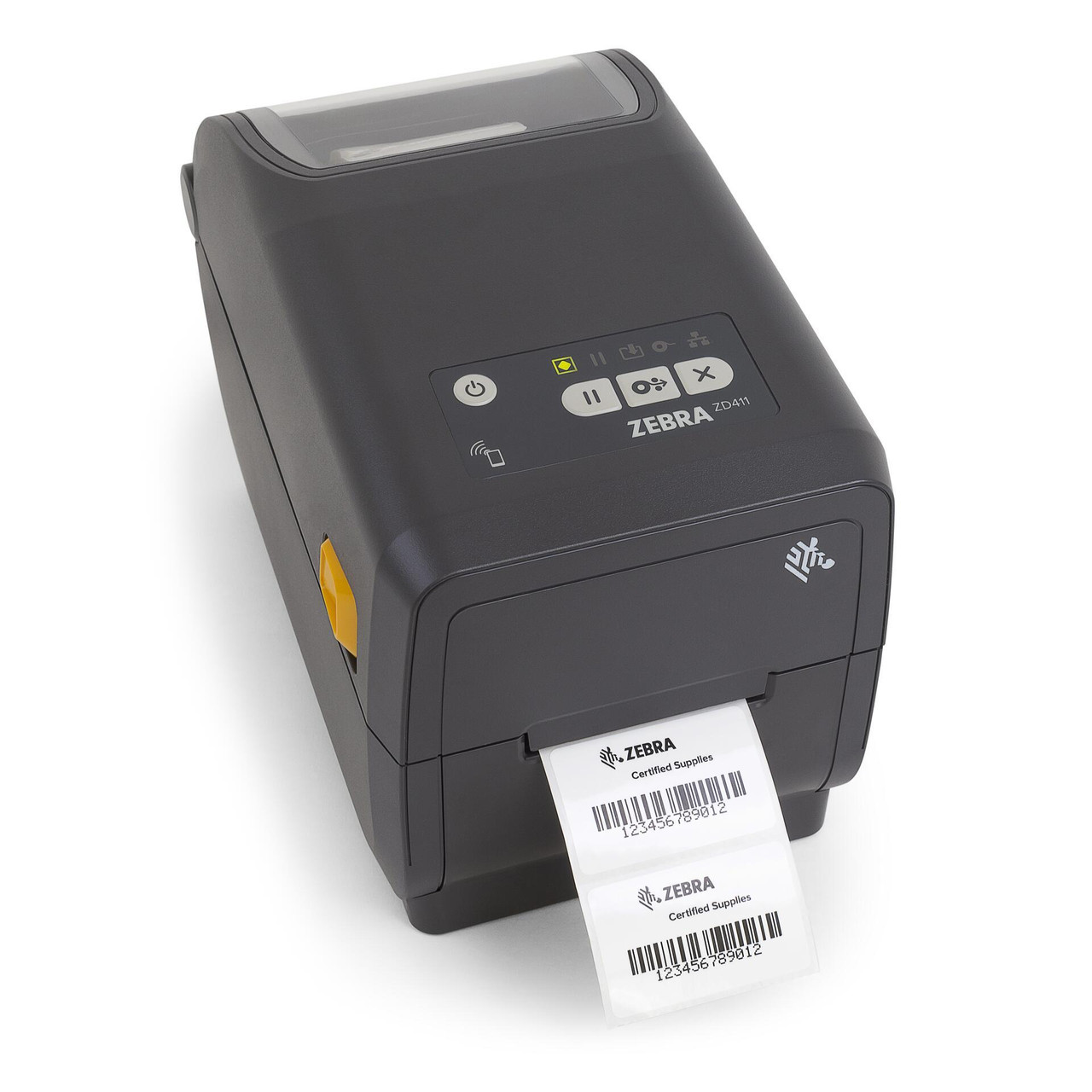
Price: CAD $1.032
The Zebra ZD411t expands the capabilities of the ZD411 series by supporting thermal transfer printing, enabling businesses to produce durable labels with ribbon-based technology.
Thermal transfer printing enables labels that are resistant to moisture, abrasion, and environmental exposure, making the ZD411t suitable for long-lasting barcode labels and asset tracking.
Available models:
-
Zebra ZD411t 2" Wide 300 dpi, 4 ips Thermal Transfer Label Printer USB/WIFI/BT4 | ZD4A023-T01W01EZ
-
Zebra ZD411t 2" Wide 300 dpi, 4 ips Thermal Transfer Label Printer USB/BTLE5 | ZD4A023-T01M00EZ
-
Zebra ZD411t 2" Wide 203 dpi, 6 ips Thermal Transfer Label Printer USB/LAN/BTLE5 | ZD4A022-T01E00EZ
-
Zebra ZD411t 2" Wide 203 dpi, 6 ips Thermal Transfer Label Printer USB/WIFI/BT4 | ZD4A022-T01W01EZ
-
Zebra ZD411t 2" Wide 203 dpi, 6 ips Thermal Transfer Label Printer USB/BTLE5/TAA | ZD4A022-T01M00GA
Compare Zebra ZD411T Printers: Features, Specifications, and Variants
|
Feature |
ZD411T 300 DPI (USB + WiFi + BT4) |
ZD411T 300 DPI (USB + BTLE5) |
ZD411T 300 DPI (USB + LAN + BTLE5) |
ZD411T 203 DPI (USB + WiFi + BT4) |
ZD411T 203 DPI (USB + BTLE5, TAA) |
|---|---|---|---|---|---|
|
Best For |
flexible workflows, wireless setups |
simple desktop setups |
networked operations, shared environments |
fast label production with wireless flexibility |
government/compliance environments |
|
Print Method |
thermal transfer |
thermal transfer |
thermal transfer |
thermal transfer |
thermal transfer |
|
Resolution |
300 dpi (great detail) |
300 dpi (great detail) |
300 dpi greath detail) |
203 dpi (standard) |
203 dpi (standard) |
|
Print Speed |
4 ips |
4 ips |
4 ips |
6 ips |
6 ips |
|
Print Width |
2 inch |
2 inch |
2 inch |
2 inch |
2 inch |
|
Connectivity Options |
USB, WiFi4 |
USB, BTLE5 |
USB, LAN, BTLE5 |
USB, WiFi4 |
USB, BTLE5 |
|
Network Capability |
WiFi-enabled |
not available |
Ethernet (LAN) enabled |
WiFi-enabled |
not available |
|
Bluetooth Type |
BT4 (classic) |
BTLE5 (low energy) |
BTLE5 (low energy) |
BT4 (classic) |
BTLE5 (low energy) |
|
Ribbon Support |
thermal transfer ribbon (74 m standard) |
thermal transfer ribbon |
thermal transfer ribbon |
thermal transfer ribbon |
thermal transfer ribbon |
|
TAA Compliance |
not available |
not available |
not available |
not available |
TAA compliant |
|
Speed vs Quality Focus |
quality-focused |
quality-focused |
quality + network control |
speed-focused |
speed + compliance |
|
Typical Use Case |
retail, asset labelling, mobile setups |
small business desktop printing |
warehouse, centralized |
shipping, logistics labels |
public sector, regulated industries |
|
Operational Flexibility |
high (wireless + mobile) |
moderate |
high (network integration) |
high (fast + wireless) |
basic |
Who Should Use This Label Printer?
• Manufacturing environments needing durable labels
• Warehouses printing long-lasting barcode tags
• Asset tracking and equipment labelling
• Compliance labelling applications
• Businesses requiring chemical- or moisture-resistant labels
Compare Zebra ZD411 Models: Features and Specifications
|
Model |
Print Method |
Max Print Width |
Resolution |
Print Speed |
Best Use |
|
ZD411d |
Direct Thermal |
2.2″ |
203/300 dpi |
Up to 6 ips |
Shipping and retail labels |
|
ZD411d-HC |
Direct Thermal |
2.2″ |
203/300 dpi |
Up to 6 ips |
Healthcare labeling |
|
ZD411t |
Thermal Transfer/Direct Thermal |
2.2″ |
203/300 dpi |
Up to 6 ips |
Durable industrial labels |
Ready to Choose the Right Zebra ZD411 Printer?DuraFast Label Company provides expert guidance, competitive pricing, and fast Canadian shipping for Zebra barcode printers and labelling systems. Whether you're printing shipping labels, patient wristbands, or durable asset tags, our team can help you select the right ZD411 model for your workflow. Call Now: +1-866-299-0066 |
Just How Efficient Is Thermal Printing Technology?
The ZD411 series uses Zebra's advanced thermal printing technology, eliminating the need for traditional ink cartridges while delivering consistent barcode clarity.
Key advantages include:
• Reliable barcode printing for inventory and logistics
• Fast label output for operational workflows
• Reduced maintenance compared to ink printers
• Support for a wide range of label media
• Optional cutter and peel mechanisms for automated labelling
• Seamless integration with enterprise systems
Who Are Zebra ZD411 Printers Best For?
ZD411 printers are designed for businesses that require compact, dependable barcode printing.
Ideal industries include:
• Retail stores and point-of-sale operations
• Warehouses and logistics operations
• Healthcare and laboratory environments
• Manufacturing production lines
• Small businesses managing product labelling
• Shipping and fulfillment centres
Where to Buy Zebra ZD411 Printers in Canada?
When you purchase from DuraFast Label Company, you receive expert support and a reliable supply for your labelling systems.
Why Buy From DuraFast Label Company?
• Canadian supplier with nationwide shipping
• Competitive pricing on Zebra barcode printers
• Quick fulfillment for printers and accessories
• Technical expertise in barcode and label printing systems
• Ongoing support for labels, ribbons, and supplies
• Scalable solutions for growing businesses
Manufacturer Warranty for Zebra ZD411 Printers
Zebra ZD411 printers are backed by a standard 'smanufacturer's warranty from Zebra Technologies, designed to ensure reliability in both desktop and light-industrial environments.
-
Warranty Coverage: Typically,, 2 years limited warranty from the date of shipment
-
What's Included: Protection against defects in materials and artistry under normal use
-
Hardware Support: Covers core components such as the printhead, power supply, and internal electronics (subject to usage conditions)
-
Service Type: Repair or replacement through authorized Zebra service centres
-
Exclusions: Damage caused by misuse, improper maintenance, non-approved media/ribbons, or unauthorized modifications
For businesses operating in critical environments (retail, healthcare, logistics), Zebra also offers extended service plans and Zebra OneCare™ support, which can include expedited repairs, advanced replacements, and technical assistance.
What's Included in the Box
Each Zebra ZD411 printer package is designed for quick deployment, with all essential components included for immediate setup:
-
Zebra ZD411 Printer Unit (pre-configured based on selected model)
-
Power Supply and AC Power Cord (region-specific)
-
USB Cable (standard connectivity for initial setup)
-
Quick Start Guide/Setup Documentation
-
Regulatory and Safety Documentation
Additional Notes:
-
Thermal Transfer (ZD411T models only): Ribbon components are supported, but ribbons are typically sold separately
-
Media (Labels): Not included by default and should be selected based on application requirements
-
Connectivity Modules: WiFiWiFiN, or Bluetooth configurations are pre-installed as per SKU, not added in-box separately
This standard packaging ensures that users can move from unboxing to operational setup with minimal configuration, especially when paired with Zebra's setup utilities and drivers.
Which Zebra Industrial Label Printers Are Designed for High-Volume Printing?
The following Zebra industrial printers support reliable barcode, compliance, and product label printing for demanding environments such as manufacturing facilities, warehouses, logistics centres, and large distribution operations:
-
ZD220t Thermal Transfer 4-inch Print Width
Real Customer Reviews from Our Customers
Impressed with the level of service provided by Durafast.
- Excellent customer service
- Provided label samples on different label printers
- Had a showroom in which I could see the label printers in person
Thanks for making my decision on label printers easier.
Had a great experience. After searching around for a label printer, I stumbled across Durafast, and I'm glad I did. They had great service and provided the perfect printer for my business. They also have the best prices among the companies I contacted. And since they also provide labels and ink, I'll be back the next time I need a refill.
EXCEPTIONAL customer care! I mean... the labels are great, but when you're designing something you're purchasing hundreds or thousands of, you want a customer care team that's gonna make sure your order is what you want. HIGHLY recommend!!!
Need Help Choosing the Right Zebra ZD411 Setup?Every labelling workflow is different, from media type and durability requirements to integration with warehouse systems. The specialists at DuraFast Label Company can help you select the right Zebra printer, labels, and accessories for your business. Talk to Our Team Today |
Frequently Asked Questions
What is the difference between ZD411d and ZD411t?
The ZD411d uses direct thermal technology, while the ZD411t supports thermal transfer ribbons for longer-lasting labels. Both models share a new architecture, compact dpi print width, and enhanced functionality through Zebra's exclusive Print DNA software suite.
What industries commonly use the Zebra ZD411 printers?
The ZD411 works as a versatile label maker across retail, healthcare, logistics, and warehouse operations. Its compact design, movable sensor, and reliable printer status monitoring support barcode labelling tasks across diverse operational environments.
What is the maximum print speed of the ZD411 series?
ZD411 printers reach speeds of about 6 inches per second while maintaining sharp output with precise dpi print width. Their innovative architecture improves processing performance, ensuring smooth label production even during continuous barcode printing.
Can Zebra ZD411 printers print barcode labels?
Yes. The ZD411 supports barcode printing using EZPL command language and Swiss font options for consistent readability. It works efficiently as a label maker for inventory labels, shipping barcodes, and compliance labelling across operational systems.
Does the ZD411 support wireless connectivity?
Yes. Many configurations include a wireless radio with WiFiWiFinectivity, along with USB host and USB cable connections. This flexibility allows the printer to connect easily to a PC, Mac, or laptop for streamlined printing.
Are Zebra ZD411 printers suitable for healthcare environments?
Yes. Healthcare variants are designed with disinfectant-ready surfaces and reliable printer status indicators. When combined with Zebra's exclusive Print DNA software suite, they help maintain efficiency and compliance across hospital, laboratory, and pharmacy workflows.
How do I print simple barcode labels using a Zebra ZD411 printer?
To print barcode labels, connect the printer to a PC, Mac, or laptop using a USB cable or Wi-Fi. Use EZPL commands or compatible label software to design labels with Swiss-font barcodes and send the job directly to the printer.
Where can I download drivers and firmware updates for the Zebra ZD411?
Drivers and firmware for the ZD411 can be downloaded from Zebra's official support pages. These updates improve functionality, maintain compatibility with Amazon or enterprise systems, and ensure the printer operates efficiently within modern IT environments.
How do I set up and install the Zebra ZD411 desktop printer for the first time?
Connect the printer to your PC, Mac, or laptop using a USB cable or configure WiFi available. Install drivers, load labels using the movable sensor, and verify printer status through the intuitive user interface.
How can I troubleshoot an orange status light with a diamond-shaped icon on my Zebra ZD411?
An orange light with a diamond icon often indicates media detection or calibration issues. Check the movable sensor, reload the labels, and review the printer status on the user interface to quickly restore normal operation.
-
Zebra Technologies
Zebra ZD411d-HC 2" Wide 300 dpi, 4 ips Direct Thermal Label Printer USB/WIFI/BT4 | ZD4AH23-D01W01EZ
MSRP: CAD $1,247.00Was: CAD $1,428.00Now: CAD $998.00 -

Zebra Technologies
Zebra ZD411t 2" Wide 300 dpi, 4 ips Thermal Transfer Label Printer USB/WIFI/BT4 | ZD4A023-T01W01EZ
MSRP: CAD $1,290.00Was: CAD $1,477.00Now: CAD $1,032.00