How to Set the Right Label Unwind Direction?
20th Jul 2026
Key Highlights
-
The label unwind direction determines which edge peels off the roll first.
-
An incorrect unwind setup can cause upside-down labels and machine jams.
-
Orientation and unwind direction must align for proper application.
-
Standard unwind charts use four numbered direction positions (1-4) to indicate the exact sequence and orientation.
-
Machine application requires precise roll direction and configuration details.
-
Inside wound and outside wound rolls affect feeding compatibility.
-
Always confirm size, orientation, unwind direction, and roll specifications before ordering.
Have you ever received a roll of labels that looked perfect, but were applied completely wrong on your product? Labels printing upside down, shifting out of alignment, or jamming your applicator can be frustrating and costly.
One of the most common reasons this happens is an overlooked setting called label unwind direction. While many businesses focus on label size, material, and artwork, the unwind direction for labels directly controls how labels feed through machines, peel from the liner, and land on packaging.
If this configuration is incorrect, you may face sensor errors, crooked placement, applicator jams, and unexpected production downtime. In this guide, you will learn what label unwind direction labels mean, how unwind direction connects with orientation, and how to choose the correct setup for both hand application and automated systems.
What Is Label Unwind Direction?
Label unwind direction means which edge of the label comes off the roll first when it is applied. Choosing the correct unwind direction for labels helps make sure your design looks right and your labels feed smoothly through machines.
Here is what the unwind direction controls.
-
Which side of the label comes out first.
-
How your artwork appears during label application.
-
How the roll feeds into the printers properly.
-
Whether it works with automated labeling equipment.
-
How easy labels are applied by hand.
Unwind direction becomes especially important in the following situations.
-
Automatic label applicators in production lines.
-
Print and apply systems for shipping labels.
-
Inline packaging lines in manufacturing facilities.
-
High-volume production environments with fast labeling.
For hand application, it mainly affects workflow speed and efficiency.
This is especially important when ordering custom roll labels such as product labels, barcode roll labels, or prime packaging labels, where correct configuration ensures seamless application.
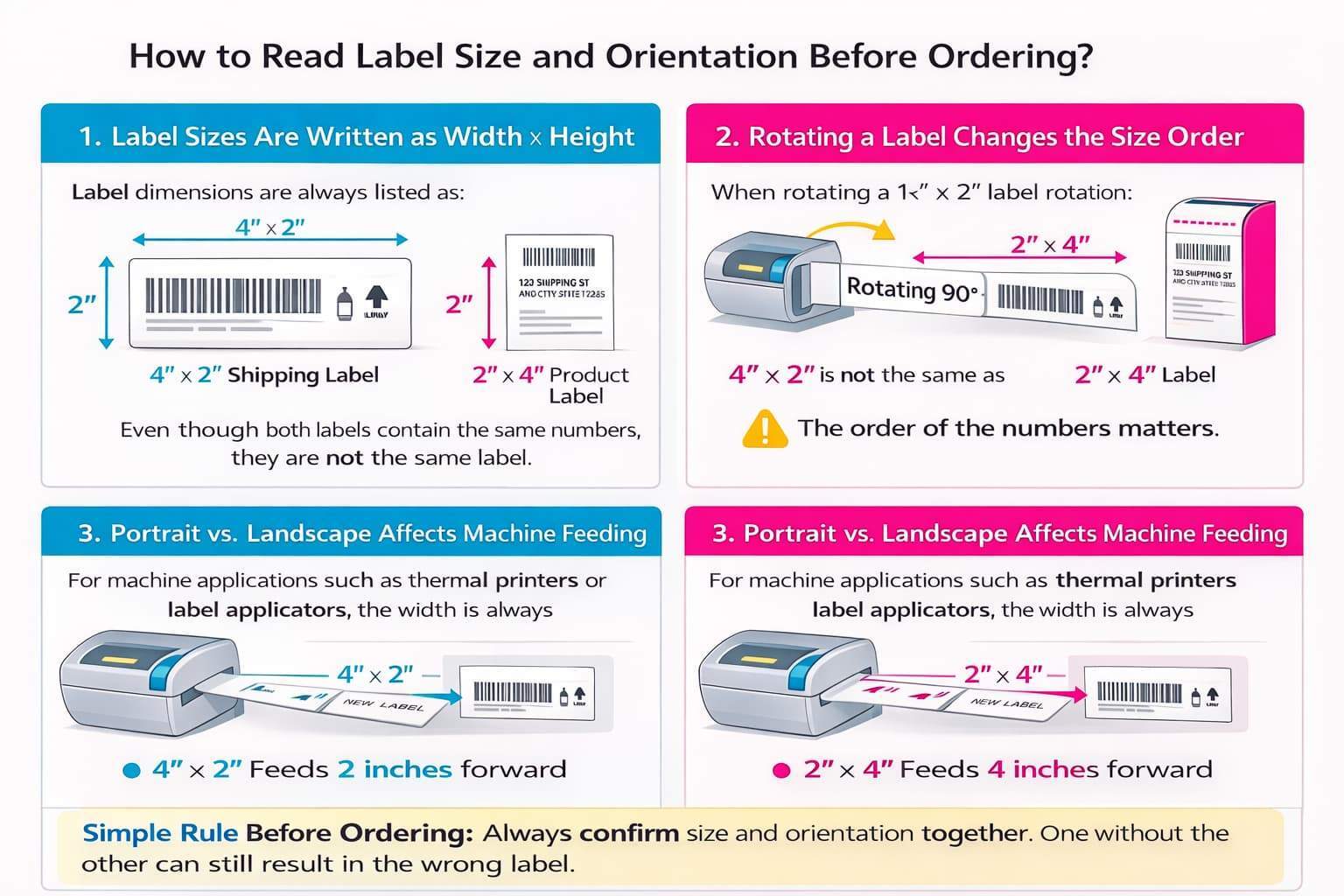
How to Read Label Size and Orientation Before Ordering?
Understanding label size is more than just reading numbers. The way dimensions are written and the orientation of the label directly affect how your label prints and applies, especially for machine-fed labels.
1. Label Sizes Are Written as Width × Height
Label dimensions are always listed as:
Width × Height
-
A 4" × 2" shipping label means the label is 4 inches wide and 2 inches tall.
-
A 2" × 4" product label means the label is 2 inches wide and 4 inches tall.
Even though both labels contain the same numbers, they are not the same label.
2. Rotating a Label Changes the Size Order
If you rotate a 4" × 2" label 90 degrees, it becomes a 2" × 4" label.
The material may look similar, but the orientation changes how it feeds into a printer or applicator.
This is why:
4" × 2" is not the same as 2" × 4"
The order of the numbers matters.
3. Portrait vs. Landscape Affects Machine Feeding
For machine applications such as thermal printers or label applicators, the width is always the measurement across the roll, and the height is the direction the label feeds through the machine.
-
A 4" × 2" label feeds 2 inches forward before the next label.
-
A 2" × 4" label feeds 4 inches forward before the next label.
If orientation is incorrect, your design may print sideways or require artwork reformatting.
For hand-applied labels, orientation is more flexible. For machine applications, it must match your printer setup.
Simple Rule Before Ordering: Always confirm size and orientation together. One without the other can still result in the wrong label.
Before placing an order, double-check:
-
Width × Height format
-
Feed direction
-
Machine or hand application
This ensures your labels print correctly and apply without issues.
How Do You Understand Label Orientation on Rolls?
Before choosing the unwind direction, you must first understand label orientation. Label size and layout affect how the design prints and feeds through equipment. If the orientation is incorrect, even the right unwind setup will not fix application issues.
Here is how label sizes are usually read.
Label sizes are typically expressed as: Width (across the roll) × Height (along the roll direction).
For example:
-
4" × 3" means 4" across the web, 3" along the feed direction.
-
If the artwork is portrait vs. landscape, that changes how it prints and feeds.
Orientation becomes important when ordering labels such as:
-
Custom product labels for retail packaging.
-
Food and beverage labels for containers.
-
Health and beauty labels for bottles.
-
GHS chemical labels for safety compliance.
If orientation is misunderstood, problems can occur.
-
Logos may print sideways on labels.
-
Barcodes may rotate and not scan.
-
Labels may apply upside down accidentally.
Now, let’s connect orientation with unwind direction in a simple way.
-
Orientation decides how your design sits on the label.
-
Unwind direction decides how the label comes off the roll.
-
Both must match your machine or hand application process.
If these do not match, labels may print correctly but apply incorrectly.
When both orientation and unwind direction are set properly, labels print clearly and are applied the right way every time.
What Is the Standard Label Unwind Direction Chart?
Most roll label manufacturers use a numbered chart to show how a label unwinds from the roll. This chart identifies which edge of the label comes off first as it feeds into a printer or applicator. Unwind direction directly affects print alignment, application accuracy, and production efficiency.
How to Read the Unwind Direction Chart?
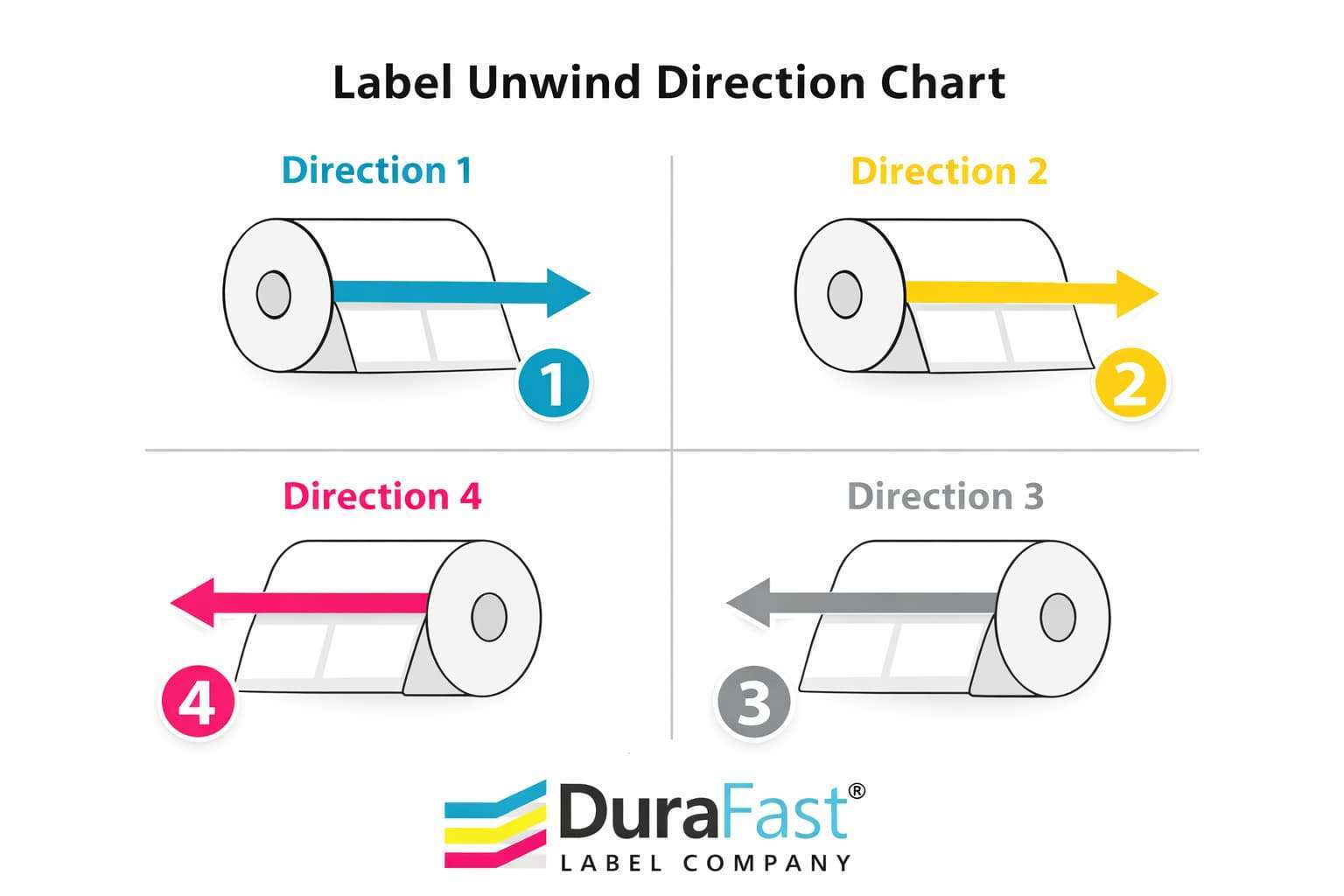
Before selecting a direction number, it is important to understand what the chart is actually showing. Each number represents a specific way the label feeds off the roll. The arrow indicates the forward movement of the label, and the edge that reaches the peel plate or print head first determines the direction.
When reviewing an unwind chart:
-
The numbered position identifies the unwind direction.
-
The arrow shows how the label feeds forward.
-
The edge that reaches the peel plate or print head first determines the direction number.
-
The face of the label indicates whether the printed side is facing up or down as it feeds.
In simple terms, the unwind direction answers one key question: Which edge of the label leaves the roll first as your machine pulls it forward?
What Are The Four Primary Unwind Directions?
Most suppliers reference four standard unwind directions labeled 1 through 4. These directions describe which edge of the label leads as the roll advances through a printer or applicator. Understanding these definitions helps prevent incorrect orientation during automated labeling.
Direction 1: Direction 1 means the top edge of the label feeds off the roll first, moving toward the applicator or print head. If your machine pulls from the top of the roll and applies labels with the design facing upright, Direction 1 is typically correct.
Direction 2: Direction 2 means the bottom edge of the label feeds first. This orientation is often required when the applicator inverts the label during placement or when the machine’s feed path reverses vertical positioning.
Direction 3: Direction 3 indicates that the right edge of the label leads off the roll first. This setup is common when labels are applied sideways relative to the artwork layout or when the application head is mounted perpendicular to product movement.
Direction 4: Direction 4 means the left edge of the label feeds off first. If your applicator pulls labels from the left side of the machine or peels labels horizontally from that direction, you likely need Direction 4.
Practical Example Before Ordering
Choosing the correct unwind direction requires understanding how your specific machine pulls and applies labels. The direction must match the physical feed path of your printer or applicator to ensure proper alignment and smooth operation.
For example:
-
If your automatic applicator pulls labels from the left side.
-
Peels labels forward horizontally.
-
Applies them without rotating the product.
You likely require Direction 4.
If your thermal printer feeds labels straight forward with the design upright and the top of the label exiting first, you likely require Direction 1.
Always confirm how your machine pulls the roll before selecting a direction number during ordering.
Important Note About Manufacturer Variations
While many suppliers use a 1 through 4 numbering system, unwind charts are not universally standardized. The numbering sequence, rotation pattern, and diagram layout can differ between manufacturers, which can create confusion if you rely only on the direction number.
Some manufacturers:
-
Use 1 through 8 instead of 1 through 4.
-
Use letter designations such as A, B, C, and D.
-
Rotate numbering clockwise instead of counterclockwise.
Because numbering systems vary, the direction number alone is not sufficient. The physical feed orientation must match your equipment setup.
Before Production: Confirm With DuraFast
Unwind direction is critical for automated roll-fed labeling systems, and selecting the wrong orientation can cause production delays, reprinting costs, or misapplied labels. Confirming direction before production ensures the labels run correctly the first time.
If you are unsure, DuraFast can confirm the correct unwind direction based on:
-
Your printer model.
-
Your applicator type.
-
Your feed path configuration.
-
Whether labels are applied by hand or machine.
Always confirm unwind direction before ordering custom roll labels to prevent costly mistakes and ensure smooth application.
How Does Unwind Direction Differ for Machine vs Hand Application?
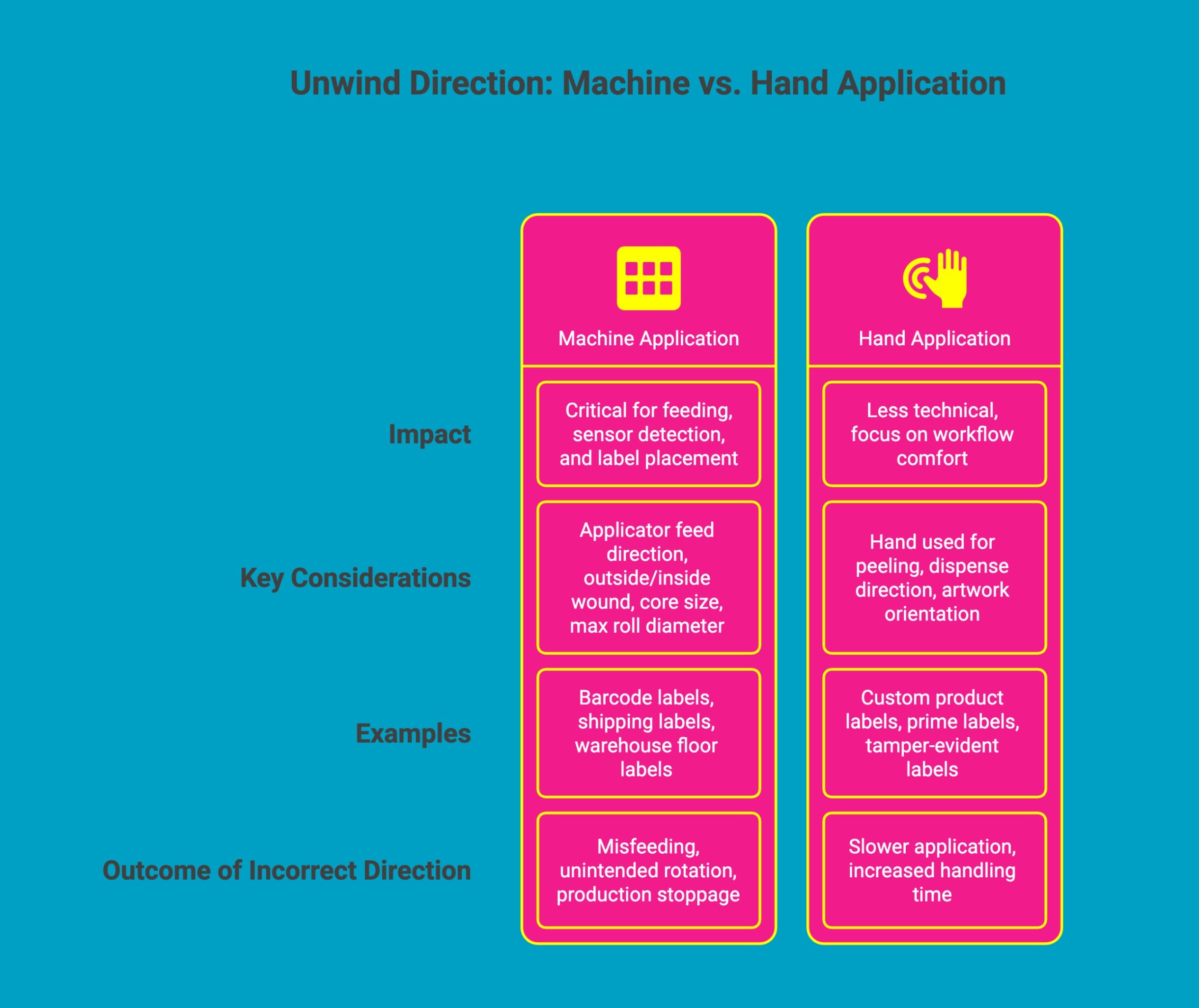
Unwind direction affects both automated labeling systems and manual operations, but the level of impact differs significantly. For machines, unwind accuracy directly influences feeding, sensor detection, and label placement. For hand application, the concern shifts toward workflow comfort and artwork orientation rather than mechanical compatibility.
A: Machine Application
When labels are applied using a printer or automatic applicator, unwind direction is critical. Machines are configured to pull labels in one fixed direction, detect the gap consistently, and apply the label in a specific orientation. If the unwind direction is incorrect, the system may misfeed, rotate the label unintentionally, or stop production altogether.
Before ordering roll labels for machine use, confirm these four requirements:
1. Applicator Feed Direction: Identify which edge of the label feeds into the machine first. Your unwind direction must match this feed path exactly.
2. Outside Wound or Inside Wound: Determine whether the label face should be on the outside of the roll or wound inward. This affects how the label presents to the peel plate or print head.
3. Core Size: Confirm your required core size. The most common are 1 inch and 3 inches, depending on your printer or applicator spindle.
4. Maximum Roll Diameter: Verify the largest roll diameter your equipment can accommodate to avoid loading issues or machine interference.
This becomes especially important when ordering:
-
Barcode labels supplied on rolls.
-
Shipping labels for packing stations.
-
Warehouse floor labels for facilities.
-
Floor barcode labels for scanning systems.
If any of these specifications are incorrect, even the right label size will not run properly. Always confirm these details before production to prevent downtime or reorders.
B: Hand Application
For hand-applied labels, unwind direction is far less technical but still worth considering. Instead of machine compatibility, the focus shifts to operator comfort and natural workflow.
When applying labels manually, consider:
-
Which hand does the operator use to peel labels?
-
Whether the label dispenses left to right or right to left?
-
Whether the artwork remains upright as it comes off the roll?
You may see this when ordering:
-
Custom product labels for retail use.
-
Prime Labels for branded packaging.
-
Tamper-evident labels for sealed products.
For example, a right-handed operator may prefer a direction that allows peeling with the right hand while holding the product with the left. If the unwind direction causes the artwork to appear upside down as it peels, it can slow down application and increase handling time.
In short production runs, retail labeling, or packaging assembly, choosing a comfortable unwind direction improves efficiency and reduces fatigue. While machines demand precision, hand application benefits from practicality and ease of use.
Selecting the correct unwind direction ensures smooth labeling, whether your operation is automated or manual.
Practical Scenario: How Applicator Setup Changes Width and Height?
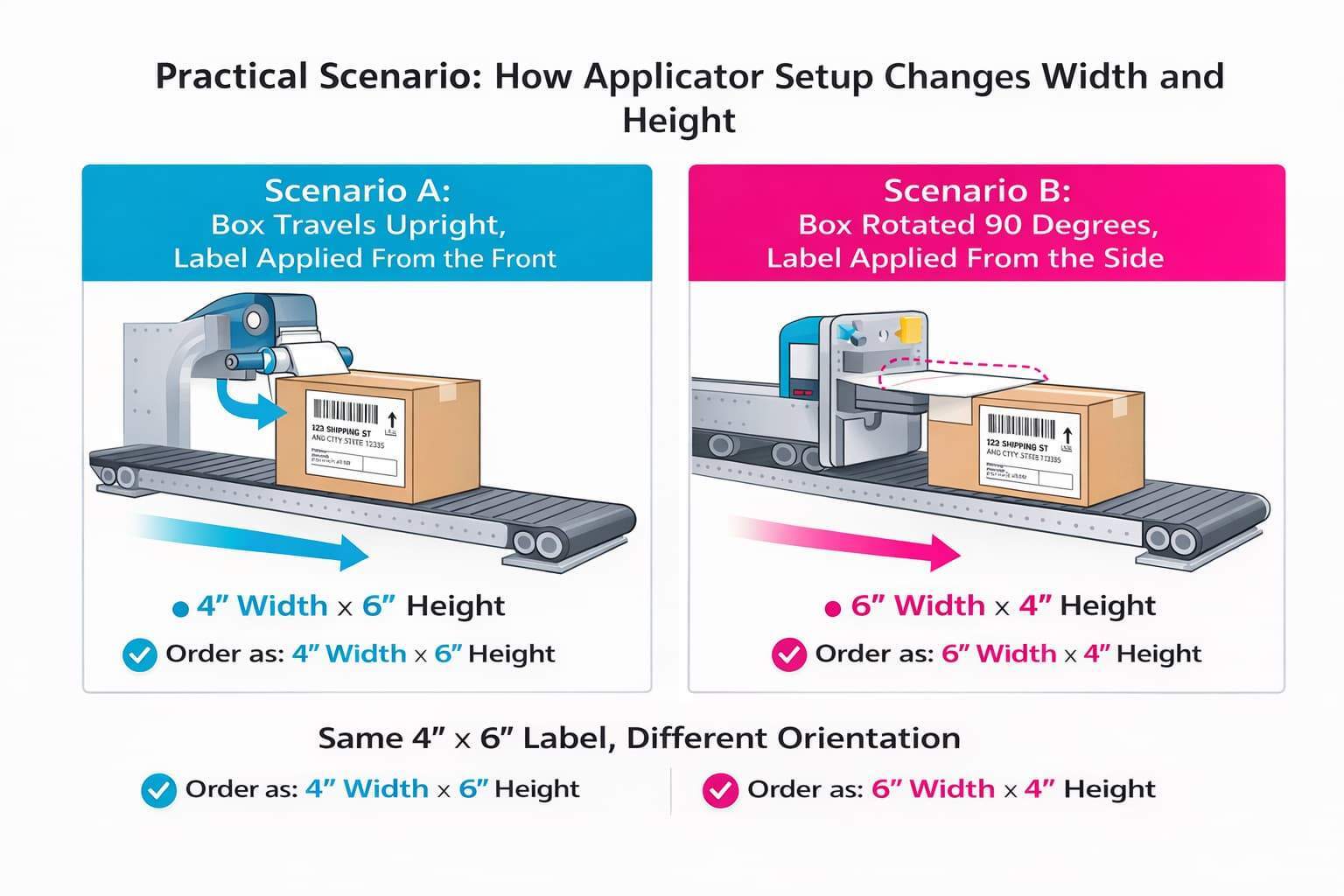
Understanding Width × Height becomes much easier when you look at a real production example. The same label can require a completely different orientation depending on how the product moves through the applicator.
Example: Shipping Box on a Conveyor Line
Imagine you are labeling corrugated shipping boxes on an automated conveyor.
You need a label that measures 4 inches by 6 inches and contains a barcode, address block, and handling information.
Scenario A: Box Travels Upright, Label Applied From the Front
The box moves forward with the largest face pointing toward the applicator head.
The applicator presses the label directly onto the front panel.
In this setup:
-
The label feeds forward vertically.
-
The top of the design exits the roll first.
-
The correct size is likely 4" × 6" if 4 inches runs across the roll and 6 inches feeds forward.
Here, the height is the direction of feed.
Scenario B: Box Rotated 90 Degrees, Label Applied From the Side
Now imagine the same box travels sideways on the conveyor.
The applicator is mounted on the side of the line and applies labels horizontally.
Nothing about the box or artwork changed. But the application direction did.
In this setup:
-
The label now feeds sideways instead of vertically.
-
What was previously the “height” may now function as the width.
-
The same physical label may now need to be ordered as 6" × 4" instead of 4" × 6".
Even though the numbers are identical, reversing Width × Height changes how the label feeds through the machine.
Why This Matters?
If you order 4" × 6" but your applicator setup requires 6" × 4", the label may:
-
Print sideways
-
Apply rotated
-
Trigger incorrect unwind direction
-
Require artwork reformatting
The product did not change. The applicator position did. This is why width and height are not just measurements. They define how the label interacts with your equipment.
What Is the Difference Between Inside Wound and Outside Wound Labels?
Unwind direction is closely related to how labels are wound on the roll. The winding style determines how the label presents to your printer or applicator and whether the roll will feed correctly through the machine. Even if your unwind direction is correct, the wrong winding type can prevent proper operation.
There are two common winding types used in roll labels.
Outside Wound: Labels peel from the outside of the roll. This means the printable face is visible on the outer surface as the roll unwinds. This is the most common configuration used in thermal printers and automatic applicators.
Inside Wound: Labels peel from the inside of the roll. The printable face is wound inward, and the roll feeds in the opposite direction compared to outside wound.
How to Identify Which Winding Type Your Machine Requires?
Most printer and applicator manuals clearly specify whether the machine requires inside-wound or outside-wound rolls. Look for sections describing:
-
Roll loading diagrams
-
Spindle orientation
-
Label path illustrations
-
Peel plate or sensor positioning
If the manual shows labels feeding off the outer surface of the roll toward the print head, it requires an outside wound. If the labels feed from the inner surface of the roll, it requires an inside wound.
When in doubt, check the equipment documentation or provide your machine model before placing your order.
What Happens If You Order the Wrong Winding Type?
If the winding type is incorrect, the roll may:
-
Feed backwards through the machine.
-
Present the label face in the wrong direction.
-
Fail to align with the print head or sensor.
-
Not feed at all.
In automated environments, this can result in production delays, wasted labels, or the need to reorder the entire roll configuration. The machine cannot compensate for the wrong winding orientation.
Important Ordering Note
At DuraFast Label Company, the outside wound is the default configuration unless otherwise specified.
If your equipment requires inside wound rolls, you must clearly state this at the time of ordering. Without that specification, labels will be produced as outside wound.
Always confirm winding type along with unwind direction to ensure your labels load and feed correctly, the first time.
Pre-Order Checklist: What to Confirm Before Ordering Roll Labels?
Before placing a roll label order, review each of the specifications below. Confirming these details in advance prevents feeding problems, misalignment, production delays, and costly reprints.
1. Confirm Exact Label Size (Width × Height)
Verify your label dimensions using the Width × Height format. Width is measured across the roll, and height is the direction the label feeds forward. Reversing these numbers changes the orientation and may result in the wrong label configuration.
2. Verify Artwork Orientation (Portrait or Landscape)
Determine whether your design is laid out vertically or horizontally. Artwork orientation must align with how the label feeds through your printer or applicator to avoid sideways or inverted printing.
3. Decide Machine or Hand Application
Identify whether labels will be applied using an automatic applicator or manually. Machine applications require strict alignment of unwind direction and winding type, while hand application allows more flexibility but still benefits from proper orientation.
4. Specify the Correct Unwind Direction
Confirm which edge of the label feeds off the roll first. Your unwind direction must match your printer or applicator’s feed path to ensure smooth operation and correct label placement.
5. Check Required Core Size
Verify the internal core diameter your equipment supports. The most common core sizes are 1 inch and 3 inches. Using the wrong core size can prevent the roll from mounting properly.
6. Confirm Maximum Roll Diameter
Check the largest roll diameter your machine can accommodate. Exceeding this limit may cause clearance issues or require re-rolling labels to a smaller size.
Taking a few minutes to confirm these specifications ensures your labels print correctly and apply without interruption.
If any of these specifications are unclear, contact DuraFast’s team before placing your order. Providing your machine make and model allows us to confirm the correct configuration and prevent costly mistakes.
How Orientation Changes When a Product Is Placed Sideways in an Applicator?
Label orientation is not determined by artwork alone. It is directly affected by how the product moves through the applicator. When a product is placed sideways instead of upright, the label orientation must often rotate to match the direction of application.
In a standard setup, products move forward with the front panel facing the applicator head. The label feeds straight onto the surface without rotation. In this case, portrait artwork typically remains upright as it applies.
However, when a product is placed sideways:
-
The applicator may approach from the side instead of the front.
-
The label may need to rotate 90 degrees before placement.
-
What was previously portrait may now need to be landscape.
-
The unwind direction may change to match the new feed path.
For example, if cartons travel left to right on a conveyor and the applicator is mounted on the side, the label feeds horizontally instead of vertically. If the artwork is not adjusted, the design may appear rotated or sideways once applied.
Before ordering roll labels, confirm:
-
How the product travels on the conveyor.
-
Where the applicator head is mounted.
-
Whether the label is applied from the side, top, or bottom.
-
If the artwork needs to rotate to remain upright after application.
A small change in product orientation can require a different unwind direction or artwork layout. Always review your machine setup before finalizing size, orientation, and direction specifications.
Need Help Confirming Your Roll Label Configuration?
Not sure which unwind direction, core size, roll diameter, or winding type is right for your equipment?
At DuraFast Label Company, the team can confirm the correct specifications based on your printer model, applicator setup, and feed configuration. Whether you are running an automatic labeling system or applying labels by hand, we will help ensure your rolls are produced correctly, the first time.
Avoid production delays, misfeeds, and costly reorders by verifying your setup before printing begins.
Contact us today for a custom label quote, free samples, or a quick configuration check before you place your order. Providing your machine make and model allows us to confirm the correct unwind direction and roll configuration for your application.
Conclusion
Now that you understand label orientation and unwind direction, the next step is to review your application setup carefully. Confirm how your printer or applicator feeds labels, how your artwork is positioned, and which unwind direction matches your workflow.
If you are unsure, check your equipment manual or speak with your label supplier before placing an order. Taking a few extra minutes to verify these details helps prevent costly reprints, delays, and production interruptions later.
Frequently Asked Questions
What are the different types of label unwind directions?
There are four primary unwind directions in the label printing industry, typically referenced as positions one through four. Each direction indicates how labels feed from a roll relative to printer orientation and application equipment requirements during installation.
When should I use outside versus inside unwind direction for labels?
Choose outside unwind when labels dispense from the outer layer of the roll of labels, commonly used in most printers. Inside unwind is preferred when labels feed from the core outward, depending on equipment design.
How does the unwind direction affect automatic label application machines?
Unwind direction directly influences the label printing process and automated application flow. Machines rely on consistent feed orientation so labels peel correctly, align properly, and apply without twisting, misplacement, or unnecessary production slowdowns.
How can I determine the correct unwind direction for my labels?
To determine the correct orientation, review your printer or applicator specifications and observe how labels feed during operation. Match equipment requirements with unwind charts to ensure labels dispense accurately without rotation or misalignment issues.
How do I read a label unwind direction chart?
A chart shows how the label appears as it feeds from the roll. The top of the label indicates reading direction, while arrows display the feed path, helping confirm compatibility with printers or applicators.
Is the unwind direction the same as the winding direction for labels?
Unwind direction describes how labels dispense during application, while winding direction refers to how they are wrapped onto the core. The inside of the roll may differ from outward feed orientation, depending on configuration.
What problems can happen if I choose the wrong unwind direction for my labels?
Selecting the wrong direction can disrupt the label printing process, causing labels to rotate, apply sideways, or feed improperly. This may result in wasted materials, downtime, and inconsistent placement during application runs.
Does unwind direction matter for custom labels?
Yes, unwind direction matters because it determines how the bottom of the label and artwork align during dispensing. Choosing correctly ensures a possible label prints and applies accurately without repositioning or manual correction during production.