Top 4x6 UPS Shipping Labels for Canadian Businesses
16th Aug 2026
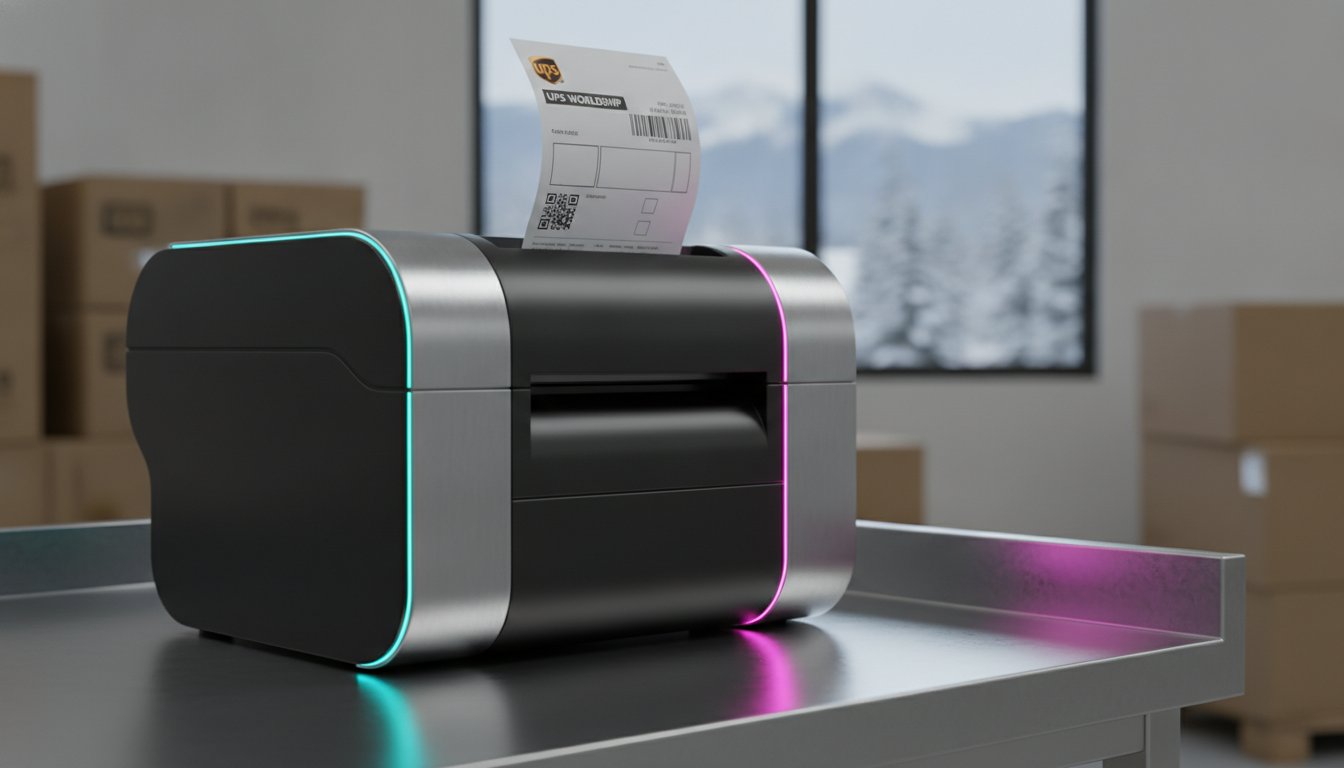
Have you ever calculated the true cost of a "free" shipping label that peels off in a frozen Calgary sorting centre? While UPS Canada provides basic supplies, the hidden expense of a failed delivery or a $26 address correction fee can quickly erode your profit margins. Standardizing your workflow with a 4x6 ups label system is a critical step toward operational maturity, yet the hardware and material choices you make today will determine your efficiency during the next high-volume peak. Most Canadian business owners realize that a label is more than just paper; it's the final handshake with your customer.
We understand that dealing with printer jams and adhesive failures during a busy shipping cycle is a frustration you simply don't have time for. This guide promises to help you master your logistics by selecting, setting up, and optimizing your 4x6 UPS labels for maximum durability and cost-effectiveness. We'll explore the technical differences between direct thermal and thermal transfer options, ensure your hardware is ready for WorldShip 29.0, and help you choose consumables that survive the rigours of the Canadian supply chain.
Key Takeaways
- Understand the main difference between direct thermal and thermal transfer technologies to ensure your labels survive the rigours of Canadian winter transit and sorting centres.
- Learn why standardizing on a professional 4x6 ups label system optimizes carrier scanner readability and helps you avoid expensive address correction fees.
- Discover why high-performance adhesives and premium materials are superior to free basic supplies when shipping specialized items like tires or frozen goods.
- Master the technical configuration of UPS WorldShip 29.0 to ensure seamless integration with industrial hardware from Zebra, Honeywell, and Toshiba.
- Evaluate the business benefits of upgrading to high-volume industrial printers to maximize your print speed in inches per second (ips) and improve operational longevity.
Standardizing Your Shipping: Why 4x6 UPS Labels Are the Industry Benchmark
Why do major carriers insist on a specific dimension for their tracking documents? The 4x6 format has become the Industry Benchmark for Shipping because it provides the optimal surface area for high-density barcodes without unnecessarily increasing the package footprint. Standardizing on a 4x6 ups label system ensures that your tracking data remains legible for automated sorting systems at the UPS shipping centre, significantly reducing the risk of manual intervention or costly delivery delays. When a scanner can't read a distorted or undersized barcode, your package is pulled from the line, which can lead to missed delivery windows and frustrated customers.
Many growing businesses begin by printing labels on standard letter paper and securing them with clear tape. This manual process is often the first bottleneck as shipping volumes increase. The main difference between paper printing and using dedicated direct thermal labels is the total elimination of consumables like ink, toner, and tape. Thermal printing uses heat-sensitive material, which means there's no risk of ink smearing during a snowy transit in Ontario or a humid summer in the Maritimes. It's a more resilient approach that prioritizes both professional presentation and fiscal responsibility.
The Anatomy of a 4x6 UPS Label
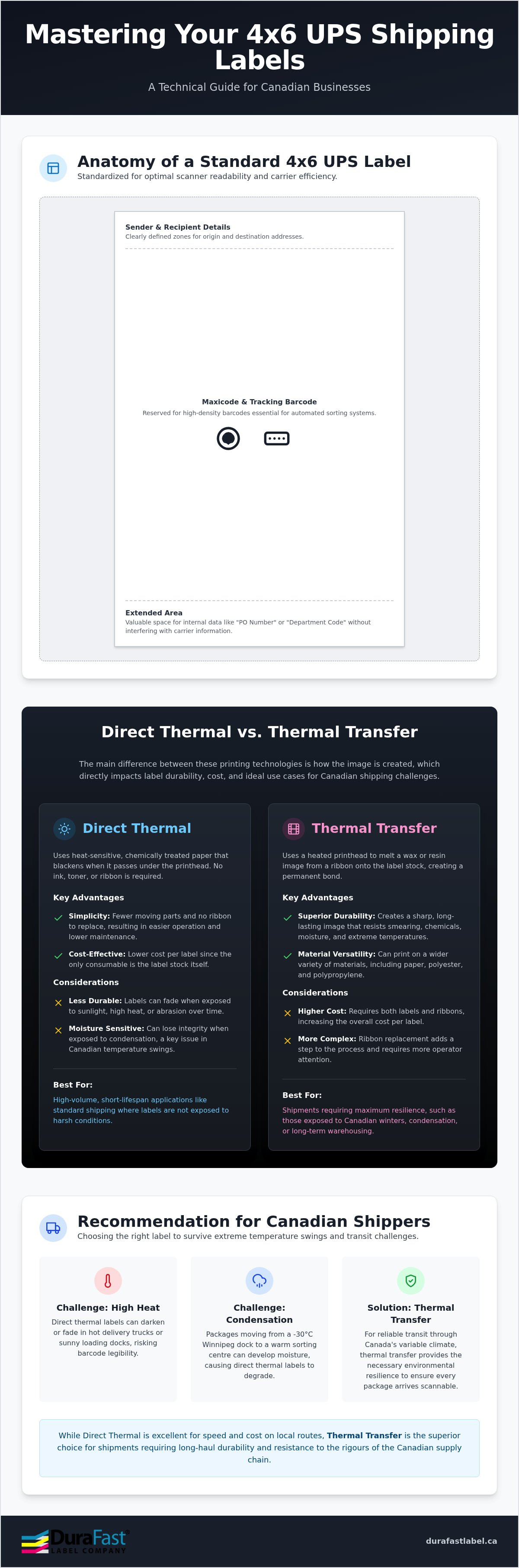
A standard 4x6 ups label is divided into logical zones designed for maximum carrier efficiency. The top section contains the sender and recipient details, while the middle zone is reserved for the Maxicode and the primary tracking barcode. Have you noticed the "Extended Area" at the bottom of your label? This space is invaluable for Canadian businesses that need to include internal reference numbers, such as "PO Number" or "Department Code," without cluttering the carrier's required data. Because this size is the most widely supported format for Canadian logistics software, it integrates seamlessly with WorldShip 29.0 and most third-party platforms, ensuring your hardware and software work in perfect harmony.
Logistical Advantages for Canadian SMEs
Streamlining your packing bench starts with peel-and-stick efficiency. Transitioning to dedicated thermal labels allows your team to move faster since they don't have to cut paper or manage cumbersome tape dispensers. This shift also reduces the dimensional weight and waste of your shipments by eliminating bulky pouches. For businesses shipping across the border, using standard 4x6 labels ensures your packages comply with international standards, helping your goods clear customs without unnecessary scrutiny. It's a pragmatic solution that empowers you to take control of your production process while achieving better results at the shipping dock.
Direct Thermal vs. Thermal Transfer: Choosing the Right 4x6 Label Material
The main difference between direct thermal and thermal transfer printing technologies lies in how the image is created on the label surface. Direct thermal printing uses heat-sensitive chemically treated paper that blackens when it passes under the printhead. In contrast, thermal transfer printing utilizes a heated ribbon to melt a wax or resin image onto the substrate, creating a bond that resists smearing and environmental degradation. Choosing the right 4x6 ups stock depends entirely on your specific logistical environment and how long you need the tracking data to remain legible during transit.
Canadian logistics present unique challenges, specifically regarding extreme temperature swings. A package moving from a -30°C loading dock in Winnipeg to a heated sorting centre can develop surface condensation. While direct thermal labels are excellent for speed, they can sometimes lose integrity when exposed to excessive moisture or high heat over long periods. Thermal transfer materials provide the environmental resilience needed to survive these transitions, preventing the tracking failures that lead to lost packages and administrative headaches. If you are unsure which material fits your volume, you can speak with our technical team for a specific recommendation.
Direct Thermal 4x6 Labels: Simplicity and Speed
Direct thermal labels are the cost-effective choice for high-speed domestic shipping. Because they don't require ribbons, they simplify your maintenance routine and reduce the overall hardware footprint in your warehouse. These labels are ideal for most Canadian e-commerce businesses where packages reach their destination within a few days. However, you should be aware of their sensitivity to light and heat. If your 4x6 ups labels will be stored in a hot delivery van or under bright warehouse lights for extended periods, the stock may fade or darken. For fast-turnover environments, direct thermal labels offer the most streamlined path to efficiency.
Thermal Transfer Labels for Maximum Durability
When your shipping routes involve long-haul transit or high-friction environments, thermal transfer labels are the superior choice. These require high-performance thermal transfer ribbons to create a permanent, crisp image that won't smudge or scratch. This is particularly important for labels introduced to water, industrial oils, or heavy environmental debris. If you are shipping frozen foods or heavy hardware that faces significant abrasion, the resin-based bond of thermal transfer ensures your barcodes remain scannable from the warehouse to the customer's door. Understanding these technical material requirements is a vital part of Setting Up Your Printer for UPS WorldShip successfully.
Sourcing 4x6 UPS Labels in Canada: Free Supplies vs. High-Performance Alternatives
Is there really such a thing as a free lunch in Canadian logistics? While UPS Canada offers free shipping supplies to account holders, the availability of these items is strictly tied to your recent shipping volume. For many small and medium-sized businesses, the quantity of 4x6 ups stock provided may not keep pace with seasonal spikes or specific branding needs. Relying solely on standard-issue supplies can also limit your ability to pivot when your packaging materials change or when you need a label that adheres to non-standard surfaces.
The main difference between standard-issue labels and premium alternatives is the quality of the adhesive and the thickness of the liner. While carrier labels focus on tracking, your overall packaging must still align with Canadian federal labeling requirements for consumer safety and bilingual clarity. Investing in high-performance stock ensures that your labels don't just meet these standards but actually stay attached until they reach the final destination. A label that falls off in a sorting centre isn't just a lost package; it's a potential $26 address correction fee or a total loss of inventory.
Evaluating UPS-Provided Thermal Stock
Standard-issue thermal labels are designed for high-volume, generic applications. They often feature thinner liners to maximize the number of labels per roll. However, these thin liners can cause significant issues in industrial environments. They are prone to curling and can cause premature thermal printhead wear because the printer's sensors and rollers have to work harder to maintain alignment. If your operation requires specialized durability, such as tire shipping labels that must adhere to rubber and survive heavy friction, the standard "free" stock will likely fail to perform.
When to Invest in Premium 4x6 Labels
When should you move beyond basic supplies? If you've transitioned to recycled cardboard or plastic mailers, you'll find that standard adhesives often struggle to maintain a permanent bond. Premium 4x6 ups labels feature aggressive adhesives specifically formulated for these challenging substrates. Besides better adhesion, sourcing your own blank labels allows you to standardize your entire multi-carrier workflow. Using the same high-quality stock for UPS, FedEx, and Canada Post reduces the need for hardware adjustments and minimizes printer downtime. This strategic choice empowers you to maintain a cleaner-cutting production line, ultimately lowering your long-term hardware maintenance costs.
Configuration and Troubleshooting: Setting Up Your Printer for UPS WorldShip
Setting up a thermal printer for WorldShip 29.0 requires more than just a simple USB connection. To ensure your 4x6 ups labels print with the precision required for automated carrier sorting, you must first install the correct manufacturer-specific drivers. While Windows may attempt a generic plug-and-play installation, the main difference between generic and dedicated drivers for Zebra, Honeywell, or Toshiba models is the ability to control specific hardware parameters like heat settings and sensor types. Without these controls, you risk faint barcodes that fail at the shipping centre, potentially triggering a CAD 26 address correction fee if the label becomes unreadable for the carrier's scanners.
Software Setup: WorldShip and Beyond
Inside the UPS WorldShip 29.0 interface, navigate to System Preferences and then to the Printing Setup tab. Here, you must define your label stock as either "Thermal 4x6" or "4x6-1/4" to ensure the software properly maps the data fields. Within the printer configuration, you can adjust the print speed, measured in ips (inches per second). For high-density barcodes, a slower speed of 2 to 4 ips often produces better clarity than pushing the hardware to its maximum rated speed. You might also consider using label design software to automate recurring shipping tasks and ensure your layout remains consistent across different workstation configurations in your warehouse.
Hardware Calibration and Maintenance
If your printer is skipping labels or flashing a "no paper" error, a manual calibration is usually the necessary solution. This process teaches the hardware sensors to recognize the physical gap between labels or the black mark on the liner. In high-volume environments, the only difference between constant downtime and operational seamlessness is often the addition of an external label unwinder. These allow you to use larger, more economical rolls that don't fit inside a standard desktop footprint, thereby reducing the frequency of roll changes. Keeping the printhead clean is equally critical; even a small speck of environmental debris can cause a "void" in a barcode, leading to scanning failures. If you encounter persistent alignment issues, you can consult our technical support team for a diagnostic review of your hardware settings.
Scaling Your Logistics: Professional 4x6 Printing Solutions from DuraFast Label Company Canada
As your daily shipping volume grows from a handful of packages to hundreds, your equipment must keep pace with the increased demand. The main difference between a desktop unit and industrial label printers is the duty cycle and internal construction. While desktop printers are excellent for intermittent use, an industrial model is built for 24/7 operations in environments where dust or temperature fluctuations are common. Standardizing on industrial hardware allows you to use larger label rolls with an eight-inch outer diameter; this significantly reduces the frequency of roll changes and lowers your total cost per label. Moving to this level of hardware ensures that your high-volume 4x6 ups printing remains consistent even during the most demanding peak seasons.
When selecting hardware for your shipping station, you must decide between 203 DPI and 300 DPI resolution. The only difference is the pixel density. A 203 DPI printer is the industry standard for most shipping applications and provides sufficient clarity for standard barcodes. However, if your labels require small fonts for international customs forms or complex logos, a 300 DPI model is a better choice. Higher resolution ensures that every line of a GS1-128 barcode is crisp. This prevents the scanning errors that lead to manual processing delays at the sorting centre, particularly when standardizing your 4x6 ups workflow for cross-border logistics.
Recommended Hardware for 4x6 UPS Printing
The Zebra ZD421 has become a reliable workhorse for Canadian SMEs due to its intuitive interface and field-installable connectivity options. For businesses with higher throughput requirements, Toshiba and Honeywell offer industrial solutions designed for continuous shipping cycles. These models often feature a faster print speed, reaching up to 12 or 14 ips (inches per second). This technical capability allows your team to clear the packing queue faster while maintaining barcode integrity. If your logistics involve moving through a large warehouse or field office, mobile printing solutions allow you to generate labels at the point of application, reducing the time spent walking back and forth to a central station.
The DuraFast Label Company Canada Advantage: Beyond the Printer
Scaling requires more than just new hardware; it requires a strategic partner who understands the technical nuances of Canadian logistics. DuraFast Label Company Canada provides expert consultation to help you match your specific shipping volume to the right equipment and consumables. Our inventory includes a comprehensive range of thermal ribbons and labels that are tested for durability in our unique climate. By helping you organize your shipping department with the right accessories, such as external label unwinders and high-capacity rolls, we ensure your operation remains future-proof as you grow throughout 2026 and beyond.
Optimizing Your Canadian Shipping Workflow for Long-Term Growth
Transitioning to a professional 4x6 ups labeling system is a strategic investment in your company's operational resilience. We've explored how matching the right thermal technology to your specific environment prevents the tracking failures that lead to costly carrier surcharges. Whether you require direct thermal simplicity for fast domestic turnover or the industrial durability of thermal transfer ribbons for long-haul transit, your choice of consumables directly impacts your hardware's longevity. Proper calibration and driver configuration ensure that your barcodes remain scannable through every sorting facility in the country.
As an authorized dealer for Zebra, Toshiba, and Honeywell, DuraFast Label Company Canada provides the technical expertise and high-performance stock Canadian businesses need to scale. We offer fast shipping across Canada and specialized support tailored to our unique logistical requirements. If you're ready to move beyond basic supplies and build a more efficient shipping station, browse our full range of 4x6 shipping labels and thermal printers at DuraFast Label Company Canada. Taking control of your production process today ensures your business is prepared for the growth ahead.
Frequently Asked Questions
Can I use any thermal printer for 4x6 UPS labels?
No, the printer must support a 4-inch print width to handle these labels properly. Many desktop printers are limited to 2-inch widths for receipts or jewellery tags. You specifically need a model capable of handling 4x6 ups stock, such as the Zebra ZD421 or Honeywell PC42t. Additionally, the printer must be compatible with UPS WorldShip 29.0 or the web-based platform to ensure the software correctly maps the tracking data and barcodes.
How do I get free 4x6 labels from UPS in Canada?
You can order free supplies through your UPS Canada account on the official website. However, the quantity you're allowed to order is strictly based on your recent shipping volume. UPS monitors your account activity to prevent stockpiling. If your business is growing rapidly or you need specialized adhesives for recycled boxes, the standard-issue free stock might not be available in the quantities or quality your operation requires to remain efficient.
What is the difference between 4x6 and 4x6.25 labels?
The main difference is the extra quarter-inch of length, which is often used for a "doc-tab" or extended reference area. While a standard 4x6 ups label is the industry benchmark, the 4x6.25 version allows you to print additional internal tracking data or warehouse instructions that aren't part of the carrier's barcode zone. You must ensure your WorldShip settings are configured for "Thermal 4x6-1/4" if you choose the larger size to avoid alignment issues.
Why is my 4x6 UPS label printing sideways or cut off?
This is usually caused by an incorrect orientation setting in your printer driver or WorldShip preferences. You should check that the page setup is set to "Landscape" or "Portrait" to match the physical orientation of the roll. If the image is cut off, your printer might not be calibrated to recognize the label gaps. Performing a manual calibration teaches the sensors where one label ends and the next begins, ensuring the print remains centred.
Do I need a special printer for 4x6 tire shipping labels?
You don't necessarily need a different printer, but you definitely need a model that supports thermal transfer technology. Tire labels require an aggressive adhesive and a resin-based ribbon to bond with the rubber surface. A standard direct thermal printer won't work because the image will smudge or fade when exposed to the oils in the tire. Using an industrial printer from Toshiba or Zebra ensures the hardware can handle these thicker, specialized materials without causing a jam.
Can I print 4x6 UPS labels from a standard inkjet printer?
You can, but it's significantly less efficient than using a dedicated thermal printer. Inkjet printing requires expensive ink cartridges and specialized 4x6 sticker sheets, which often lead to a higher cost-per-label. There's also a high risk of the ink smearing if the label gets wet during transit. For professional logistics, a direct thermal printer is the better choice because it eliminates ink costs and produces more resilient, smudge-proof barcodes that survive the sorting centre.
How often should I clean my thermal printhead when printing shipping labels?
You should clean the printhead every time you replace a roll of labels or a ribbon. Dust and environmental debris can accumulate on the heating elements, leading to "voids" or white lines in your barcodes. These imperfections make it difficult for carrier scanners to read your 4x6 ups labels, potentially resulting in manual processing fees. Using a simple isopropyl alcohol cleaning pen is a cost-effective way to extend the life of your hardware and maintain scan accuracy.
What are the best 4x6 thermal printers for a small Canadian business?
The Zebra ZD421 and the Honeywell PC42t are excellent choices for small to medium-sized operations. These models strike a balance between industrial reliability and a compact footprint. For businesses that need to scale, a Toshiba industrial printer offers a faster print speed in ips (inches per second) and a more rugged construction. Choosing a brand with local Canadian support ensures you can easily source replacement printheads and accessories to keep your shipping station running smoothly.