
Planning for Growth: When It's Time to Upgrade Your Label Printing Workflow
31st Jul 2026
The desktop printer that handled your first hundred orders without complaint is usually the same one still running when things start to break. It just breaks quietly at first: a missed barcode here, a reprint there, an extra twenty minutes spent re-formatting labels by hand. None of it looks urgent on its own.
However, there's a point where those small frictions stop being occasional and start being the thing slowing your whole operation down, and knowing where that point sits is what actually matters. Updating your printing setup promptly is unavoidable; here’s when it's time to upgrade your label printing workflow.
How Do I Know When My Label Printer Has Been Outgrown?
The clearest signal is time spent waiting on the printer rather than the printer waiting on you; reprints, jams, or manual formatting shouldn’t be eating into hours that should go toward fulfillment.
Once a business processes more than 50 orders a day, manual label printing and retyping start creating real inefficiency. If your team is printing shipping labels one at a time between other tasks, or your desktop unit is running near-constantly during peak hours, that's less a durability problem and more a capacity one; the fix is usually upgrading your label printing workflow to a machine actually built for the volume you're now running.
What's the Difference Between a Volume Problem and a Capability Problem?
A volume problem means you need a faster or higher-capacity version of what you already have; a capability problem means you need something your current printer simply can't do, like full color. If your labels are still plain black-and-white barcodes but you're printing thousands a month, a higher-throughput thermal label printer that businesses use for shipping labels fills the gap.
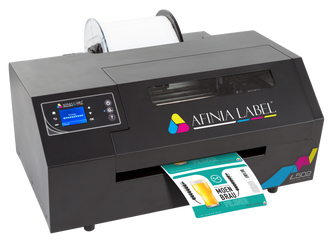
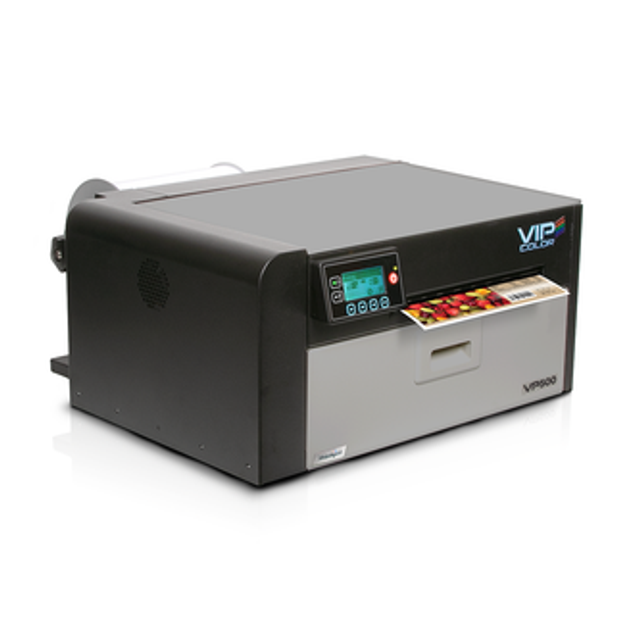
If you've started needing full-color branding, GHS compliance, or product differentiation on the label itself, that's a capability gap, and it points toward color printers like the Afinia L502, which is rated for 2,500 to 20,000 labels a month with dual dye-and-pigment ink switching, or the VIPColor VP500, a desktop color printer built for medium-volume runs using Memjet inkjet technology.
Knowing which problem you actually have keeps you from either overspending on capacity you don't need or under-buying on capability you do.
When Should I Add a Barcode Scanner to the Workflow?
Add a scanner the moment verification starts happening by eye instead of by a system; that's usually where mistakes start slipping through. Manual checks catch obvious errors but miss subtle ones. Bluetooth barcode scanners that warehouses use for cordless picking or wireless barcode scanners for shared stations both remove the "trust it looks right" step from your process.
Brother scanners are a solid, budget-friendly entry point if you're standardizing hardware for the first time rather than replacing an existing fleet.
Is It Time to Automate Label Design With Software?
If someone on your team is manually retyping the same label template with slightly different information dozens of times a week, yes, that's exactly the repetitive task automation is meant to remove.
NiceLabel software connects a label template directly to a spreadsheet, inventory system, or database, so variable information like lot numbers, SKUs, or expiration dates populates automatically instead of being typed by hand each time. This becomes more valuable, not less, as your product line grows; a business managing five SKUs might get by without it, but one managing fifty almost certainly won't.
It's also where compliance-heavy labeling, like GHS or lot-tracking requirements, stops depending on someone remembering the correct format every time.
What Other Signs Point to an Overdue Upgrade?
A few smaller signals are easy to miss individually but add up: consumables running out mid-batch because nobody's tracking stock, a printer that can't handle waterproof barcode labels or weatherproof labels for products now shipping outdoors, or a checkout counter still relying on a printer never meant for receipt printing for daily use.
If your product mix now includes anything durability-sensitive, such as vinyl labels distributors use for long-term applications, or custom barcode labels warehouses need for accurate scanning, that's usually a sign your original desktop setup was built for a business you've already outgrown.
Keeping ink cartridges for printers stocked ahead of demand, rather than reactively, is a small operational habit that becomes necessary once volume climbs.
The businesses that upgrade smoothly tend to be the ones watching for these signals early, rather than waiting until the printer becomes the reason orders are late. If reprints, manual formatting, or unverified labels are already part of your daily routine, that's not a maintenance issue; it's a sign the workflow has quietly outgrown the tools running it.
Once you've spotted the signals, the harder part is often sourcing the right upgrade without ending up with mismatched hardware and software that still don't talk to each other. DuraFast Label Company carries the full range needed for that transition in one place, from entry-level desktop units to high-quality thermal label printers and e-commerce label printers that sellers rely on for daily shipping volume.
If your current setup is already showing the signs above, browse DuraFast Label Company's label printers and supplies, or contact us today to plan the upgrade before it becomes urgent.