
How to Build the Perfect In-House Label Printing Setup for Your Business
31st Jul 2026
Most businesses don't decide to bring labeling in-house all at once; it usually starts with one frustrating reorder from a vendor that took two weeks longer than it should have. From there, the question becomes less "should we do this ourselves?" and more "what do we actually need to do it right?"
Building an in-house label printing setup isn't just about buying a printer; here’s how it's about choosing the printer, labels, software, and scanning hardware that work together instead of creating five separate bottlenecks.
What Do I Actually Need to Build an In-House Label Printing Setup?
A complete setup has four core pieces: a printer matched to your volume and label type, compatible label stock, design or automation software, and a scanner for verification and inventory tracking. Skipping any one of these usually just moves the bottleneck somewhere else: a great printer with the wrong software still means manually formatting every label, and a fast printer without a scanner means no way to confirm the label that came out is actually correct. Think of it less as "buying a printer" and more as assembling a small production line.
How Do I Choose the Right Printer for an In-House Setup?
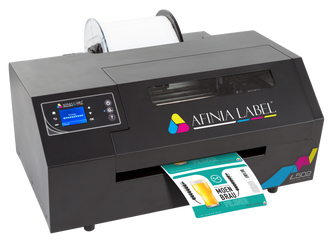
The right printer depends mainly on whether you need color, how many labels you're producing monthly, and how durable those labels need to be. For full-color, the Afinia L502 offers dual dye-and-pigment ink switching and is rated for 2,500 to 20,000 labels a month, making it a natural fit once you outgrow small-batch printing.
The VIPColor VP500 sits in a similar space: a desktop color printer purpose-built for medium-volume runs using Memjet inkjet technology.
If you're mainly printing black-and-white barcodes or shipping labels rather than color graphics, a compact thermal label printer usually costs less to run and maintain.
What Kind of Labels Should I Pair With the Printer?
Match the label material to where the product is actually going, not just to what looks good off the roll. Products headed for outdoor storage, coolers, or shipping in wet conditions need waterproof barcode labels or weatherproof labels rather than standard paper stock, while items that get handled repeatedly, like tools or automotive parts, hold up better on vinyl labels.
For anything with your own branding, printing custom product labels in-house gives you control over exact colors and sizing that pre-printed rolls can't match.
Why Does Label Design Software Matter So Much?
Software is what turns a printer from a single-label device into a system that can pull variable data automatically. NiceLabel software is a common choice here, letting you build a label template once and then populate it automatically from a spreadsheet, database, or inventory system rather than retyping information for every SKU.
This matters more as your label printing machines for business scale up; manually formatting fifty label variations a day isn't sustainable, but a template pulling from a connected data source handles that volume without added labor. It's also where compliance-heavy labels, like GHS or lot-tracking labels, become manageable instead of error-prone.
Do I Actually Need a Barcode Scanner in This Setup?
Yes. Without one, there's no way to verify if the print matches what was ordered until a customer or downstream system catches the mistake. Manual data entry carries a documented error rate, and even barcode scanning itself isn't flawless.
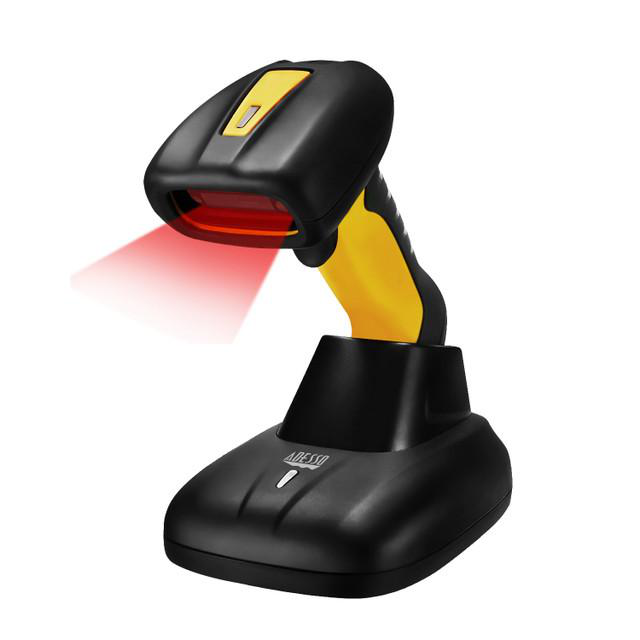
For most in-house setups, warehouses use wireless barcode scanners to cut that risk significantly.
What Accessories Round Out an Efficient Labeling Workflow?
The printer and scanner get the most attention, but the smaller pieces are what keep the workflow from stalling mid-shift. Keep a buffer stock of ink cartridges for printers on hand so a color run never gets interrupted by a supply gap, and pair your setup with thermal POS receipt printers if you're also handling in-person checkout alongside product labeling.
Businesses running high order volumes should also look at e-commerce label printer options built specifically for repetitive 4x6 shipping labels, since general-purpose printers tend to wear out faster under that kind of daily load.
A printing setup built in the right order tends to need far fewer replacements down the line than one assembled piece by piece under pressure.
Sourcing all components from different vendors is usually where in-house setups start to fall apart: mismatched label stock, software that doesn't talk to your printer, scanners bought as an afterthought. DuraFast Label Company carries the full stack under one roof, so the pieces are built to work together instead of being guessed at separately.
Our lineup includes color and thermal label printing machines for businesses of every size, from compact desktop models to industrial-grade options.
Whether you're building a first-time setup or replacing a patchwork of mismatched vendors, we can help match every piece to your actual print volume and durability needs. Contact us today to start building a setup that holds up.