Designing Labels with Spot White: Afinia LT5c Guide | DuraFast Canada
12th Sep 2026
Designing Labels with Spot White Colour: A Guide for Afinia LT5c Users (Based on the OKI Pro1050)
If you've ever tried to print a full-colour label on clear, transparent, or coloured label material with a standard CMYK printer, you know the frustration: your colours look washed out, dull, or disappear entirely against the product behind them. The solution is spot white — and printers like the Afinia LT5c, based on the OKI Pro1050 professional label printer, make it possible in a single pass.
In this article, we'll explain what spot white printing is, why the CMYK+1 fifth colour technology in the OKI Pro1050 platform changes the game for label design, and how to set up your label artwork so you get brilliant, professional results every time.
What Is Spot White Colour Printing?
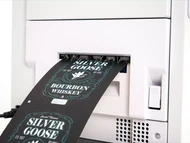
Spot white printing uses a dedicated white toner channel in addition to the standard CMYK process colours. Instead of being an afterthought, white becomes a controllable design element you place exactly where you want it. Using digital LED technology together with dry toner, the fifth colour or 'CMYK+1' option allows for greater flexibility in your label design: you can print an opaque white background under the CMYK image on transparent or coloured label media, so your printed label stands out and your message is always visible.
In practical terms, spot white lets you:
- Print vibrant CMYK colours on clear labels — the white layer blocks the product or container from showing through and dulling your colours
- Print on coloured or dark substrates — black, kraft, metallic, or tinted materials become printable canvases
- Use white as a design element itself — crisp white text, logos, and graphics on clear or coloured film without any CMYK printing at all
The Afinia LT5c and the OKI Pro1050 Platform
The Afinia LT5c colour label printer is built on the OKI Pro1050, part of OKI's Pro Series of narrow-format professional label printers. Where the Pro1040 prints in four colours (CMYK), the Pro1050 adds the fifth white station (CMYK+W) — the same architecture that gives the LT5c its spot white capability.
Key specifications from the OKI Pro1050 that matter for label designers include:
- Print resolution: 1200 × 1200 dpi for razor-sharp text, barcodes, and fine detail
- Print width: up to 125.76 mm (4.95") — covering the most common product label sizes
- Label length: 12.7 mm (0.5") up to 1320.8 mm (52"), with a minimum cuttable media length of 101.6 mm when using the auto cutter
- Media width: rolls from 25.4 mm (1.0") to 130 mm (5.1") including liner
- Roll size: 3" core, up to 8" outer diameter — high-capacity rolls for longer production runs
- Media detection: black mark (printed on the back of the liner), gap, or continuous mode
- Print language: Adobe PostScript, with PCL5c and PCL6 XL emulation — meaning white layers can be defined directly in professional design applications
- Media flexibility: plain paper, glossy paper labels, and synthetic films — textured papers, white, clear, opaque, or coloured substrates
- Speed: up to 152.4 mm/s (6 ips), so short and medium runs stay economical
Because the Pro Series uses dry toner rather than ink, it also opens up materials that inkjet label printers simply can't handle — textured papers, synthetics, and specialty substrates — and produces labels that are robust, waterproof, and UV resistant, tested to survive underwater. That makes the platform ideal for industrial chemical labelling, asset tags, outdoor labels, freezer and cold-storage labels, and food, beverage, and household goods.
How to Design Labels with Spot White in Your Artwork
Step 1: Create a Dedicated White Plate
In your design software (Adobe Illustrator, Photoshop, CorelDRAW, or the included BarTender UltraLite label software that ships with the printer), set up the white layer as a separate spot colour channel — typically named "White" and defined as a spot colour. Anything on this plate will print in white toner; anything left empty will show the substrate (or the CMYK image above it).
Step 2: Decide Where White Sits in the Layer Stack
The most common technique is white underprinting: place the white plate behind your CMYK artwork as an opaque base. On clear film, this makes colours look like they were printed on white paper. You can also print white on top of CMYK for special effects, or use white alone for elegant "no-label-look" designs on coloured containers.
Step 3: Account for Registration and Trapping
Always build a small trap or bleed — let the white underprint extend slightly beyond the CMYK image edges (0.2–0.5 mm) so any minor misalignment between the white and colour stations doesn't leave unprinted slivers. Remember the printer's minimum print margin of 2.12 mm on all four sides and keep critical white elements inside the safe area.
Step 4: Choose the Right Media
Spot white truly shines on clear glossy polyester (the "no-label" look), coloured or metallic films, and kraft or dark paper stocks. The Pro1050 platform's unrivalled media handling — from textured papers and synthetics to white, clear, opaque, or coloured substrates — means you can experiment freely. DuraFast Label Company stocks a full range of laser-compatible label materials in Canada suited to dry toner printing, and can custom make labels to your exact size and material requirements.
Step 5: Proof and Print
Send your file as a PostScript-ready PDF with the spot white channel intact, load your media roll (up to 8" outer diameter on a 3" core), and set media detection to gap or black mark as appropriate for your labels. With print speeds up to 6 inches per second and a full-cut auto cutter, you'll have finished, kiss-cut-ready labels in minutes — perfect for on-demand, short-run label production with minimal training and fast job setup.
Real-World Applications for Spot White Labels
- Food & beverage: bold full-colour graphics on clear film so the product inside stays visible
- Chemical & industrial: waterproof, UV-resistant labels that survive harsh environments
- Cosmetics & personal care: premium white-on-colour branding for bottles and jars
- Pharmaceutical & nutraceutical: crisp, legible variable data over opaque white bases
- Logistics & asset tracking: durable synthetic labels with high-contrast white text and barcodes
- Proofs & mockups: print realistic colour comps on the actual production material before committing to a large flexo or offset run
Start Designing with Spot White Today
The Afinia LT5c, powered by the OKI Pro1050's CMYK+W digital LED engine, brings professional spot white label printing in-house — no plates, no minimum runs, no outsourcing. Pair it with the right clear, coloured, or synthetic media and your labels will stand out on the shelf and survive the harshest conditions.
DuraFast Label Company is your Canadian source for laser-compatible label materials in the sizes and stocks these printers demand. Contact us today to discuss your spot white label project, request samples, or get a custom quote on labels made to your exact specifications.