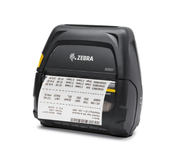
Are Portable Label Makers a Smart Choice for Field Service and Mobile Work?
3rd Nov 2026
What happens when your team needs an accurate, readable label but the nearest printer is miles away? For mobile workers, portable label makers can reduce unnecessary trips and help keep records organised.
At DuraFast Label Company, we offer mobile printing options to support businesses that need reliable labelling beyond the office. Choosing the right equipment starts with understanding your work environment, printing requirements, and daily demands.
Why Do Mobile Workers Need Portable Label Makers?
Field technicians, warehouse employees, delivery teams, and healthcare professionals often need labels while working away from a fixed workstation. Writing labels by hand can lead to inconsistent formatting, unclear text, and identification errors.
Portable label makers allow employees to print identification labels where tasks take place. Depending on the model, they can produce labels for equipment, inventory, packages, cables, and other items requiring clear identification.
These devices can help businesses:
- Reduce trips between work areas and central printing stations.
- Maintain consistent label formats across mobile teams.
- Improve identification and tracking of products, tools, and assets.
- Support quicker updates when inventory or equipment details change.
- Keep essential labelling supplies accessible during field operations.
For businesses comparing label printing machines for business applications, portability can be an important consideration alongside print quality, speed, and operating costs.
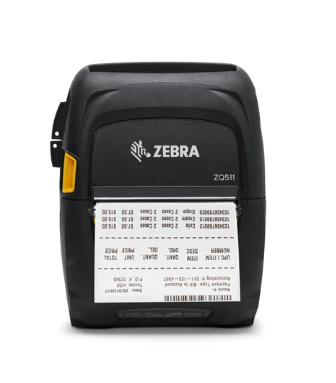
6 Features to Consider Before Choosing a Mobile Label Printer
Not every portable printer suits every workplace. The following factors can help you identify the right option.
1. Portability and Practical Design
Consider how employees will carry the printer throughout their shifts. Compact, lightweight models are generally easier to transport between customer sites, storage areas, delivery vehicles, and service locations.
Check the device's dimensions, weight, carrying options, and ease of loading label supplies. A printer that fits comfortably into a technician's equipment bag may be more practical than a larger unit designed primarily for vehicle-based operations.
2. Wireless Connectivity
Bluetooth and Wi-Fi connectivity can allow compatible printers to receive information from smartphones, tablets, laptops, or business systems.
This is particularly useful when employees need to print labels directly from work orders, inventory records, or delivery information. Before purchasing, confirm that the printer supports your operating system, preferred applications, and existing workflow.
Some models also offer USB connectivity, which can be useful when a wired connection is preferred or wireless access is unavailable.
3. Battery Operation and Charging
Battery-powered mobile label printers can operate without a nearby power outlet, making them suitable for outdoor maintenance, warehouse inspections, and delivery operations.
Review the manufacturer's stated battery life, charging time, and expected printing capacity. Actual performance depends on print volume, connectivity, battery condition, and operating conditions.
For longer shifts, consider whether spare batteries, vehicle charging, or convenient recharging arrangements are available.
4. Label Sizes and Media Compatibility
Your printing requirements should determine the type of label printer you choose. Some applications require narrow labels for cables or tools, while others need wider labels for shipping information, asset identification, or inventory details.
Check the supported label widths, roll or media configuration, adhesive options, and material compatibility before ordering.
Thermal printing is common in mobile applications because it can produce readable text and barcodes without conventional ink cartridges. However, direct thermal and thermal transfer technologies serve different requirements. Direct thermal printing uses heat-sensitive media, while thermal transfer printing uses a ribbon to transfer ink onto the label.
5. Durability in Working Conditions
A portable printer may face dust, vibration, moisture, frequent handling, or temperature changes. These conditions can affect equipment performance and label readability.
Review the device's published protection ratings and operating temperature range. Also consider whether the labels themselves can withstand exposure to water, sunlight, chemicals, or abrasion.
High-quality thermal label printers and mobile models should be selected according to their intended environment rather than portability alone.
6. Software and System Compatibility
A printer is most useful when it fits the way your team already works. Check whether it supports barcode generation, variable information, templates, and integration with inventory or field service software.
Standardised templates can help employees produce consistent labels without repeatedly entering the same information.
Ready to Find the Right Printing Solution for Your Team?
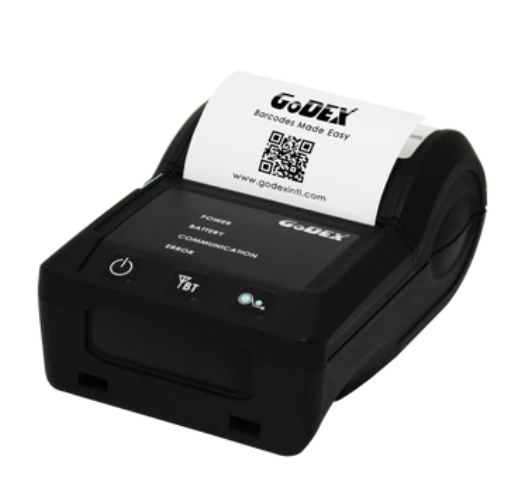
Could printing labels directly at the point of work make daily tasks easier for your employees? The answer depends on your printing volume, label requirements, and working conditions.
At DuraFast Label Company, we help businesses assess their labelling needs with a selection of printing equipment and supplies, including SATO mobile printers and Brother mobile printing products. Our range supports businesses seeking practical options for different labelling environments.
If you are searching for portable label makers online, compare supported media, battery operation, connectivity, and software compatibility before making a decision. We can help you identify suitable equipment alongside other high-quality thermal label printers and business labelling supplies.
Order from DuraFast Label Company to find mobile printing equipment that fits your workflow, supports clear identification, and helps your team print labels where the work happens.