Zebra ZD420 Ribbon Cartridges: Complete Buyer's Guide
12th Nov 2026
A ribbon cartridge isn’t necessarily limited to the printer generation printed on its label: cartridge-style wax, wax/resin and resin ribbons listed for the zebra zd420 ribbon cartridge are also identified for the ZD421. That shared compatibility can simplify supply decisions, but the right ribbon still depends on your label material and print job.
If you’re weighing cartridge-style ribbons against traditional rolls, you’ll want more than a quick fit check. Ribbon type affects the surfaces and conditions a label can handle, while dimensions and printer version help determine whether a supply is suitable. Choosing the right material helps support clear, durable printing.
This guide explains how cartridge-style ribbons compare with ribbon rolls, how to install a cartridge, and which dimensions and model details matter. It also covers ZD420 and ZD421 cartridge compatibility, including the wax, wax/resin and resin options, so you can make a practical choice for your Canadian operation.
Key Takeaways
- Choose wax, wax/resin or resin ribbon based on your label material and the conditions the printed label will face.
- Cartridge-style ribbons and traditional ribbon rolls use different printer setups, so identify which version your ZD420 has before selecting supplies.
- Install a cartridge by sliding it into the ribbon transport until it locks into place, then close the printer.
- Check ribbon width and length when comparing supplies; listed cartridge options measure 4.33 inches by 244 feet.
- ZD420 and ZD421 cartridge-style wax, wax/resin and resin ribbons share compatibility, which can make supply selection simpler across the two models.
Labels, ribbons and tags resources
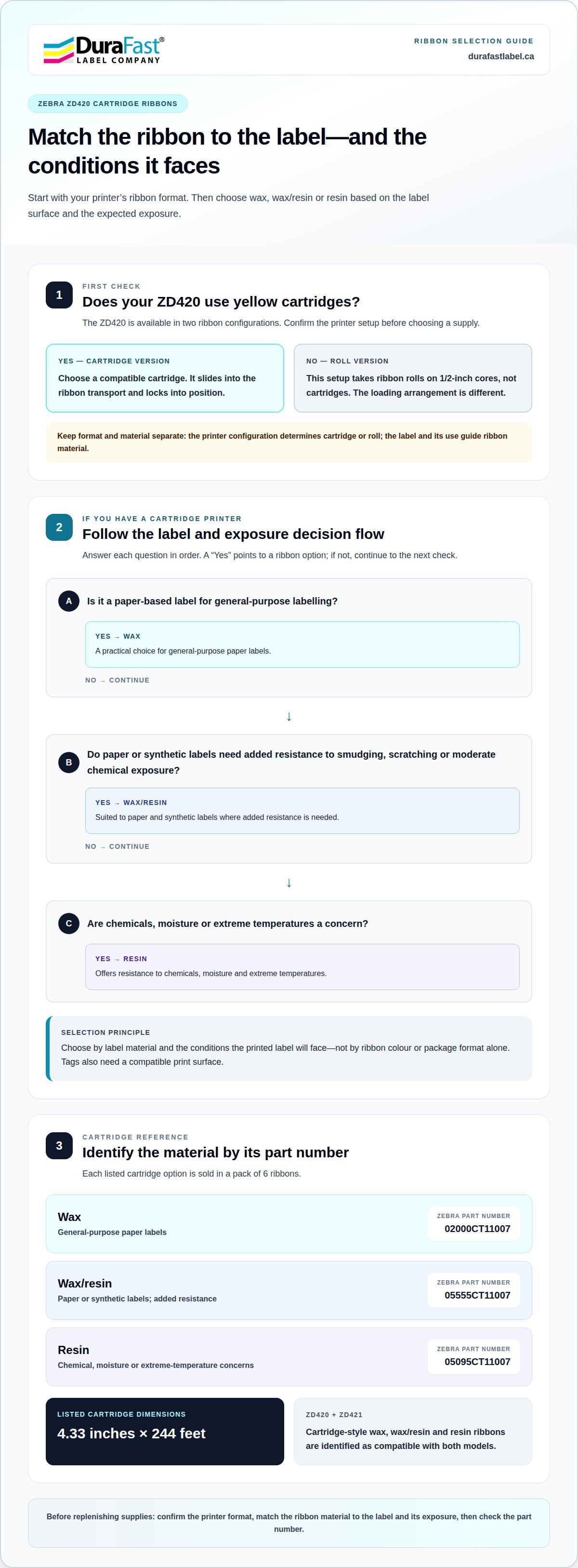
For a Zebra ZD420, ribbon choice starts with the label surface and the conditions the label will face. Wax ribbons suit general-purpose labelling on paper-based labels. Wax/resin ribbons work with paper and synthetic labels, adding resistance to smudging, scratching and moderate chemical exposure. Resin ribbons resist chemicals, moisture and extreme temperatures. Match the ribbon type to the intended use, rather than choosing by colour or package format alone.
Cartridge-style supplies for the ZD420 include three ribbon materials and specific Zebra part numbers. The wax cartridge is 02000CT11007, the wax/resin cartridge is 05555CT11007, and the resin cartridge is 05095CT11007. Each is sold in a pack of 6 ribbons. Those identifiers help distinguish the ribbon material when replenishing supplies or comparing options for different label jobs.
- Wax: A practical choice for general-purpose paper labels.
- Wax/resin: Suited to paper or synthetic labels needing added smudge, scratch and moderate chemical resistance.
- Resin: Offers resistance to chemicals, moisture and extreme temperatures.
The ZD420 ribbon-cartridge printer reads information stored on its cartridge. Use genuine Zebra ribbon cartridges, the supported cartridge supplies for this printer. Then match the printer settings to the supplies being used and the printer’s options. For example, selecting wax for paper labels starts with a different material choice than selecting wax/resin for a synthetic label exposed to more handling.
Label stock and ribbon work together: the ribbon transfers the print, and the label stock provides the surface. Wax may suit paper labels used for routine identification. For synthetic labels that need more resistance to smudging or moderate chemical exposure, consider wax/resin. Resin may be appropriate where moisture or extreme temperatures are a concern. Tags also need a compatible print surface, so assess their material along with the ribbon.
Keep packaging applications distinct from ZD420 cartridge supplies. For example, Autobag ribbons are a separate ribbon resource, not a substitute for the cartridge part numbers above. Identifying the printer, label or tag material, and expected exposure gives each supply choice a clear purpose. That practical match helps avoid selecting a ribbon solely because its name resembles another supply.
Cartridge-style versus traditional ribbons
The Zebra ZD420 is available in two ribbon configurations: one uses ribbon rolls, and the other uses yellow cartridges. The distinction matters before ordering supplies because the printer’s ribbon system determines which format fits. A roll-style unit needs ribbon rolls; a cartridge-style unit needs compatible cartridges. Similar-looking supplies aren’t interchangeable just because both contain thermal-transfer ribbon.
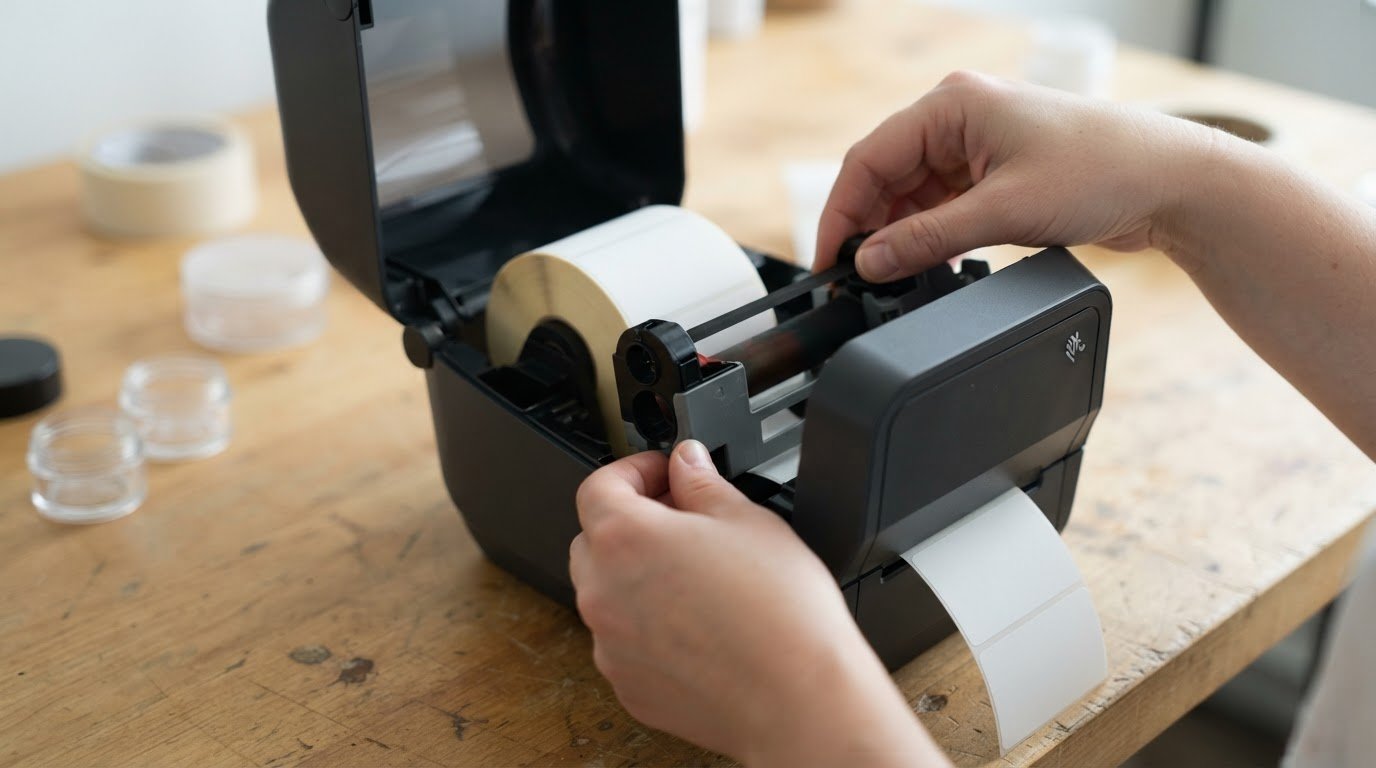
A cartridge holds the ribbon in a dedicated housing that fits into the printer’s ribbon transport. Open the printer, place the cartridge in its slot, and push it nearly flush until it locks. Information stored on the cartridge helps identify it, and the enclosed design provides one component to handle when replacing the ribbon.
A roll-style ZD420 uses ribbon rolls rather than the yellow cartridge format. The roll version uses ribbons on 1/2-inch cores. Unlike cartridge installation, roll loading involves placing ribbon components into the printer’s ribbon path. The key difference is the supply format and loading arrangement, not the basic job of transferring ink from ribbon to label.
- Cartridge version: Takes a compatible yellow cartridge, which slides into the ribbon transport and locks into position.
- Roll version: Takes ribbon rolls on 1/2-inch cores, rather than a cartridge.
- Both formats: Require the supply type and printer settings to suit the print job and printer options.
Identify the printer configuration before choosing a replacement. A cartridge-shaped supply is intended for the cartridge version, while a ribbon roll belongs with the roll version. For instance, a Zebra ZD420 with a cartridge slot won’t use a roll simply because the ribbon material is wax. Confirming the printer format first prevents a mismatch between the supply and its loading system.
The ribbon material is a separate choice from its format. Cartridge options include wax, wax/resin, and resin; roll systems use ribbon rolls. Choose the material for the label stock and the conditions the label will face, then confirm the format suits your printer. Set the printer to match the supplies used for the job and the printer’s options.
If you’re comparing a cartridge printer with a roll version for an existing workflow, consider how supplies are loaded and replenished, as well as which ribbon materials suit the job. For guidance on matching the format to your setup, get help with your ribbon selection.
Installing a ribbon cartridge
Common Zebra ZD420 cartridge errors include using a ribbon roll in a cartridge model or leaving the cartridge short of its locked position. Match the supply format to the printer, then slide the cartridge into the ribbon transport until it locks nearly flush.
Start by confirming the printer uses cartridges, not ribbon rolls. The ZD420 is available in both configurations, and their supplies load differently. For thermal-transfer media, insert a cartridge into the cartridge slot on the ribbon transport. Keep the printer open while positioning it so the slot remains accessible.
- Open the printer. Raise the cover and locate the ribbon transport and its cartridge slot.
- Align the cartridge. Position it at the slot, keeping it oriented for the ribbon transport.
- Slide it into place. Push the cartridge inward until it sits nearly flush with the front of the transport.
- Confirm and close. Check that the cartridge locks into place, then close the printer.
If insertion meets resistance, stop rather than forcing the cartridge into the slot. Confirm that the printer is open and that you have a cartridge, not a roll. Align it with the ribbon cartridge slot and try again. A correctly positioned cartridge should slide nearly flush and lock into place.
If the cartridge feels loose, remove it and realign it. Check that it is seated in the ribbon transport rather than resting against the printer housing. It should lock when pushed into position. Closing the printer will not fix a loading mismatch, so confirm the cartridge is seated first.
After loading the cartridge, set the printer for the supplies in the job and the printer’s options. A cartridge replacement may also mean a change in ribbon material, so make sure the settings match the supplies. This keeps the setup aligned with the label and ribbon combination instead of treating installation as the only step.
A cartridge that won’t fit may indicate a format mismatch, especially if the printer uses ribbon rolls. The ZD420 roll version uses a different loading arrangement from the cartridge version. Identify the printer configuration before trying another supply. If the cartridge format and slot match but it still won’t lock, get assistance with cartridge installation.
After installation, check that the printhead is seated securely and moves as expected. To access the printhead, raise the printhead actuator arm until it touches the printer’s top cover and hold it there; release the printhead by pushing the printhead release latch toward the printhead. To release the ribbon drive transport, pull out both release arms. The cartridge locks when pushed nearly flush to the front of the ribbon transport.
Ribbon dimensions
The cartridge dimensions identify both ribbon width and available length. The Zebra ZD420 and ZD421 cartridge-style wax ribbon 02000CT11007 measures 4.33 inches by 244 feet. The wax/resin ribbon 05555CT11007 and resin ribbon 05095CT11007 have the same stated dimensions. Material differs, but those cartridge options share the same listed size.
How many labels can a cartridge print? There isn’t one fixed label count: the result depends mainly on how much ribbon each label consumes. Label length, spacing and the print job’s layout affect how many labels fit along the ribbon’s 244-foot length.
Read the two measurements as separate specifications. The 4.33-inch measurement is the ribbon’s width, while 244 feet is its length. Width helps establish whether the ribbon is suitable for the print width required. Length indicates how much ribbon is available before replacement. Neither measurement alone gives a label count.
- 02000CT11007: Wax, 4.33 inches by 244 feet.
- 05555CT11007: Wax/resin, 4.33 inches by 244 feet.
- 05095CT11007: Resin, 4.33 inches by 244 feet.
Estimate cartridge yield from the actual label layout, not the label’s name or application. A short label with a narrow gap uses less ribbon per repeat than a longer label with more space between prints. The total also depends on the print job’s feed pattern. Without those layout details, a reliable label count per cartridge cannot be calculated.
Width matters when selecting a ribbon for the image area. A ribbon must cover the area being printed, while its length supports the run before the next cartridge change. The listed cartridge options all have a 4.33-inch width, so the material choice distinguishes these three examples, not their stated dimensions. Match the ribbon material to the label stock and use conditions.
Don’t confuse cartridge measurements with ribbon-roll specifications. Zebra ZD420 and ZD421 ribbon-roll versions use ribbons on 1/2-inch cores. That core measurement describes the roll’s centre, not its width or length. Cartridge-style ribbons instead use the listed 4.33-inch by 244-foot dimensions. Knowing which format the printer takes helps prevent comparing unlike measurements.
For planning, start with the part number, then confirm material and dimensions. If a production run uses several label formats, estimate consumption separately for each layout. A change in label length or spacing changes the number of prints supported by the same 244-foot ribbon. This approach gives a more useful replenishment estimate than treating cartridge length as a guaranteed label quantity.
ZD420 and ZD421 cartridge-style ribbon compatibility
Cartridge-style wax, wax/resin and resin ribbons identified for the Zebra ZD420 are also identified for the ZD421. The shared part numbers are 02000CT11007, 05555CT11007 and 05095CT11007. This means the model change alone doesn’t require a different cartridge from these listed options. Confirm the printer uses cartridges before relying on that shared compatibility.
Cartridge-equipped ZD420 and ZD421 models include the letter “c” in their model name. Use that model identifier to distinguish a cartridge printer from a roll-ribbon version. The ZD421 is identified as the replacement for the ZD420, but the model name and cartridge configuration still matter when selecting a supply.
The part number provides a specific way to identify each shared cartridge. 02000CT11007 denotes wax, 05555CT11007 denotes wax/resin, and 05095CT11007 denotes resin. Each option is sold in packs of 6 ribbons. Matching the full identifier helps avoid confusing materials or selecting a roll supply for a cartridge-equipped printer.
- 02000CT11007: Wax cartridge for the ZD420 and ZD421.
- 05555CT11007: Wax/resin cartridge for the ZD420 and ZD421.
- 05095CT11007: Resin cartridge for the ZD420 and ZD421.
Is the Zebra ZD420 direct thermal, thermal transfer, or both? The ribbon-cartridge setup uses a ribbon with thermal-transfer media. For this cartridge configuration, the practical distinction is that the ribbon is part of the printing supplies; the cartridge information does not establish that every ZD420 configuration uses the same printing method.
How much does a Zebra ZD420 ribbon cartridge cost in Canada? The amount depends on the selected cartridge part number and material. The three options are separate products, so a cost for one SKU shouldn’t be treated as the cost of all cartridge types.
For a replacement, identify the complete model name, including whether it has the “c” cartridge identifier, then match the ribbon part number. For example, a cartridge-equipped ZD421 and a cartridge-equipped ZD420 share the three listed part numbers. A roll-style printer uses a different supply format, so model-family similarity alone isn’t enough to establish cartridge fit.
The ZD420 reads information stored on its ribbon cartridge. Printer settings should also match the supplies used for the job and the printer’s options. These details help keep the shared ZD420 and ZD421 cartridge choices tied to the actual setup. Get help selecting a compatible ribbon for your printer and label application.
DuraFast Label Company Canada offers Zebra ZD420 ribbon cartridges for businesses selecting supplies for cartridge-style printers. If you need a zebra ZD420 ribbon cartridge for replenishment, match the printer format and ribbon material to your labels and their intended use.
Turn to DuraFast Label Company Canada when you’re choosing between cartridge options for your printing setup. Identifying your printer model and application can help narrow down the right zebra zd420 ribbon cartridge for the job.
For help with your ribbon selection, contact DuraFast Label Company Canada.
Build a supply plan that supports your next production run
Your next step is to make ribbon selection part of a consistent supply plan. Record the printer configuration and the material suited to your label application, so replenishment decisions stay connected to production needs. As requirements change, revisit the supplies and equipment together rather than treating each purchase as an isolated choice. Selecting a zebra ZD420 ribbon cartridge is one part of keeping that plan aligned.
DuraFast Label Company Canada also sells VIPColor and Afinia label printers. If your labelling needs go beyond your current setup, compare these options with your existing workflow to plan suitable equipment.
Contact DuraFast Label Company Canada to discuss your next step. A considered supply plan can help you move forward with confidence.
Frequently Asked Questions
What ribbon cartridge does the Zebra ZD420 use?
A cartridge-equipped Zebra ZD420 uses a genuine Zebra cartridge compatible with its cartridge configuration. Wax, wax/resin and resin options are available under distinct part numbers. The printer’s model format determines whether you need a cartridge or a ribbon roll. Match the supply to the label material and intended use, then select the corresponding cartridge type.
How do I install a ribbon cartridge in a Zebra ZD420?
Open the printer and slide the cartridge into the ribbon transport slot, keeping it aligned as it moves inward. Push until it locks nearly flush with the front of the transport, then close the printer after confirming it is seated. If it will not lock, check that the printer uses cartridges rather than rolls, and realign the cartridge with the slot.
How do I replace the cartridge?
Open the printer and remove the used cartridge from the ribbon transport. Slide in a compatible replacement until it locks. Before loading it, compare the part number and ribbon material with the job requirements. For example, switching from wax to resin changes the ribbon material even if the cartridge format stays the same. Close the printer once the replacement is seated.
Which ribbon types and widths are compatible with the Zebra ZD420?
Cartridge-style options include wax, wax/resin and resin ribbons. The listed cartridge options measure 4.33 inches wide by 244 feet long. ZD420 roll-style versions use ribbons on 1/2-inch cores, so that core measurement applies to rolls, not cartridges. Select the cartridge width and material for the job, and avoid comparing roll-core dimensions with cartridge measurements.
What is the difference between cartridge and standard ribbon models?
The ZD420 is available in a cartridge configuration and a ribbon-roll configuration. Cartridge models take cartridges that slide into the ribbon transport, while roll models use ribbon rolls on 1/2-inch cores. The loading systems differ, so the formats aren’t interchangeable. Identify the printer configuration before ordering, even if the ribbon material you need is already clear.
How can I check compatibility by model or part number?
Cartridge-equipped ZD420 and ZD421 model names include the letter “c”. Then match the part number to the required material: 02000CT11007 is wax, 05555CT11007 is wax/resin, and 05095CT11007 is resin. These listed cartridge options are identified for both models. The printer reads information stored on its cartridge, which helps distinguish the installed supply.
Where can I buy a Zebra ZD420 ribbon cartridge in Canada?
DuraFast Label Company Canada offers Zebra ZD420 ribbon cartridges to Canadian customers. For a zebra zd420 ribbon cartridge, select the cartridge format and material suited to your printer and label application. If you’re unsure which listed option fits your setup, contact DuraFast Label Company Canada for help with your selection. That gives you a practical starting point for replenishing supplies.