Thermal Transfer Continuous Vinyl Rolls in Canada by Format
23rd Oct 2026
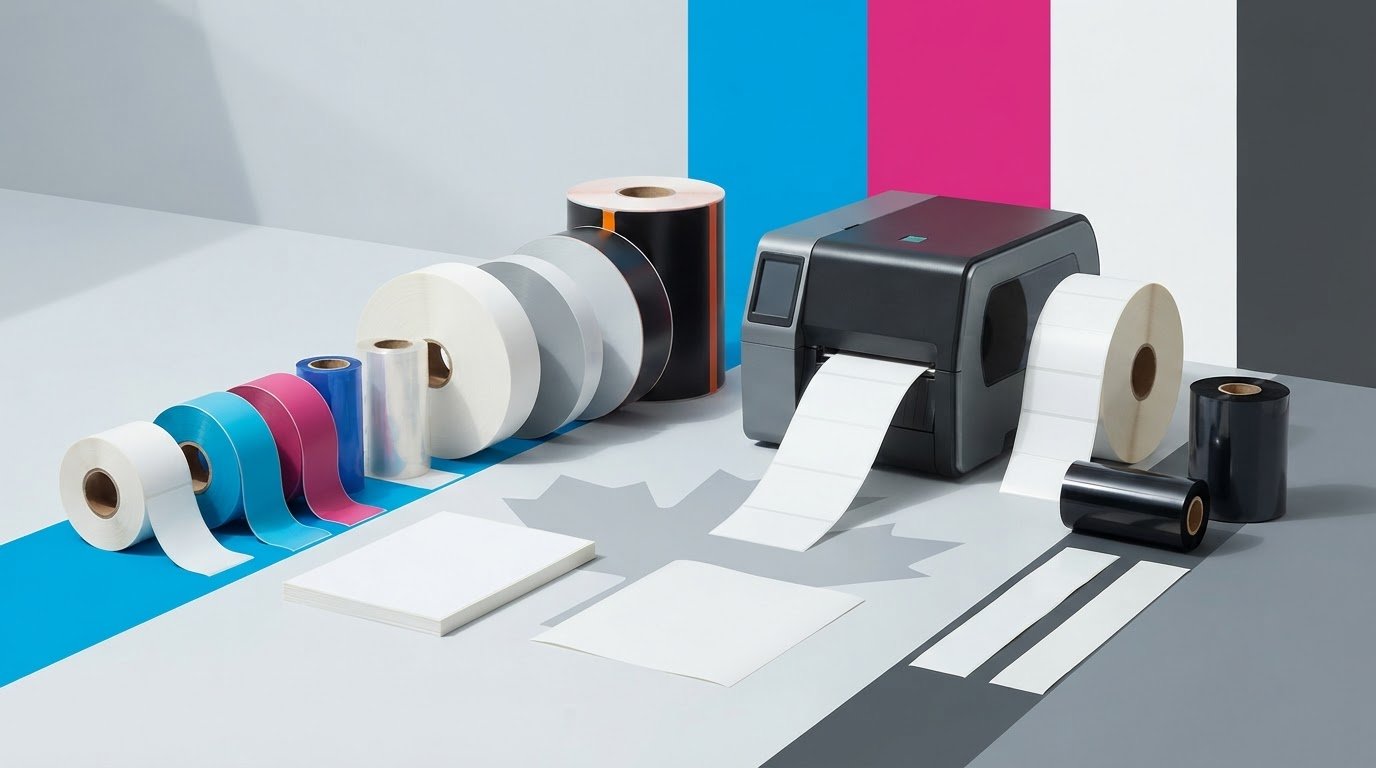
Thermal transfer continuous vinyl rolls in Canada are a fit when the roll format suits your printer and you use a thermal transfer ribbon. The right choice depends on more than label material: core size, roll diameter, width and printing needs all affect compatibility. Thermal transfer labels also come in materials such as matte paper for general-purpose labelling and matte polypropylene for demanding applications.
Choosing a roll can seem straightforward until a mismatch causes feeding or printing problems. Before selecting a format, compare the label material and dimensions with your printer’s specifications.
This guide explains the differences between desktop and industrial rolls, how material and size affect your options, and why ribbon selection matters. Use these points to assess thermal transfer continuous vinyl rolls and other thermal transfer formats for your application.
Key Takeaways
- Choose between continuous, pre-die-cut and fanfold labels based on how you need labels presented and fed through the printer.
- For desktop rolls, compare the printer’s roll capacity with common core sizes of 1 or 1.5 inches and outside diameters of 4 or 5 inches.
- Match the label material to its use: matte paper suits general-purpose shipping and inventory labelling, while matte polypropylene is described for demanding applications.
- Thermal transfer printing requires a ribbon; wax ribbons are commonly used for general-purpose printing, so consider the ribbon alongside the label material.
- Before choosing a roll, align its format and dimensions with your printer and the demands of your printing workflow.
What Types of Thermal Transfer Labels Can I Print?
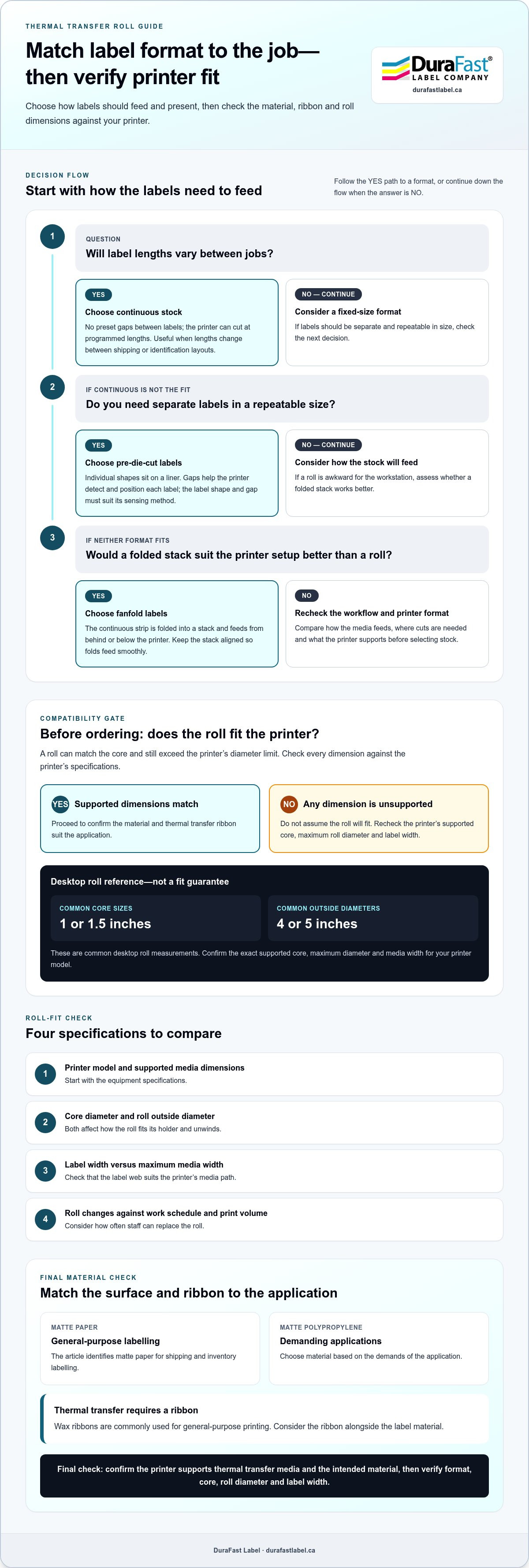
Thermal transfer printers can print on continuous, pre-die-cut, and fanfold labels. The right format depends on how media feeds, where cuts are needed, and what fits the printer. Vinyl is a material; continuous describes the format. A continuous vinyl roll has no preset gaps between labels, so the printer can produce labels at programmed lengths.
There is no single Canadian total for thermal transfer vinyl rolls, shipping, and taxes. The total depends on the roll, shipping destination, and applicable charges shown at checkout. Compare the full order total, not just the listed roll price.
Canadian buyers can look for continuous vinyl rolls through specialist label retailers and online label suppliers. A supplier’s thermal-transfer category helps narrow the search to compatible label formats and materials. For example, browse thermal transfer labels by application and printer needs.
Continuous stock is useful when label lengths vary between jobs. A shipping workflow, for example, might use one roll for long handling labels and shorter identification labels. The printer advances the material and cuts each label at the programmed point. This can reduce the need to stock multiple preset lengths, though the printed labels may still need cutting or separation.
Pre-die-cut labels come in individual shapes on a liner. The gaps between labels help the printer detect and position each one consistently. Choose this format when labels need a fixed size, such as for product names or inventory identifiers. The label shape and gap must suit the printer’s sensing method.
Fanfold labels form a continuous strip folded into a stack rather than wound around a core. They feed from a stack behind or below the printer, which can suit a fixed workstation where a roll is awkward to use. Keep the stack aligned so the folds feed smoothly.
- Continuous: Select it for variable label lengths, including changing shipping or identification layouts.
- Pre-die-cut: Select it for repeatable label dimensions and consistent positioning between separate labels.
- Fanfold: Select it when a folded stack fits the printer setup better than a roll.
Before ordering, identify the format your workflow needs. Measure the label area and compare its width with the printer’s supported media path. For pre-die-cut stock, note the label length, gap, and liner. For continuous stock, determine the longest label required. For fanfold stock, consider where the stack will sit and how it will feed.
Vinyl is a material choice, not a guarantee of printer compatibility. Confirm that the printer supports both vinyl and thermal transfer printing. Then match the format to the job: variable lengths suit continuous stock, uniform individual labels suit die-cut stock, and stack-fed printing may suit fanfold. These decisions narrow your options before you compare sizes.
Industrial and desktop roll formats
Desktop and industrial printers take rolls suited to different equipment and workloads. Desktop models fit compact work areas and lower-volume tasks, while industrial equipment is commonly used in production environments and extended print runs. The printer’s media path determines the roll widths and outside diameters it can accept.
Desktop thermal transfer rolls commonly use 1- or 1.5-inch cores and 4- or 5-inch outside diameters. Those measurements help narrow the format, but they don’t establish fit by themselves. Check the printer’s supported core, maximum roll diameter, and label width before ordering. A roll can match the core yet exceed the printer’s diameter limit.
Choose industrial rolls based on printer capacity and the demands of the print station. A warehouse printer producing inventory labels may need a roll suitable for longer runs, while a small office printer may use a more compact roll for intermittent tasks. Check the printer’s specifications, then consider how often staff can replace the roll.
Canadian suppliers’ shipping, return, and warranty policies should be compared separately. Review shipping coverage and charges, return conditions, and warranty scope before ordering, since each policy affects the purchase differently.
Use this sequence to assess roll format:
- Find the printer model and its supported media dimensions.
- Measure the core diameter and roll’s outside diameter.
- Compare label width with the printer’s maximum media width.
- Consider how roll changes fit the work schedule and print volume.
For example, a desktop printer designed for a 1-inch core cannot reliably accept a roll built around a different core without suitable support. Likewise, a roll with a 5-inch outside diameter may be too large for a printer with less clearance. Dimensions affect loading, unwinding, and consistent feeding.
Core size and roll diameter determine how a roll fits its holder. If the roll shifts sideways, the label web may track unevenly; if it binds, feeding may become inconsistent. Confirm that the holder, guides, and roll dimensions work together before a production run.
Roll format alone doesn’t establish that vinyl is printable on a particular machine. Confirm the printer supports thermal transfer media and the intended material. Then match roll dimensions to the printer’s media path. For a broader view of thermal transfer label formats, compare how each option aligns with your equipment and workflow.
Record the printer model, core size, roll diameter, and label width. This specification list simplifies repeat purchases and helps prevent format mismatches. A purchasing team can use the same dimensions when replacing stock for a desktop station or industrial line.
Label materials, sizes and colours
Material affects how a label performs in its intended setting. Matte paper suits general-purpose shipping and inventory labels, while matte polypropylene is described for demanding applications. Vinyl is another option, but printer and ribbon compatibility still matter. Match the face material to the label’s use before comparing colour or dimensions.
Start with the environment. A shipping label on a box has different requirements from an equipment identification label. Consider exposure to moisture, handling, and the surface receiving the label. These conditions guide material selection: matte paper suits everyday shipping identification, while matte polypropylene may suit a more demanding application.
Choose a size based on the information the label must carry. Measure the available surface and plan space for text, barcodes, and product details. A narrow equipment label may need only a short identifier, while a product label may require several lines. Keep essential content within the printable area so the edges do not crowd the text.
Continuous stock allows flexible label lengths, but the width must suit both the printer and the application. Wider stock offers room for larger text or more details; narrower stock can fit compact items such as cables or small containers. Compare your layout with the printer’s supported media width before choosing thermal transfer continuous vinyl rolls in Canada.
Colour affects contrast and readability. Dark printing on light stock can make text and barcodes easier to distinguish. With coloured vinyl, consider how the ribbon will look against the background. For example, dark printing on a pale label can help an inventory code stand out from nearby packaging text.
- Material: Choose matte paper for general shipping or inventory tasks; consider matte polypropylene for demanding use.
- Size: Measure the application surface and allow space for each printed element.
- Colour: Assess contrast between the label stock, ribbon, and printed information.
- Compatibility: Confirm the printer supports the selected material and ribbon combination.
Before ordering, prepare a sample layout using the actual label dimensions. Include the longest text line, barcode, and required identifiers, then check that each element remains legible at the intended size. This can reveal a cramped design before a full roll enters production.
When choosing thermal transfer continuous vinyl rolls in Canada, consider material, size, and colour together. The stock must suit its environment, its dimensions must fit the printer and label surface, and the colour must preserve contrast. Record these requirements and compare each roll against the same list to identify stock that fits the job.
Printer compatibility
Compatibility depends on the printer’s print method, media path, and supported materials. A roll may fit the holder but exceed the printer’s supported width. Check each requirement before selecting vinyl stock rather than relying on core size alone.
Continuous vinyl rolls and pre-die-cut vinyl labels can work with thermal transfer printers designed for those formats. The printer must support the vinyl, roll dimensions, and label-sensing method. A cutter is a separate consideration: printers create the image, while compatible cutting equipment cuts the media.
Start with the printer model. Check its media specifications for supported label widths, roll diameters, and core sizes, then compare them with the roll details. A roll may have the right width but an oversized diameter that prevents proper loading.
Next, confirm that the printer supports vinyl with thermal transfer printing. The label surface and ribbon must work together to produce legible output. Material intended for another printing method may not give the desired result in a thermal transfer setup. Check the media description for thermal transfer use before production.
Label sensing matters, too. A printer may use gaps, marks, or another detection method to track individual labels. Continuous stock has no preset gaps, so the printer’s feed settings must support continuous media. Pre-die-cut rolls need spacing the printer can detect and advance accurately.
Use this compatibility check before loading a new roll:
- Printer model: Record the exact model and its supported media specifications.
- Material: Confirm vinyl is intended for thermal transfer printing.
- Roll format: Match continuous or pre-die-cut stock to the printer’s feed and sensing setup.
- Dimensions: Compare width, core, and outside diameter with the printer’s limits.
- Ribbon: Select a thermal transfer ribbon suited to the label surface and printing task.
Check media compatibility for any cutter you plan to use. Confirm that it accepts the roll format and vinyl construction, and review its supported width and feed path. A printer that prints continuous labels does not necessarily cut them to length, so the workflow may need separate cutting equipment.
Run a short test before using a full production roll. Load the vinyl according to the printer instructions, select the correct media type, and print a sample with representative text. Watch for skewing, feed interruptions, or inconsistent positioning. A barcode or small text line can reveal registration issues early.
For Canadian operations, keep the printer model and approved media details with purchasing records. That reference helps staff reorder compatible vinyl and ribbon combinations for the same equipment. If the printer changes, repeat the compatibility check. A roll that suits one printer may not fit another model’s media path or sensing system.
Thermal transfer printing technology
Thermal transfer printing uses a heated printhead and ribbon to place an image on label stock. For vinyl rolls, ink transfers from the ribbon onto the label surface. Heat transfer vinyl is different: it is a film cut into shapes and applied to fabric with a heat press.
Thermal transfer vinyl refers to vinyl label stock printed with a thermal transfer printer. It is not the same material or process as heat transfer vinyl for garments. Thermal transfer labels require a ribbon; wax ribbons are commonly used for general-purpose printing.
For thermal transfer vinyl rolls, follow the printer’s guidance for the specific stock rather than heat-press instructions. A label printer transfers ribbon ink with its printhead; it does not use a heat press to attach film. Follow the printer’s media settings and ribbon guidance for the specific label stock.
For a typical label job, the process is straightforward:
- Load the vinyl roll and thermal transfer ribbon in the printer.
- Set the media format and print dimensions in the label software.
- Print a sample, then inspect text, edges, and barcode clarity.
- Cut the printed continuous stock to the required label length.
- Apply each label to a clean, dry surface suited to the material.
Keep printing, cutting, and application distinct. A thermal transfer printer creates the image, but that does not mean the printed web is cut into individual labels. A continuous roll may need a cutter after printing. Pre-cut stock already has individual label shapes, which the printer advances as it prints.
Ribbon and vinyl compatibility affect image quality. A ribbon must transfer ink onto the label surface, while the printer settings control printhead heat and feed behaviour. If the print looks faint, check that the ribbon is installed correctly and the media setting matches the stock. If text smears or looks uneven, inspect the ribbon and label path before printing more rolls.
Wax ribbons suit many general-purpose thermal transfer tasks, but the right choice depends on the label surface and intended use. A barcode on a vinyl equipment label, for example, needs clear edges and sufficient contrast. Test the planned text and barcode with the same vinyl and ribbon intended for the job.
Keep the sample with the printer and material details. Record the vinyl type, ribbon, and printer settings that produced readable output. That gives operators a repeatable starting point when they reload the same materials. For help aligning thermal transfer ribbons with your label workflow, discuss your printer and media requirements.
DuraFast Label Company Canada: VIPColor Label Printers
DuraFast Label Company Canada offers VIPColor Label Printers for businesses considering colour label printing alongside thermal transfer workflows. VIPColor models use Memjet technology and dye inks, making them an option for colour inkjet labels rather than ribbon-printed vinyl rolls.
For applications involving water or condensation, the VP550, VP660, and VP750 use Memjet water-enhanced dye inks. The VP500, VP610, and VP700 use standard Memjet dye inks. The right model depends on your printing method and label requirements; a thermal transfer workflow still calls for a compatible thermal transfer printer and ribbon.
If you’re comparing printer types for your label operation, contact DuraFast Label Company Canada or visit DuraFastLabel.ca.
Plan Your Next Label Run
Document the combination your workflow needs: printer model, label material, roll format, and ribbon. Keeping these details together gives your team a consistent reference for future orders and helps prevent mismatches when equipment or applications change. A sample print can also show whether the finished label is readable.
For a different printing approach, DuraFast Label Company Canada offers VIPColor and Afinia label printers. These options suit colour label printing when it is a better fit than ribbon-based thermal transfer. Choose according to your label requirements and existing workflow.
For help with the next step in your label operation, contact DuraFast Label Company Canada to discuss your needs. With your printer and application details in hand, you can move forward with a clearer plan for thermal transfer continuous vinyl rolls in Canada.
Frequently Asked Questions
What widths, lengths, and thicknesses do thermal transfer vinyl rolls come in?
Roll widths, lengths, and thicknesses vary, so there is no single standard set of dimensions. Use the printer’s media specifications to establish the supported width and roll capacity, then choose a continuous length suited to the job and storage setup. Consider the complete media construction, including vinyl face stock and liner, and make sure it feeds properly through the printer.
What safety risks or compatibility issues should buyers check before purchasing?
Check that the printer supports thermal transfer media, vinyl stock, the roll dimensions, and the ribbon you plan to use. Mismatched media can feed poorly or produce unclear print. Follow the printer’s instructions for loading, cutting, and cleaning, including procedures for handling the printhead and any cutter. Consider the label’s intended environment, including moisture exposure, when choosing a material.
Which continuous thermal transfer vinyl rolls are available in Canada?
Continuous vinyl rolls have no preset gaps between labels, and the printer can cut them to programmed lengths. Choose a roll with material and dimensions supported by your printer.