The Definitive Guide to High Quality Barcode Printing for Canadian Businesses
18th Jun 2026
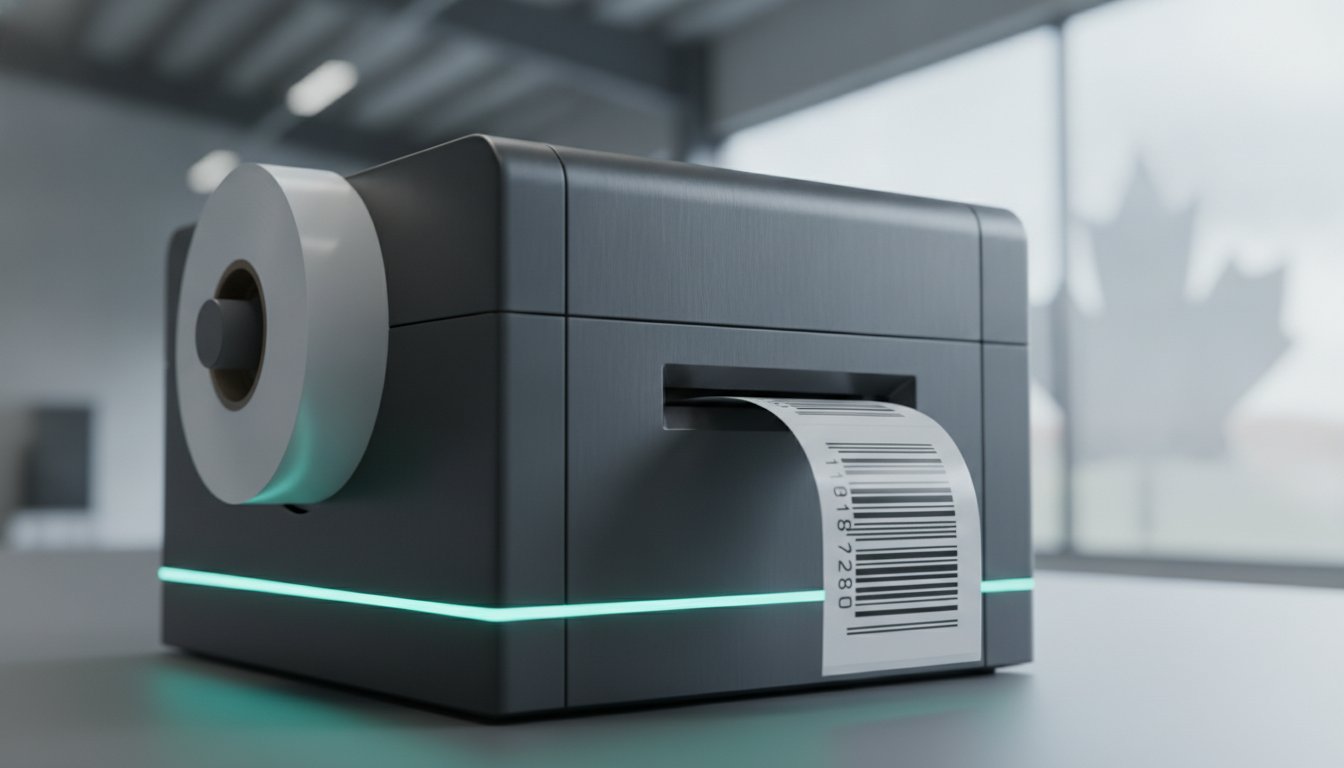
A single unreadable label can cost your business thousands in retailer chargebacks and logistical delays. It's a frustrating reality for many Canadian operations where inconsistent results on different materials lead to rejected shipments at the warehouse door. Why is it so difficult to maintain consistency across your entire production line? The answer lies in high quality barcode printing, which requires a precise alignment of hardware resolution, software logic, and material chemistry to meet global standards.
You likely recognize that keeping up with the latest GS1 General Specifications, specifically version 26 published in January 2026, is essential for staying compliant. This guide will help you eliminate the guesswork by detailing the technical standards and hardware requirements necessary to achieve 100% scan success rates. We'll explore how to choose between 300 and 600 dpi resolutions, why print speeds measured in ips matter for high-volume runs, and how to establish a standardized labelling process that protects your bottom line.
Key Takeaways
- Understand the shift from visual clarity to ISO/IEC compliance to ensure your labels are recognized reliably across global supply chains.
- Learn how to optimize printer DPI and maintain proper "Quiet Zones" to prevent scanning failures at the retail point of sale.
- Discover how to select the right hardware and software combinations to achieve high quality barcode printing that withstands moisture and abrasion.
- Distinguish between simple barcode validation and professional verification to identify quality issues before they result in expensive retailer chargebacks.
- Establish a proactive maintenance schedule for your equipment to eliminate streaks and ensure consistent performance in challenging industrial environments.
Defining High Quality Barcode Printing: Beyond Visual Clarity
Can you trust your eyes when inspecting a shipping label? Most operators assume that if a barcode is dark and crisp, it's ready for the supply chain. This is a common misconception that leads to rejected shipments. High quality barcode printing isn't about aesthetics; it's a technical measurement of how well a label adheres to international barcode quality standards. In a professional setting, we move past the idea that a label "looks good" and focus entirely on whether it scans reliably across various automated systems.
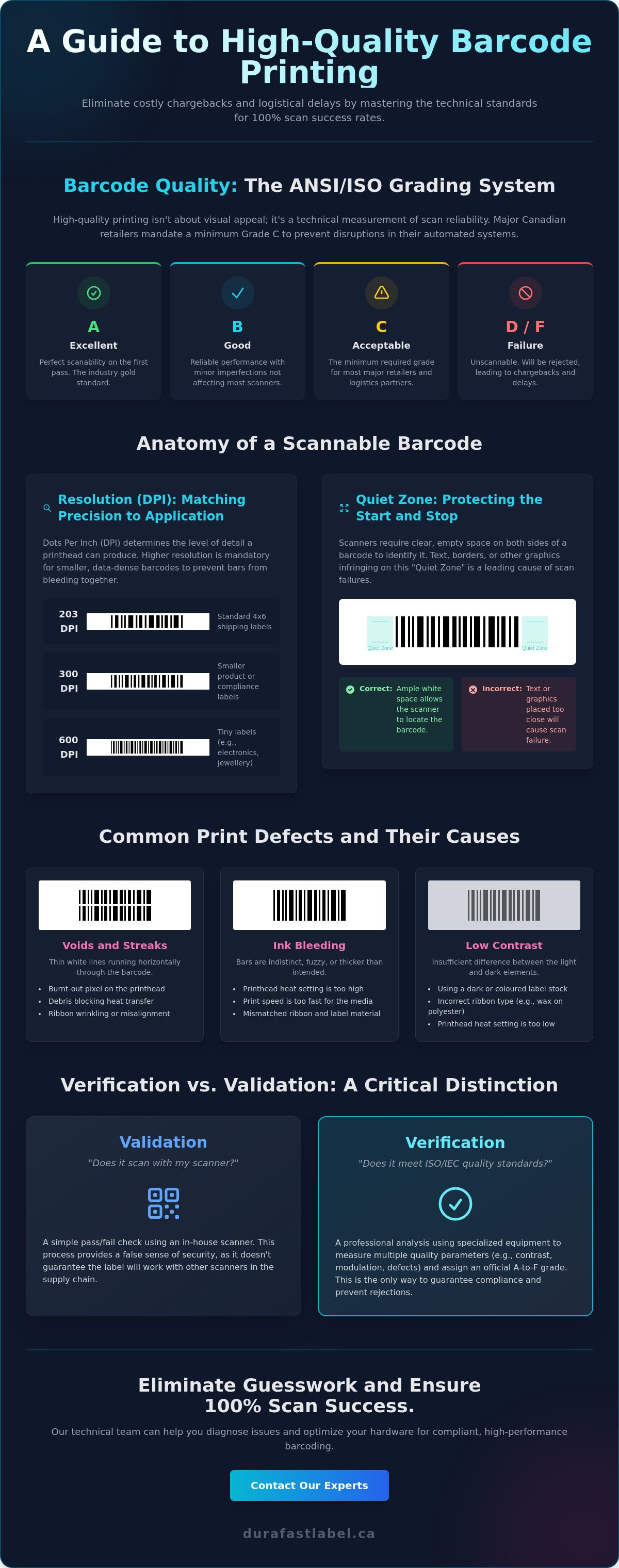
To quantify this reliability, the industry uses an ANSI/ISO grading system ranging from A to F. An 'A' grade represents perfect scanability, while an 'F' indicates a total failure. Major Canadian retailers and logistics hubs don't just want a scan; they want a first-pass success. They often mandate a minimum Grade C to prevent bottlenecks in their automated distribution centres. If your labels fall below this threshold, you aren't just dealing with a minor technicality; you're risking significant operational disruption.
The Role of ISO/IEC 15416 and 15415 Standards
Linear (1D) barcodes and 2D barcodes, like QR codes or Data Matrix symbols, are measured using different criteria. ISO/IEC 15416 governs 1D barcodes, while ISO/
The Anatomy of a Scannable Barcode: Key Technical Factors
Achieving high quality barcode printing requires more than just a functioning printer; it requires an understanding of the geometry and physics behind a scannable image. A barcode is essentially a high-contrast map that a scanner interprets based on the width of bars and the gaps between them. If these dimensions are altered by even a fraction of a millimetre, the data becomes unreadable. To maintain 100% scan success, you must balance resolution, speed, and symbology selection.
Resolution and DPI: Finding the Sweet Spot
The main difference between 203, 300, and 600 DPI (dots per inch) is the level of detail the printhead can render. For standard 4x6 shipping labels, 203 DPI is often the industry baseline. However, as barcodes get smaller or carry more data, higher resolution becomes mandatory. If you're printing tiny labels for electronics or jewellery, you'll need the precision of 600 DPI industrial label printers to prevent the bars from bleeding together. High-resolution heads ensure that the "X-dimension" (the width of the narrowest bar) remains consistent with the requirements found in the GS1 General Specifications.
Common Print Defects and Their Causes
Why do barcodes that look clear to the human eye often fail at the checkout? The most common culprit is ink bleeding, where the ink or ribbon spreads beyond its intended boundary. This usually happens when the heat setting is too high or the print speed, measured in ips (inches per second), is mismatched with the label material. Other frequent issues include:
- Voids and Streaks: These thin white lines running through the barcode indicate a burnt-out pixel on the printhead or a piece of debris blocking the heat transfer.
- Quiet Zone Infringement: Scanners require a "Quiet Zone," which is the clear white space at both ends of the barcode. If your design places text or borders too close to the code, the scanner won't be able to "find" the start and stop characters.
- Low Contrast: This occurs when the background material is too dark or the bars aren't dark enough. Scanners rely on light reflectance; if the difference between the light and dark elements is too narrow, the scan will fail.
Selecting the right symbology is also vital. For example, Code 128 is highly efficient for alphanumeric data, but it requires higher precision than a simpler UPC-A code. If you're seeing persistent streaks or "fuzzy" edges on your labels, you can speak with our technical team to help identify whether the issue is your hardware settings or your consumable mix.
Hardware vs. Software: The Synergy Behind Precision Labelling
How do you ensure that the barcode designed on your screen is exactly what prints on the label? Achieving high quality barcode printing relies on a seamless "handshake" between your design software and the print engine. While the printer provides the physical dots, the software provides the mathematical precision required to keep those dots in perfect alignment. If this connection is weak, even the most expensive industrial printer will produce sub-par results that fail at the scanner.
The main difference between professional label software and standard office applications is how they handle data. If you use a generic word processor, the barcode is often treated as a "bitmap" or a static image. This can lead to jagged edges and scaling errors that distort the bars. Professional suites generate vector-perfect data. They communicate directly with the printer's firmware using specialized drivers to ensure that a "10-mil" bar is exactly 10 mils wide. This level of accuracy is necessary to meet the technical requirements of the GS1 General Specifications, which define the strict tolerances for global supply chain compliance.
Thermal Transfer vs. Colour Inkjet for Barcoding
When durability is the priority, thermal transfer ribbons remain the gold standard for Canadian manufacturers. This technology uses heat to melt a wax or resin ribbon onto the substrate, creating a bond that resists smudging, moisture, and chemical exposure. Other than this, the rise of high-speed colour label printers has changed the landscape for GHS-compliant labelling and secondary packaging. These inkjet systems allow you to print high-contrast barcodes alongside full-colour branding in a single pass. The key to success with inkjet is matching the ink chemistry to the label material. Using pigment-based inks on a compatible matte synthetic substrate prevents the ink from "wicking" or bleeding, which preserves the sharp edges needed for a Grade A scan.
Software-Driven Quality Control
How do you prevent human error from entering your production line? Professional software automates the most critical parts of barcode generation. It calculates check digits automatically, ensuring that every UPC or GS1-128 code is mathematically valid before it ever reaches the printhead. By utilizing Loftware NiceLabel Designer Pro, businesses can link their label templates directly to an ERP or WMS database. This dynamic data integration ensures that the barcode on the box always matches the physical product inside. This automated workflow eliminates the risk of mismatched shipments and helps maintain a consistent quality standard across multiple production facilities.
Barcode Verification vs. Validation: Ensuring 100% Success
Does a successful scan in your warehouse guarantee that your customer will be able to read the label? Many businesses rely on standard handheld scanners to check their work, but this only confirms that the barcode is readable by that specific device at that specific moment. To truly achieve high quality barcode printing, you must distinguish between validation and verification. While they sound similar, the technical differences between these two processes are the difference between a seamless shipment and an expensive retailer chargeback.
Validation: Checking the Data
Validation asks a simple question: "Is this the correct barcode for this product?" This process typically involves a standard scanner and database integration to ensure that the encoded data matches the item being labelled. It's a critical step for inventory accuracy, but it's a pass or fail tool that tells you nothing about the physical integrity of the print. Validation alone won't prevent scan failures at a retail destination if the contrast is low or the quiet zone is too narrow. It ensures the data is right, but it doesn't ensure the data will be accessible later in the supply chain.
Verification: Checking the Physics
Verification is a more sophisticated process that measures the barcode against objective ISO standards. Instead of a simple scanner, you use a barcode verifier, which is a precision instrument designed to analyze the physics of the printed image. This device provides a diagnostic report based on parameters like modulation, decodability, and symbol contrast. If your print quality begins to drop due to printhead degradation or a clogged nozzle in your colour label printers, a verifier will catch the trend before the labels become unreadable.
Why should Canadian manufacturers invest in this level of detail? A verifier assigns a formal grade to your output, allowing you to establish a standardized quality control process. Other than checking for immediate readability, verification identifies specific failures, such as ink bleeding or physical defects in the label substrate. This proactive approach allows you to replace printheads or adjust heat settings before a whole batch of inventory is compromised. If you're struggling with rejected shipments or need help selecting the right equipment for your quality control line, contact our experts for a personalized consultation regarding your labelling environment.
Optimizing Your In-House Production for High-Performance Barcoding
Have you considered how the physical environment of your production floor impacts your scan success rates? Even the most advanced hardware cannot compensate for a workspace that introduces variables like airborne dust or extreme temperature fluctuations. High quality barcode printing is a process that begins with environmental control. When dust settles on a label substrate and passes under a thermal printhead, it acts as an abrasive. This leads to premature equipment failure and permanent streaks in your barcodes. If your facility is prone to environmental debris, utilizing printers with an internal label unwinder can protect your media from contamination before it reaches the print zone.
Environmental debris isn't the only hurdle. The main difference between a reliable production line and one plagued by rejected shipments is the commitment to a standardized maintenance routine. A single clogged nozzle or a burnt-out pixel can render a high-density barcode unreadable by automated sorting systems. By treating your labelling equipment as a precision industrial tool rather than a standard office peripheral, you ensure the longevity of your investment and the reliability of your supply chain.
Consumable Selection for Canadian Climates
Canadian weather presents unique challenges for adhesive performance and print clarity. For businesses operating in cold storage or shipping across vast temperature gradients, standard "bargain" labels often fail because the adhesive loses its tack or the face stock becomes brittle. Moisture and condensation are equally problematic for ink-based systems. If your products face wet environments, selecting pigment inks or water enhanced dye inks is essential to prevent the barcode from bleeding. Matching your ribbon chemistry to your specific label material is the only way to achieve the smudge-proof results required for industrial applications. For a deeper look at selecting the right materials, you can consult our guide on thermal transfer ribbons Canada to find the optimal match for your substrate.
Preventative Maintenance for Your Print Fleet
Establishing a strict cleaning schedule is the most effective way to maintain "Grade A" output. You should clean your printheads with isopropanol every time you replace a roll of labels or a thermal ribbon. This simple habit removes the buildup of adhesive residue and carbon dust that causes the voids mentioned earlier in this guide. Other than physical cleaning, you must standardize your settings across all devices. If one printer is set to a higher heat or a slower ips (inches per second) than another, your barcode density will vary. This leads to inconsistent scan results across your fleet. At DuraFast Label Company Canada, we act as your strategic partner for high quality barcode printing solutions. We don't just provide the hardware; we help you select the exact combination of industrial label printers and high-performance consumables to keep your Canadian business moving without disruption.
Future-Proofing Your Operations with Precision Labelling
Achieving 100% scan success rates isn't just about the printer you choose; it's about the synergy between your hardware, software, and consumables. Precision pays for itself. By aligning your production with current ISO standards and implementing a diagnostic verification process, you eliminate the risk of rejected shipments and costly chargebacks. Whether you need the high-resolution precision of 600 DPI industrial printers or the durability of resin-based thermal transfer ribbons, the right technical configuration protects your operational efficiency.
Since 2012, DuraFast Label Company Canada has specialized in ISO-compliant labelling solutions. As an authorized dealer for Zebra, Epson, and VIPColor, we provide the technical expertise needed to master high quality barcode printing. Our Canadian-based support team ensures you have access to fast national shipping and expert guidance tailored to your specific facility. Browse our Professional Barcode Printers and Supplies today to find the perfect fit for your production line. We're here to help you turn your labelling process into a strategic asset for your business growth.
Frequently Asked Questions
What is the difference between a barcode scanner and a barcode analyzer?
A barcode scanner simply attempts to read the data encoded in the bars, while a barcode analyzer, or verifier, measures the physical quality against ISO standards. Scanners provide a pass or fail result based on their specific sensor's ability to decode the symbol. In contrast, an analyzer generates a diagnostic report on parameters like modulation and contrast. This ensures your labels meet strict retailer requirements before they leave your facility.
Why does my barcode printer produce labels that look fuzzy or bleed?
Fuzzy edges or bleeding usually occur because of a mismatch between the printer's heat settings and the label material. If the darkness setting is too high, the ink or ribbon spreads beyond the intended boundaries of the bars. Other than this, using a print speed that is too fast for the specific media can cause the image to smudge. Adjusting your ips settings often resolves these clarity issues immediately.
Does DPI really matter for simple shipping barcodes?
DPI is critical even for simple shipping labels because it determines the edge definition of the bars. While 203 DPI is the industry baseline for 4x6 shipping labels, 300 DPI provides the extra clarity needed for smaller labels or complex GS1-128 codes. Achieving high quality barcode printing depends on these sharp edges to ensure automated warehouse scanners can distinguish between the bars and gaps at high speeds.
What is an ISO/ANSI barcode grade and why do I need an "A"?
An ISO/ANSI grade is a technical score from A to F that rates a barcode's scanability based on objective measurements. Canadian retailers typically require a minimum Grade C, but aiming for an "A" provides a necessary safety margin for labels that might get slightly scratched during transit. These grades are determined by measuring factors like reflectance and decodability through a formal verification process using a calibrated instrument.
Can I print high quality barcodes on a colour inkjet printer?
Yes, you can print high quality barcode printing results on colour inkjet printers provided you use pigment-based inks and compatible matte synthetic media. Modern inkjet systems produce high-contrast, sharp images that easily meet ISO standards for retail and industrial use. The main difference lies in selecting the right ink chemistry to prevent wicking on the substrate, which ensures the bars remain crisp and scannable. This same focus on precision and colour fidelity is what allows professional platforms like printumo.com to help artists transform their digital artwork into premium canvas and fine-art paper prints.
How often should I verify my barcodes during a production run?
You should verify barcodes at the start of every production run and at regular intervals throughout the shift. Periodic checks help you identify printhead degradation or pixel failure before a large batch of labels is wasted. Many Canadian facilities establish a protocol to verify a sample every hour or whenever a new roll of media is loaded to maintain consistent compliance with supply chain standards.
What are the most common reasons a barcode fails to scan in a warehouse?
The most common reasons for warehouse scan failures include poor contrast, "Quiet Zone" infringement, and physical damage to the label. If the white space at the end of the barcode is too narrow, the scanner cannot identify the beginning or end of the code. Streaks caused by a dirty printhead or burnt-out pixels are also frequent culprits that disrupt the sensor's ability to decode the data.
Is thermal transfer better than direct thermal for barcode longevity?
Thermal transfer is superior for longevity because it uses a ribbon to create a permanent bond that resists heat, light, and chemical exposure. Direct thermal labels use heat-sensitive paper that eventually fades or turns black when exposed to sunlight or high temperatures. If your labels need to remain readable for more than six months in a warehouse environment, thermal transfer is the professional choice for durability.