Shipping Label Printers: The Ultimate 2026 Roundup for Canadian Businesses
3rd Jul 2026
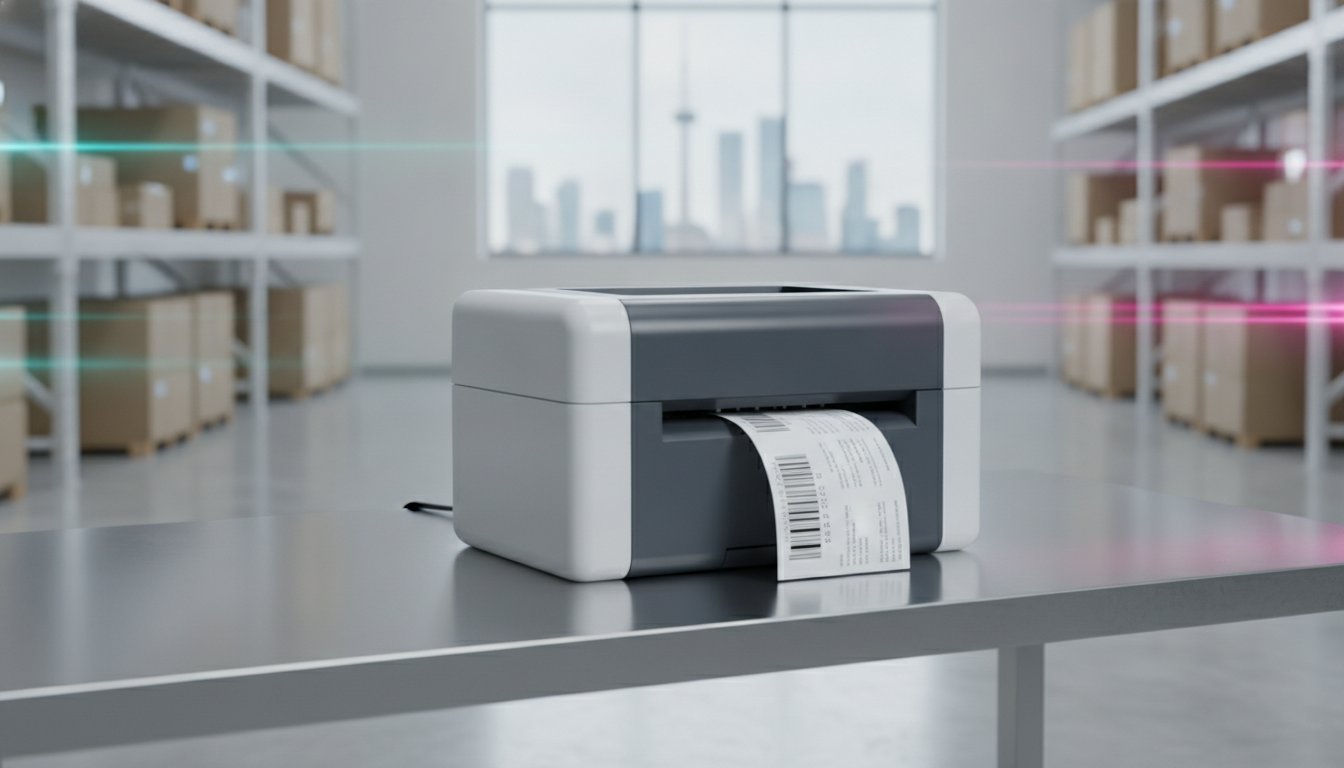
Did you know that e-commerce now accounts for 14.5% of all retail sales in Canada, with over 31 million online shoppers driving market growth through 2026? As your order volumes climb, the friction of outsourcing labels or battling hardware failures becomes a significant operational bottleneck. Have you found yourself managing frequent printer jams or slow output speeds during peak seasons? These delays don't just frustrate your team; they erode your profit margins. We believe that managing logistics effectively requires shipping label printers that are as resilient as your business strategy.
This roundup will help you discover the most reliable hardware to streamline your logistics, reduce overhead, and scale your in-house labelling operations effectively. By focusing on technical specifications like inches per second (ips) and thermal transfer durability, you can achieve a lower cost-per-label and faster shipping turnarounds. We will examine the latest models from industry leaders to ensure your equipment integrates seamlessly with Canadian carriers like Canada Post and Purolator, providing you with a clear path to operational excellence and long-term fiscal responsibility.
Key Takeaways
- Learn how specialized shipping label printers act as the backbone of the Canadian e-commerce ecosystem by producing high-contrast, scuff-resistant adhesive labels.
- Identify the specific performance metrics, such as print speed in inches per second (ips), that make compact desktop units ideal for small-to-medium Canadian distribution centres.
- Determine exactly when to transition to industrial hardware featuring all-metal frames and internal label rewinders to manage high-volume scaling.
- Discover how Memjet Technology allows you to integrate full-colour branding into your shipping labels to enhance the customer unboxing experience.
- Understand how pairing your hardware with professional label design software and automated dispensers can eliminate manual bottlenecks in your logistics workflow.
Understanding Shipping Label Printers: Essential Technology for Modern Logistics
How does a Canadian business manage the logistical demands of 31.5 million online shoppers without creating a bottleneck at the loading dock? The answer lies in specialized hardware. A label printer is more than just a compact document printer; it is a device specifically engineered to produce high-contrast, scuff-resistant adhesive labels at high speeds. In the Canadian e-commerce ecosystem, where cross-border shopping and rapid domestic delivery are standard, these machines ensure that every package is tracked accurately from the warehouse to the customer's doorstep.
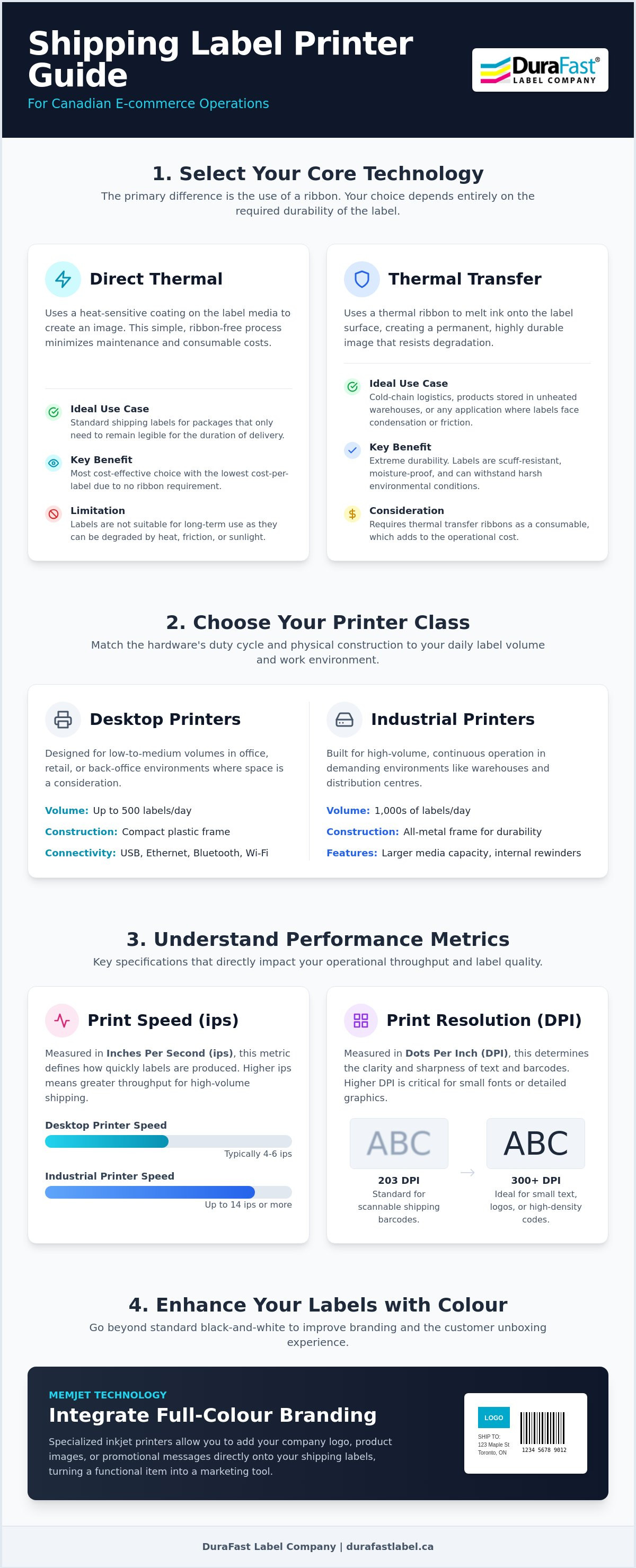
When you transition from a standard office printer to dedicated thermal label printers, you realize immediate improvements in operational efficiency. Standard inkjet or laser printers require expensive consumables and often produce labels that smudge when exposed to moisture or friction. Dedicated shipping label printers utilize heat-activated technology to ensure every barcode is crisp and scannable for carriers like Canada Post or Purolator. To select the right model, you must understand two key metrics: print resolution, measured in dots per inch (DPI), and print speed, measured in inches per second (ips). While 203 DPI is the baseline for most shipping needs, higher resolution models are available for labels with small fonts or intricate branding.
Direct Thermal vs. Thermal Transfer: The Baseline Comparison
The main difference between these two technologies is the requirement for a ribbon. Direct thermal printing uses heat-sensitive media to create an image, making it the most cost-effective choice for standard direct thermal labels that only need to remain legible for the duration of a delivery. It is a simple, ribbon-free process that minimizes maintenance. Other than this, thermal transfer technology represents the delta for businesses requiring extreme durability. This method utilizes thermal transfer ribbons to melt ink onto the label surface. This is essential for cold-chain logistics or products stored in unheated warehouses where condensation and environmental debris can degrade standard labels. Matching the technology to your specific shipping environment ensures your labels remain intact regardless of the weather conditions in transit.
The Economics of In-House Shipping Label Production
Does the initial hardware investment justify the switch? When you analyze the cost-per-label, the savings on consumables like ink and toner quickly offset the price of the printer. By using blank labels specifically sized for your needs, you eliminate the waste associated with half-used laser label sheets. Organizing your shipping centre with automated dispensers and precision-cut media allows your team to achieve a higher throughput during peak seasons. This transition turns a logistical hurdle into a streamlined process, allowing you to scale your operations without a proportional increase in labour or material costs.
Desktop Shipping Label Printers: Efficiency for Small to Medium Enterprises
How do you maintain a high shipping volume when your office footprint is limited? For many small-to-medium Canadian enterprises, the answer is a compact desktop unit. These shipping label printers are designed to handle low-to-medium daily volumes without consuming valuable desk space in a retail centre or back-office. Modern desktop models have evolved beyond simple USB connections. You can now find units with Ethernet for shared network access; others offer Bluetooth and AirPrint for printing directly from mobile devices. This flexibility allows your team to generate labels from anywhere in the facility, reducing the time spent walking back and forth to a central station.
Reliability is the primary differentiator when selecting hardware. Brands like Brother, Seiko, and TSC offer varied performance metrics to suit different budgets. If you are researching the market, looking at PCMag's top tested label makers provides a helpful benchmark for hands-on performance. While some entry-level models focus on basic adhesive paper, the models we recommend are built to handle the rigours of daily logistics. While most desktop units focus on monochrome output, more businesses are realizing the value of colour-integrated shipping to enhance their brand presence directly on the package.
Compact Powerhouses: Zebra and TSC Desktop Models
The Zebra ZD-series serves as the industry baseline for reliability and ease of use, particularly for standard 4x6 shipping labels. The main difference between the Zebra units and TSC desktop alternatives is often the price-to-performance ratio. TSC models frequently offer a budget-friendly delta while maintaining comparable print speeds. One physical feature you should prioritize is the internal label unwinder. Unlike external unwinders that leave media exposed to environmental debris, internal unwinders keep your label rolls protected inside the printer chassis. This is essential for maintaining a clean workspace and preventing dust from reaching the sensitive internal components.
Maintaining Quality in Desktop Labelling
Achieving a consistent scan rate depends heavily on using high-quality direct thermal labels. If your labels appear light or streaky, you may need to adjust the print density settings in your driver. High-speed modes can sometimes lead to reduced clarity if the heat settings are not optimized for the specific media. Simple maintenance routines, such as cleaning the thermal printhead with isopropyl alcohol every time you change a roll, will extend the life of your hardware. If you are unsure which desktop model fits your specific daily volume, you can reach out to our team for a technical consultation. This proactive approach ensures your labelling station remains a tool for growth rather than a source of frustration.
Industrial Shipping Label Printers: High-Volume Solutions for Scaling
When do you know it's time to move beyond the desktop? For many Canadian distribution centres, the tipping point occurs when daily output consistently exceeds 500 labels or when operations move to a 24/7 schedule. While desktop units are excellent for low-to-medium volumes, they lack the duty cycle required for continuous operation. Industrial label printers are built with all-metal frames and high-torque motors to handle the physical strain of high-speed production. These machines also feature high-capacity internal label rewinders, which are essential for managing large print runs without manual intervention. This transition represents a shift from simple equipment to a strategic infrastructure investment.
Integration is another critical factor for scaling businesses. High-performance series from brands like Honeywell, Toshiba, and Zebra are designed to communicate directly with your Enterprise Resource Planning (ERP) and Warehouse Management Systems (WMS). This seamless connectivity ensures that your shipping label printers receive real-time data from your inventory software, which eliminates the risks associated with manual data entry. By automating the flow of information from the order desk to the loading dock, you reduce the likelihood of shipping errors that can lead to costly returns and carrier surcharges.
Heavy-Duty Performance: Toshiba and Honeywell
The main difference between industrial and desktop hardware is the physical design and media capacity. Toshiba industrial printers are recognized for their precision and the longevity of their printheads, which reduces the frequency of replacements and lowers your total cost of ownership. Honeywell solutions offer rugged hardware specifically built for demanding warehouse environments where environmental debris is common. Other than this, these units are designed for easy maintenance. You can often replace printheads and platen rollers without specialized tools, ensuring that your production line stays moving during the busiest shipping windows of the year.
Thermal Transfer Excellence for Industrial Shipping
Achieving smudge-proof results in industrial settings requires the use of thermal transfer ribbons. This technology is the delta for specialized shipping, such as chemical transport or outdoor storage, where standard paper labels would fail. By matching specific ribbons to synthetic media, you ensure that your barcodes remain scannable despite exposure to oils, chemicals, or extreme Canadian temperatures. High-speed industrial units can achieve print speeds of up to 14 ips. This performance allows you to clear large shipping queues during peak seasons without sacrificing the clarity of your tracking numbers or carrier barcodes.
Colour-Integrated Shipping: Branding and Functional Differentiators
Why should your shipping labels be limited to black-and-white barcodes? In a competitive e-commerce market, the unboxing experience begins the moment a customer sees the package on their doorstep. Branded shipping labels transform a standard logistical necessity into a powerful marketing touchpoint. While traditional shipping label printers rely on thermal technology, the rise of Memjet Technology has introduced high-speed colour inkjet capabilities to the warehouse floor. This allows you to print full-colour logos, promotional offers, or handling instructions at speeds that rival industrial thermal units, ensuring that branding does not become a bottleneck in your logistics chain.
The functional benefits of colour go beyond aesthetics. By integrating colour-coded elements into your labels, you can significantly improve warehouse efficiency. For example, using specific colours to denote different carriers or shipping priorities allows your team to sort packages at a glance. This visual system reduces the cognitive load on staff and minimizes the risk of a package being placed on the wrong pallet. This transition to on-demand colour production allows you to take full control of your visual identity while simultaneously optimizing your internal sorting processes.
VIPColor VP-Series: Scaling Colour Production
The VIPColor VP-series is engineered specifically for businesses that require both speed and high-quality output. The main difference between the VIPColor VP700 and the VP750 is the ink technology and environmental resistance. While the VP700 is a baseline for high-speed vibrant labels, the VP750 utilizes water-enhanced dye inks. Other than this improvement in moisture resistance, both models offer exceptional ips ratings for high-volume environments. By utilizing colour label printers, you can eliminate the need for a large inventory of pre-printed labels. This reduces waste and allows you to update your branding or seasonal promotions instantly without discarding obsolete stock.
Inkjet Labels for Durability
To maintain professional quality throughout the shipping journey, you must pair your hardware with the correct media. Using inkjet-ready labels is essential to prevent smearing or bleeding during transit. In the Canadian climate, labels often face challenges like condensation in delivery vans or environmental debris in sorting centres. Water-enhanced dye inks provide a durable solution that keeps your branding crisp and your barcodes scannable despite these conditions. While pigment-based inks are the delta for extreme chemical resistance, water-enhanced dye inks offer the ideal balance of colour depth and durability for standard logistics. If you want to see how colour can transform your shipping workflow, you can contact our specialists for a sample print of your branding.
Optimizing Your Workflow with Software and Accessories
Is high-performance hardware enough to eliminate your logistical hurdles? While selecting the right shipping label printers is a critical first step, the efficiency of your station depends heavily on the digital and physical infrastructure supporting it. Hardware provides the capability to print, but professional software and accessories determine the speed and accuracy of your entire production process. By automating manual tasks and ensuring barcode precision, you can achieve the seamless integration required to handle modern Canadian carrier demands. This holistic approach transforms a simple printing station into a high-speed distribution hub.
Ensuring 100% scan success rates is non-negotiable for maintaining carrier relationships and avoiding surcharges. Professional barcode software generates labels that meet strict industry standards, which prevents the delays associated with unreadable tracking numbers. Partnering with a strategic supplier for ongoing support and consumables is the final piece of the puzzle. This relationship ensures you have access to the specific technical expertise required to troubleshoot issues and the high-quality media needed to keep your production line moving without interruption.
Professional Design Software: Bartender and NiceLabel
The main difference between standard drivers and professional design software is the level of automation and carrier compliance they provide. Loftware NiceLabel is designed to simplify complex labelling workflows, particularly in multi-user environments where consistency across different workstations is vital. Other than this, Bartender Professional offers advanced barcoding capabilities and deep integration with Canadian logistics providers. Using professional software allows you to automate the flow of data from your order desk to the printer, reducing the risk of manual entry errors. For businesses with multiple locations across Canada, cloud-based labelling provides a centralized platform to manage designs, ensuring that every warehouse operates with the same updated templates and branding.
Accessories for Maximum Efficiency
How do you manage high-volume print runs without creating a tangled mess of media? Label rewinders are the primary solution for businesses that print in batches for later application. These devices neatly wind printed labels onto a core, keeping your workspace organized and protecting the media from environmental debris. If you use oversized media rolls to reduce the frequency of roll changes, external label unwinders are an essential delta to your setup. These accessories allow you to feed larger rolls into your printer, which significantly reduces downtime during peak shipping seasons by extending the intervals between media replacements. To find the right combination of hardware and support for your scaling operations, you can explore the full range of industrial label printers at DuraFast Label.
Future-Proofing Your Canadian Logistics Strategy
Selecting the right shipping label printers is a strategic decision that impacts your fiscal responsibility and operational seamlessness for years to come. Whether you choose a compact desktop unit for retail centres or a high-torque industrial model for 24/7 distribution, the goal is balancing technical specifications like ips speed with the long-term durability of your media. Transitioning toward full-colour integrated branding with Memjet Technology offers a significant delta in customer experience, while professional software ensures 100% scan success rates with carriers like Canada Post and Purolator.
As an authorized dealer for Zebra, Epson, and VIPColor, we act as a knowledgeable consultant to help you navigate these complex hardware choices. We maintain a specialized Canadian inventory of 4x6 shipping labels and provide expert technical support to ensure your in-house production scales without disruption. Shop our full selection of shipping label printers at DuraFast Label to find the resolution that fits your unique workflow. We're here to help you achieve faster turnarounds and lower costs for your growing business.
Frequently Asked Questions
Do I need a special printer for 4x6 shipping labels?
Yes, while standard document printers can print labels on adhesive sheets, dedicated shipping label printers are the industry standard for 4x6 output. These machines use rolls or fanfold media, which eliminates the manual labour of cutting and taping paper labels to your packages. This specialized hardware ensures your barcodes meet carrier specifications for scan accuracy every time.
Is direct thermal better than thermal transfer for shipping?
It depends on your specific shipping environment and the duration the label must remain legible. Direct thermal is often better for standard domestic shipping because it's cost-effective and doesn't require a ribbon. Other than this, thermal transfer is the superior choice for international shipping or cold-chain logistics where labels face extreme temperatures and friction during transit.
Can I use a regular inkjet printer for shipping labels?
You can use a regular inkjet printer, but it's generally not recommended for scaling a business. Inkjet ink smudges easily when exposed to rain or snow, which can lead to delivery failures. Thermal printers offer a much lower cost-per-label and produce smudge-proof results that are specifically designed for the rigours of the Canadian postal system.
What is the most reliable shipping label printer for a small business in Canada?
The Zebra ZD-series and TSC desktop models are currently the most reliable options for Canadian small businesses. These units provide a consistent baseline of performance for daily shipping volumes under 500 labels. They integrate seamlessly with major Canadian carriers and offer the durability needed to prevent downtime during peak holiday seasons.
How do I connect my shipping label printer to Shopify or Amazon?
Connection is typically established via USB, Ethernet, or Bluetooth through your computer's print driver. Once the driver is installed, e-commerce platforms like Shopify or Amazon recognize the device as a standard printer. You can then use integrated software like ShipStation or Shippo to format and send your 4x6 label data directly to the hardware.
Why are my shipping labels coming out blurry or too light?
This issue is usually caused by incorrect darkness settings in your print driver or environmental debris on the printhead. You should first try cleaning the thermal printhead with an isopropyl alcohol swab. If the problem persists, increasing the "darkness" or "heat" setting in your printer preferences will usually resolve the clarity issues immediately.
Do I need to buy ink for a thermal shipping label printer?
No, thermal shipping label printers don't use liquid ink or toner. Direct thermal models use heat-sensitive paper that blackens when heated by the printhead. Thermal transfer models use a solid wax or resin ribbon. This technology eliminates the recurring cost of expensive ink cartridges and ensures your labelling station is always ready for production.
What is the difference between desktop and industrial shipping printers?
The main difference lies in the duty cycle and physical construction. Desktop printers are made with plastic housings for low-to-medium volumes. Industrial printers feature all-metal frames and high-torque motors designed for 24/7 operation. Industrial units also accommodate larger label rolls, which reduces the frequency of media changes in high-volume distribution centres.