Seiko Mobile Printers: A Practical Guide to Field Labelling
3rd Oct 2026

What if the most useful label printer is the one that goes where the work happens? When staff need labels away from a fixed workstation, carrying pre-printed stock can add delays and make it harder to label items at the right moment. Seiko mobile printers bring label creation closer to the task, so teams can print as needs arise.
Choosing a mobile setup takes more than picking a compact printer. Label size and type, how information reaches the printer, and where printing will happen all matter. A small desktop printer may save space, but it isn’t automatically suited to work that moves between locations.
This guide explains where mobile label printing can help, what to assess before choosing a printer, and how to match a Seiko option to your application. It also covers the listed Seiko SLP721RT, a 2-inch linerless label printer with Bluetooth and USB, and practical considerations for selecting compatible direct thermal labels.
Key Takeaways
- Identify where labels are needed and whether printing at the point of work would better support the task.
- Map the steps from label data to printing and application so the mobile setup fits the existing workflow.
- Compare work location, print frequency, label format, and connection needs before choosing among Seiko mobile printers.
- Test representative labels and the full process in the actual work setting before standardizing the setup.
- Match the printer to suitable direct thermal media. Seiko mobile printers and compatible label supplies are a practical place to start.
What Seiko mobile printers do for field labelling
A label is most useful when it is ready where the product, asset, or task is being handled. If staff leave receiving, inventory checks, or maintenance work to print at a central desk, the extra trip can interrupt the task and separate label creation from application.
A mobile label printer supports printing away from a fixed workstation. In a field workflow, it brings label creation closer to the item that needs identifying. The value is not simply having a smaller printer. It is being able to produce the required label near the work, when the relevant details are available.
Mobile label printing moves label creation to the point of work. Fixed-location printing brings the work back to the printer.
How point-of-work printing changes a field workflow
Consider an inventory check: a worker identifies an item, prepares its label, prints it nearby, then applies it before moving on. During receiving, labels can be created as goods are processed. During maintenance, an asset or component can be identified as the task is completed. In each case, staff can prepare the label where the item is located instead of relying on a return trip to a printing station.
The practical benefit depends on the whole sequence. Decide where label information is captured, where the label is printed, and where it will be applied. If those steps happen in different places, mobile printing may reduce back-and-forth. If printing and application already happen at one stable station, mobility may add little to the process.
Mobile label printer versus compact desktop printer
A compact desktop printer can suit a permanent workstation where staff print repeatable batches and apply labels nearby. Its small footprint does not, by itself, make it a mobile printer. The key distinction is whether the device is intended for printing away from a fixed station and fits the movement required by the task.
Before choosing, picture the worker’s route. Will they carry the printer between work areas, or bring items to a desk for labelling? How often are labels needed away from the workstation? Can staff keep label details accurate when printing away from a fixed station? These answers clarify whether portability solves a real workflow problem.
Seiko Instruments Inc. (SII), the manufacturer behind Seiko’s thermal printing products, provides background on the company’s corporate history. For application planning, distinguish mobile equipment from other Seiko thermal printer options, then match the choice to where labels are produced and applied. Explore DuraFast Label Company Canada’s Seiko thermal printers to compare options in the category.
How a Seiko mobile printing workflow fits together
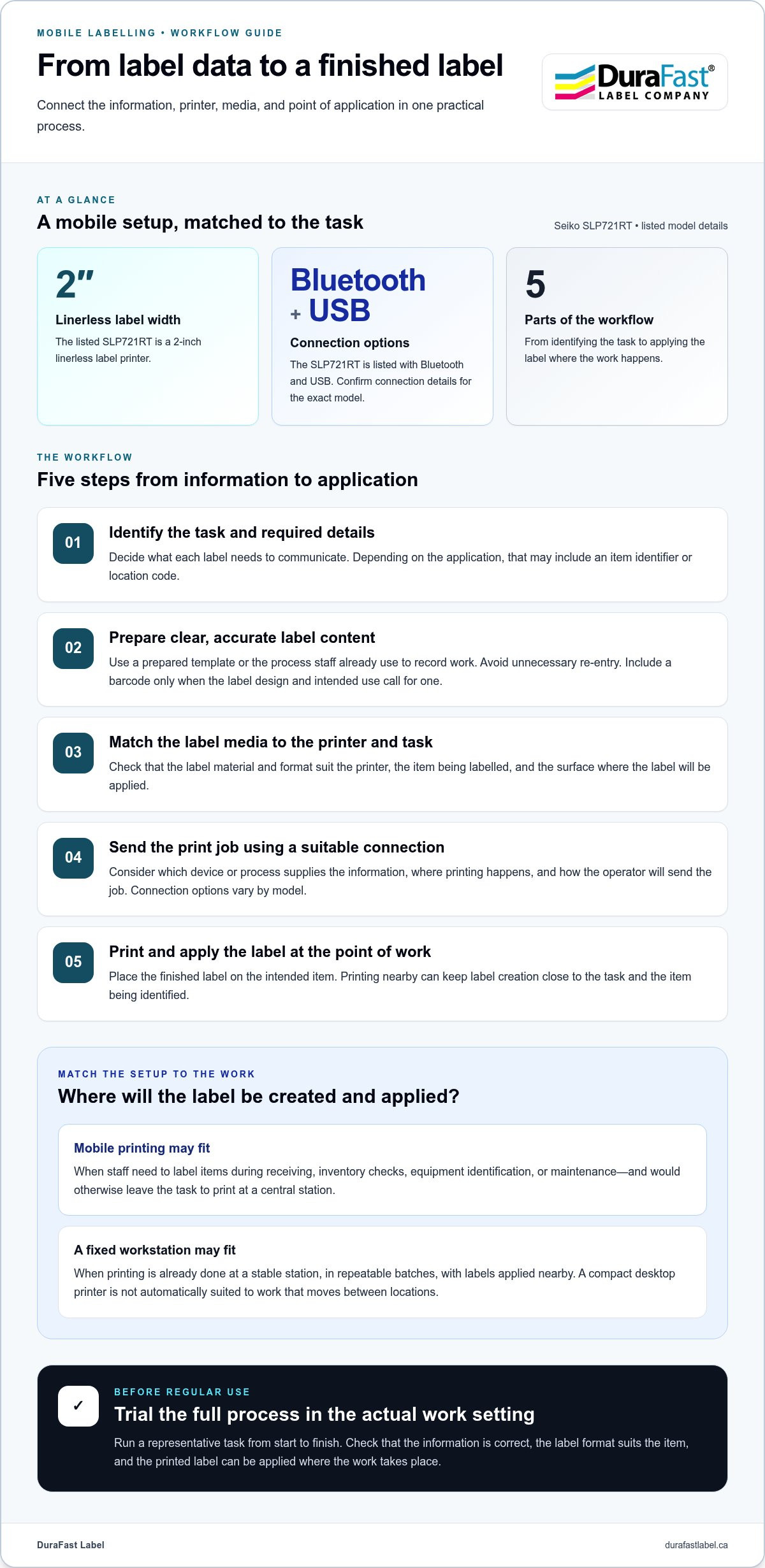
A reliable mobile labelling process connects the information on the label to the place it will be printed and applied. Start by identifying the task and the details each label must show. These might include an item identifier or location code, depending on the application. Then prepare the label content, choose media suited to the printer and task, print, and apply the label to the intended item.
From label data to a finished label
Label data can come from a prepared template or from the process staff already use to record work. Avoid unnecessary re-entry while keeping the printed information clear and accurate. For example, an identifier recorded during an inventory check could become the label content. A barcode may also be included if the label design and intended use call for one. Its usefulness depends on how the label will be read and used.
Before putting the process into regular use, follow a sample task from beginning to end. Check that the content is correct, the label format suits the item, and the printed label can be applied where the work takes place. A simple trial can reveal gaps between the information gathered and what the finished label needs to communicate.
Connectivity and label media in a mobile setup
The connection method should fit the operator’s working pattern. Consider what device or process will provide the label information, where the printer will be used, and how the operator will send the print job. Connection options vary by model, so compare the details for the exact printer. The listed Seiko SLP721RT, for example, is a 2-inch linerless label printer with Bluetooth and USB.
Media matters just as much. Confirm that the label material and format suit both the printer and the task, including the surface or item being labelled. DuraFast Label offers mobile direct thermal labels to consider alongside a compatible printer.
Printer, media, and workflow work best as one matched system. The label format must suit both the device and the task. Seiko mobile printers can support point-of-work labelling when their connection and media fit how staff capture information and apply labels. Discuss your mobile labelling requirements with DuraFast Label to bring the printer, media, and process into the same conversation.
Will a Seiko mobile printer suit your application?
Mobile printing is useful when a label needs to be created near the item or task, not simply because a printer is compact. If staff routinely step away from receiving, inventory work, equipment identification, or maintenance to print labels, producing them closer to the task may reduce unnecessary movement and the chance of applying the wrong label. The result depends on how label information is captured and how the work is organized.
A stable workstation and repeatable, fixed-location batch process may be better served by a printer set up at that station. High-volume production and field tasks have different workflow needs, so compare the work itself rather than assuming one printer type suits both.
Which work settings benefit from printing at the point of use?
Consider whether labels are created as goods are received, during an inventory check, while identifying equipment, or as part of a service or maintenance task. Printing near the item can help staff apply a label while its identity and location are in view. It may reduce avoidable trips and relabelling, but the outcome depends on how label information is captured and how the work is organized.
What to compare before selecting a printer
Use the workflow details below to frame the decision. Treat a listed feature as a product fact only when it belongs to the exact model under consideration. Operating conditions and process expectations are application requirements to evaluate.
| What to assess | Workflow consideration |
|---|---|
| Work location | Will printing happen at a fixed station, or must the printer move between task locations? |
| Print frequency | Are labels produced occasionally as work arises, or in planned batches? Match the setup to the actual pattern rather than assuming a capacity. |
| Label dimensions and media | Measure the required label format and identify the media the task calls for. Compare these with the exact printer’s supported options. |
| Connection needs | Consider how label information reaches the printer and which connection method fits the operator’s process. Options can vary by model. |
For example, the listed Seiko SLP721RT is a 2-inch linerless label printer with Bluetooth and USB. Those details apply to that product, not automatically to every model in the Seiko range. Don’t infer a printer’s media support, connection options, or suitability from its brand alone.
For a closer look at a named option, see the Seiko SLP720RT printer details. The broader Seiko thermal printer range can also help frame a comparison. Make the final choice based on the label format, work location, print pattern, and connection requirements of the application.
How to plan a dependable mobile labelling setup
A dependable setup starts with the work, not the printer. Document the task from the moment a label is needed through printing and application. This makes it easier to identify the information, media, and operator steps the process must support before introducing Seiko mobile printers into daily use.
A practical pre-deployment checklist
Use a small, representative trial to check the whole process in the setting where staff will work. Include the item, label content, intended media, and the steps an operator will follow. Review the result before expanding the setup:
- Document the task: Record where labels are created and applied, who prints them, and what information each label must carry.
- Confirm the label content: Identify required text or identifiers and keep the format consistent with the label’s purpose.
- Match media to the job: Choose label stock that suits the printer’s printing method and the item’s handling conditions.
- Test in the actual work setting: Check readability, label placement, and operator steps using representative labels.
- Standardize what works: Make the agreed format and process easy for the team to repeat.
A trial can reveal practical issues that are easy to miss at a desk: the label may be hard to read on the item, placement may vary between operators, or a step may interrupt the task. Adjust the process, then repeat the trial before broader adoption.
Integrating mobile printing into daily operations
Plan the routine around people and supplies as well as equipment. Assign responsibility for maintaining approved label formats, storing media appropriately, and replenishing supplies. Show operators how to follow the same steps and place labels consistently, including what to do when a label needs to be reprinted.
Clear ownership supports a repeatable process across work areas. Keep the approved label format and handling instructions accessible to the people who use them, and review the process if the task or item changes. Base decisions about software, network integration, battery runtime, and environmental durability on the exact printer details and a practical workflow test.
If some labels are produced at a fixed station instead, this thermal label printer guide offers context for evaluating that workflow alongside mobile printing. To discuss printer and label requirements for your process, contact DuraFast Label about your labelling setup.
Explore Seiko mobile printers and matching label supplies
Choosing a field-labelling setup starts with a practical question: where does each label need to be created and applied? Then match the workflow to the label media and the exact printer requirements. Consider the label’s dimensions and format, how often staff print, how information reaches the printer, and the conditions the labelled item will encounter.
Match the printer to the label and task
Media is part of the decision, not an afterthought. A label roll that doesn’t fit the printer or a format that doesn’t suit the item can interrupt an otherwise effective process. Before standardizing, compare the intended label stock with the specific printer’s supported media, then test a sample through the actual printing and application steps.
Keep model details precise. The Seiko SLP850 is listed as a 2-inch, 300 dpi barcode label printer. That description alone doesn’t establish that it is a mobile printer or define every media and connection option. Explore Seiko SLP850 printers as part of the wider Seiko printer range, and assess each product against the job rather than assuming models share the same features.
DuraFast Label offers Seiko mobile printers and mobile direct thermal labels for mobile work. The listed Seiko SLP721RT, for example, is a 2-inch linerless label printer with Bluetooth and USB. Use those details for that product, then consider whether its listed format and connection options align with your task. A different label size, printing location, or connection requirement may point to another option.
Take the next step with DuraFast Label
Before settling on a setup, bring together the application, work setting, label dimensions, media type, printing frequency, and connection needs. This gives you a clear basis for comparing Seiko printers and relevant label supplies without relying on assumptions about model capabilities. It also helps distinguish a mobile workflow from printing at a fixed workstation.
If you’re weighing those requirements, discuss your Seiko mobile printing needs with DuraFast Label. Share where labels are used and what they need to do, and use those details to guide the printer and media decision.
Put your field-labelling plan into action
Effective field labelling begins with the task: identify where labels are needed, what information they must carry, and how staff will print and apply them. Then match the printer, media format, and connection needs to that workflow. A small test in the actual work setting can reveal practical adjustments before the process is standardized.
Seiko mobile printers can support label creation closer to the work. The right choice depends on the specific model and application. DuraFast Label offers Seiko thermal printers and mobile direct thermal labels to help bring printer and media decisions together. For example, the listed Seiko SLP721RT is a 2-inch linerless label printer with Bluetooth and USB connectivity. Those details apply to that product, so assess the model’s specifications against your process.
Ready to define the next step? Share your application, work setting, and label requirements when you discuss your Seiko mobile printing needs with DuraFast Label. A clear plan can make field labelling more consistent and practical for your team.
Frequently Asked Questions
What is a Seiko mobile printer used for?
Seiko mobile printers are used to create labels near the item or task instead of returning to a fixed printing station. This can suit field workflows such as identifying equipment during maintenance, labelling items during receiving, or updating inventory as it’s checked. The benefit depends on the process: staff need a practical way to prepare label content, print it where work happens, and apply it accurately.
Can a Seiko mobile printer print barcode labels?
Barcode printing depends on the exact printer model, label format, and barcode design, so don’t assume every Seiko mobile printer supports every barcode job. The Seiko SLP850 is listed as a 2-inch, 300 dpi barcode label printer, but that description doesn’t establish it as a mobile printer. Check the specific model’s supported label format and ensure the barcode design suits its intended use.
How do I choose labels for a Seiko mobile printer?
Start by checking the exact printer’s supported media and dimensions. Then consider the label format and material needed for the item and its handling conditions. Don’t infer media compatibility from the Seiko name alone. Before standardizing, print and apply representative labels in the intended workflow, then review fit, readability, and placement. Mobile direct thermal labels are one relevant category to consider with a compatible printer.
Is a mobile label printer different from a desktop label printer?
A mobile label printer is intended for printing away from a fixed workstation, while a desktop printer typically serves a stable work area. The distinction is workflow, not simply size: a compact device may still be meant to remain at a desk. If employees need to print beside items across different work areas, mobility may help. Repeatable batch printing at one station may favour a desktop setup.
Can I connect a Seiko mobile printer using Bluetooth?
Bluetooth connectivity is model-specific, so check the individual printer details rather than assuming all Seiko models offer it. The listed Seiko SLP721RT is a 2-inch linerless label printer with Bluetooth and USB. Those connection details apply to that product only. Consider which connection fits the operator’s device and printing process, and don’t extend the SLP721RT’s specifications to other Seiko printers.
What should I consider before using a mobile printer in the field?
Before field use, define where printing happens, what each label must say, and which media format fits the printer and item. Decide who prepares the label and how staff will apply it consistently, then plan where supplies are stored and replenished. Run a representative task in the actual work setting. Check content, readability, placement, connection steps, and operator hand-off, then adjust unclear steps before making the process routine.
Where can I find Seiko mobile printers and compatible labels in Canada?
Canadian businesses can explore Seiko mobile printers and mobile direct thermal labels through DuraFast Label. Start with the Seiko printer category, then compare the exact model’s details with your label dimensions, media needs, connection method, and work location. DuraFast Label offers mobile direct thermal labels, helping you consider printer and supply requirements together. Don’t assume every Seiko thermal printer is designed for mobile use.