Reliable Pharmacy Labels and Printing Solutions in Canada
19th Oct 2026
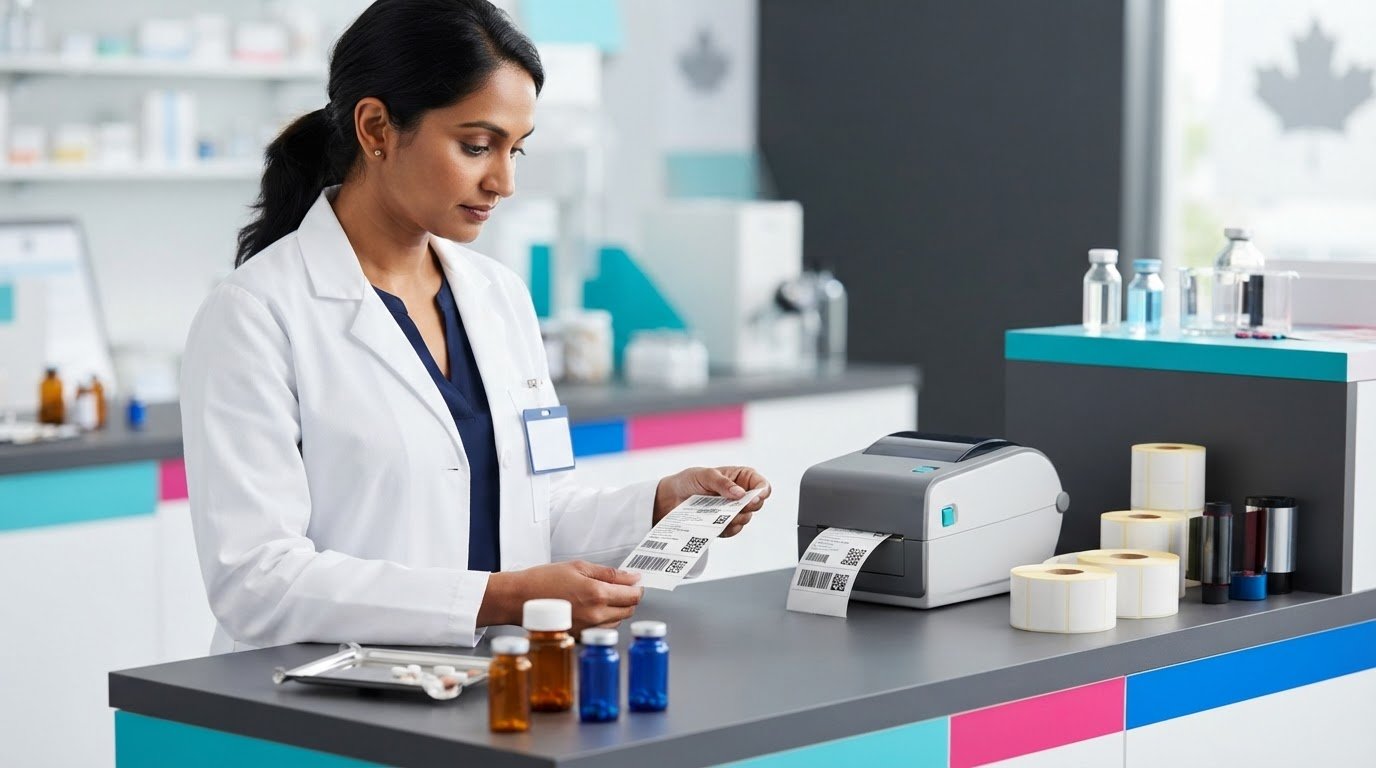
What if the label slowing down your dispensing workflow is not the printer, but the format or stock feeding it? Choosing pharmacy labels means checking how they fit your equipment and daily process, not just how they look on a roll or sheet. Small instructions, dosage details and barcodes also need to print clearly at the size staff will use.
Start with the printer model and the way your team prints and handles labels. These details help you compare sheet and roll formats, identify the right print method and avoid ordering media that does not suit your setup.
This guide explains how to match label format and stock to your printing workflow, and which printer and software details to record before buying. It also covers practical checks for clear, consistent print output, including readable text and barcodes. DuraFast Label Company Canada offers label printers, media and consumables, so you can consider the equipment and supplies together when planning an in-house setup.
Key Takeaways
- Identify what each label needs to do and what information it must communicate before comparing options.
- Compare sheet and roll formats, and match inkjet, direct thermal or thermal transfer media to the printer’s method.
- Use a step-by-step process to match pharmacy labels to your printer model, print method, media dimensions and workflow.
- Build a simple print-review routine to catch issues with text readability, label placement and barcode output where applicable.
- Consider labels, printers and consumables together to narrow down suitable supplies for your pharmacy setup.
What are pharmacy labels, and what jobs do they support?
Pharmacy labels identify medication containers and support related pharmacy workflows. Depending on their purpose, they may communicate directions, a caution, storage information or an identifier. A pharmacy label identifies a medication or item and communicates relevant information in a format people can recognize and read.
Labels work best as part of a consistent process, not as isolated stickers. A clear layout helps staff locate key details, while a repeatable format can make similar tasks easier to handle throughout the day. For broader background on the purposes and context of medication labelling, see Drug labelling.
Which pharmacy tasks use labels?
Different tasks call for different label roles. A prescription container label may identify the medication and communicate patient directions or relevant cautions. Other labels can help staff organize medication or distinguish items as they move through handling and preparation steps.
- Prescription containers: Information may relate to identification, directions, storage or cautions.
- Medication organization: Identifiers can help staff distinguish products or containers during routine handling.
- Internal processes: Labels can support consistent identification as items move through pharmacy workflows.
These examples describe functions, not a universal template. Required information can vary with the medication, task, container and pharmacy procedures. Label content should follow current applicable requirements and the pharmacy’s established processes. Do not assume one layout or set of instructions suits every use.
What makes pharmacy label information easy to read?
Readability depends on both layout and print quality. Create a clear visual hierarchy so important details are easy to find, and choose type that remains legible at the label’s actual size. Strong contrast between text and background helps separate information, while a less crowded layout makes details easier to scan.
The label and container matter, too. A design that looks readable on a large screen may become cramped on a small label or hard to see once applied to a curved surface. Consider how much information the label needs to carry, where it will sit on the container and whether key text will remain visible. If the layout feels crowded, reorganize the content rather than simply shrinking the text. Consistent formats for similar tasks can also help staff know where to look.
Define the label’s job first, then shape its content and layout around that use. DuraFast Label Company Canada offers label printers, media and consumables to support in-house printing workflows.
Pharmacy label formats and printing methods: sheets, rolls and media
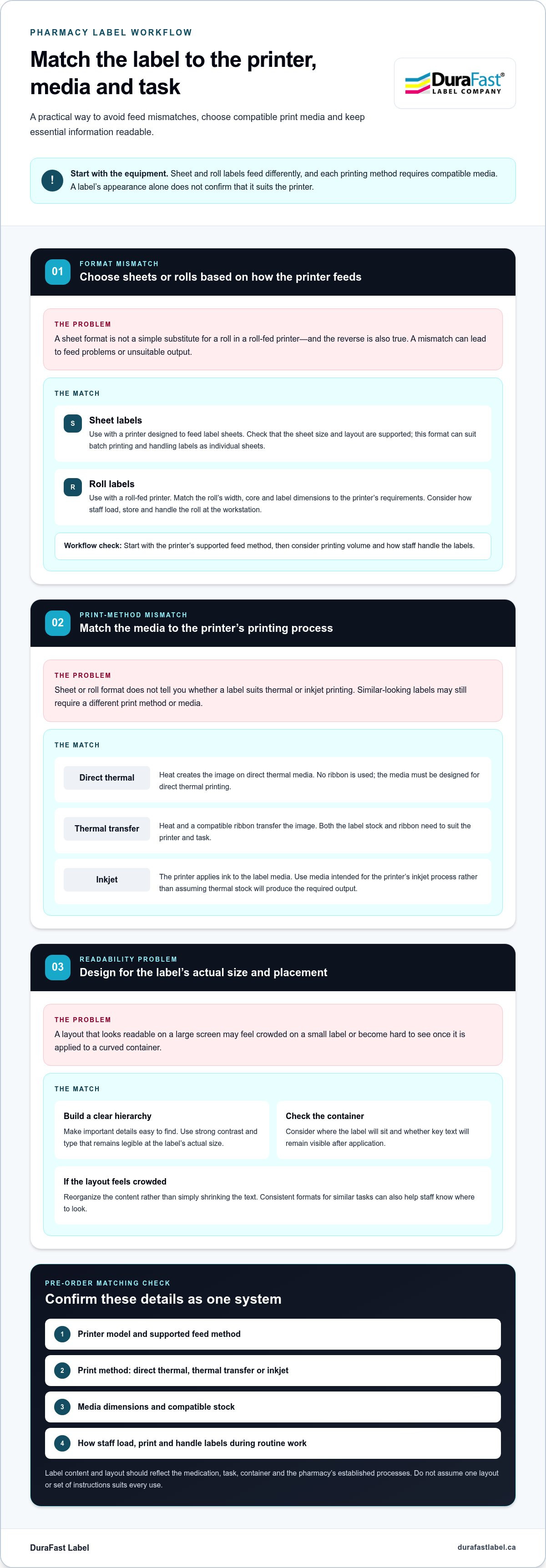
Choose a format that suits the printer, not just the label’s intended use. Sheet and roll labels feed differently, and each print method requires compatible media. Start with the equipment in your pharmacy, then consider how staff load, print and handle pharmacy labels during routine work. Matching the format, printer and media helps prevent feed problems and unsuitable output.
Are sheet or roll pharmacy labels the better fit?
Sheet labels suit printers designed to feed label sheets. They can work well when staff print a batch and handle the labels as individual sheets, but the printer must support the sheet size and layout. Compare the media dimensions and feed requirements with your equipment before choosing a sheet format.
Roll labels are made for roll-fed printers. Staff load a roll and print pharmacy labels as needed, which can suit a workflow where labels are produced individually or dispensed from the roll. The roll’s width, core and label dimensions need to match the printer’s media requirements. Also consider where rolls will be stored and how staff will handle pharmacy labels at the workstation.
Neither format is automatically better. A roll format is not a simple substitute for sheets in a printer designed for sheet feeding, and the reverse is also true. Start with the printer model and its supported feed method, then consider printing volume and how staff handle pharmacy labels. For blank pharmacy labels printed in-house, match the format to both the equipment and the workflow.
How do pharmacy label printing methods differ?
Printing method is a separate decision from sheet or roll format. A pharmacy label’s shape and feed format do not establish whether it suits thermal or inkjet printing. Match the printer and media as a system.
- Direct thermal: The printer uses heat to create an image on direct thermal media. This method does not use a ribbon, but the media must be designed for direct thermal printing.
- Thermal transfer: The printer uses heat and a compatible ribbon to transfer an image. Both the label stock and ribbon need to suit the printer and task.
- Inkjet: An inkjet printer applies ink to label media. Use media intended for the printer’s inkjet process rather than assuming thermal stock will produce the required output.
Before ordering, compare the printer model, print method, media dimensions and feed format with the pharmacy label specifications. Do not assume labels fit because they look similar or share a broad category. DuraFast Label Company Canada offers printers, label media and consumables for in-house printing setups. You can discuss your label requirements with the team.
How to compare pharmacy labels for your printer and workflow
Compare options in sequence: define the task, then match the label to the equipment and the way staff will use it. This makes it less likely that a familiar-looking label or broad product category will be mistaken for a suitable fit. Keep the printer and media specifications together as you evaluate options.
- Define the label’s purpose and information. Identify where the label will be used, what it needs to identify or communicate, and which details its intended use requires. Consider whether it is for a prescription container, internal organization or another pharmacy process. Follow current applicable requirements and the pharmacy’s procedures when determining content.
- Record the printer make and exact model. Note the full model name, not just the brand. Models from one manufacturer can support different media or printing methods. Do not assume a label suited to one printer will work in another, even if both are used in a pharmacy.
- Identify the print method and media format. Establish whether the printer uses inkjet, direct thermal or thermal transfer printing, then record whether it takes sheets or rolls. For roll media, note the printer’s feed requirements. For sheets, record the supported sheet arrangement. Do not treat printing methods as interchangeable.
- Compare the dimensions and layout. Check the label’s width and height against the printer documentation, along with how labels are arranged on the sheet or roll. Make sure the printable area can accommodate required text, identifiers and any barcode without crowding or clipping.
- Test the label in the real process. Print a sample using the intended layout and media. Review text, placement and barcode output where applicable, then follow the label through the actual handling or dispensing steps. A sample can reveal feed, alignment or handling issues before the setup becomes routine.
Which printer and media details should you record?
Keep a short reference with the printer make and model, supported print method, sheet or roll format and media dimensions. Compare those details with the printer documentation and label specifications. Compatibility depends on the exact printer model and label specifications, not just a shared brand or broad label category. Pharmacy software requirements vary as well, so verify them separately rather than assuming compatibility across systems.
How should the label layout fit the task?
Arrange essential information so staff can distinguish instructions, cautions and identifiers quickly. If the design includes a barcode, check that it prints clearly and can be scanned in the intended workflow. A layout that fits the label dimensions on screen still needs a print test. Confirm that text is not cut off, elements are positioned correctly and the label remains usable during dispensing.
Use these checks to narrow down label options by task and printing setup. If you are comparing a printer, label format and workflow together, share your pharmacy label requirements with DuraFast Label.
A practical pharmacy label workflow: check, print and review
A repeatable print routine helps catch mismatches before they become part of everyday dispensing. Review the output whenever a label, printer or workflow changes, and keep the checks aligned with the pharmacy’s procedures and current applicable requirements.
What should a pharmacy check before printing?
Before a routine job, confirm the label’s intended medication or operational use, then check that the selected template and media match that purpose. Make sure the printer is configured for the chosen sheet or roll format and print method. Review template fields and alignment before printing a full run. A short sample can reveal missing information, crowded text or misplaced elements.
How can teams keep output consistent?
Use a controlled template for each established label task, with clear staff instructions for loading and handling the selected media. Record the printer model, media description, dimensions, feed format and relevant print settings alongside the approved template. These details make it easier to repeat a setup and reorder the same media without relying on memory. Choose a thermal label printer based on the intended media and workflow.
Build a sample review into the process whenever a label, printer, template or workflow changes. Check the sample in context, not just on screen:
- Content: Confirm the label matches its intended use and follows the pharmacy’s procedures.
- Readability: Check that text is clear at the printed size, with no clipping or crowding.
- Placement: Make sure printed elements align on the label and remain positioned as intended when applied.
- Barcode: Where used, review the printed result and test that it scans in the pharmacy’s process.
- Media handling: Confirm the label feeds and can be handled as staff expect during dispensing or internal work.
Document the review and keep approved printer and media details accessible to staff who print or reorder supplies. Consistency depends on both the setup and the people using it, so instructions should explain how to load the media and how to flag print problems.
When should a pharmacy revisit its label setup?
Review the setup after a printer, software, container or dispensing-process change. Recurring feed issues, poor alignment, difficult-to-read text or barcode scanning problems are also reasons to investigate before reordering the same media. Identify whether the issue comes from the template, settings, media or workflow, then test the revised setup before returning to routine printing.
When discussing pharmacy label requirements, provide the printer and media details you have recorded.
Source pharmacy labels and printing supplies with DuraFast Label
Once your label purpose, format and printer details are documented, you can use them to guide a focused product discussion. DuraFast Label is a Canadian online retailer offering label printers, media and printing consumables, including ink and ribbons. Considering these supplies together helps keep equipment and media requirements in view as you compare options. It does not mean every label will work with every printer or pharmacy system.
What can a pharmacy plan before discussing label needs?
A concise record makes it easier to describe the setup and the task. Gather the printer’s make and exact model, its printing method, and whether it uses sheets or rolls. Note the label dimensions and arrangement, along with the label’s purpose, layout needs and whether the design includes a barcode. Include the workflow context too: how staff load, print, handle or dispense labels, and any recurring feed, alignment or readability issues.
It can also help to separate requirements from preferences. Identify the information the label must carry under the pharmacy’s procedures and applicable requirements, then note practical considerations such as the space available on the container or where staff need the label in their process. This gives the product discussion a clear starting point without treating a general category as proof of compatibility.
How can label supplies fit into a broader printing setup?
DuraFast Label offers printers, labels, ink, ribbons and related supplies for in-house printing setups. Bringing the recorded printer and media specifications into the discussion helps keep product choices tied to your equipment and application. It also makes it easier to consider consumables alongside a printer rather than selecting each item without regard to the rest of the setup.
Compatibility depends on the printer model, print method, media format and dimensions. Software requirements should be considered separately from physical media fit. A product category or similar-looking label is not enough to establish that a particular combination will work. Use your documentation and product specifications to narrow the options, and keep the pharmacy’s procedures at the centre of any change.
Before putting a new label into routine use, keep the approved details together: printer model, media description, layout version and relevant settings. That reference supports consistent reordering and helps staff recognize when a change warrants another sample review. It also gives your team a practical baseline if a printer, container or workflow changes.
For help discussing your documented setup, contact DuraFast Label about your pharmacy label and printing requirements.
Move your label planning forward with confidence
Your next label decision can set a useful baseline for future changes. Keep the requirements you have established together so your team can revisit them as its dispensing process evolves. That record can make a later adjustment a focused review instead of a complete restart.
Before choosing pharmacy labels or printing supplies, gather the details that matter to your setup: the task, printer and media, plus any challenges you want to resolve. Sharing those specifics creates a more productive starting point for comparing options and considering labels, equipment and consumables as parts of one workflow.
A clear brief does not need to be complicated. It needs to reflect how your pharmacy prints and uses labels, while leaving room to review the final choice in practice. With that foundation, your team can make informed decisions and refine its setup as needs change.
Ready to take the next step? Contact DuraFast Label to discuss your pharmacy label and printing requirements, including your printer model, format and workflow.
Frequently Asked Questions
What are pharmacy labels used for?
Pharmacy labels support medication handling and the related tasks that keep pharmacy work organized. A container label may carry directions or a caution, while an internal process label can help staff distinguish items during preparation or storage. These uses are not interchangeable: consider who needs the information and at what point in the workflow. That distinction helps shape an appropriate layout and supports consistent use of pharmacy labels.
Are pharmacy labels available in sheet and roll formats?
Pharmacy labels can be printed from sheets or rolls, depending on the media and intended setup. A sheet format may suit batch printing where staff handle a page of labels at a time. A roll can fit a process that loads media into roll-fed equipment. Consider not only the printer, but also where labels are staged and how staff collect or dispense them after printing.
How do I choose pharmacy labels for my printer?
Start by recording the printer’s exact model and the media details in its documentation. Compare the label’s dimensions and format with the printer’s supported specifications. For roll media, for example, the width and feed requirements matter as much as the label’s printable area. Also consider the intended use and the design’s information needs. A sample print can reveal fit or layout issues before you adopt a new supply.
What is the difference between direct thermal and thermal transfer pharmacy labels?
Direct thermal printing forms an image on media designed to respond to heat. Thermal transfer printing uses a ribbon to transfer the image onto suitable label stock. The two methods require different media choices, so identify the printer’s print technology before selecting supplies. For thermal transfer, consider the ribbon and label stock together. Consult the printer and media specifications rather than inferring suitability from appearance alone.
Can pharmacy labels include barcodes?
A label layout can include a barcode if the pharmacy’s process calls for one and the design has room for it. Plan its placement alongside surrounding text so neither crowds the other. Review a sample using the scanning process staff will use in practice. A barcode that appears printed may still need adjustment to work as intended. Follow internal procedures for barcode use and label content.
What should I check before ordering pharmacy labels?
Before ordering, gather the printer model, print method, media format, label dimensions and feed requirements from the equipment documentation. Add the label’s intended use, layout needs and barcode details. Include any recurring feed or alignment problems staff have noted. Keeping this information in a shared record can support consistent reordering and reduce the risk of selecting media based on a vague description.
Do pharmacy labels need to follow specific requirements in Canada?
Label content and approval should follow the requirements applicable to the pharmacy’s operation, along with its established procedures. Expectations can depend on the label’s purpose and context, so a generic template should not be treated as a complete guide. Have the appropriate pharmacy personnel review content and layout before use, and consult current authoritative guidance for requirements that apply to your specific workflow.