Professional Inkjet Card Grading Tags: A Complete Guide
24th Sep 2026
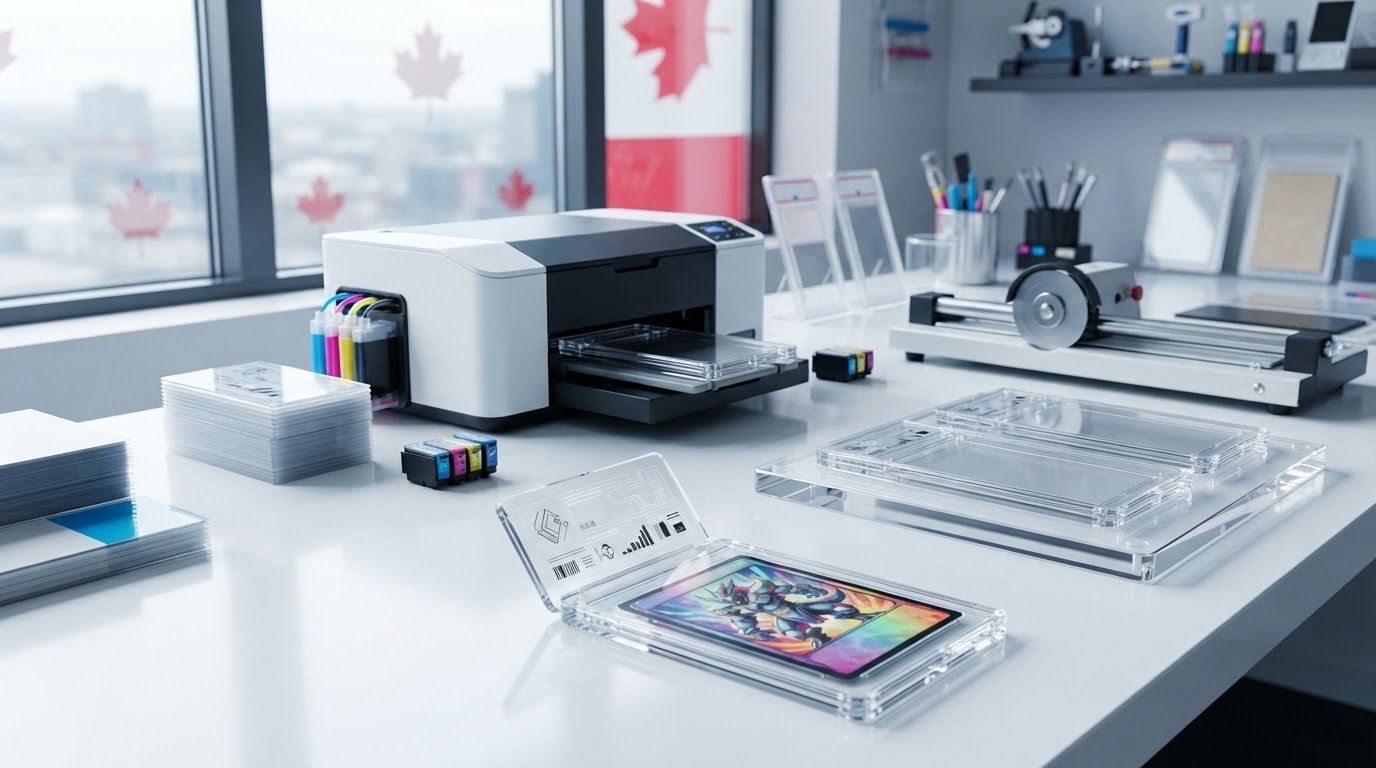
The most vulnerable component inside a sonic-welded collectible slab isn't the card itself; it is the tag sealed directly above it. Using standard office paper can quickly compromise an entire grading run. Without specialized substrates, an inkjet card grading tag easily bleeds, smudges against glossy synthetic inserts, or suffers from faded colours that ruin a collectible's visual appeal. If you handle encapsulation, you already understand how costly jammed shells, illegible microtext, and unreadable barcodes can be to your turnaround times.
Maintaining high presentation standards while scaling production doesn't have to be a constant struggle. Discover how to produce flawless, high-resolution card grading tags using professional inkjet technology across Canada. In this comprehensive guide, we'll break down the engineered synthetic stocks, water-resistant dye inks, and high-performance colour label printers needed to deliver archival colour vibrancy, crisp QR codes, and a seamless workflow from initial design to final cut.
Key Takeaways
- Learn how an engineered inkjet card grading tag prevents ink bleeding, dimensional warping, and smudging inside sonic-welded slabs.
- Discover the optimal combination of synthetic media and water-resistant inks to achieve archival colour vibrancy and crisp microtext legibility.
- Compare professional inkjet systems with traditional thermal printers to evaluate resolution quality, full-colour versatility, and operational costs.
- Master the step-by-step workflow for calibrating digital design templates to match manufacturer slab dimensions perfectly.
- Identify the core printing equipment and specialized label media required to scale reliable, in-house encapsulation runs across Canada.
What Is an Inkjet Card Grading Tag and Why Does Quality Matter?
A physical card grading tag serves as the permanent identity certificate sealed within an acrylic card slab. While online search results often confuse grading companies like TAG with printable inserts, the physical tag itself is a high-precision header that displays authentication details, grades, and serial numbers. As independent grading operations and custom encapsulation projects expand across Canada, maintaining crisp presentation has become paramount. Collectors demand perfection. An engineered inkjet card grading tag provides the sharp definition and colour fidelity required to establish immediate credibility on the secondary market.
Modern third-party grading relies on optical machine-readability and visual trust. When you print inserts using specialized inkjet printing technology, you achieve photo-grade microtext and precise lines that prevent tampering. Cheap substitutes also introduce chemical hazards. Lower-tier commercial inks can outgas volatile organic compounds inside hermetically sealed or sonic-welded plastic cases. Trapped inside the capsule, these airborne solvents slowly react with the cardstock, causing chemical clouding or surface degradation on valuable sports cards and collectible game foils.
The Anatomy of a Collectible Slab Insert
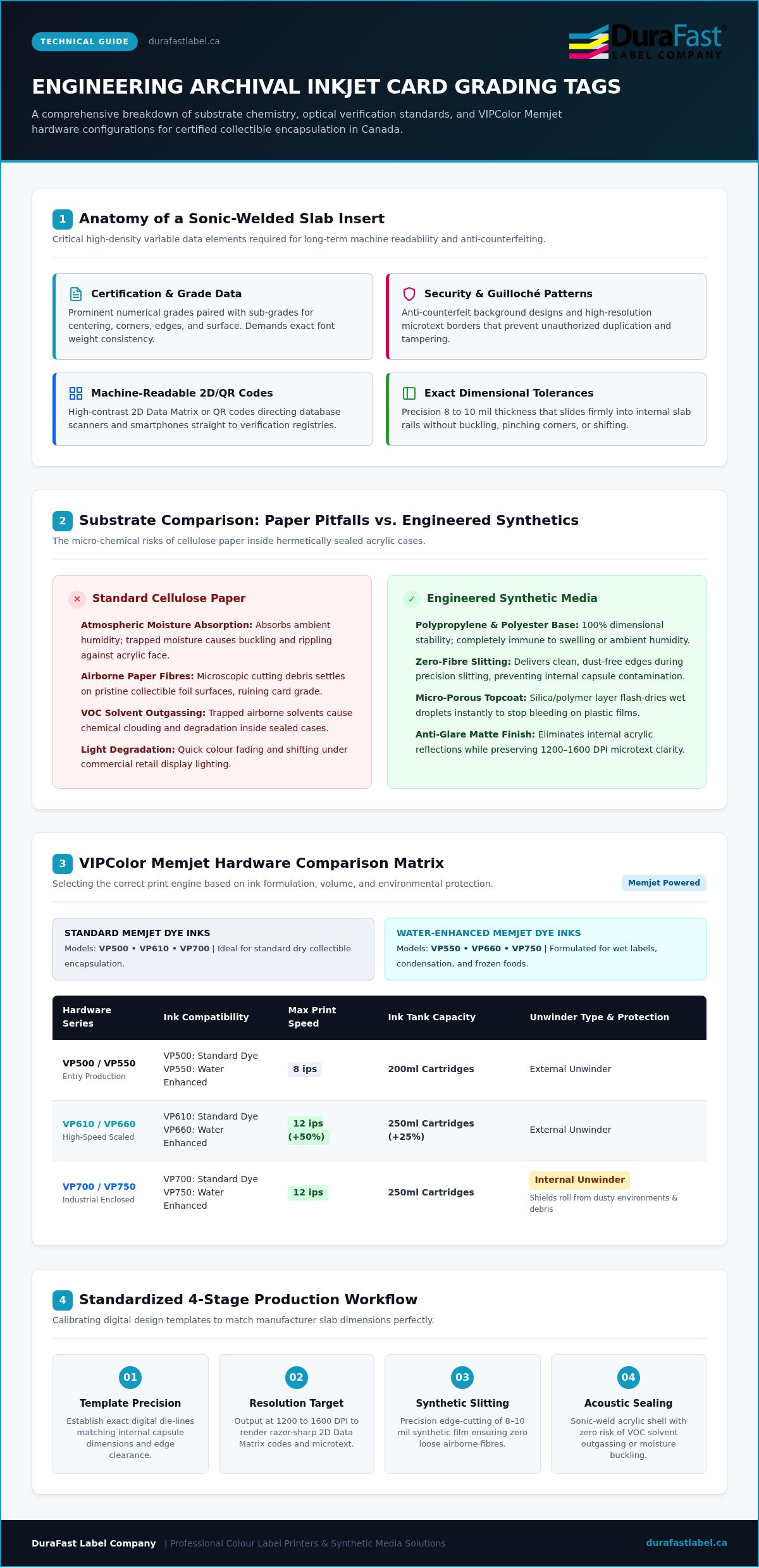
Every professional grading insert houses high-density variable data that must remain scannable for decades. A standard layout contains several critical elements:
- Certification and Grade Data: Prominent numerical grades alongside detailed sub-grades for centering, corners, edges, and surface.
- Security Features: Anti-counterfeit Guilloché background patterns and high-resolution microtext borders that prevent unauthorized duplication.
- Machine-Readable Codes: High-contrast 2D Data Matrix or QR codes that direct smartphones and database scanners to online verification registries.
- Exact Dimensional Tolerances: Strict edge tolerances designed to slide cleanly into internal slab rails without buckling, pinching, or shifting.
Why Standard Desktop Paper Fails in Card Slabs
Can standard copy paper or retail photo sheets handle encapsulation? The short answer is no. Standard cellulose paper naturally absorbs atmospheric humidity before sealing. Once enclosed within an airtight acoustic weld, shifting ambient temperatures cause this trapped moisture to release, making the insert buckle and ripple against the plastic face.
Direct exposure to retail display lighting also accelerates colour degradation on non-archival paper. Standard desktop inks quickly shift and fade, stripping value from the collectible. Cutting regular cardstock produces tiny airborne paper fibres. These microscopic particles migrate across the interior cavity, settling onto pristine card foils and ruining the grade of the encapsulated card.
Substrates, Inks, and Print Resolution: Engineering the Perfect Tag
Producing an archival-grade insert requires balancing three elements: the base substrate, ink chemistry, and print resolution. A flawless inkjet card grading tag relies on a specialized inkjet-receptive topcoat. This micro-porous silica or polymer layer flash-dries wet droplets the instant they touch the surface, preventing ink bleeding across synthetic plastic films. Paired with a minimum output resolution of 1200 to 1600 DPI, this chemical barrier ensures microtext, guilloché borders, and high-density 2D barcodes scan instantly under automated verification hardware.
Synthetic Media vs. Premium Matte Heavyweight Cardstock
Choosing the right facestock determines how your insert handles physical encapsulation. While premium heavyweight matte cardstock provides a traditional look, synthetic substrates like polypropylene and polyester deliver unmatched dimensional stability. Unlike cellulose paper, synthetic films do not swell, warp, or react to ambient storage humidity. They also provide clean, dust-free edges during slitting, eliminating loose fibres that could contaminate cards evaluated against strict official grading standards.
Calibre thickness matters just as much. Substrates measuring between 8 and 10 mils offer enough structural rigidity to lock into internal slab rails without bowing outward or pinching card corners. Choosing a smooth matte finish over high gloss also eliminates distracting internal reflections against the outer acrylic shell, ensuring every sub-grade remains legible from any viewing angle.
Dye Inks vs. Pigment Inks for Archival Integrity
Which ink formulation best protects your collectible certification? The answer comes down to your production priorities:
- Dye Inks: Deliver a broad colour gamut with deep black densities and vibrant saturation. They excel at striking label art, though standard formulations can remain sensitive to moisture before curing.
- Pigment Inks: Rely on microscopic suspended particles that bind mechanically to the topcoat. They offer superior UV lightfastness, zero outgassing, and long-term resistance to fading under retail display lights.
- Water-Enhanced Dye Inks: Provide a practical middle ground. Formulations like those used in modern VIPColor Memjet systems deliver vivid colour richness while resisting condensation and moisture inside sealed casings.
Selecting the ideal media pairing protects the visual grade of your encapsulated collectibles. If you are refining your tag specifications or want to evaluate custom materials, you can always connect with our technical support team for personalized media recommendations.
Inkjet vs. Thermal Card Grading Tags: Choosing Your Technology
Which printing method best aligns with your encapsulation volume and branding requirements? For grading houses and private submitters, balancing equipment investment against finished insert quality is essential. While thermal transfer printers have long served industrial tracking, the modern collectible market demands aesthetic distinction. Deploying an inkjet card grading tag workflow unlocks photographic colour reproduction and fine graphic detailing that monochrome thermal units simply cannot achieve.
When Colour Inkjet Outperforms Thermal Printing
Visual differentiation drives collectible valuation. An inkjet card grading tag allows operations to incorporate dynamic design elements that elevate brand prestige:
- Graded Tier Accents: Deliver instant tier recognition using vibrant colour-coded banners, metallic gradients, and simulated security accents.
- Franchise Branding: Reproduce authentic sports team colours, licensed gaming set logos, and custom commemorative palettes with photo-grade accuracy.
- Variable Data Agility: Generate unique serialization numbers, sub-grade score matrices, and high-contrast QR codes in a single pass without changing print plates.
Because colour inkjet systems print digitally on demand, switching between a vintage hockey card layout and a modern trading card template requires zero hardware adjustments or downtime.
When Thermal Transfer Still Holds a Place
Does thermal printing still have a role in card encapsulation? For specific operational models, yes. Industrial thermal transfer systems excel at high-speed monochrome output, printing sharp alphanumeric text and linear barcodes with minimal per-unit consumable wear. Combining durable resin ribbons with synthetic films creates resilient, smear-proof markings that easily endure long-term storage.
Some enterprise grading operations deploy thermal card grading labels within a hybrid workflow. In this setup, large volumes of generic tag shells are pre-printed with background brand colours, leaving blank windows for on-demand thermal imprinting of serial data and card titles. However, this two-step process restricts flexibility. Your team remains tied to pre-ordered shell designs, whereas an all-in-one colour inkjet workflow allows you to modify tag borders, sub-grades, and authentication graphics instantly as collection requirements evolve.
How to Design, Print, and Cut Card Grading Tags: Step-by-Step
Achieving a production-grade finish requires strict mechanical discipline across every step of fabrication. When you manufacture an inkjet card grading tag in-house, a systematic workflow eliminates misprints, cutting slippage, and assembly jams. Following these five technical stages ensures your inserts seat perfectly into acrylic shells every time:
- Step 1: Canvas Calibration: Measure the interior recess of your specific slab shells with a digital caliper. Establish digital artboard dimensions with a 1 mm bleed and a 1.5 mm interior safe margin.
- Step 2: Media and Colour Profiling: Select your synthetic substrate profile in the RIP or print driver, matching ink saturation limits to the topcoat to prevent wet pooling.
- Step 3: Registration Verification: Run single-sheet proofs on continuous media to check front-to-back optical alignment, especially if printing double-sided authentication headers.
- Step 4: Precision Finishing: Cut printed sheets using automated digital label cutters or a calibrated rotary trimmer with a micro-adjustable backstop.
- Step 5: Optical Inspection: Examine finished tag perimeters under 10x magnification to confirm clean, burr-free edges and run barcode validation scans on dynamic QR elements.
Precision Design and Alignment Parameters
How do slight dimensional variances impact the encapsulation process? Acrylic slabs from different manufacturers often exhibit fractional millimetre discrepancies across their internal guide rails. If your art extends past the safe perimeter, internal plastic bezels will clip crucial registration numbers. Always keep certification titles, numeric grades, and variable 2D Data Matrix codes centered within the visible window. Maintaining strict layout templates across different tier colours ensures uniform visual branding across an entire collection.
Finishing and Encapsulation Preparation
Dull blades ruin synthetic substrates. When cutting polypropylene or polyester tags, dull cutting wheels crush rather than shear the media, leaving raised burrs that cause tags to catch unevenly in plastic rails. Replace cutting blades regularly to preserve razor-sharp edges. After printing, allow sheets adequate dry time before encapsulation. While quick-drying synthetic topcoats feel dry immediately, allowing residual moisture carriers to clear completely prevents internal case fogging.
Before sealing slabs, wipe each tag with an anti-static brush to neutralize surface charges that pull floating dust onto card surfaces. Sourcing precision inkjet card grading labels engineered specifically for friction-fit insertion removes the guesswork from roll-fed tag feeding. Ready to upgrade your production hardware? Contact our team to discuss your cutting and printing requirements today.
Building Your Production Setup with DuraFast Label
Scaling encapsulation output requires a printing setup that combines high resolution with industrial consistency. Relying on consumer-grade desktop printers creates bottlenecks, inconsistent colour outputs, and frequent media misfeeds. Commercial operations need purpose-built systems capable of rendering crisp 1600 DPI graphics on continuous rolls. DuraFast Label serves as Canada's primary resource for professional colour label printers and specialized media engineered specifically for collectible certification.
Selecting the Right In-House Colour Printer
How does your production volume dictate printer selection? Matching hardware capabilities to your workflow prevents costly equipment upgrades later:
- VP500 Series: Ideal for specialized, mid-volume encapsulation runs. The VP500 uses standard Memjet dye inks, prints at speeds up to 8 ips, utilizes 200ml ink cartridges, and includes an external unwinder. If your facility requires moisture protection against humidity or condensation, the VP550 offers the identical 8 ips speed and 200ml capacity while deploying water-enhanced dye inks.
- VP600 Series: Built for faster throughput. The VP610 (standard dye) and VP660 (water-enhanced dye) operate at 12 ips, run high-capacity 250ml ink cartridges, and use external unwinders to handle longer batch runs.
- VP700 Series: Designed for demanding environments. The VP700 (standard dye) and VP750 (water-enhanced dye) print at 12 ips with 250ml tanks and incorporate a built-in internal unwinder. This enclosed design protects media rolls from ambient dust and airborne debris before printing.
- Integrated Digital Cutting: Systems like the Primera LX610 combine high-resolution colour printing with an integrated digital contour blade, allowing short-run creators to print and cut custom tag geometries in a single pass.
Comprehensive Media and Consumable Support
Consistent results require premium substrates. DuraFast Label stocks precision-slit rolls and sheets of blank inkjet media coated with advanced topcoats that lock in droplets instantly. These substrates eliminate edge bleeding and preserve barcode integrity for decades inside acrylic shells. By engineering synthetic tag media that matches industry-standard slab rails, you avoid cutting misalignments and pinched inserts during slab closure.
Operating a grading business across Canada means you need dependable consumable access. DuraFast Label maintains a complete inventory of genuine Memjet ink tanks, replacement printheads, and durable substrates with prompt nationwide fulfilment. Strategic guidance ensures your operational success. Experienced product specialists assist with driver colour management, media profile selection, and feed adjustments, empowering your team to manufacture a pristine inkjet card grading tag for every encapsulated collectible.
Transform Your Collectible Encapsulation Standards Today
Delivering pristine slab presentation comes down to intentional media choices and reliable printing hardware. A professional inkjet card grading tag bridges the gap between digital security and visual elegance, eliminating the risks of faded sub-grades, cellulose debris, and chemical outgassing trapped inside sealed acrylic shells. By pairing dimensionally stable synthetic films with water-enhanced or pigment inks, your operation protects card value while streamlining production turnaround times.
DuraFast Label supports your growth with an extensive inventory of commercial colour label printers, genuine OEM ink formulations, and specialized synthetic label stocks tested for durability and archival presentation. Backed by nationwide Canadian distribution and knowledgeable technical specialists, bringing high-precision tag manufacturing in-house has never been more practical. When you're ready to modernize your workflow and produce flawless grading inserts on demand, reach out to our label specialists to build your ideal encapsulation setup.
Frequently Asked Questions
What is the recommended paper thickness or caliper for card grading tags?
The standard caliper for card grading tags ranges between 8 and 10 mils (approximately 200 to 250 microns). This thickness provides sufficient rigidity to friction-fit securely inside internal slab guide rails without bowing or curling. Thinner substrates tend to buckle or shift during handling, while excessively thick stocks risk pinching card edges during ultrasonic welding or mechanical snap closure. Synthetic facestocks in this weight class ensure optimal structural stability.
Can I print professional card grading tags using a standard home inkjet printer?
Standard desktop printers generally fall short for commercial slab production. While they can output acceptable casual proofs, consumer hardware lacks precise roll feeding, micro-registration control, and the mechanical alignment required for encapsulation. Producing a professional inkjet card grading tag demands commercial roll-fed equipment that delivers clean edge cuts, consistent 1200 to 1600 DPI resolution, and quick-drying ink chemistry that won't smudge against acrylic walls.
Do inkjet card grading tags fade over time inside acrylic slabs?
Fading depends entirely on the ink chemistry and topcoat pairing you choose. Standard desktop dye inks printed on uncoated paper will degrade and shift colour under indoor display lighting. Using specialized pigment inks or water-enhanced dye formulations on micro-porous synthetic media prevents premature fading. These archival solutions resist UV degradation, ensuring high-contrast typography and vivid background art remain crisp for decades inside sealed display cases.
What is the difference between dye and pigment inks for card slab labels?
Dye inks utilize dissolved liquid colourants that deliver an expansive colour gamut, smooth tonal transitions, and intense saturation for intricate grading badges. Pigment inks rely on microscopic suspended particles that bond mechanically to media coatings, offering superior UV lightfastness and zero solvent outgassing. While pigment inks provide unmatched archival endurance under retail lights, water-enhanced dye inks offer a practical balance of rich colour reproduction and condensation resistance.
How do I ensure barcodes on my grading tags remain scannable through thick plastic?
Maintain a minimum resolution of 1200 DPI and print on high-contrast matte white synthetic facestocks. High-gloss substrates can generate glare against internal acrylic surfaces, creating read errors for optical scanners. Always ensure linear barcodes and 2D QR codes include sufficient quiet margins around their perimeter. Razor-sharp edge definition and deep black optical density prevent refraction distortion through sonic-welded plastic shells.
Are card grading tags adhesive stickers or non-adhesive cardstock inserts?
Professional card grading inserts are non-adhesive tags held securely by internal perimeter tabs molded into the acrylic slab. Pressure-sensitive adhesive labels introduce risks of bubbling, corner lifting, and chemical outgassing from adhesive compounds over time. Using rigid synthetic tag media or specialized non-adhesive cardstock ensures the insert remains perfectly flat and centred in the display header without adhering directly to the inner plastic shell.
Can I print double-sided card grading tags on synthetic inkjet media?
Yes, provided you choose media engineered with topcoats on both faces. Standard roll films typically feature an inkjet-receptive coating on only one side, causing reverse printing to smudge or pool. Specialized duplex synthetic stocks allow you to run double-sided print workflows seamlessly, displaying player statistics and primary grades on the front while featuring verification QR codes, legal disclosures, and anti-tamper security graphics on the reverse.