Primera LX910 vs LX4000: Which Printer Fits Your Needs?
26th Jul 2026
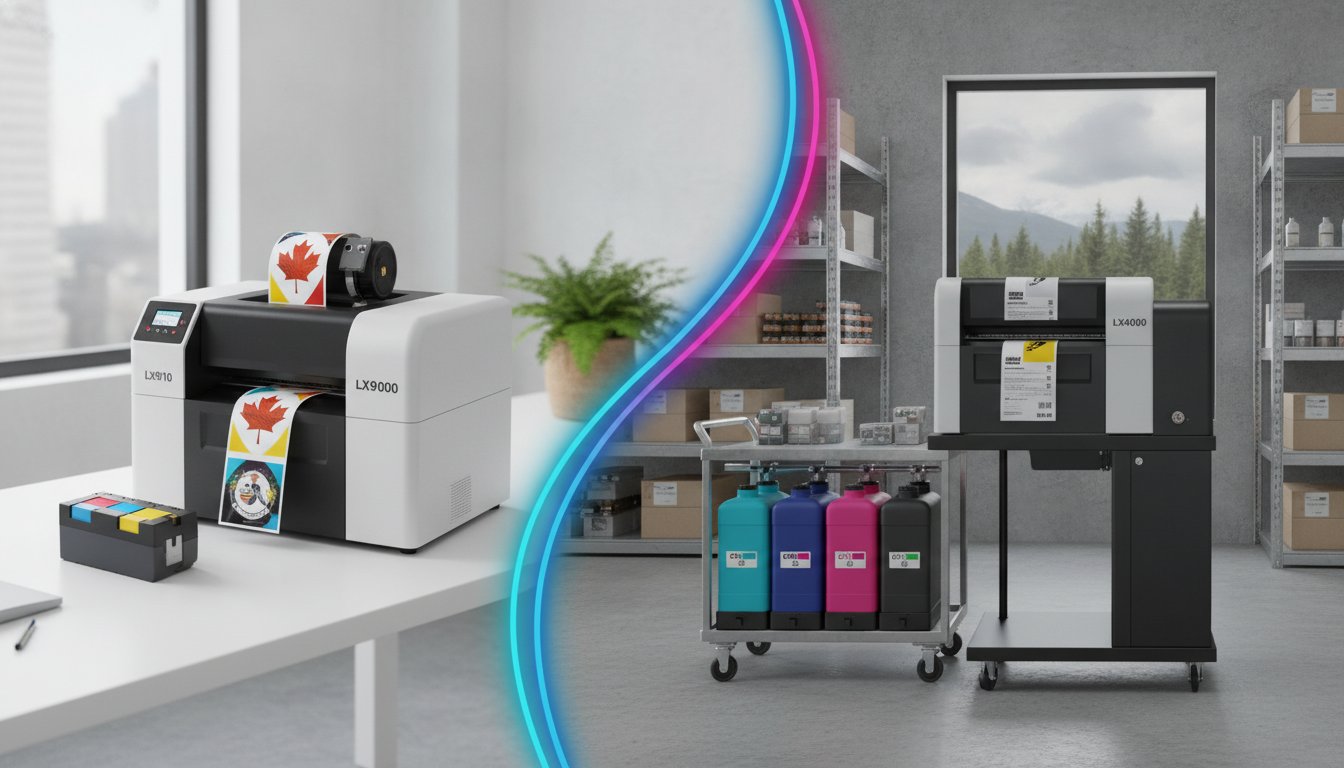
Choosing the most expensive equipment doesn't always guarantee the best return on investment for your specific production line. You likely understand the frustration of watching profit margins shrink whenever a tri-colour cartridge runs dry or a production run stalls due to slow output. When looking at the Primera LX910 compared to LX4000 printer, the right choice depends entirely on your daily volume and the environmental conditions your labels must survive.
This guide provides a clear analysis of how these two models differ in print speed, ink management, and hardware durability. You'll learn how the LX4000’s individual 60ml ink tanks and rugged steel frame compare to the LX910’s user-friendly single-cartridge system. We'll examine technical metrics, such as the 4.5 inches per second print speed and 1200 x 4800 dpi resolution, to ensure your professional-grade colour labels remain crisp and durable even in damp or cold Canadian storage conditions. By the end, you'll have the data needed to select the printer that maximizes your operational efficiency.
Key Takeaways
- Identify how transitioning from a single tri-colour cartridge to separate 60ml tanks can slash your operational costs by eliminating colour ink waste.
- Evaluate the structural differences when the Primera LX910 compared to LX4000 printer is placed in high-demand environments, focusing on the LX4000's rugged steel frame.
- Understand the technical parity between these models, such as their shared 4.5 ips speed, while distinguishing where their hardware configurations diverge.
- Learn how to select the appropriate ink type to ensure your labels remain durable against moisture, condensation, and cold storage conditions.
- Pinpoint the specific production volume thresholds where the LX4000’s "Big Ink" system provides a superior return on investment for your business.
Understanding the Core Technologies: LX910 vs. LX4000
Selecting the right hardware for your production line requires more than a glance at a spec sheet. It's about understanding how the internal architecture influences your daily workflow and long-term fiscal health. When the Primera LX910 compared to LX4000 printer is examined side-by-side, you'll see two distinct philosophies. The LX910 focuses on simplicity and versatility for boutique brands, while the LX4000 introduces a "Big Ink" infrastructure designed for industrial-lite production.
As Canadian businesses scale their operations in 2026, the shift toward higher-capacity inkjet printing technology has accelerated. This trend is driven by a need to minimize downtime and reduce the environmental impact of discarded cartridges. While both machines deliver stunning 1200 x 4800 dpi resolution, the way they deliver that ink to the page defines their best use cases. The main difference between these models lies in their ink delivery systems and the volume they're built to sustain.
The LX910: The Reliable All-in-One
The LX910 utilizes a single, ultra-high capacity tri-colour cartridge that includes an integrated print head. This design is incredibly convenient for low-volume users or businesses that frequently switch between dye and pigment inks. Because the print head is replaced with every cartridge swap, you're guaranteed a fresh start with every new ink tank. It's an ideal solution for seasonal products, prototyping, or small office centres where space is at a premium. If you only print a few hundred labels a week, the simplicity of managing just one consumable often outweighs the higher cost-per-ml. It simplifies your inventory by requiring you to stock only one part number for your colour label printers.
The LX4000: A New Standard in Desktop Production
The LX4000 represents a significant architectural leap. It features a system of individual 60ml ink tanks for cyan, magenta, and yellow, paired with a separate, reusable print head. This "Big Ink" configuration allows you to replace only the specific colour you've exhausted. If your brand uses a heavy amount of yellow, you don't have to throw away perfectly good cyan and magenta ink just because one chamber is empty. The only difference in maintenance is the occasional replacement of the reusable print head, which is designed to handle much higher throughput.
This model also includes a rugged, powder-coated steel cover and an all-steel frame. This build quality makes it much better suited for busy production floors. A notable feature is the built-in pizza-style cutter. This allows you to print and cut custom label lengths from continuous stock, providing immense flexibility for varied product sizes. By separating the print head from the ink tanks, the LX4000 offers improved longevity for the internal mechanisms, as the head is designed to handle the higher throughput of up to 7,500 labels per day.
Print Performance and Output Quality: Speed, Resolution, and Inks
High-quality branding relies on more than just design; it requires hardware capable of rendering that design accurately. When the Primera LX910 compared to LX4000 printer is examined for output quality, you'll find that both machines offer a maximum resolution of 1200 x 4800 dpi. This level of detail ensures that fine text and complex graphics remain sharp. It's especially critical for industrial applications where colour accuracy isn't just aesthetic. Understanding the psychology of color in safety highlights why vibrant, accurate warning symbols are essential for workplace compliance and hazard recognition.
Speed Comparisons: ips and Throughput
Both the LX910 and LX4000 boast print speeds of up to 4.5 inches per second (ips). While this metric is identical on paper, the real-world throughput can differ during long production runs. If you're printing 1,000 4x6 labels, a speed of 4.5 ips means your job finishes in approximately 22 minutes of pure print time. For Canadian manufacturing teams, this level of speed reduces labour costs by allowing staff to focus on packaging rather than waiting for slow equipment. The LX4000 often maintains this pace more consistently during high-volume shifts because its reusable print head is engineered for industrial-lite duty. It's built to handle the heat and friction of continuous operation without slowing down to cool.
Ink Versatility: Dye vs. Pigment Systems
The LX4000 is often preferred for "wet labels" or products facing condensation for frozen foods because its pigment ink system is highly resistant to smudging and fading. This makes it ideal for GHS compliance where labels must remain legible after exposure to chemicals or harsh weather. If you're unsure which ink system fits your environmental requirements, you can reach out to our consultants to discuss your specific application and request printed samples.
Total Cost of Ownership: Comparing Ink Systems and Consumables
The initial purchase price of a printer is only the first step in a long-term financial commitment. For businesses focused on operational seamlessness, the real story lies in the recurring cost of consumables. When the Primera LX910 compared to LX4000 printer is analyzed through the lens of fiscal responsibility, the "Big Ink" system of the LX4000 offers a distinct advantage for high-volume users. While the LX910 is an excellent entry point, its tri-colour cartridge system can lead to higher costs if your label designs use one colour more heavily than others.
The main difference between these two models is how they handle ink exhaustion. In a tri-colour system, you're forced to discard the entire cartridge once a single colour chamber is empty. If your branding features a large yellow logo, you'll likely throw away usable amounts of cyan and magenta ink. The LX4000 eliminates this waste by utilizing individual tanks. This allows you to replace only the specific colour you've used; it ensures every millilitre of ink is converted into a professional label rather than being tossed in the bin.
Ink Volume and Capacity Analysis
Capacity is where the LX4000 truly shines as a production workhorse. Each of the three separate ink tanks in the LX4000 holds 60ml of ink. This is significantly more than the volume found in standard tri-colour cartridges. By utilizing larger individual reservoirs, you reduce the frequency of operator intervention. This leads to a lower total cost per label and a faster "break-even" point for businesses printing several thousand labels per month. Long-term maintenance is also streamlined. While the LX910 replaces the print head with every cartridge, the LX4000 uses a reusable head that only needs periodic replacement, further lowering the cost of consumables over the life of the machine.
Sourcing Quality Labels in Canada
Operational efficiency also depends on the quality of the media you feed into your printer. Using blank labels for sale that are specifically engineered for Primera's inkjet technology prevents common issues like ink bleeding or poor adhesion. Whether you require matte finish for a rustic look or high-gloss for premium branding, matching the substrate to your ink type is essential for a high-quality result.
We maintain a deep inventory of Primera LX910 labels and specialized media for the LX4000 right here in Canada to ensure you never face a production bottleneck. If you're still exploring your options, you can view our full range of colour label printers to find the perfect fit for your budget and volume requirements.
Hardware Durability and Environmental Resilience
Hardware reliability becomes a critical factor when your equipment moves from a climate-controlled office to a busy warehouse floor. While both printers produce excellent results, their physical construction reflects different operational intensities. The LX910 features a high-impact polycarbonate shell that's perfect for desktop environments or small office centres. In contrast, the LX4000 is built with an all-steel frame and a rugged, powder-coated steel cover. This metal construction acts as a shield against the "environmental debris" common in industrial settings, such as cardboard dust and warehouse particulates that can migrate into sensitive internal mechanisms. When the Primera LX910 compared to LX4000 printer is evaluated for industrial longevity, the LX4000’s metal chassis provides the structural integrity needed for high-demand production lines.
Managing Large Rolls and Unwinders
Production efficiency often depends on how often you stop to change media. The LX910 uses an internal label unwinder that keeps the footprint compact but limits you to smaller roll diameters. If you're running high-volume shifts, the LX4000 is designed to accommodate an external label unwinder. This setup allows you to use much larger rolls, which minimizes downtime and reduces the labour cost associated with frequent changeovers. You'll need to organize your workspace to accommodate the LX4000’s slightly larger footprint, but the trade-off is a significantly more seamless workflow that handles thousands of labels without interruption.
Industrial Resilience and Maintenance
Dust is the enemy of any inkjet system. Protecting your investment requires a consistent cleaning protocol for your Primera print heads. This ensures that every label maintains the vibrant colour output your branding requires. If your products are destined for cold storage or face condensation for frozen foods, the LX4000’s pigment ink system paired with synthetic media provides the durability you need. These labels won't smudge or peel when introduced to moisture or extreme temperature shifts common in Canadian logistics.
If your environment is particularly demanding, you might also consider looking at other industrial-grade options. You can see our VIPColor VP550 guide for another durable alternative that handles dusty warehouse conditions with ease. Choosing the right hardware means anticipating these logistical hurdles before they cause a bottleneck. If you're ready to discuss which build quality best fits your facility, reach out to our technical team for a personalized consultation.
The Final Verdict: Which Primera Printer Fits Your Production Workflow?
Deciding between the Primera LX910 compared to LX4000 printer requires a clear-eyed look at your current output and your goals for the next fiscal year. Both machines utilize advanced inkjet technology to produce stunning, high-resolution branding, but they serve different operational scales. For the Canadian business owner, the choice usually comes down to a simple question: are you looking for the lowest entry cost or the lowest long-term operational cost? While the LX910 offers an accessible path to professional labels, the LX4000 is a strategic investment for those ready to scale their production efficiency.
Buy the Primera LX910 If...
The LX910 remains the superior choice for boutique brands and innovators who prioritize versatility over sheer volume. You should choose this model if:
- You print fewer than 500 labels per month: At this volume, the convenience of a single tri-colour cartridge outweighs the cost savings of individual tanks.
- Space is at a premium: If you are operating out of a retail centre or a small office, the compact footprint and internal unwinder make it easier to manage.
- You frequently switch ink types: The ability to swap between dye and pigment inks with a single cartridge change makes it ideal for prototyping and seasonal product lines.
Buy the Primera LX4000 If...
The LX4000 is the clear winner for businesses that have moved beyond the startup phase and need a dedicated production workhorse. This model is the right fit if:
- Your volume exceeds 2,000 labels per month: The "Big Ink" system with 60ml individual tanks ensures that ink costs don't eat into your margins.
- You require industrial resilience: If your printer lives in a warehouse, the all-steel frame and powder-coated cover provide the durability needed to withstand environmental debris.
- You need to hit strict shipping deadlines: While both machines reach 4.5 ips, the LX4000's higher ink capacity and support for external unwinders mean fewer stops and faster overall throughput.
The financial case for upgrading to the LX4000 today is built on the reality of ink management. By replacing only the colour you use, you stop throwing away usable ink and start realizing significant savings on every production run. Transitioning your workflow to an LX4000 allows your team to focus on growth rather than constant consumable maintenance. If you're still weighing the specific metrics of the Primera LX910 compared to LX4000 printer for your facility, we recommend conducting a total cost of ownership analysis based on your unique label designs. Selecting the right hardware now prevents production bottlenecks as your business continues to expand across the Canadian market.
Optimizing Your Production for Long-Term Growth
How do you ensure your labeling process remains a driver of profit rather than an operational bottleneck? The choice between the Primera LX910 compared to LX4000 printer ultimately hinges on your monthly throughput and your requirement for industrial-grade durability. While the LX910 offers unmatched flexibility for boutique runs, the LX4000 provides the fiscal responsibility needed for high-volume production through its separate 60ml ink tanks and rugged steel chassis.
Selecting the right system today prevents the frustration of ink waste and production delays tomorrow. DuraFast Label Company Canada is here to help you navigate these technical specifications with confidence. Our team provides expert Canadian technical support and maintains a fully stocked inventory of specialized Primera ink and labels to keep your lines moving without interruption.
If you're ready to see the numbers for yourself, contact us for a free cost-per-label analysis to determine exactly which model maximizes your return on investment. Taking control of your in-house production is a significant step toward operational seamlessness; we look forward to supporting your business's expansion.
Frequently Asked Questions
What is the main difference between the Primera LX910 and LX4000 ink systems?
The main difference is the architecture of ink delivery and the resulting cost efficiency. The LX910 uses a single, all-in-one tri-colour cartridge that includes the print head; this is convenient for low-volume users. In contrast, the LX4000 features separate 60ml ink tanks for each colour and a reusable print head. This "Big Ink" system allows you to replace only the specific colour that has run out, which significantly reduces ink waste during high-volume production runs.
Which printer is better for labels that will be introduced to water or moisture?
Both models are capable of producing water-resistant labels when equipped with pigment ink. However, the LX4000 is often the better choice for labels introduced to water or moisture because its individual tank system is more cost-effective for the high volumes typically associated with chilled or frozen foods. Using pigment ink on synthetic media ensures your branding survives condensation and damp storage conditions without smudging or peeling during distribution.
Can I use the same labels for both the LX910 and the LX4000?
You can use the same inkjet-receptive label stock for both printers provided the roll width and core size are compatible. Both machines are designed to work with a wide variety of matte and high-gloss materials. When the Primera LX910 compared to LX4000 printer is used in the same facility, maintaining a unified inventory of blank labels can simplify your logistics and ensure consistent output quality across different production lines.
How much faster is the LX4000 compared to the LX910 in terms of ips?
Both printers share an identical maximum print speed of up to 4.5 inches per second (ips). While the raw speed is the same, the LX4000 provides better overall throughput for large jobs. This is because its higher ink capacity and reusable print head are engineered for continuous operation, reducing the frequency of stops for cartridge changes compared to the LX910’s smaller single-cartridge system. It’s built to handle the heat of long production shifts more effectively.
Does the LX4000 require an external label unwinder for standard operation?
An external label unwinder is not strictly required for standard operation, but it's highly recommended for businesses running high-capacity rolls. The LX4000 is designed to accommodate these external attachments to minimize downtime during long shifts. If you're printing thousands of labels per day, the ability to use larger rolls significantly reduces the labour cost associated with frequent media changeovers and keeps your production moving seamlessly.
Are pigment inks available for both Primera models for GHS compliance?
Pigment inks are available for both the LX910 and the LX4000, making both models suitable for GHS compliance and industrial applications. These inks offer the UV and chemical resistance necessary for safety labeling. The LX4000 is typically preferred for large-scale GHS projects because the individual 60ml tanks offer a lower cost-per-label when printing the dense, high-coverage graphics often required for chemical hazard warnings and international shipping regulations.
How do I calculate the cost-per-label difference between these two printers?
Calculating the difference requires analyzing your specific label design and monthly volume. The primary factor is the ink volume; each LX4000 tank holds 60ml, while the LX910 uses a single tri-colour cartridge. You must account for "ink waste" in the LX910 system, where you might discard usable ink if one colour chamber runs out first. We recommend a professional cost-per-label analysis to realize the exact break-even point for your business before you invest.
What maintenance is required to protect these printers from environmental debris?
Protecting your equipment from environmental debris requires regular cleaning of the print heads and keeping the printer covers closed during operation. The LX4000’s all-steel frame and powder-coated cover provide superior protection in dusty warehouse environments compared to the polycarbonate shell of the LX910. Routine maintenance ensures consistent colour output and prevents particulates from causing hardware failures or clogs in the inkjet nozzles, protecting your long-term investment.