Primera LX500 Replacement Ink Cartridge: Compatibility and Replacement Guide
3rd Oct 2026
Choosing a primera lx500 replacement ink cartridge starts with two details: the exact printer model and the cartridge reference. Primera cartridge 53374 is described as a high-yield, tri-colour dye cartridge for the LX500, LX500c and RX500. Before ordering, match the model on your printer with the cartridge reference and compatibility information. That quick comparison helps you avoid a mismatch that could interrupt label production.
Product listings can use similar wording while describing different models or cartridge details. This guide explains how to check compatibility, interpret terms such as “tri-colour dye” and “high-yield,” and prepare for replacement using the manual for your printer. You’ll also find a straightforward way to compare listings and identify related supplies, including inkjet labels, for your workflow.
Key Takeaways
- Start with the complete printer model shown on the device or in its documentation.
- For a primera lx500 replacement ink cartridge, compare the cartridge reference and compatibility description with current Primera information for your model.
- “Tri-colour” and “dye” describe aspects of the cartridge, but don’t establish compatibility on their own.
- Check the model and cartridge reference before opening the package, then follow the manual for your specific printer.
- DuraFast Label sells Primera printers and ink cartridges, as well as inkjet labels for label production.
Primera LX500 Replacement Ink Cartridge: Start by Confirming Your Printer
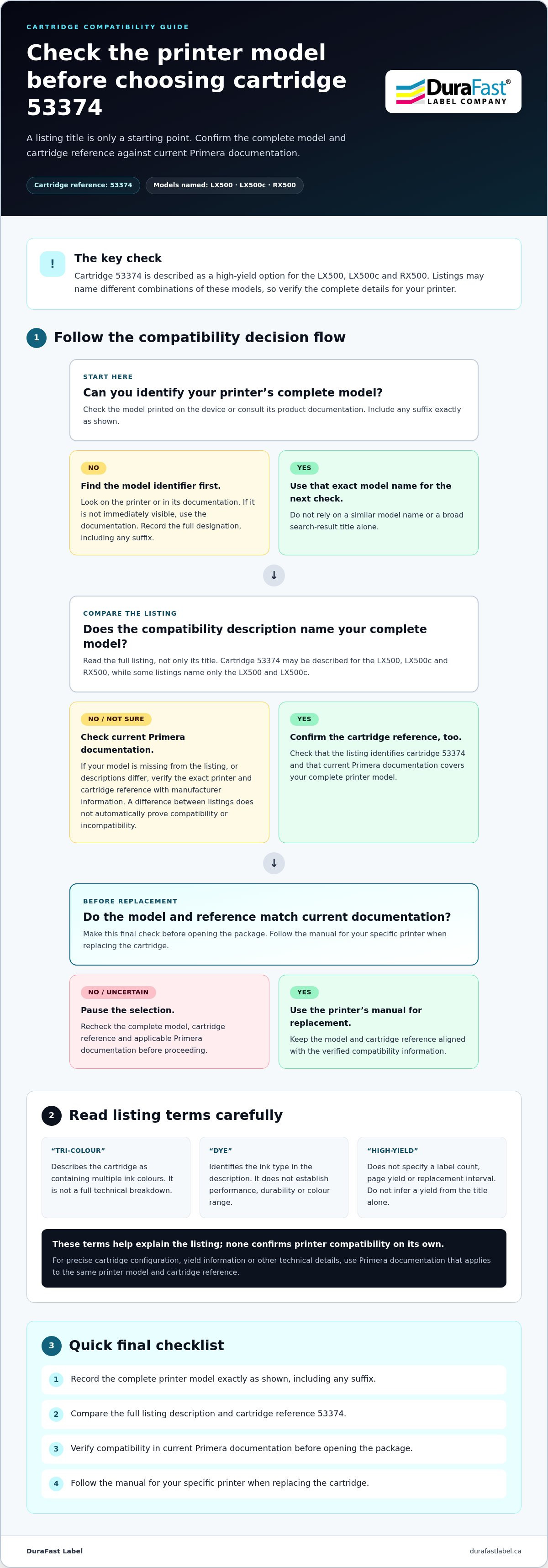
Before ordering, confirm that the cartridge listing matches the printer you use. Find the complete model designation on the printer or in its product documentation, then compare it with the model names and cartridge reference in the listing. A similar model name can be a useful clue, but it isn’t enough by itself to establish compatibility.
Cartridge 53374 is described for the LX500, LX500c and RX500, but listings may name different combinations of those models. Compare the wording with current Primera documentation for your exact printer. This is especially important if your model is not named in the listing or if two descriptions differ. Checking before you order is simpler than dealing with an incorrect cartridge after production has stopped.
Compatibility check
- Cartridge description: Cartridge 53374 is described as a high-yield option for the LX500, LX500c and RX500.
- Model coverage: Listings may name only some of those printers, so read the full compatibility description rather than relying on a search result title.
- Final check: Match your complete printer model and the cartridge reference with current Primera documentation before ordering. Different listing descriptions don’t automatically prove either compatibility or incompatibility.
Where to find the Primera printer model
Look for the model name printed on the printer or refer to the documentation that came with it. The model identifier’s location can vary, so use the documentation if it isn’t immediately visible. Record the full designation, including any suffix, exactly as shown. Use that same model name when comparing the cartridge listing and manufacturer information.
Why LX500, LX500c and RX500 references need checking
Cartridge 53374 is described for the LX500, LX500c and RX500, while some listings name only the LX500 and LX500c. Treat each description as a compatibility claim and compare it with current Primera documentation for your printer. If the listing doesn’t name your model or the descriptions differ, check the documentation before choosing a primera lx500 replacement ink cartridge.
An ink cartridge is a printer consumable. For a general explanation of cartridge types and components, see this overview of the inkjet cartridge. For printer compatibility, use the exact model designation and current manufacturer guidance rather than a broad search-result title.
What the Primera LX500 Cartridge Description Tells You
“Tri-colour,” “dye” and “high-yield” describe different aspects of a cartridge listing. They can help you compare products, but none of these terms alone confirms whether a cartridge fits your printer. Use them to understand the description, then check current Primera information for compatibility and technical details.
Tri-colour and dye-based ink, explained
A tri-colour dye cartridge is described as containing multiple colours of dye-based ink. For an LX500, LX500c or RX500, check the exact cartridge configuration and compatibility in current Primera documentation.
“Tri-colour” describes the cartridge as containing multiple ink colours, but it isn’t a full technical breakdown. The term alone doesn’t confirm the precise ink configuration or other cartridge features. Similarly, “dye-based” identifies the ink type in the description; it doesn’t establish performance, durability or colour range.
For a primera lx500 replacement ink cartridge, treat these terms as identifiers, not a substitute for manufacturer guidance. If you need the exact colour composition or configuration, refer to Primera documentation for your printer model. Don’t infer technical specifications from “tri-colour dye” alone.
What high-yield does, and doesn’t, tell you
The cartridge description uses “high-yield,” but that wording doesn’t specify a label count, page yield or replacement interval. Those details can’t be reliably calculated from the title alone. Relying on an unsupported estimate can make it harder to plan cartridge purchases around your production needs.
If you need yield information for purchasing or scheduling, look for Primera documentation that applies to your printer and cartridge. Confirm that it refers to the same model and cartridge reference as the product you’re considering. This keeps a general description from being mistaken for a guarantee of how long a cartridge will last in your workflow.
Once you’ve identified your printer model and understood the listing, you can make a more informed sourcing decision. DuraFast Label sells Primera ink cartridges and printers. For questions about your cartridge purchase, visit the DuraFast Label contact page. For end-of-life information, the U.S. Postal Service describes a U.S. mail-back programme for recycling ink cartridges; use Canadian guidance for local disposal or recycling options.
How to Compare Primera LX500 Replacement Cartridge Listings
Listings can look similar while naming different printer models or highlighting different cartridge details. Compare each description with your printer and current Primera documentation instead of treating a search result as a complete compatibility check. The table shows what the descriptions say and what to verify before ordering.
| Listing model names | Cartridge wording | Source | Verification needed |
|---|---|---|---|
| LX500, LX500c and RX500 | High-yield cartridge | Manufacturer result | Confirm that Primera documentation matches your complete printer model and the cartridge reference. |
| LX500 and LX500c | Tri-colour dye cartridge | Retailer result | Check the cartridge reference and whether current Primera documentation covers your printer. |
A three-point compatibility check before ordering
Compare the same three details for every listing. First, match the complete model name on your printer with the models named in the product description. Next, compare the cartridge reference with current Primera documentation. Finally, pause if a listing covers more models than the documentation you’re using. Resolve the difference before ordering instead of assuming similar model names guarantee a match.
How to assess unclear or conflicting product descriptions
Separate what the listing says from what it doesn’t establish. “High-yield” doesn’t give a specific label count, and “tri-colour dye” doesn’t confirm the exact ink configuration or compatibility with every model mentioned in a search result. Keep a short checklist as you compare:
- Printer: Complete model designation shown on the device or in its documentation.
- Cartridge: Reference and description shown on the listing or packaging.
- Source: Manufacturer or retailer, and the compatibility statement each provides.
If descriptions disagree, use current Primera documentation to guide your decision. For general online purchasing tips, the U.S. Federal Trade Commission’s online shopping guidance offers a useful reference; it isn’t Canadian consumer guidance. Once you’ve confirmed the cartridge match, you can also choose inkjet labels as a related supply. Label compatibility and cartridge compatibility are separate checks.
How to Prepare for a Primera LX500 Cartridge Replacement
Check the cartridge before opening it to reduce the chance of a mismatch and an avoidable interruption to label production. For installation, use the user manual for your specific Primera printer. A product listing is not a substitute for the model-specific replacement instructions.
Before opening or installing a replacement
Keep the instructions for your printer nearby. Some listings group the LX500, LX500c and RX500 together, but you still need to confirm your own printer model and cartridge reference before proceeding.
Use this checklist before opening the package:
- Read the printer model. Record the complete designation printed on the device or shown in its product documentation.
- Check the cartridge reference. Compare the listing or package details with current Primera documentation for your model.
- Resolve any mismatch first. If the model or reference differs, pause rather than relying on a similar product description.
- Open the correct manual. Keep the user instructions for your exact Primera printer available and follow them during installation.
- Leave components alone unless directed. Don’t touch or clean printer components unless the model-specific manual instructs you to do so.
These checks help you prepare without guessing at installation steps. For help with label-printer supplies, contact DuraFast Label Company Canada.
If the printer doesn’t recognize the cartridge
Don’t assume one fix will resolve every recognition issue. Start by rechecking the printer model and cartridge reference, then compare them with the documentation for that exact model.
If the references match but the printer still doesn’t recognize the cartridge, consult the troubleshooting section of the correct Primera manual. Follow only the steps it gives for your printer. Avoid actions such as reseating, cleaning or restarting unless the manual directs you to do so. If the documented steps don’t resolve the issue, pause before trying anything further to avoid risking damage to the printer or cartridge.
A model-specific approach keeps a primera lx500 replacement ink cartridge change grounded in the instructions for your equipment, rather than assumptions based on another printer or listing.
Source Your Primera LX500 Replacement Ink Cartridge with Confidence
You’re ready to source a replacement when the printer model, cartridge reference and compatibility information align. Don’t rely on a shortened search such as “LX500 cartridge” alone. Product titles may group several models together, while other descriptions may name only some of them. Check that current Primera documentation supports the cartridge reference for your specific printer.
A final checklist for a confident order
Compare these details before completing your purchase. The check is quick and can help prevent an avoidable ordering error that interrupts your in-house label workflow.
- Confirm the printer: Use the complete model designation shown on the device or in its product documentation, not just the shorter search phrase.
- Review the cartridge description: Note the cartridge reference and terms such as “tri-colour” or “high-yield,” but don’t treat them as proof of compatibility.
- Check manufacturer guidance: Compare the listing with current Primera documentation for your model. If the details don’t align, pause before ordering.
- Keep the details handy: Have the printer model and product description or cartridge reference available if you need purchasing assistance.
Related supplies for consistent label production
Inkjet labels and ink cartridges are separate consumables. Choose label stock suited to your printer and application, but don’t use label compatibility as evidence that a cartridge will fit. The printer documentation guides cartridge selection; your label requirements guide the choice of stock.
DuraFast Label sells Primera printers and ink cartridges. The range also includes colour label printers for businesses considering related equipment. For a replacement, focus on matching your current printer to the cartridge using Primera’s compatibility information.
Have your model and cartridge details ready? Contact DuraFast Label about your Primera ink cartridge for help with your purchasing question. Those details provide a practical starting point for finding a primera lx500 replacement ink cartridge that suits your workflow.
Make Your Next Cartridge Order with Confidence
Start with the exact printer model, then compare the cartridge description and reference with current Primera compatibility information. Terms such as “tri-colour” and “high-yield” help explain a listing, but they don’t replace a model-by-model compatibility check. Before opening a cartridge or installing it, follow the manual for your specific printer.
These steps make it easier to choose a primera lx500 replacement ink cartridge and reduce the risk of an avoidable mismatch. Keep your printer model and cartridge details handy if you need help with your purchase.
DuraFast Label serves customers nationally across Canada and sells Primera printers and ink cartridges. The range also includes inkjet labels and colour label printers for in-house label production.
Ready to source your replacement? Contact DuraFast Label about your Primera LX500 ink cartridge with your printer model and cartridge details.
Frequently Asked Questions
How do I know which replacement ink cartridge fits a Primera LX500?
To choose a compatible primera lx500 replacement ink cartridge, record the complete printer model from the device or its documentation. Compare it with the model names and cartridge reference in the listing, then check current Primera documentation. Listings may group the LX500, LX500c and RX500 differently, so the printer name alone may not settle compatibility. For help with your supply question, contact DuraFast Label through its contact page.
Is the Primera LX500 cartridge the same as the LX500c cartridge?
Cartridge 53374 is described for both the LX500 and LX500c, and some descriptions also name the RX500. The listing alone doesn’t establish that every version or product description is interchangeable. Match your printer’s complete model and the cartridge reference with current Primera documentation before ordering. If the listing and documentation differ, resolve the discrepancy before opening the package.
Can an RX500 use the same high-yield cartridge as a Primera LX500?
Cartridge 53374 is described for the LX500, LX500c and RX500, although some listings name only the LX500 and LX500c. Check the RX500’s exact configuration against current Primera documentation before ordering. Don’t rely on a shortened marketplace title; compare the full printer model and cartridge reference with the manufacturer’s compatibility information.
What does tri-colour dye ink mean in a Primera LX500 cartridge listing?
The cartridge is described as tri-colour and dye-based. “Tri-colour” indicates multiple ink colours in the description, while “dye-based” identifies the ink type. Neither term alone confirms the exact ink composition or cartridge configuration, nor does it establish yield or performance in your workflow. Check the product documentation for the specifications relevant to your application.
How do I replace the ink cartridge in a Primera LX500?
Use the user instructions for your exact Primera printer model. Before installation, confirm that the printer model and replacement cartridge reference match current compatibility information. A product listing doesn’t provide the replacement sequence, so follow the model-specific manual for each step. Don’t guess panel locations, button presses, cleaning methods or cartridge-handling instructions.
Why is my Primera LX500 not recognizing a replacement cartridge?
Recheck the complete printer model and cartridge reference against current Primera documentation. If they match, follow only the troubleshooting steps in the manual for your specific printer. A product listing alone can’t identify the cause, and cleaning or reset procedures aren’t guaranteed fixes. For help with your cartridge question, contact DuraFast Label with the model and cartridge details at hand.