Pre Die Cut Circle Inkjet Labels on Rolls for Your Printer
22nd Oct 2026
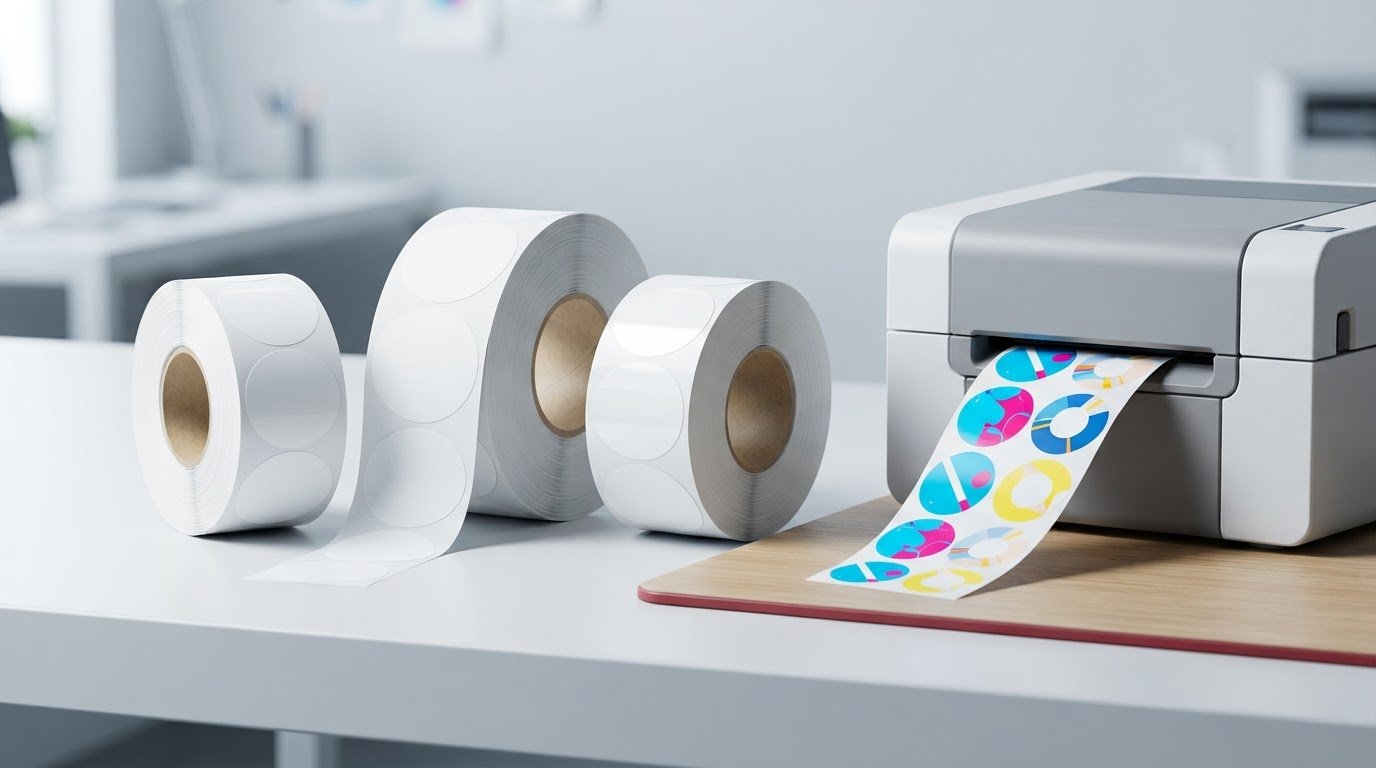
A standard printer can print round stickers only if the labels suit its feed system and print technology. Pre die cut circle inkjet labels on rolls are made for inkjet printers that accept label rolls; a typical sheet-fed desktop printer needs labels supplied on sheets instead.
It’s easy to focus on the circle shape and miss the details that affect print results. The label material must suit inkjet ink, and the roll size, core and cutline must fit both the printer and the way you’ll apply the labels.
This guide explains how to compare paper and synthetic materials, choose a circle size and cutline, and check printer compatibility before buying. It also covers how roll configuration affects loading and production, helping you narrow your options to labels that suit your equipment and workflow.
Key Takeaways
- Match label material to the surface and conditions the finished label will encounter.
- Understand how a pre-cut shape and cutline can affect print alignment and application.
- Choose labels made for your printer’s ink type and roll-feed setup, rather than assuming any round label will work.
- Compare the 60 mm circle option with other sizes and roll configurations to suit your labelling workflow.
- Use printer and label compatibility as the starting point for a reliable choice.
What materials are die-cut roll labels made of?
For inkjet printing, choose a material made to accept inkjet ink, then match the roll dimensions to your printer. Options listed for 60 mm circle labels include paper gloss, synthetic matt and synthetic gloss. These names describe the available material and finish choices; the right fit depends on the label’s use, the surface it will be applied to and the printer’s feed requirements. A smooth, pre-cut circle can suit product packaging, while a different shape may better fit a container or package.
Think about what the label needs to communicate and where it will be used. A product label displayed on packaging may call for a different finish than one handled frequently. Material alone doesn’t determine the result: the inkjet ink, print settings and time allowed for ink to dry also affect how the printed surface looks during handling. For inkjet label options, compare the material and printer requirements described on the inkjet labels page.
How well do inkjet-printed roll labels resist water, smudging and sunlight? Durability depends on the label material and ink, along with exposure and handling. If labels may get wet, be rubbed or sit in direct sunlight, choose materials and printing supplies suited to those conditions rather than assuming all inkjet labels resist them equally.
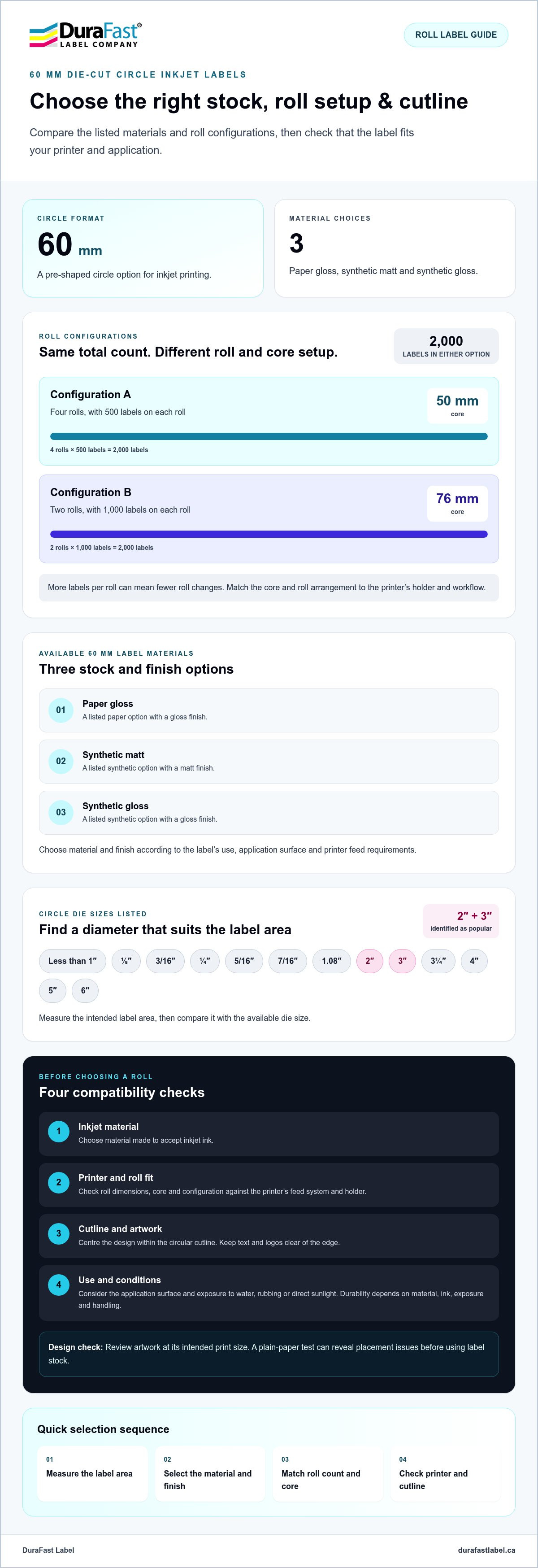
Circle dies come in a broad range of sizes. Listed options include less than 1 inch, 1/8 inch, 3/16 inch, 1/4 inch, 5/16 inch, 7/16 inch, 1.08 inches, 2 inches, 3 inches, 3 1/4 inches, 4 inches, 5 inches and 6 inches. Premium Label Supply identifies 2-inch and 3-inch circles as popular sizes for product labelling and branding. Use the intended label area to guide your choice, then compare the finished circle with the available die size.
- Paper gloss: an option for 60 mm circles.
- Synthetic matt: another listed 60 mm material choice.
- Synthetic gloss: a gloss-finish synthetic option for 60 mm circles.
Roll quantities and cores affect how labels load and feed. One 60 mm configuration contains 2,000 labels across four rolls of 500, with 50 mm cores. Another contains 2,000 labels across two rolls of 1,000, with 76 mm cores. Match the core and roll arrangement to the printer’s holder and workflow; more labels per roll can mean fewer roll changes, while a compatible core helps the roll sit correctly.
Custom sizing begins with the application area and printer limits. Measure the available space on the container, then compare it with a circle die or a rectangular format. Continuous rolls can be cut to different lengths, with examples including 4-by-1-inch, 4-by-2-inch and 4-by-6-inch labels. Those formats illustrate flexible roll printing, but they are not circle sizes; a die-cut circle needs a matching circular cutline.
What are typical Canadian shipping times, minimum orders and customization options? Shipping timing depends on order processing and destination, while minimum quantities and customization depend on the label configuration. Decide on the material, circle size, roll count and core first, since each affects how the labels fit the printer and application.
Die-cut label shapes and custom cutlines
A die-cut label is cut into its finished shape before printing or application. The cut follows a defined path through the label material, leaving a clean edge and a backing liner that holds each label until use. Circles are a familiar choice for lids, seals and small product marks; ovals, squares, rounded rectangles and distinctive outlines may better suit other packaging.
Shape affects more than appearance. A circle can sit neatly on a round lid, while a narrow oval may fit a curved bottle surface. A custom silhouette can echo a logo or package outline, but intricate points and tight curves can make peeling and placement harder. Choose a shape that supports the design and can be applied consistently by hand or machine.
A cutline defines where the label will be cut. Keep important artwork inside that boundary, leaving clear space between text, logos and the edge. Otherwise, small shifts in printing or cutting can leave lettering too close to the perimeter. For a circle, centre the design within the cutline and keep fine details away from the edge.
What artwork, spacing and file specifications are needed for custom circle labels? Provide the finished diameter, artwork and a clearly marked circular cutline, keeping essential text safely inside the edge. Use clean, high-resolution or vector artwork, and follow the template and file requirements for the printer and production workflow.
Before approving a design, compare the cutline with the usable label area and package surface. A circle that looks balanced on screen may crowd a small logo or leave too little room for required product information. Review the artwork at its intended print size, check text readability and keep the cutline separate from the printed design. A plain-paper test can reveal placement issues before you use label stock.
- Match shape to surface: consider lids, bottles, boxes and the available application area.
- Protect the artwork: keep text and logos inside the cutline rather than against its edge.
- Review the finish: make sure the selected material and surface finish suit the design and printing method.
For a production-ready custom circle, finalize the shape, diameter, artwork and cutline together. A clear file and a practical design make printing and application easier to manage. If you’re planning a custom label project, discuss the label requirements as you refine the design.
60 Mm die-cut circle inkjet labels
A 60 mm die-cut circle is a pre-shaped option for inkjet printing, available in different materials and roll configurations. Compare the stock, core and label count with your printer and application before placing orders.
60 Mm Circle Label Details
The 60 mm format is offered in paper gloss, synthetic matt and synthetic gloss. Choose by considering the package surface, the look you want and how the label will be handled. These materials provide different finish options, but the material name alone doesn’t establish how a label will perform in every environment.
Pack configurations include 2,000 labels divided between four rolls of 500, with 50 mm cores, or two rolls of 1,000, with 76 mm cores. Match the core to your printer’s roll holder, then consider how often operators can pause to change rolls. The four-roll option divides labels into smaller rolls; the two-roll option groups more labels together.
Circle Label Roll Costs
How much do circle inkjet labels on rolls cost in Canada? Cost depends on the material and roll configuration. Compare options with the same stock, label count and core before assessing the total. Paper gloss, synthetic matt and synthetic gloss are distinct options that can affect the configuration.
For a useful comparison, separate the base label specification from any material upgrade, then consider the quantity and number of rolls your workflow needs. A lower roll count may mean fewer changeovers, while smaller rolls can be easier to manage in some setups. Compare the complete specification, not just the label material.
For printing, start with a layout sized to the 60 mm circle and set the printer to 100% scale. If printing from a PDF template, select “Actual Size” rather than “Fit to Page.” Scaling can shift artwork relative to the pre-cut edge, leaving a design off-centre or too close to the cutline.
Print the circle layout on plain paper first, then compare its position with a label. This test can reveal scaling or feed-alignment problems before you use label stock. When printing sheets, load one sheet at a time to help reduce misalignment or jams. With roll-fed equipment, use the compatible roll path and check that the core sits securely.
Once printed, let inkjet labels dry completely before handling them to help prevent smearing. Store unused rolls flat in a cool, dry place to reduce curling or adhesive issues. These steps matter whether the 60 mm circles identify products, seal packaging or carry a small brand mark. A consistent workflow protects the finished appearance from printing through application.
Choosing inkjet- or laser-compatible circle labels
Choose label stock to suit the printer’s technology and feed method, not just the circle shape. Inkjet and laser printers apply ink differently, so don’t assume labels made for one process will work in the other.
Are roll labels compatible with desktop inkjet printers, and which models work? They fit desktop inkjet printers designed to accept roll media; a standard sheet-fed desktop inkjet won’t feed a roll. Use a roll-fed colour label printer, and match the roll’s core, width and outer diameter to the printer’s specifications.
Inkjet labels have a surface that receives liquid ink, helping printed colours and details appear as intended. Laser printers use heat to fuse toner, so their label stock must tolerate that process. A label described as waterproof may still be affected by its face material, ink or toner, and exposure conditions. Don’t assume “waterproof” guarantees that every printed label will resist moisture.
Before choosing stock, identify the printer type and how labels feed into it. A roll-fed printer needs media designed for its feed path and sensing method. A sheet-fed inkjet or laser printer needs labels supplied on sheets. Then check the label material and cut shape against the printer’s supported media, rather than assuming all circle labels are compatible.
How do inkjet circle labels on rolls compare with sheet labels and pre-printed labels? Roll labels suit repeated printing on roll-fed equipment, while sheets suit printers with a flat paper tray. Pre-printed labels arrive with fixed artwork; printing in-house lets you produce designs as needed.
The right choice depends on how you produce and use the labels:
- Inkjet rolls: useful when a roll-fed inkjet printer and compatible roll stock are part of the workflow.
- Inkjet or laser sheets: choose the stock labelled for the printer’s technology and the tray’s feeding method.
- Pre-printed labels: consider them when artwork stays the same and in-house printing isn’t needed.
For inkjet printing, don’t substitute laser stock unless its manufacturer identifies it as inkjet-compatible. The reverse is also true: inkjet-coated materials aren’t automatically suitable for laser heat. A mismatch can affect ink absorption, toner adhesion, feeding or appearance. Check the packaging or media specification for the exact print process before loading labels.
Test the full process with the selected label format. Check that the roll feeds smoothly, the die-cut gaps or marks are detected, and the printed circles sit within their cut edges. If the artwork must be centred, compare the printed result with the label boundary before starting production. If labels will be exposed to moisture or rubbing, assess the stock and printing system together; the face material alone doesn’t determine finished-label durability.
What circle label sizes and roll configurations are available in Canada?
Canadian choices range from small identification dots to large product labels, with roll formats suited to different printers. Start by measuring the package area, then compare the usable space with a listed circle die size. The roll width, core and label count also affect fit with your printer and production routine.
Available circle die sizes range from fractions of an inch to larger formats. Listed options include less than 1 inch, 1/8 inch, 3/16 inch, 1/4 inch, 5/16 inch, 7/16 inch, 1.08 inches, 2 inches, 3 inches, 3 1/4 inches, 4 inches, 5 inches and 6 inches. Premium Label Supply identifies 2-inch and 3-inch circles as popular for product labelling and branding.
Choose a die size that leaves enough room for the label content and intended placement. A small circle may suit a compact mark, while a larger one allows more room for text or a logo. Measure a flat, usable area on the package rather than its widest point. This helps keep the circle away from an edge, seam or curved section.
- Small formats: compare fractional-inch dies with the available area for dots or compact identifiers.
- Common branding sizes: assess 2-inch and 3-inch circles against your artwork and package.
- Larger circles: consider 4-inch, 5-inch or 6-inch dies when the application area allows.
Roll configuration matters as much as circle diameter. A listed continuous roll example is 4 inches wide and 100 feet long. Continuous stock can be cut to different lengths, while die-cut rolls contain labels cut to a defined shape. These formats serve different layouts: a circle requires a matching die, whereas a continuous roll supports printing and cutting to length.
For a die-cut roll, match the core and roll dimensions to the printer’s media holder and feed path. Then consider how the number of labels per roll affects changeovers and storage. Smaller rolls may be easier to handle in some workflows; larger rolls can reduce interruptions if the printer supports them. Confirm the printer’s accepted media dimensions before choosing a roll.
A practical selection sequence is simple: measure the application area, choose a circle diameter, and identify the printer’s roll requirements. Next, match the artwork to the printable circle and consider how often rolls will be changed. For example, a 2-inch circle may suit a compact package mark, while a 3-inch circle provides a larger design area. Select the roll arrangement that fits your equipment and label-use volume.
To discuss circle sizes and roll configurations for your setup, talk through your label requirements.
DuraFast Label Company Canada: VIPColor Label Printers
DuraFast Label Company Canada offers VIPColor Label Printers for businesses considering colour label printing alongside a roll-label workflow. Compare the label material, roll dimensions and core with the printer’s media requirements before choosing a setup.
When choosing a label printer, consider whether its ink and media suit the intended use. The VP500 prints at 8 ips with 200 ml ink cartridges; the VP610 prints at 12 ips with 250 ml cartridges. Both have external unwinders. The VP700 shares the VP610’s speed, features, print quality and cartridge size, but adds an internal unwinder that protects the roll from environmental debris in dusty settings.
For labels exposed to water or condensation, the VP550, VP660 and VP750 use Memjet water-enhanced dye inks. DuraFast Label Company Canada can help you consider printer choices alongside your label requirements. Contact DuraFast Label Company Canada to discuss your printing setup.
Set Up Your Next Label Run with Confidence
Your next step is to turn the label choice into a clear production specification. Before selecting pre die cut circle inkjet labels on rolls, note the printer model, roll dimensions, core size, material and intended use. Having these details together makes it easier to assess whether the media and printer suit the same workflow.
If you're also evaluating printing equipment, DuraFast Label Company Canada offers VIPColor and Afinia Label Printers. Start with your actual setup and the demands of your label application, rather than a one-size-fits-all assumption. A clear specification helps you compare options and plan a practical next step for your operation.
Contact DuraFast Label Company Canada to discuss your label-printer requirements and move forward with an informed choice.
Frequently Asked Questions
Can you print round stickers on a normal printer?
Yes, if the printer accepts the label format and the stock suits its print technology. A sheet-fed home inkjet can print round labels supplied on compatible sheets, but it generally cannot feed a roll. For roll stock, use a printer designed for roll media. Before printing a full batch, confirm the printer’s media settings and run a test to see whether the design lands within each circle.
What sizes of circle label stickers are there?
Circle label dies range from sizes under an inch to larger formats reaching 6 inches. The best diameter depends on the available space and how much information the design needs to carry. For example, a small seal may need only a logo, while a product-front label may need room for more artwork. Measure the flat application area first, then select a die that fits without crossing package edges.
What are pre-die-cut circle inkjet labels on rolls?
They are roll-fed labels with circular shapes cut through the face stock, ready for printing on compatible inkjet equipment. Each circle stays on its backing until it is peeled off for application. Unlike continuous stock, the die determines the label shape and spacing. This format suits repeated circular marks, such as a brand seal on packaging, when the roll and material match the printer.
Which Canadian suppliers sell pre-die-cut circle inkjet labels on rolls?
DuraFast Label Company Canada is a Canadian online retailer of label supplies and printers, including inkjet models. For circle labels, compare the media requirements with your printer’s supported roll dimensions and inkjet process. DuraFast Label Company Canada also offers VIPColor, Afinia and Primera Label Printers for businesses considering an in-house colour-label setup. Match the label specification to the application before selecting a printer or supply.
What label materials and adhesives are available for inkjet-printed circle labels?
Inkjet circle labels are available in paper gloss, synthetic matt and synthetic gloss. Adhesive suitability depends on the application surface and conditions, such as whether the label will go on a smooth package or a frequently handled container. Confirm that the label is intended for inkjet printing, then consider the surface, handling and moisture exposure. The material and adhesive should suit the intended use.
How much do circle inkjet labels on rolls cost in Canada?
Material upgrades cost extra: paper gloss, synthetic matt and synthetic gloss have different additional charges.