Horticulture Label Printers: A 2026 Guide for Nurseries
27th Sep 2026
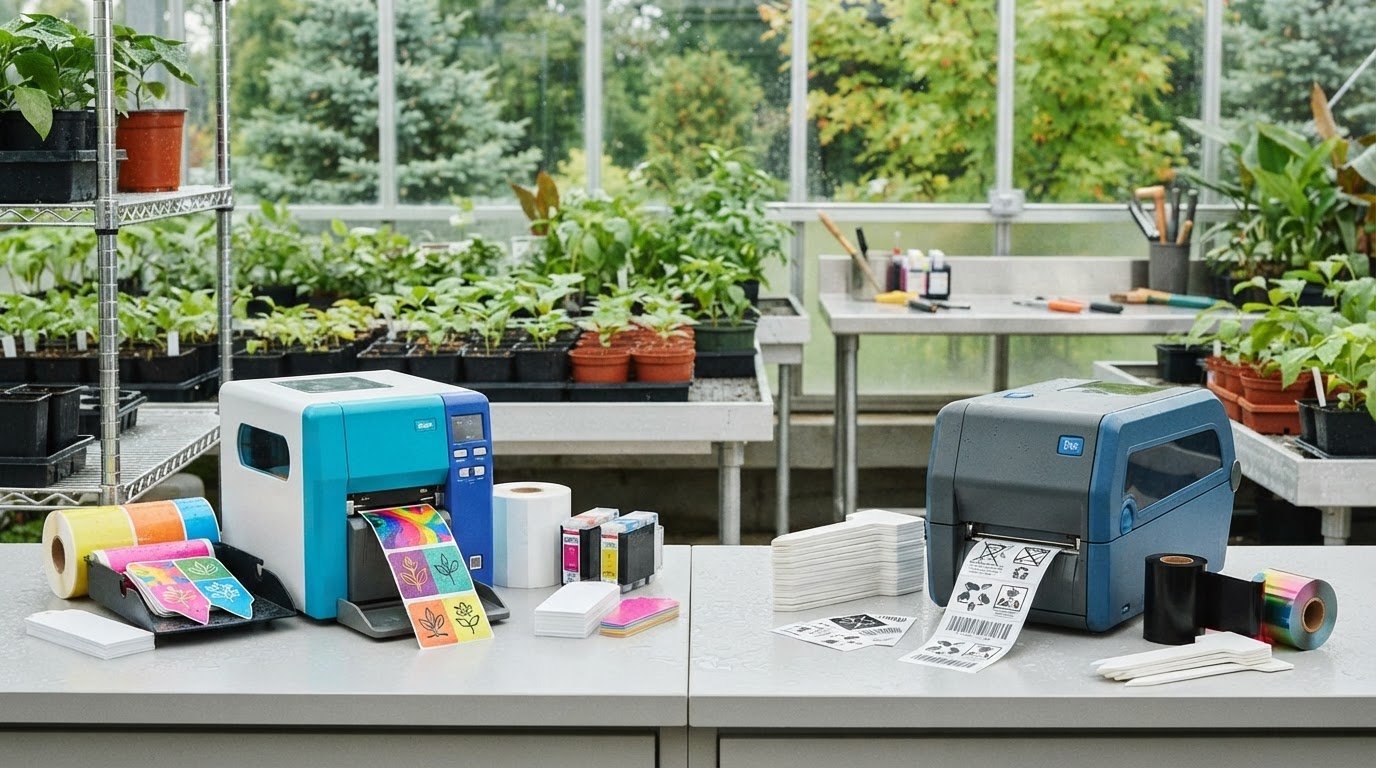
The fastest printer may not be the right choice for your nursery. The best horticulture label printers are the ones that work with your specific tags or pot stakes, suit the conditions where the labels will be used, and fit your daily workflow. Wet conditions, outdoor exposure, and media compatibility can all affect the result, so it pays to check the complete setup before choosing a printer.
This guide compares colour inkjet and thermal transfer printing, explains how to assess tag materials, and outlines what to confirm before buying a printer, supplies, or software. You’ll see how print speed, ink or ribbon, and label handling can affect day-to-day use. You’ll also find practical questions to take to a supplier, including when comparing DuraFast Label Company Canada’s horticulture labels, tags, and signs.
Key Takeaways
- Choose horticulture label printers by matching the print method to your tag material, label design, and production workflow.
- Compare thermal transfer and colour inkjet as distinct options, and verify compatibility with the exact tag or pot stake before buying.
- Record each tag’s dimensions, shape, material, and roll or fanfold format to help narrow down suitable printers.
- Assess label volume, staff workflow, software, consumables, and printer footprint before bringing printing in-house.
- Check how the media is expected to perform in your growing conditions, then test the output. DuraFast Label lists nursery pot stakes, horticulture labels, tags, and signs.
What Do Horticulture Label Printers Need to Do in a Nursery?
A horticulture label printer produces identification for plants, pots, trays, signs, or nursery inventory using media suited to the printer and its intended conditions. Its job is to make information clear and repeatable as staff handle, store, move, and sell plants or other items.
Start by listing what each label needs to communicate, rather than choosing a printer technology first. A plant label might show a plant name and variety. An inventory tag may also need a barcode or other tracking details. Once you know the required content, compare print methods and confirm which one supports the exact media you plan to use. These decisions are connected, but they are not interchangeable.
Which nursery labels and tags might need printing?
Nurseries may use pot stakes, plant tags, signs, or product labels for different purposes. A stake may identify a variety in a pot; a sign may have more room for growing information; and an inventory label may need a barcode that staff can scan. List the information for each format, including any details that change from batch to batch.
DuraFast Label lists horticulture labels, tags, and signs, as well as thermal transfer printers and pot stakes for nurseries. For background on printing methods, Thermal printing explains the basics of thermal transfer and direct thermal technology. If you’re comparing thermal options, review the available thermal label printers, then confirm compatibility with your specific tag.
What makes horticulture labelling different from general product labelling?
A nursery label may be watered, handled repeatedly, stored, or moved between different growing environments. These conditions can affect whether the printed information stays legible. Choose media based on where and how each label will be used, and don’t assume a tag or print will resist water, condensation, sunlight, or other exposure. Check the specifications for the exact media and printer combination.
Workload matters as well. For a small batch, staff may print only when new plants need identification. A recurring production or inventory workflow may involve frequent batches, changing data, and consistent label placement. Consider which information changes, who prepares and prints it, and how the labels are applied. These details help define what your horticulture label printers need to do before you assess speed, media support, or other capabilities.
Thermal Transfer or Colour Inkjet: Which Horticulture Printer Fits?
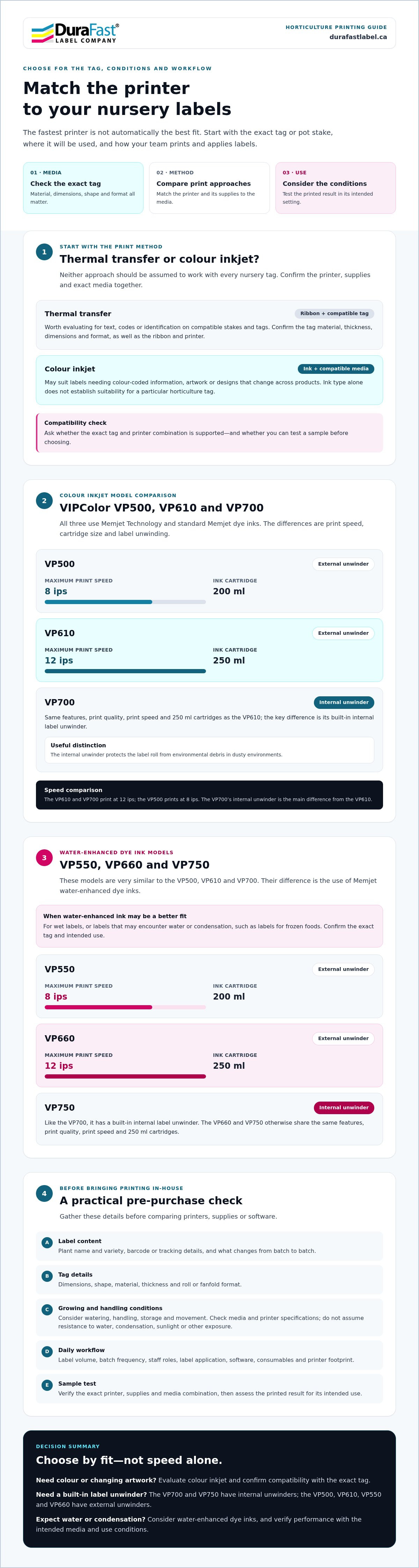
The right choice depends on what you’re printing, which media you need, and how often label designs change. Thermal transfer uses a compatible ribbon to transfer print onto a compatible label or tag. Colour inkjet prints with ink and may suit designs that need colour or detailed artwork. Neither method should be assumed to work with every nursery tag. Check the printer, supplies, and exact media together before choosing.
When should a nursery consider thermal transfer printing?
Thermal transfer is worth evaluating when you need to print identification on a compatible tag or stake, including nursery pot stakes. DuraFast Label lists thermal transfer pot stakes for nurseries, along with thermal transfer printers and ribbons. That does not mean every printer and ribbon will work with every stake. Confirm the material, thickness, dimensions, and format with the supplier, and ask whether you can test a sample in the intended printer.
When might colour inkjet be worth evaluating?
Colour inkjet may be a fit if labels need colour-coded information, artwork, or designs that change across products. The VIPColor VP500, VP610, and VP700 use Memjet Technology and standard Memjet dye inks. The ink type alone does not establish suitability for a particular horticulture tag. Check compatibility and confirm that the printed result meets the needs of its intended use. Explore colour label printers as a starting point for comparing options.
Use this comparison to prepare specific questions for your supplier:
| Print approach | Use case to evaluate | Supplies to confirm | Questions for the supplier |
|---|---|---|---|
| Thermal transfer | Text, codes, or identification on compatible stakes and tags | Printer, ribbon, tag material, and format | Does this combination support the tag’s dimensions and thickness? |
| Colour inkjet | Labels where colour, artwork, or changing designs matter | Printer, ink, and inkjet-compatible media | Will the media feed correctly, and is the printed output suitable for its use conditions? |
Label content and print method are separate decisions. First list what each label must show, then assess whether colour or ribbon-based printing suits the job. For a reference on plant-label information, the UMass Amherst resource on container labeling regulations discusses US requirements, so don’t treat it as Canadian guidance. Confirm applicable requirements for your operation separately. To assess a printer and media combination, you can contact DuraFast Label with your tag specifications.
Matching Horticulture Label Printers to Tags and Conditions
A printer that handles ordinary label stock may not feed a nursery stake or tag correctly. To narrow down horticulture label printers, check the media and growing environment before settling on a model.
Confirm printer and media compatibility for the exact application. Work through these checks in order:
- 1. Define the label. Note what it identifies, what information it needs to display, and where it will be used.
- 2. Measure the media. Record the tag’s width, length, shape, material, and thickness. Note whether it comes on a roll or in fanfold format.
- 3. Assess conditions. Identify exposure to watering, condensation, sunlight, handling, and storage.
- 4. Confirm the printer. Ask the supplier whether the specific printer supports that material, size, thickness, feed format, and print area. Check any core or roll requirements as well.
- 5. Test the output. Print on the intended stock and assess feeding, print placement, readability, and performance under the conditions the label will encounter.
What should you check about tag stock before choosing a printer?
Give the supplier the measurements and media details rather than asking only whether a printer “does tags.” Pot stakes and other nursery tags vary, so don’t assume they’ll run through every printer type. Confirm that the stock fits the printer’s supported media path and that the required information fits the printable area without interfering with tag edges, holes, or cut-outs.
DuraFast Label lists horticulture labels, tags, and signs. Use the product information as a starting point, then verify compatibility with the exact printer and format you plan to use.
How should growing conditions influence media selection?
Consider the label’s full journey, from printing and storage to placement and routine handling. A tag kept under cover may face different conditions from one exposed to sun and repeated watering. Research from the American Society for Horticultural Science discusses nursery labelling challenges; see Bar code labels can reduce or eliminate these problems. Treat performance as specific to the application, not as a blanket claim about a material or print method.
For wet or condensation-prone applications, verify the ink or ribbon and media combination, including the supplier’s guidance on exposure. The VIPColor VP550, VP660, and VP750 use Memjet water-enhanced dye inks, but that does not establish compatibility with any particular horticulture tag. Confirm the complete setup and test it before committing to production. If you’re comparing a specific printer and tag, share your media details with DuraFast Label to help guide the compatibility discussion.
What Should You Evaluate Before Bringing Horticulture Printing In-House?
In-house printing can make it easier to respond to changing plant information, but the printer is only one part of the setup. Before choosing among horticulture label printers, map the work from preparing label data to applying tags. Consider who will keep supplies available and the equipment ready to use.
Use this checklist to assess the full workflow:
- Volume and frequency: Estimate typical batch sizes and how often you print. Note seasonal peaks and whether plant details or designs change between batches.
- People and handoffs: Identify who creates, checks, approves, and prints each label, and when labels are needed in the production cycle.
- Space and media handling: Check the printer footprint, where rolls or fanfold stock will be stored, and how media will be loaded and handled.
- Software and data: Confirm that label design software fits your process and can use the information sources needed for variable text or barcodes.
- Ongoing supplies and planning: Identify the required ink or ribbons and compatible tag stock. Include routine cleaning and maintenance planning in your operating procedures.
Which workflow details affect printer selection?
A nursery printing occasional batches has different needs from one producing labels as a recurring inventory task. Record how frequently you print, how many label versions are active, and which fields change, such as variety or inventory details. Then map who supplies the data, who checks its accuracy, and who runs the print job. This helps you determine whether the workflow needs straightforward batch printing or more structured software and data handling.
How can a nursery test print quality before committing?
Ask the supplier to review the proposed printer with the exact tag stock and specified ribbon or ink. Test representative artwork and variable information, not just a simple sample. Check that text is legible at the intended size, and assess barcode readability if scanning is part of the process. Run the tags through normal handling and relevant growing conditions. Keep your conclusions limited to the materials and conditions you actually tested.
Before standardizing, document the approved printer, media, consumables, software settings, and test results. This gives staff a repeatable reference when a tag or label changes and helps prevent an untested substitute from disrupting the process. To discuss your printer, tag stock, and workflow requirements, contact DuraFast Label with your setup details.
Where to Find Horticulture Label Printers and Supplies in Canada
Once you’ve defined the tag, print method, and working conditions, you’re ready to compare suppliers. Look for a source that can help you consider the printer alongside its media, ink or ribbon, and software requirements. This makes it easier to avoid choosing equipment based on a feature that does not suit the tags you need to print.
Before placing an order, follow four steps: confirm your label requirements, shortlist suitable print methods, validate the exact media and consumables, then test a representative sample. Keep the compatibility decision specific to the printer and tag combination under consideration.
What information should you have ready when contacting a supplier?
A clear set of requirements makes the compatibility discussion more useful. Gather:
- Tag dimensions, shape, material, thickness, and roll or fanfold format.
- The information to print, such as plant details, variable text, or a barcode.
- Typical print volume, batch frequency, and who prepares and prints the labels.
- Expected exposure to moisture, condensation, sunlight, handling, and storage conditions.
- The printer and any ink, ribbon, software, or other supplies you’re considering.
Ask the supplier to confirm whether the specific printer supports the media format and whether the chosen consumables suit the intended application. If possible, arrange a test with representative stock and artwork before standardizing the workflow.
How can DuraFast Label support printer and supply selection?
DuraFast Label is a Canadian retailer of label printers, supplies, software, and accessories. Its horticulture labels, tags, and signs give nursery buyers relevant media options to review. The retailer also lists thermal transfer pot stakes for nurseries and thermal transfer ribbons. If your labels need colour, colour inkjet printers may be worth evaluating, but compatibility with your exact tag stock still needs to be verified.
When making an enquiry, share your tag specifications, intended print content, and growing conditions. This gives you a practical basis for discussing the printer and supplies without assuming that every tag works with every technology. For help reviewing a planned setup, contact DuraFast Label with your printer and tag application details.
Build a Label Setup That Fits Your Nursery
Choose horticulture label printers by matching the print method to your label content, tag stock, growing conditions, and day-to-day workflow. Confirm the exact media format and printer compatibility before purchasing, then test representative tags with the intended ink or ribbon. These checks help you build a repeatable setup without assuming one printer suits every nursery application.
DuraFast Label is a Canadian online retailer offering printers, consumables, label software, and accessories. Its listed nursery supplies include thermal transfer pot stakes, which you can consider alongside the printer and ribbon requirements for your application.
Before you choose a setup, gather your tag dimensions, material, print needs, and operating conditions. Contact DuraFast Label to discuss your horticulture printer and tag requirements and review what to verify for your intended application.
Frequently Asked Questions
Can I use a thermal transfer printer for nursery pot stakes?
Yes, a thermal transfer printer may work for nursery pot stakes if the specific printer, ribbon, and tag stock are compatible. DuraFast Label lists thermal transfer pot stakes as a nursery supply option, but that does not mean every printer and stake combination will work. Before purchasing, share the tag’s dimensions and material with the supplier, and confirm the feed format and printer compatibility.
What type of printer is best for horticulture labels?
The best printer depends on your label format, colour requirements, growing conditions, print volume, and media compatibility. Thermal transfer uses a compatible ribbon and tag or label stock, while colour inkjet is an option for designs that need colour. Neither is a universal winner. Define the application first, then verify that a specific printer and its required supplies support your chosen media.
Can horticulture labels get wet without the print fading?
Water resistance depends on the label material and the ink or ribbon combination, not the printer alone. Check the manufacturer’s specifications for your exact supplies, including any guidance on water or condensation exposure. Then test printed labels under conditions that reflect their intended use. Water-enhanced Memjet dye inks are an available printer ink option, but their presence does not guarantee compatibility with a particular tag or a specific result.
How do I choose a printer for plant tags and pot stakes?
Start by listing each tag’s dimensions, material, and feed format, along with the information it must display and your expected print volume. Compare thermal transfer and colour inkjet against those needs, then ask the supplier to verify printer and media compatibility. Test representative tags before standardizing the process, particularly if they’ll face watering, condensation, frequent handling, or changing storage conditions.
What is the difference between thermal transfer and colour inkjet label printing?
Thermal transfer uses heat to move ink from a compatible ribbon onto compatible media. Colour inkjet applies ink directly to suitable label stock. The practical choice depends on whether labels need colour, the tag material and format, the growing environment, and your workflow. Check the specifications for the exact printer, ribbon or ink, and media you plan to use. Don’t assume either method suits every nursery tag.
Can a colour label printer print horticulture tags?
A colour label printer may suit designs that need colour, but compatibility depends on the specific printer and tag material. Don’t assume a printer for colour labels can handle pot stakes or every nursery tag format. Give the supplier the tag’s dimensions, material, thickness, and feed format, and confirm that the printer supports the media before selecting equipment. Testing a sample can help you assess the result.
What should I ask before buying a horticulture label printer?
Ask whether the printer supports your exact tag dimensions, material, thickness, and feed format, and which ink or ribbon it requires. Confirm whether the complete printer and supplies combination suits your intended environment, including any moisture or outdoor exposure. Check software and workflow requirements as well. Before deciding, ask about testing representative media so you can assess print placement, legibility, and feeding.