Guide to Selecting the Best Rat Tail Tags for Jewelry
8th Oct 2026
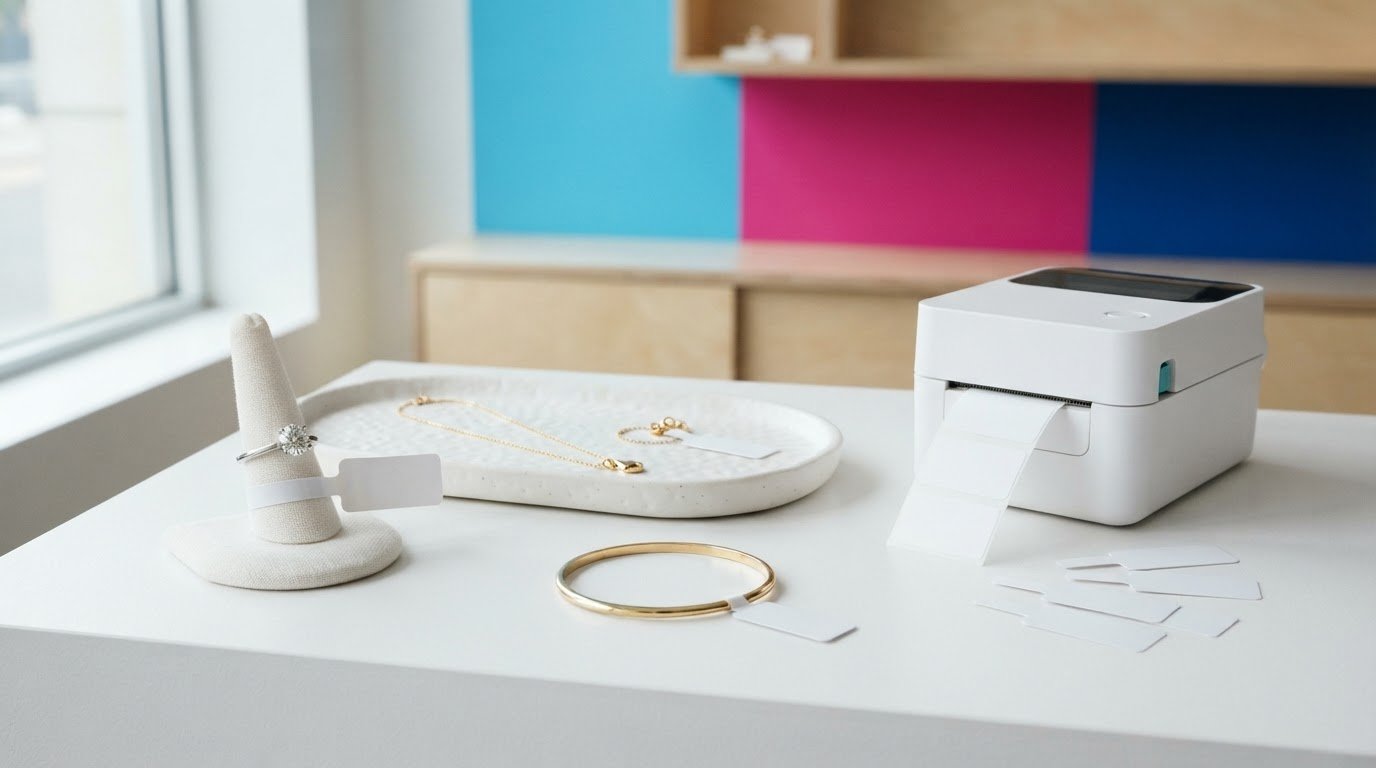
Could the wrong jewellery tag make a small item harder to identify, display or process? A Rat Tail Tag uses adhesive ends that stick to each other rather than directly to the jewellery, helping keep the item free of adhesive residue. Choosing a suitable tag still depends on the piece, the information your team needs and how you print and apply it.
If you’re comparing jewellery rat tail tags, start by considering the item and your day-to-day workflow. This guide explains how the format is used, what to assess before choosing one, and how to build a consistent printing process. DuraFast Label offers Jewelry Rat Tail Tags, including TT364, TT306 and TT307. Use the selection steps below to compare your needs with the product details and your existing equipment and supplies.
Key Takeaways
- Match a Rat Tail Tag to the jewellery item, the information staff need to identify, and how the piece will be displayed.
- Compare item fit, print content, presentation and application needs before choosing a tag format.
- Check the selected tag’s specifications against your printer and media requirements to reduce setup issues and rework.
- Build a repeatable workflow by defining tag content, checking requirements, testing the print output and recording the approved setup.
- DuraFast Label offers Jewelry Rat Tail Tags, including TT364, TT306 and TT307, for jewellery labelling.
What Is a Rat Tail Tag, and Why Use One for Jewellery?
A Rat Tail Tag is a jewellery identification tag that connects an item with useful product or inventory information. Unlike a general-purpose product label, it is intended for identifying individual pieces during retail handling and display. Its adhesive ends fasten to each other rather than directly to the jewellery, which helps keep adhesive off the item.
A rat tail tag helps staff identify a specific piece during handling, display and inventory tasks. Whether it suits a particular item depends on the jewellery, how the piece is presented and the steps it passes through. Consider those factors together rather than assuming one tag format will suit every item.
How rat tail tags fit jewellery labelling
Jewellery businesses handle a variety of pieces, including rings, necklaces and earrings. A dedicated tag gives staff a way to associate an item with its identifying information as it moves through receiving, storage, display and sale. Since jewellery comes in many forms and materials, as described in this general overview of Jewellery, choose a labelling approach for the actual piece rather than relying on a one-size-fits-all assumption.
Jewellery tags are made for item-level identification in a jewellery retail workflow. When choosing one, consider the item, its presentation and how the tag will be applied. DuraFast Label offers jewellery and ring labels, including Jewelry Rat Tail Tags, for businesses looking for options in this product category.
What information should a jewellery tag carry?
Begin with the task the tag needs to support. What information helps staff distinguish similar pieces, retrieve an item or maintain consistent stock records? Depending on your workflow, it could be an item description, an internal product identifier or another reference your business already uses. These are examples to consider, not universal requirements.
Keep the layout focused and readable at the size you’ll print. Use a consistent format for product identifiers so staff can match a physical item with its record. For example, if your inventory system assigns a code to each piece, printing that same code on the tag can help connect the item to the correct record. Avoid adding fields just because there seems to be room. Prioritize information that supports identification and routine handling.
Before selecting a format, consider the item’s shape and size, how it will look on display and how often it will be handled or moved. These details help narrow your options and point to the next step: checking the tag against your printing process.
How to Choose Rat Tail Tags for Your Jewellery and Rings
A suitable tag fits the piece, communicates useful information and works with the way your team applies and handles it. A Rat Tail Tag that suits one item may be awkward on another, so assess the product and workflow rather than choosing by name alone.
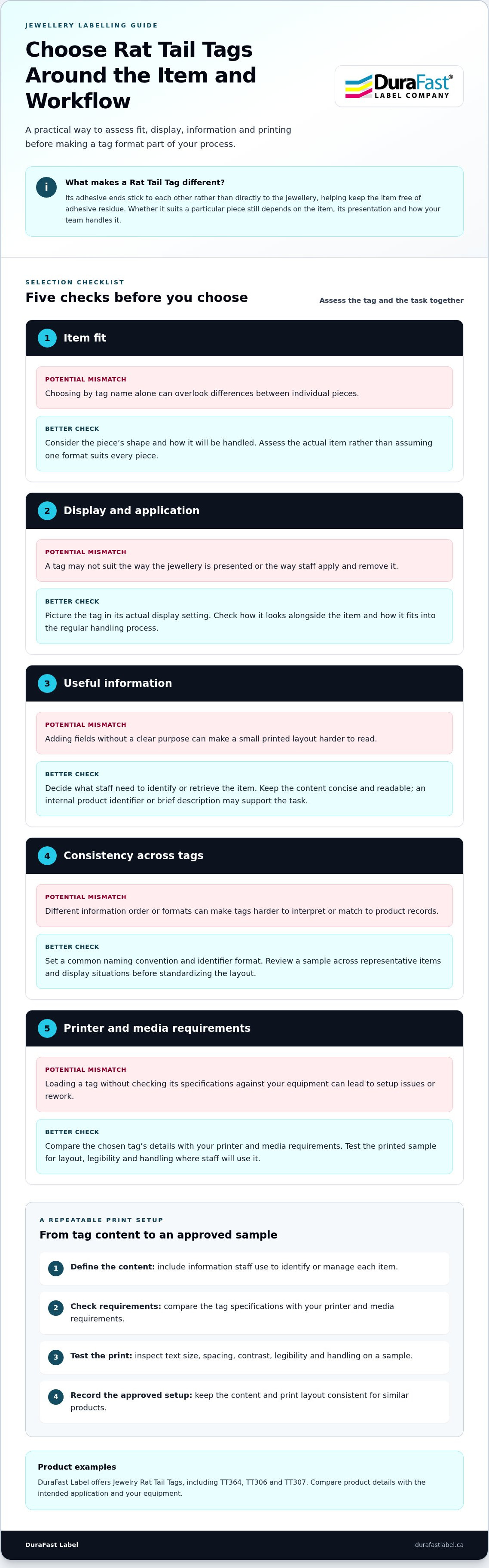
Choose jewellery rat tail tags by assessing item fit, display, information, readability and application requirements together. Use this checklist to guide your decision:
- Item: Consider the piece’s shape and how it will be handled.
- Presentation: Check how the tag looks alongside the jewellery on display.
- Information: Decide what staff need to identify or retrieve the item.
- Application: Consider how tags will be applied within your current process.
- Specifications: Compare the selected tag’s details with your printer and media requirements.
Match the tag to the item and display
Picture the tag in its actual setting. A ring displayed in a case may raise different fit and presentation questions from a piece that is frequently moved, handled or returned to storage. Check whether the tag suits the item without detracting from its display, and consider how staff will apply and remove it as part of their regular process.
DuraFast Label offers jewellery and ring labels, including TT364, TT306 and TT307 Jewelry Rat Tail Tags. Compare the product details with the intended application and your equipment before choosing a format. For broader industry context on responsible business practices, the Responsible Jewellery Council provides resources on responsible jewellery practices.
Match the information to the business process
Choose printed content based on how your team identifies, retrieves and manages each piece. An internal item code may be more useful for inventory than a long description, while a brief description may help staff distinguish similar items during everyday handling. Keep the layout concise so the information is easy to read.
Consistency matters across an assortment. If information appears in a different order or format on every tag, staff may need extra time to interpret it or match it to a product record. Set a common naming convention and identifier format. Then review a sample across representative items and display situations before making the layout standard.
Once you’ve narrowed the options, compare the tag details with your printer and application process. For help with jewellery labelling, talk with DuraFast Label Company Canada.
Rat Tail Tags and Printing: Plan a Reliable Workflow
A reliable print process starts before you load a tag. Define what staff need to read, then compare the chosen tag’s specifications with your printer and media requirements. A test print gives you a chance to catch layout, legibility or handling issues before the setup becomes routine.
Prepare the tag content and print layout
Focus the layout on information staff use to identify or manage an item. Remove fields that don’t support the task, then check the text size, spacing and contrast on a printed sample. Assess it where staff will use it, not just on a computer screen. Use consistent placement and formatting for similar products so staff can scan tags and match identifiers to records efficiently.
Check printer and consumable compatibility
Don’t assume a tag will work with a printer simply because it looks like another media type. Compare the tag’s documented requirements with the printer’s supported media and printing method. For a thermal-transfer setup, check that the tag and ribbon suit the specific printer-media combination. DuraFast Label carries thermal-transfer ribbons, which are one of the consumables to consider when planning this type of setup.
Thermal-transfer printing is one possible approach, but it isn’t automatically suitable for every Rat Tail Tag. Base your choice on the tag’s specifications and the printer in your workflow. DuraFast Label also carries thermal-transfer labels for businesses using this printing method.
Use this sequence to make the process repeatable:
- 1. Define the content. Select the identifiers staff need and leave unnecessary copy off the tag.
- 2. Confirm requirements. Compare the tag’s documented media details with the printer and any required consumables, including ribbon where applicable.
- 3. Test the output. Print a sample. Check that the text is readable, the layout is aligned, and the tag works as intended during normal application and handling.
- 4. Standardize. Once the sample meets your needs, save the approved layout and record the tag, printer and consumable combination for repeat jobs.
Keep a sample with your setup notes. If you change the tag, printer, ribbon or layout, test the updated combination before returning to routine printing. This simple control can help avoid unnecessary reprints and keep identification consistent across your assortment. To discuss jewellery labelling needs, connect with DuraFast Label Company Canada.
Common Rat Tail Tag Selection Mistakes, and How to Avoid Them
A tag can seem like a sensible choice but cause problems at the counter, on display or at the printer. A familiar product name or format doesn’t prove that it will suit every item and process. Assess the tag against its intended use before adopting it across an assortment.
Avoid choosing by product name alone
TT364, TT306 and TT307 identify rat tail tag options, but a product name alone doesn’t tell you whether a tag fits a particular piece, suits its display or works with your printing setup. Compare the product details with the intended application and your equipment rather than relying on the code.
Consider the jewellery item, how it will be displayed and handled, and how staff will apply the tag. Don’t assume a tag suited to one item will automatically work for rings or other pieces. A brief review of the product details and a sample on a representative item can help you assess fit and presentation before using the format more widely.
Prevent legibility and process problems
There’s a practical balance between concise content and useful identification. Adding fields may seem helpful, but crowded text can be difficult to read on a small tag. Removing an identifier staff rely on, however, can make it harder to connect a piece to its inventory record. Prioritize the information your team uses and check that it remains legible in normal viewing conditions.
Before routine printing, review a sample on the intended item. Check the printed content, how the tag looks on display and whether it remains useful during ordinary handling. Compare the tag’s documented requirements with your printer and media setup as well. Skipping that compatibility check can lead to setup problems, wasted test prints or rework.
Before ordering or putting a new format into regular use, take these steps:
- Compare the tag details with the item and display application.
- Review the text and identifiers for accuracy and consistency.
- Print and assess a sample under normal viewing and handling conditions.
- Record the approved layout and tag-printer-media combination for future reference.
These checks can make repeat orders more consistent while helping you avoid the assumption that one format works for every product. If you’re comparing options for your jewellery labelling process, discuss your requirements with DuraFast Label.
Find Jewellery Rat Tail Tags and Build Your Next Steps
Start with the work the tag needs to do. Identify the jewellery items you’ll label, the information staff need to see and how each piece moves through application, display, handling and inventory. Then compare the tag’s product details with your printer and media requirements before settling on a repeatable setup.
Prepare before selecting jewellery rat tail tags
Gather the practical details first. Note the item types in your assortment, the identifiers your team relies on and the steps for applying and handling tags. A ring and a larger jewellery piece may raise different questions about fit and presentation, so consider representative items rather than basing your decision on just one example.
Next, review the product details for the tag you’re considering. Use the documented specifications to assess fit, application and printer compatibility. If you use thermal-transfer printing, include the printer’s media requirements and the ribbon specifications in your review. A representative print sample helps you assess whether the layout is readable and the tag suits your routine process before you make it standard.
Choose a practical next step for your labelling setup
DuraFast Label offers Jewelry Rat Tail Tags, including TT364, TT306 and TT307. Compare these options with your application and equipment, and browse jewellery and ring labels for related labelling products.
Before moving to routine use, bring the decisions together: choose a tag for the item and its intended use, settle on concise and consistent printed content, and test the tag with the printer and media combination you plan to use. Record the approved layout and setup so your team has a reference for repeat jobs and future reorders.
If you use thermal transfer, include ribbon selection in your setup review. Compare the printer and tag requirements with the ribbon specifications instead of assuming one ribbon suits every combination. With those details in hand, you can make a more informed choice and build a labelling process that fits your jewellery assortment.
For help with your jewellery labelling requirements, discuss your tag and workflow needs with DuraFast Label.
Build a Jewellery Labelling Setup That Works
A dependable jewellery labelling process starts with the pieces you need to identify, the information your team uses and how each tag will be displayed and handled. Choose a Rat Tail Tag based on those needs, not its product name alone, and compare the tag details with your printer and media setup.
Before making a format routine, test a representative sample for readability and fit. Then record the approved layout and supplies. This preparation can help keep identification consistent across your assortment and reduce avoidable printing rework.
DuraFast Label offers Jewelry Rat Tail Tags and related jewellery and ring labels. To discuss your jewellery labelling needs and choose a practical next step, contact DuraFast Label.
Frequently Asked Questions
What is a rat tail tag?
A rat tail tag is a jewellery identification tag used to connect a piece with relevant product or inventory information. Its adhesive ends fasten to each other rather than directly to the jewellery. It is intended for item-level identification in a jewellery workflow, rather than general product labelling. Review the product details to assess whether a particular tag suits your item and printing process.
What are rat tail tags used for in jewellery retail?
Rat tail tags help jewellery retailers identify and manage pieces as they move through receiving, storage, display and sale. A tag might carry an internal item code that staff can match to an inventory record, or a concise description to distinguish similar pieces. Choose information that supports your workflow and use consistent identifiers so staff can connect the tagged item with the correct product information.
How do I choose rat tail tags for rings?
Assess the ring’s shape, how the tag will fit alongside it, and how the piece will look on display and during handling. Review the selected tag’s product details and compare them with your intended application. Check that the information is readable in the chosen position. Testing a sample on a representative ring can help you judge fit and presentation before adopting a format for routine use.
Can I print rat tail tags with a thermal-transfer printer?
A thermal-transfer printer may be suitable if the specific tag meets the printer’s documented media requirements. The ribbon must also suit the printer and tag combination. Don’t assume every rat tail tag supports thermal-transfer printing. Compare the relevant product details with your setup, then print a sample to assess legibility and how it performs during your usual handling process.
What information should I print on a jewellery rat tail tag?
Print the details your team needs to identify, retrieve or manage each item. Depending on your system, that could be an internal product code, a concise item description or another inventory reference. These are examples, not universal requirements. Keep the content brief enough to read clearly, and use the same identifier format as your product records so staff can match the tag to the correct item.
Are rat tail tags suitable for every type of jewellery?
Not automatically. Jewellery varies in shape, size, presentation and handling, so one tag format may not suit every item or retail process. Consider how the tag fits the specific piece and how it will look on display. Review the product details and test a sample on representative items to see whether the format works across your assortment or only for selected pieces.
How can I avoid choosing the wrong rat tail tag?
Start by listing the items you need to label, the information staff require and how tags will be applied and handled. Compare those needs with the selected tag’s product details and your printer’s media requirements. Don’t choose by product code alone: assess TT364, TT306 or TT307 against the intended use. Test a sample for fit and readability, then record the approved layout and setup before routine use.