GS1 Canada Compliant Barcode Labels: Data and Printing
19th Nov 2026
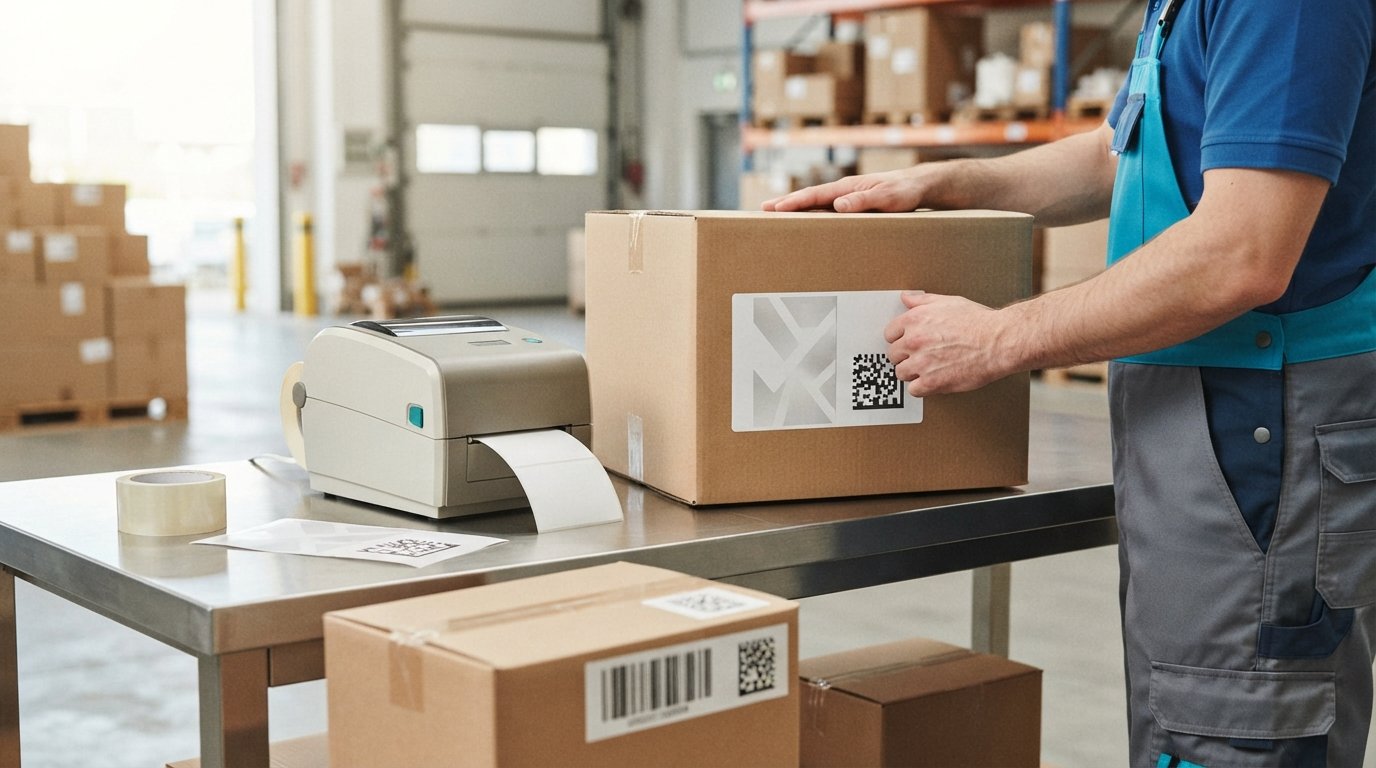
The barcode that fits your product isn’t always the one that fits your sales channel. For GS1 Canada-compliant barcode label printing, choose the symbol based on what it must identify, what data it needs to carry and where it will be scanned.
It’s easy to focus on the barcode image and overlook the decisions behind it. A retail product may need a linear UPC barcode for its GTIN, while a case or pallet may need a different format to carry traceability details such as a lot number or expiry date. GS1 2D barcodes can hold additional information, but the right choice depends on the product, packaging level and scanning requirements.
This guide explains how to choose a barcode type, organize product and traceability data, and prepare labels for clear printing and practical placement. It also covers in-store printing, showing how barcode format, data, and print quality work together before production.
Key Takeaways
- Match the barcode type to the product level, sales channel and information it needs to carry.
- Use the appropriate GS1 Application Identifiers to distinguish a product identifier from lot, expiry and other traceability data.
- Account for retailer and marketplace requirements, including barcode format, label placement and any additional identification labels.
- Protect scan reliability with clear, high-resolution printing, suitable contrast and enough quiet space around the symbol.
- Choose in-store printing equipment to suit your label workflow, then assess the printed result before wider production.
GTIN, lot, expiry and serial data in 2D barcodes
A 2D barcode can carry a product identifier alongside traceability details. GS1-standard 2D barcodes require a 14-digit GTIN. To use a GTIN-12, add two leading zeros; for a 13-digit GTIN, add one leading zero. These digits create the required length without changing the product identifier. A GTIN identifies the product, while other encoded fields can identify its batch, expiry date or serial number.
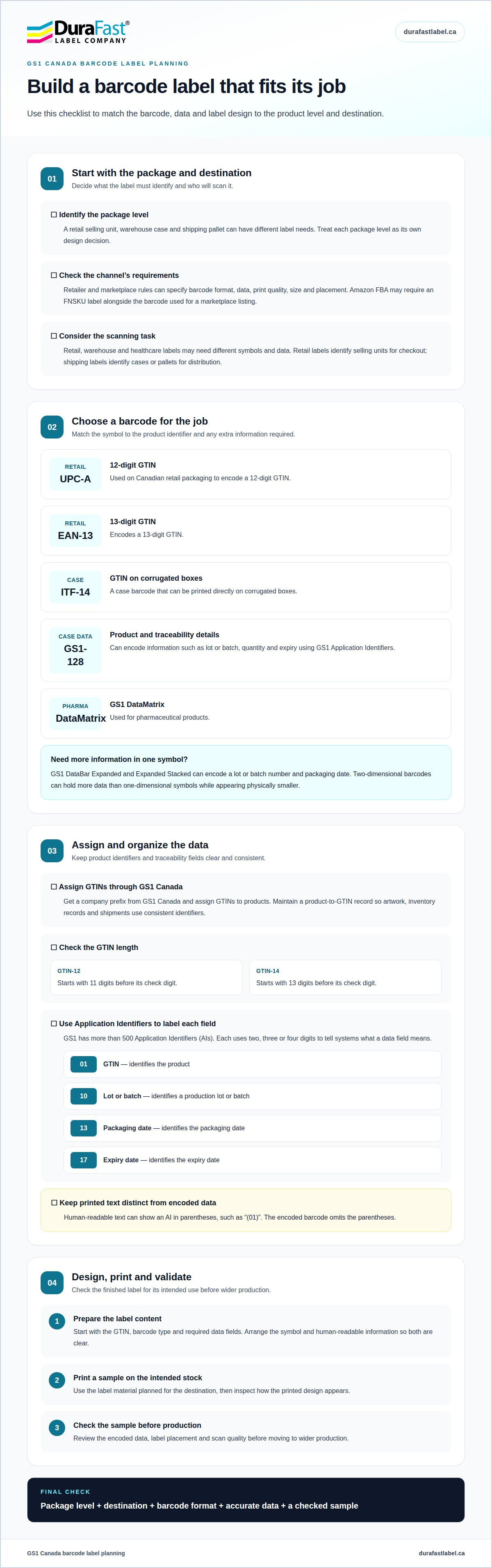
GS1 Application Identifiers (AIs) tell a scanner what each data field means. GS1 has more than 500 AIs, and each identifier uses two, three or four digits. AI 01 identifies the GTIN, AI 10 identifies a lot or batch number, and AI 13 identifies the packaging date. For example, AI 01 precedes the product GTIN, while AI 10 marks the start of batch information. The AI structures data for machines and systems to interpret consistently.
Format matters because barcode types carry different information. A UPC barcode can encode a GTIN only. GS1 DataBar Expanded and Expanded Stacked can also encode a lot or batch number and packaging date. GS1-128 can carry product information such as batch or lot numbers and expiry dates. Two-dimensional barcodes can hold more data than one-dimensional symbols while appearing physically smaller. That capacity can help combine product identification and traceability data in one symbol.
GS1 barcodes can encode identifiers and attributes using plain, GS1 element string or GS1 Digital Link URI syntax. A QR code powered by GS1 can use Digital Link syntax to provide a GTIN for supply-chain applications and connect consumers with online product resources. Choose the syntax and data fields according to how the barcode will be used. For example, a supply-chain workflow may need lot details, while a consumer-facing link can connect product identification with online information.
What does GS1 Canada membership and barcode licensing cost? Costs depend on the licence type and the number of products requiring GTINs. GS1 Canada issues individual GTIN licences to businesses with 40 products or fewer, and a Company Prefix licence when more are needed; a GTIN licence is valid for 12 months.
Some applications use specific data formats. For cannabis products, the GTIN uses AI (01) and a 14-digit value. The expiry date uses AI (17), followed by six digits in YYMMDD format. The lot or batch field uses AI (10), with a value of up to 20 alphanumeric characters. If a cannabis product has no expiry date, the default value is 500723, while retaining AI (17). Human-readable text shows AIs in parentheses, but the encoded barcode omits them.
Separate the human-readable presentation from the encoded data during label preparation. For example, display an AI as “(01)” beside its GTIN in printed text, while encoding the identifier without parentheses. This distinction helps prevent a printed representation from being mistaken for the barcode’s actual data. Barcode verification can then assess whether the symbol communicates the intended fields.
The same careful data planning can apply to specialty printed identifiers, including inkjet card grading labels. For any application, map each required value to its GS1 identifier before encoding. Check that the GTIN has the required length, each AI matches its field, and dates follow the specified format. These steps help align the printed label with the information scanning systems need to identify.
How do I create my barcodes?
Choose a barcode based on the product level, supply-chain task, and scanner that will use it. Retail, warehouse, and healthcare labels may require different symbols and data.
Retailer and Marketplace Label Requirements
Retailer and marketplace requirements determine which barcode, data, print quality, size, and placement are accepted for a product. Meeting them helps prevent listing or receiving problems. For example, Amazon FBA may require an FNSKU label alongside the barcode used for a marketplace listing. Treat each package level as a separate label-design decision.
To obtain a GS1 Canada GTIN, get a company prefix from GS1 Canada and assign GTINs to products. A GTIN-12 starts with 11 digits before its check digit; GTIN-14 creation starts with 13 digits before its check digit. Maintain a product-to-GTIN record so artwork, inventory records and shipments use consistent identifiers. A GS1 Canada compliant barcode label printing workflow begins with those accurate assignments.
Match the barcode to its role. UPC-A on Canadian retail packaging encodes a 12-digit GTIN, while EAN-13 encodes a 13-digit GTIN. For warehouse cases, ITF-14 carries the GTIN and can be printed directly on corrugated boxes. GS1-128 can encode case information such as lot, quantity and expiry using Application Identifiers. The package level and receiving process determine which format makes sense.
Retail labels identify selling units for checkout. Shipping labels identify cases or pallets for distribution, while GS1 DataMatrix is used for pharmaceutical products. Channel requirements can also affect where the label goes and how it must print. A GS1 Canada compliant barcode label printing plan should therefore account for both the destination and the package’s purpose, rather than assuming one barcode works everywhere.
Label Design, Printing, and Validation
Design, printing, and validation turn assigned product data into a readable label for its intended destination. Start with the GTIN, barcode type, and required data fields. Arrange the symbol and human-readable information so both are clear. Print a sample on the intended stock, then check its data, placement, and scan quality before production. This process helps catch layout and encoding errors early.
Canadian grocery point-of-sale systems have an industry-wide target to scan and process GS1-powered 2D barcodes by the end of 2027. During the transition, a package may carry both a 2D barcode and a linear barcode containing the same GTIN. GS1 DataMatrix requires image-based scanning, so scanner capability is part of planning. Test the printed formats with the equipment expected to read them.
Barcode software and printer selection should support the intended symbol and label layout. Reliable GS1 Canada compliant barcode label printing brings together correct product data, a suitable barcode format and readable output. Keep the approved template linked to its product records, so revisions and reprints don’t introduce mismatched information. If you need guidance matching a printer workflow to your requirements, discuss your printing workflow.
Barcode print quality, placement, and quiet zones
A barcode can contain the correct data and still fail to scan because of poor printing or placement. Check contrast, symbol dimensions, quiet zones, and position on the package, then verify a production sample against the quality standard for that barcode type.
Start with the artwork and substrate. GS1 Canada advises using high-resolution artwork and printing so bars and spaces remain clean and distinct. Dark bars, such as black, dark blue or dark green, need a light background. Smudging, distortion, low contrast or nearby text can interfere with scanning. Choose a substrate that keeps the printed symbol stable through handling and application.
Leave a clear quiet zone around each barcode. For a GS1 2D barcode, the quiet zone must be at least one module (X) wide around the symbol. A narrower margin fails ISO/IEC 15415 verification. Keep graphics, text, package seams and edges outside this space. Placement also depends on the package and sales channel; a barcode hidden by a fold or label edge cannot be scanned reliably.
Human-readable information needs its own deliberate position. For cannabis barcode labels, GS1 Canada says the numeric code must appear beneath or beside the barcode, and the symbol must be clear, legible and scannable. This layout lets a person read the identifier without placing text over the bars or within the quiet zone. For other products, align the symbol with the applicable packaging and channel requirements.
Verification measures print performance rather than just checking whether a scanner reads the symbol. Linear barcodes are tested under ISO/IEC 15416; 2D symbols use ISO/IEC 15415. Verification measures nine attributes, each receiving an ISO grade from 4 to 0. The overall grade summarizes the symbol’s verification results. The minimum acceptable grade for point-of-sale scanning is 1.5 ISO, equivalent to ANSI grade C.
Choose the verification method for the mark. Oak Ridge National Laboratory notes that ISO/IEC 15415 results apply to label barcodes, while ISO/IEC 29158 results apply to direct-part marks. GS1 Canada recommends submitting barcode work for third-party validation at the pre-production stage. That review can catch issues with size, colour, quiet zones, height, placement or check-digit calculation before a full print run.
Scan verification also tests a printed barcode across different scanners, including point-of-sale models. GS1 Canada recommends verifying final packaging for sizing, positioning and other global standards. Keep a quality-control procedure that tests barcode quality during design and production. For bilingual packaging, reserve sufficient space for the required text while keeping the barcode, human-readable data and quiet zone unobstructed; language copy does not replace barcode specifications.
GS1-compatible in-store label printing
In-store printing brings product data, label software, and printer output together at the point of sale. For Canadian retailers, the priority is keeping changing item information accurate while producing symbols that scan reliably.
Printer and Software Compatibility
Compatible printing requires software that can generate the selected GS1 symbol and encode the required numbers, paired with a printer that reproduces it clearly. This matters because a correct data record can still produce an unusable label if the software maps fields incorrectly or the printed symbol is distorted.
For a weight-variable item, the store’s workflow must associate the correct product information and weight with each printed label. Set up templates for the barcode type and data fields used by the retailer’s system. A sample print can reveal missing data, incorrect field order, or a symbol that scans inconsistently.
GS1 Canada subscribers can obtain barcode artwork and printing support from solution providers trained on GS1 Standards. Retailers can use that support to align label generation with their intended barcode format. GS1 Canada also provides scanner test kits and works with retailers on readiness assessments, helping teams consider both printed output and scanning equipment.
That equipment matters as retail moves toward 2D symbols. Canadian grocery point-of-sale systems have an industry-wide target to scan and process GS1-powered 2D barcodes by the end of 2027. GS1 recommends scanners with imaging-based capabilities. Stores can plan software and scanner compatibility together, rather than treating label printing as a standalone task.
Materials for GS1-Compatible Printing
Suitable label materials help preserve a barcode’s shape and legibility during printing and handling. Smudged ink or a distorted symbol can interfere with scanning, even when the encoded numbers are correct. Match the stock and print method to the label’s use, then inspect a printed sample for crisp edges and consistent contrast.
In-store teams should include material performance in their quality process. For example, print a sample on the intended label stock, then examine whether bars, spaces and human-readable data remain distinct. GS1 Canada recommends substrates that prevent ink from smudging and barcodes from distorting. A stock that performs well in one printer or workflow may not produce the same result in another.
Retailers should also check labels used for weight-variable products against current GS1 standards. A practical workflow connects the item record, label template, printer and scanner; staff can then identify where an error occurs. Keep sample labels from each setup, document the stock and software settings, and repeat checks after a material or template change. That makes changes easier to trace and correct.
In-store readiness depends on the whole chain: accurate product numbers, suitable software, compatible printing, stable materials and scanners prepared for the barcode format. Retailers can use GS1 Canada readiness assessments and test kits to evaluate scanner performance alongside the printed label.
What are GS1 Canada requirements for compliant barcode labels?
GS1 compliance combines correct identification data with a suitable barcode symbol and readable label presentation. The GS1 General Specifications describe how GS1 barcodes and identification keys should be used. In practice, the product level, data fields, symbol choice, label dimensions and placement all matter. A consumer unit, case and pallet may each need distinct identification and label treatment.
Start by confirming which package level the barcode identifies. For cannabis case and pallet codes, use a 14-digit GTIN. Case indicator digits 1 through 8 identify higher packaging levels, while 9 is reserved for variable-weight items. This distinction helps supply-chain systems interpret the package correctly. A case GTIN should identify the case, not simply repeat an unrelated consumer-unit identifier.
Barcode symbols are only one part of a label. Case and pallet labels need human-readable data as well as barcode symbols, so people can interpret key information when a scanner is unavailable or a symbol is difficult to read. For cannabis products, labels may be printed directly on packaging or applied separately. In either case, the data must be clear, legible, and consistent with the encoded information.
Use GS1 Application Identifiers to structure additional fields where the application calls for them. For example, a GS1-128 case label can combine a GTIN with lot, quantity or expiry data. Keep the data sequence and human-readable text aligned with the encoded values. For variable-weight products, the final digit of the weight Application Identifier represents the number of decimal places. That setting affects how systems interpret the weight.
Packaging design also affects compliance. Reserve space for the barcode and human-readable information, keeping both clear of seams, curves, and label edges. The symbol must suit the scanning environment, and its printed size and position should meet the application’s requirements. For example, a case label for warehouse handling needs to stay accessible when cartons are stacked or moved. Account for relevant carrier and placement requirements before finalizing the artwork.
Build verification into production. Compare the encoded data with the assigned GTIN and product record, then assess the printed symbol and finished package. A sample that scans does not, by itself, confirm that the data and placement are correct. Reviewing the complete label helps catch mismatches before distribution. Keep approved artwork with its corresponding product data so later reprints retain the same identification details.
For practical support selecting barcode printing equipment and labels for your GS1 workflow, discuss your label requirements.
DuraFast Label Company Canada: Dymo LabelWriter label printers
DuraFast Label Company Canada offers reliable desktop label printers alongside VIPColor, Afinia and Toshiba label printers. These options give businesses different printer categories to consider when planning GS1 barcode label production. The right fit depends on the label format, printing workflow and the requirements of the product or sales channel.
A printer alone doesn’t make a label GS1-compliant. Accurate barcode data, suitable label materials, clear print quality and verification all remain important. Match the equipment to how labels will be produced, whether you need product labels or another printing approach, then assess sample output against the applicable requirements.
If you’re selecting equipment for gs1 canada compliant barcode label printing, contact DuraFast Label Company Canada to discuss your requirements.
Plan your next label-printing decision
Make your next step a practical review of how barcode labels fit into your production workflow. Consider who prints them, where they’re applied, and how often product information changes. These details can guide equipment and process choices that support consistent labelling as your operation evolves.
Reliable GS1 Canada-compliant barcode label printing depends on more than selecting a printer. DuraFast Label Company Canada offers VIPColor, Afinia and Primera Label Printers, giving businesses options to consider for their printing needs. The right choice will depend on your label requirements and workflow.
Bring those requirements together before making an equipment decision. A focused discussion can help connect the intended label output with a suitable printer category. Discuss your barcode label printing needs with DuraFast Label Company Canada, and take the next step with a clearer plan.
Frequently Asked Questions
How do I determine what type of barcode I need?
Choose based on what the label identifies, the data it carries and the scanner that reads it. For a consumer unit scanned at retail, a UPC or EAN may suit the channel. A warehouse case carrying additional traceability fields may need GS1-128. If the label must connect product identification with online information, consider a GS1-powered QR code. Confirm the intended use before designing the symbol.
How do I know how many GTINs I need?
Count each distinct product or trade-item configuration that needs its own identification. A product sold individually and a case containing that product can require different GTINs because they identify different packaging levels. Variations that are treated as separate products may also need distinct identifiers. GS1 Canada issues individual GTIN licences to businesses with 40 products or fewer, and a Company Prefix licence when more are needed.
How do I know if my barcodes work?
Test a representative printed label with the scanners used at its destination instead of relying on a screen preview. Check that scanning returns the intended product record and any required data, such as a lot value. A barcode verifier can assess print characteristics that an ordinary scanner does not report. Repeat testing after changing artwork, label stock, printer settings, or the barcode template.
What is a GTIN?
A GTIN, or Global Trade Item Number, is the identifier used to identify a trade item in a GS1 system. It can be represented in a barcode so scanning systems can retrieve associated product information. For example, a retail unit and its shipping case may have separate GTINs because they represent different packaging levels. A barcode is the data carrier; the GTIN is the identifier encoded within it.
Does the barcode size matter?
Yes. The symbol must fit the available label area and remain readable by the scanners and channel that will use it. Reducing it too much can compromise edge clarity or spacing, while enlarging it can create placement problems on a small package. Follow the requirements for the barcode type and application, then assess a printed sample at its final size.
How do I get started?
Begin by listing the products and packaging levels that need identification, then obtain the appropriate GTINs through GS1 Canada. Choose a barcode type for each destination and decide which additional data belongs on the label. Build the artwork from those requirements, print a sample on the intended stock, and test the output before routine production. Keep product records connected to their assigned GTINs.
What barcode size, quiet zone, placement, and print quality standards apply?
Requirements depend on the symbol type, package and scanning channel, so use the applicable GS1 specifications rather than one universal label size. For GS1 2D symbols, preserve a quiet zone of at least one module (X). Place the barcode where packaging folds, seams or edges won’t obstruct it. Use suitable contrast and assess the finished print against the relevant verification standard.
How can I verify barcode print quality and scan compliance in Canada?
Use barcode verification for a measured assessment, then test scanning in the intended environment. GS1 Canada’s Barcode Scan Verification evaluates barcodes using different scanners, including point-of-sale scanners. Its grading runs from A (4.0) to F (below 0.5), and passing barcodes receive a certificate of compliance. Submit final packaging for review when sizing, positioning or symbol quality needs assessment before wider production.