Epson C7500 Gloss Polyester Label Rolls: A Practical Selection Guide
20th Oct 2026
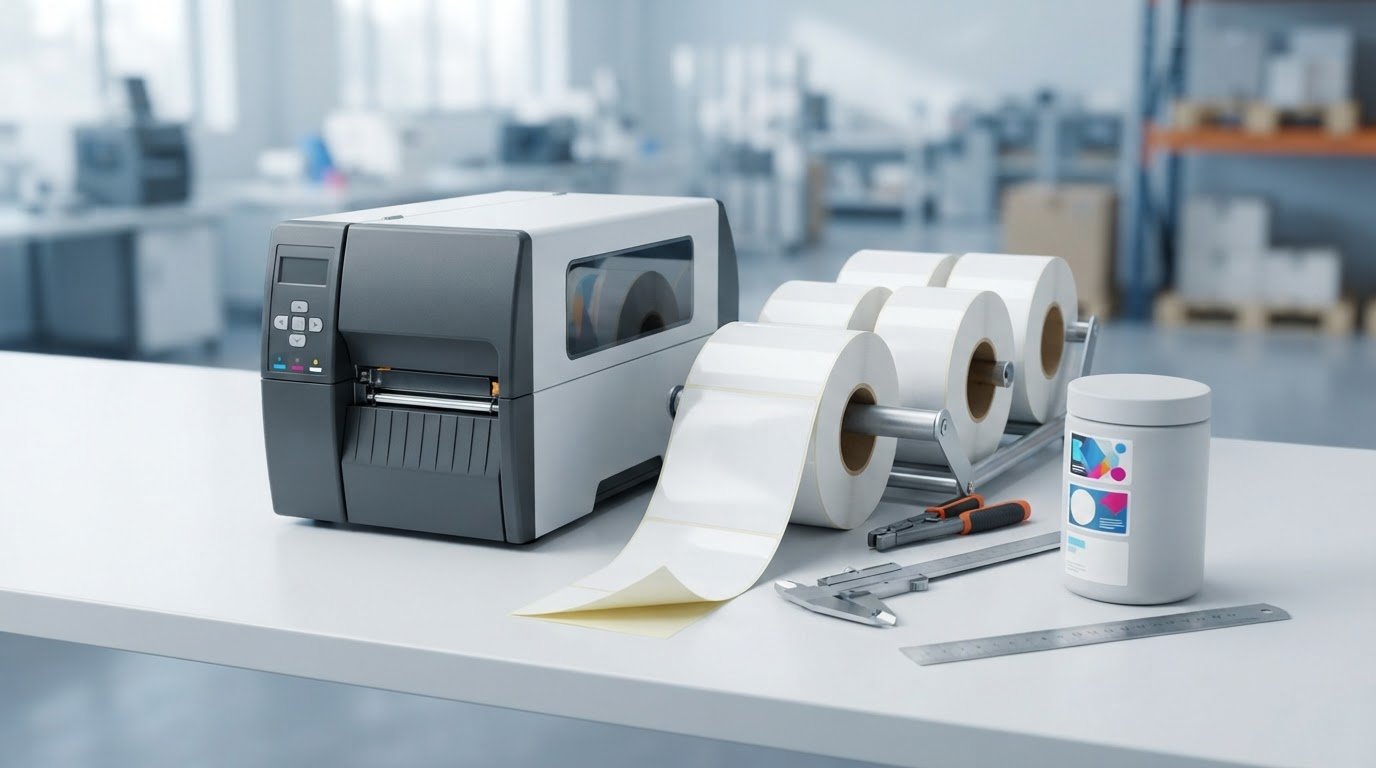
A glossy label roll can look right but still be a poor fit for your printer or product. With epson c7500 gloss polyester label rolls, finish is only one part of the decision: confirm the face material, roll dimensions and exact printer model. The C7500G is designed for glossy media, including gloss polyester, while the C7500 matte model uses different ink intended for matte media.
For a reliable match, compare the roll’s specifications with your printer documentation and the conditions the finished label will face. This guide explains how to distinguish label materials and finishes, check roll fit, and evaluate a sample on the product you intend to label.
Before comparing options, gather your printer model, roll measurements, application surface and any relevant exposure conditions. These details help you focus on media that fits your Epson C7500 workflow, rather than choosing by appearance alone.
Key Takeaways
- Check the label’s face material, finish, adhesive and liner as separate parts of its construction.
- For epson c7500 gloss polyester label rolls, match the media to the exact printer model and its documentation.
- Compare roll dimensions and feed requirements with the printer or unwinder setup before ordering.
- Start with the product surface and use conditions, then test representative labels on the actual application surface.
- Record the printer model, roll measurements and application details to make media comparisons more useful.
What Makes Gloss Polyester Label Rolls Different for the Epson C7500?
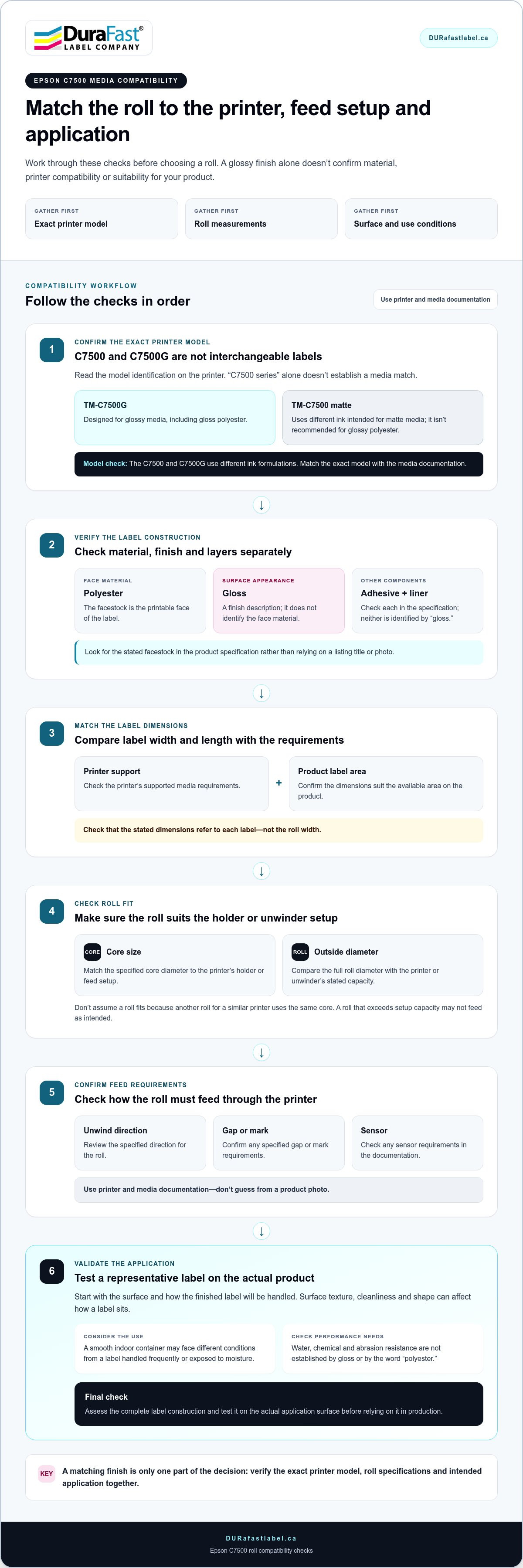
A label can look glossy without being made of polyester. That distinction matters when selecting epson c7500 gloss polyester label rolls: the finish and face material describe different features, and the printer model affects which media is appropriate. The Epson TM-C7500G is designed for glossy media, including gloss polyester. The TM-C7500 matte model uses different ink and isn’t recommended for glossy polyester.
A gloss polyester label is a pressure-sensitive label with a polyester face material and a glossy surface finish. This describes the material and appearance, but not the label’s full construction or performance in a particular setting.
Gloss finish and polyester facestock: what each term tells you
The facestock is the printable face of the label. Polyester identifies the material used for that face; it’s a synthetic material with properties that differ from paper, as outlined in Polyester material properties. The finish describes the surface appearance. Gloss can create a polished look and reflect more light, which may affect how colours and fine details appear under store or workplace lighting.
A pressure-sensitive label also includes an adhesive, which attaches the facestock to a surface, and a liner, the backing removed before application. These layers work together, but they aren’t interchangeable terms. “Gloss” doesn’t identify the face material, and “polyester” doesn’t tell you which adhesive or liner the label uses.
Check the product specification for the stated facestock rather than relying on a listing title or photo. A listing may emphasize a high-gloss appearance without naming the material. If the application depends on polyester, look for that material in the specification, then assess the adhesive, liner and roll details separately.
Why the label’s intended use matters
Start with the product being labelled, the surface where the label will be applied and how it will be handled. A label on a smooth container used indoors may face different conditions from one that is handled frequently or exposed to moisture. Appearance is one requirement; resistance to water, chemicals or abrasion is another. Gloss alone doesn’t establish any of those performance characteristics, nor does the word “polyester.”
Suitability depends on the complete label construction and the conditions of application and use. Surface texture, cleanliness and shape can affect how a label sits, while the adhesive and facestock must suit the job. A label that looks right on packaging still needs to adhere appropriately to that packaging during normal handling. Test the selected construction on the actual product before relying on it in production.
DuraFast Label Company Canada’s inkjet card grading labels serve a distinct application, illustrating why label purpose and specifications are more useful than a broad finish description alone. When evaluating a C7500 roll, consider the printer model, stated material and application requirements together.
How to Check Epson C7500 Gloss Polyester Roll Compatibility
A roll can have the right shape and finish yet still be a poor fit for a printer setup. Before choosing epson c7500 gloss polyester label rolls, compare the exact printer model with the roll’s specifications and intended application. Compatibility depends on the printer’s supported media requirements, not just a similar-looking product listing.
Work through the roll-fit checklist
Check each detail against the printer documentation and the specification for the exact roll you’re considering:
- Exact printer model: Read the model identification on the printer and distinguish the TM-C7500 from the TM-C7500G. “C7500 series” alone isn’t enough to establish a media match.
- Label dimensions: Compare label width and length with the printer’s supported media requirements and the available label area on your product. Confirm that the stated dimensions refer to each label, not the roll width.
- Core size: Match the specified core diameter to the printer’s holder or feed setup. Don’t assume it fits because another roll for a similar printer uses the same core.
- Outside diameter: Compare the full roll diameter with the printer or unwinder’s stated capacity. A roll that exceeds the setup’s capacity may not feed as intended.
- Feed requirements: Review the unwind direction and any specified gap, mark or sensor requirements. Use the printer and media documentation rather than guessing from a product photo.
Compare the specification, not just the listing title
Product titles often highlight a shape, finish or printer family. Those details are useful, but they don’t establish every compatibility requirement. A glossy roll listing may not identify the face material, core, outside diameter or feed details. Base your decision on stated specifications, and don’t fill gaps with assumptions from a similar-looking roll.
Model references matter, too. The C7500 and C7500G use different ink formulations, so a media description that says only “C7500” may not establish whether the roll is appropriate for the gloss model. Match the exact model on your printer with the media documentation, and confirm that the documentation identifies the media as suitable for that model and application.
For an inkjet workflow, compare inkjet label supplies with your printer and media requirements in mind. If you’re comparing a roll, gather the exact printer model, label dimensions, core, outside diameter and application details. DuraFast Label Company Canada offers product information and label guidance to help you focus on relevant Epson C7500 label options.
Gloss Polyester vs. Other Epson C7500 Label Options
Choosing among epson c7500 gloss polyester label rolls and other label options starts with two separate questions: what is the face material, and what finish does it have? A glossy surface can appear on different materials, while the same material may be available in different finishes. A look-alike roll isn’t necessarily made from the same facestock or suited to the same use.
Use this comparison as a starting point, not a substitute for the roll specification. Finish and facestock alone don’t establish adhesive details, and a visually similar label doesn’t guarantee the same material or performance. The C7500 matte and C7500G models also aren’t interchangeable: check that the selected media documentation names the appropriate printer model.
When a glossy appearance may suit the label design
A gloss finish may suit a polished product presentation, particularly when appearance is part of the packaging design. However, reflected light can affect how printed colours, small text or barcodes appear under the lighting where the product will be viewed. Print a representative design and assess it on the product in typical viewing conditions before settling on a finish.
When the material specification matters more than the finish
If a label will face frequent handling or exposure to moisture or chemicals, prioritize the documented facestock and adhesive details over the sheen. Don’t infer water or chemical suitability from “gloss” or “polyester”; look for explicit product specifications that address the relevant conditions. When comparing unprinted blank label rolls, consider the material, adhesive and stated application alongside the finish.
How to Select and Test C7500 Gloss Polyester Labels for Your Application
Choose media by starting with the job the label must do, then evaluate the roll in the workflow where it will be used. A product description alone can’t show how epson c7500 gloss polyester label rolls will look on your package, feed through your setup or perform on its actual surface. A practical selection process connects those requirements before you commit to a roll.
A real-surface test is more useful than appearance alone because it shows how the printed label fits, reads and adheres in its intended setting.
Set application requirements before choosing a roll
Write down the essentials first. This keeps the finish and appearance in perspective alongside the label’s working requirements.
- Identify the surface. Note the product or packaging material, its shape and the area available for the label. Record whether the surface is smooth, curved or otherwise challenging to label.
- Describe application and handling. Consider how the label will be applied, whether by hand or in a production process, and how the finished product will be stored, moved or handled.
- List environmental exposure. Specify relevant conditions such as moisture, chemicals or abrasion. Look for product-level specifications that address those requirements instead of inferring suitability from gloss or polyester alone.
- Define the design. Include the graphics, colours, smallest text and any barcode or variable information. These details help you judge print appearance and whether essential content is legible at the intended label size.
- Record dimensions and production needs. Note the required label width and length, expected print volume and how the roll will feed through the setup. Use the exact media specifications rather than assuming a similar roll will behave the same way.
Use a small print-and-apply evaluation
With the requirements in hand, make a representative sample using the intended C7500 workflow. Use the artwork you expect to print, including the smallest text and any barcode, and print on the candidate media according to its documentation. A brand panel may look fine in a design preview, but a production sample can reveal issues the preview won’t show.
Apply sample labels to the actual product surface using the normal application method. Check that the roll feeds as expected, then inspect placement, print clarity, colour appearance and legibility under the lighting where the product will be seen. Assess adhesion through normal handling and under the stated application conditions. If moisture or another exposure is relevant, compare your observations with the media’s documented performance. An informal trial doesn’t prove suitability beyond the conditions tested.
Record the media details, printer model, design, surface and observations. This makes comparisons more useful if you evaluate another construction or revise the artwork. For help narrowing down options based on your printer and application, share your label requirements with DuraFast Label Company Canada.
Choose Epson C7500 Label Rolls with DuraFast Label Support
A sound media choice brings together the exact printer model, roll fit, face material, adhesive and intended application. A glossy finish may suit your product design, but it doesn’t replace checking that the roll is documented for your printer and use conditions. Keeping these requirements together helps narrow down options for a consistent in-house labelling workflow.
DuraFast Label Company Canada offers Epson C7500 labels and inkjet label supplies for businesses printing labels in-house. When comparing epson c7500 gloss polyester label rolls, use practical application details to focus on the specifications that matter to your setup, rather than appearance or a broad printer-family reference alone.
What details help narrow down label options?
Gather the information you already have before comparing products. A clear starting point makes it easier to assess roll specifications against your workflow and application.
- Printer model: Provide the exact model shown on your printer, including whether it is the C7500 or C7500G.
- Label dimensions: Share the desired label width and length, along with any shape or layout requirements.
- Application surface: Describe the product or packaging the label will be applied to and the available labelling area.
- Finish and material preference: Specify whether you want a glossy appearance and whether the media specification needs to identify polyester.
- Use conditions: Note relevant exposure, such as moisture, chemicals, abrasion or frequent handling, so you can compare the product documentation with the application.
- Existing media details: Include the stated construction and roll measurements from any specification or sample you already have. This helps distinguish confirmed details from assumptions based on a similar listing.
Get guidance for your C7500 labelling workflow
With these details assembled, compare them with the available label specifications for your printer and application. DuraFast Label Company Canada supplies Epson C7500 labels and inkjet supplies for in-house workflows. Focus on a match between the media documentation, roll requirements and the surface you need to label.
Share the printer model, dimensions, surface, finish preference and use conditions you’ve identified, along with any existing roll information. These specifics help make a product discussion more focused than a general request for glossy labels.
Contact DuraFast Label Company Canada for information about Epson C7500 label supplies.
Take the Next Step with a Better-Matched Label Roll
Use the specifications you’ve gathered to make a focused media decision. The printer model, roll fit, label construction and product surface all matter. Describing your workflow clearly helps you compare relevant options without relying on a finish name or product title alone.
DuraFast Label offers Epson C7500 labels and inkjet label supplies to customers across Canada. Whether you’re refining an established setup or evaluating media for a new application, the printer model, roll requirements and intended use provide a practical basis for choosing.
Ready to move forward? Contact DuraFast Label about your Epson C7500 label requirements. A well-informed choice of epson c7500 gloss polyester label rolls starts with the specifications that fit your printer and application.
Frequently Asked Questions
Can the Epson C7500 print on gloss polyester labels?
The C7500G is intended for glossy media, including gloss polyester. The matte Epson C7500 isn’t recommended for gloss polyester because its standard pigment ink may not bond well to glossy surfaces. Before ordering epson c7500 gloss polyester label rolls, check your printer’s model name and the media documentation. If you have the matte model, choose media documented for that model instead.
Are glossy labels and polyester labels the same thing?
No. “Glossy” describes a label’s surface appearance, while “polyester” identifies its facestock material. A glossy label could use a different face material, and polyester labels can have different finishes. A roll described as high-gloss, for example, isn’t necessarily polyester. Check the product specification for both the material and finish, especially when the distinction matters to your application.
What is the difference between Epson C7500 and C7500G label rolls?
There isn’t one universal construction difference defined by those roll labels. The important distinction is which printer model the media is documented for. The C7500 is the matte model, while the C7500G is designed for glossy media. The “G” model uses modified pigment ink formulated for glossy surfaces. Treat a listing’s model reference as a compatibility detail to verify against its product information, not as proof that every roll in that category has identical construction.
How do I find the core size and outside diameter of a label roll?
Look for both measurements in the roll’s product specification, packaging or supplier documentation. Core size refers to the opening through the centre of the roll; outside diameter is measured across the full roll. If you have a sample without documentation, measure the core opening and the outer edge, then compare those figures with your printer or unwinder’s supported media requirements. Don’t estimate from a product photo.
Will gloss polyester labels adhere to every product surface?
No. Adhesion depends on the label construction and the surface it meets. A curved container, textured package or surface with residue may behave differently from a clean, smooth one, and the adhesive must suit the application. Review the media’s stated adhesive details and intended use. If the product will be handled or exposed to moisture, don’t assume the glossy finish or polyester facestock proves the label is suitable.
How can I test whether a label roll suits my application?
Print a sample using the intended printer, artwork and roll, then apply it to the actual product. Check that the media feeds as expected and that text, graphics and barcodes remain legible at the intended viewing distance. Observe how the label sits on the surface during normal handling. Record the results and compare them with the media’s stated specifications; a brief trial doesn’t establish performance beyond the conditions tested.
Can I use the same label roll for every Epson C7500 job?
Not necessarily. A roll that suits one product may not match another job’s printer model, label size, surface, adhesive needs or exposure conditions. A glossy design requirement, for example, doesn’t automatically make the same roll suitable for a matte-model printer or a different package surface. Keep a record of the media specification and the job it was tested for, then review that match before using it for a new application.