Epson C6500 vs. Primera LX910: Which Printer is Best?
1st Jun 2026
Table of Contents
The 8-Inch Battle: Epson C6500 vs. Primera LX910 Overview
For Canadian businesses looking to bring wide-format labelling in-house, the 8-inch colour Label printer market presents a critical decision point. This larger format is a game-changer, unlocking the ability to produce everything from large chemical drum and pallet labels to vibrant, expansive product branding on a single pass. In this competitive space, two printers stand out: the Epson ColorWorks C6500 and the Primera LX910.
Both machines are built with industrial-grade steel cases, signalling their readiness for demanding production environments. The Epson C6500 series is a purpose-built industrial engine known for its reliability and low long-term running costs. The Primera LX910, conversely, positions itself as a versatile contender, offering exceptional print quality and the unique ability to switch between ink types. This comparison will dissect the key differences to help you determine which printer delivers the best return on investment for your specific operations.
Quick-Glance Comparison
-
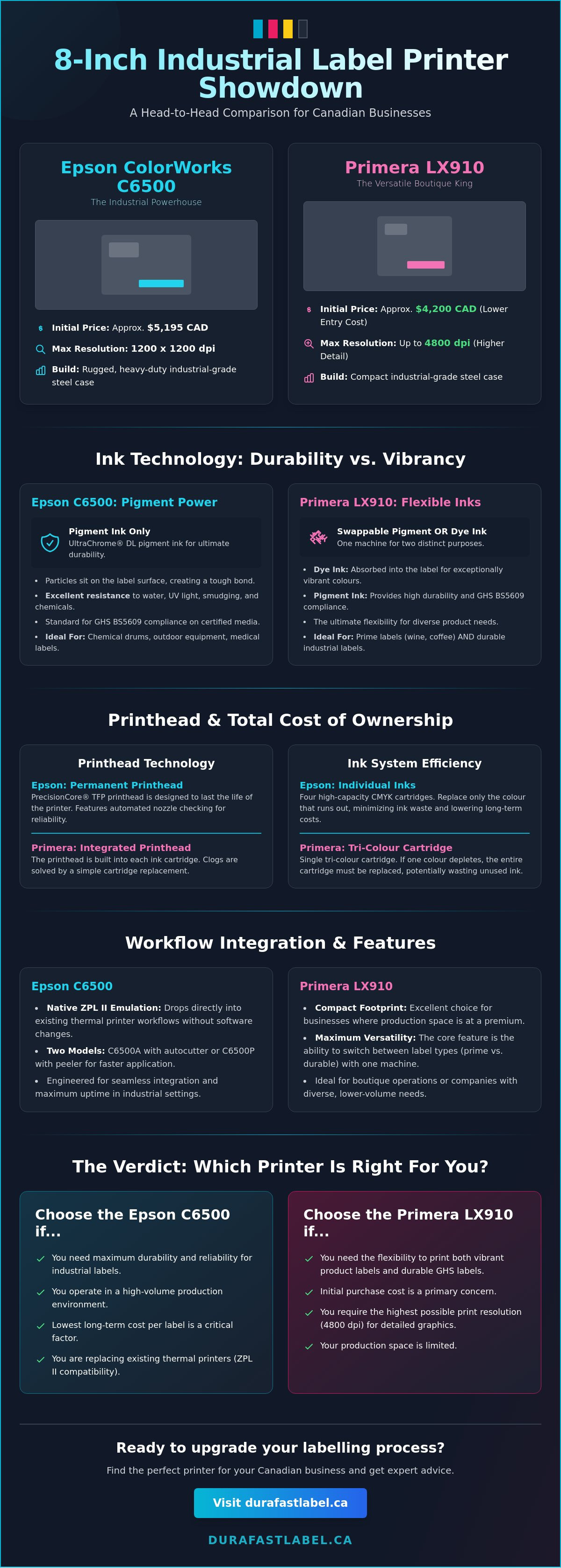
Initial Price: The Primera LX910 has a lower entry cost at approximately $4,200 CAD, compared to the Epson C6500 at around $5,195 CAD.
-
Maximum Print Width: Both printers handle media up to 8 inches wide.
-
Max Resolution: Epson C6500 offers 1200 x 1200 dpi, while the Primera LX910 can achieve up to 4800 dpi for highly detailed graphics.
-
Print Speed: At comparable high-quality settings (1200 dpi), both printers operate at a similar speed of approximately 1 inch per second (ips).
-
Ink System: Epson uses four individual high-capacity pigment ink cartridges (CMYK). Primera uses a single, high-capacity tri-colour cartridge, available in either pigment or dye formulations.
The Epson C6500 Series: Industrial Powerhouse
The Epson ColorWorks C6500 series is engineered from the ground up for industrial endurance and seamless workflow integration. It comes in two distinct models to match your production needs: the C6500A features a robust autocutter for creating variable-length labels and tags, while the C6500P includes a peeler mechanism that presents a single, ready-to-apply label, dramatically speeding up manual application processes. Its most significant advantage for established operations is its native ZPL II emulation, allowing it to drop directly into existing thermal printer workflows without costly software changes. The rugged, heavy-duty construction is designed to withstand the rigours of a warehouse or manufacturing floor, prioritizing uptime and reliability above all else.
The Primera LX910: Versatile Boutique King
The Primera LX910 carves out its niche through remarkable versatility and a lower initial capital outlay. Its defining feature is the ability to use either pigment-based or dye-based inks by simply swapping a single ink cartridge. This allows a business to print highly durable, GHS-compliant chemical labels one day and stunning, high-vibrancy product labels for retail shelves the next—all with one machine. With a more compact footprint than the Epson, it's an excellent choice for businesses where space is at a premium. The LX910 appeals to companies that need maximum flexibility and eye-catching print quality without a significant upfront investment.
Print Quality and Ink Technology: Pigment vs. Dye
Understanding the difference between ink technologies is fundamental to choosing the right printer. Pigment-based inks consist of solid particles suspended in a liquid carrier. When printed, these particles sit on top of the label's surface and bond to it, creating a highly durable image that resists water, UV light, smudging, and chemicals. Dye-based inks, in contrast, are absorbed into the label's top layer, producing exceptionally vibrant colours and a wider colour gamut, but with less resistance to environmental factors.
A critical consideration for chemical and industrial applications is GHS BS5609 compliance, a standard for labels used in marine shipping and harsh environments. Both the Epson C6500 (with its standard pigment ink) and the Primera LX910 (when equipped with its pigment ink cartridge) can produce BS5609-compliant labels on certified media.
Vibrancy vs. Durability: Choosing Your Ink
The choice between ink types comes down to your product's end-use environment. If your labels need to withstand moisture, abrasion, sunlight, or chemical exposure, pigment ink is the non-negotiable choice. This makes the Epson C6500's UltraChrome® DL pigment ink the standard for applications like chemical drums, outdoor equipment, and medical labels.
However, if your goal is to capture a customer's attention on a crowded retail shelf, the vibrancy of dye ink is unmatched. The Primera LX910’s ability to switch to a dye ink cartridge gives it a distinct advantage for businesses producing prime labels for products like wine, coffee, or cosmetics, where shelf appeal directly impacts sales. It truly offers the best of both worlds in a single machine.
Printhead Longevity and Reliability
A crucial, often-overlooked difference lies in the printhead technology. The Epson C6500 features a permanent PrecisionCore® TFP printhead designed to last the life of the printer. This industrial-grade component is separate from the ink cartridges and includes automated nozzle checking to ensure consistent quality and prevent costly downtime. In contrast, the Primera LX910 integrates the printhead into the ink cartridge itself. This simplifies maintenance—a clog or issue is resolved by simply replacing the cartridge—but it means you are replacing the printhead with every ink change, which can have long-term cost implications.
Total Cost of Ownership: Ink Efficiency and Maintenance
While the Primera LX910 offers an attractive initial savings of nearly $1,000, a complete analysis requires looking at the Total Cost of Ownership (TCO). For any label printer, the TCO is defined by the initial hardware price plus the ongoing costs of consumables (ink and labels) and maintenance over the machine's lifespan in a Canadian business context.
The most significant factor influencing TCO in this comparison is the ink delivery system. The Epson C6500 uses four individual, high-capacity CMYK ink tanks. This means you only replace the specific colour that has run out, leading to minimal ink waste. The Primera LX910 uses a single tri-colour cartridge (plus black). If your label designs heavily favour one colour (e.g., a blue logo), you may be forced to discard the entire cartridge even if the other two colours are still full, leading to significant ink waste and a higher cost-per-label over time.
Ink Utilization and Waste Management
For high-volume printing, especially of labels that don't use colours evenly, the Epson C6500's individual ink tank system provides a clear economic advantage. The initial hardware investment is higher, but the savings on ink accumulate with every print run, eventually reaching a "break-even" point where the Epson becomes the more cost-effective machine.
For lower-volume users or those printing a wide variety of designs, the Primera LX910's simplified single-cartridge management can be more convenient. The potential for ink waste is less of a factor when print volumes are low. The overall TCO is also heavily influenced by your choice of inkjet label rolls, as pairing the right material with the right ink is key to achieving both quality and efficiency.
Canadian Operating Realities
For businesses in Canada, sourcing supplies is a key part of the equation. DuraFast Label maintains a comprehensive inventory of both Epson ink cartridges and Primera supplies , ensuring that you can get the consumables you need without lengthy shipping delays from the US. Factoring in reliable, local access to supplies is essential for calculating a realistic TCO and maintaining production continuity.
Workflow Integration: Media Handling and Software
Both printers offer excellent compatibility with Windows environments, and updated drivers have improved support for Mac users. They are designed to handle a wide range of media, from roll-fed blank labels to fanfold stock for high-volume, continuous printing. For businesses that need to produce finished rolls ready for an applicator, an external rewinder can be paired with either model.
To unlock their full potential, both printers integrate seamlessly with professional label design software like Bartender and Loftware NiceLabel . This software allows for the creation of dynamic labels that pull data from databases, ideal for printing product information, serial numbers, and barcodes that change with each label.
Loading and Calibrating Media
The Epson C6500 excels with its highly adjustable media sensors, which can be positioned to detect the gap between labels of unique or irregular shapes, ensuring precise printing and preventing media errors. The Primera LX910 uses a more traditional "pizza-wheel" style roller system, which is effective for standard shapes but may require more careful setup for custom die-cut labels. Selecting high-quality, compatible labels is the best way to avoid jamming and ensure smooth operation on either machine.
Advanced Features: Peeler vs. Cutter
The specific models of the Epson C6500 offer distinct workflow advantages. The C6500P's peeler function is a powerful tool for cell-based manufacturing or manual application lines, as it presents a single, liner-free label to the operator, saving precious seconds on every item. The C6500A's autocutter is perfect for "print and present" applications or for creating batches of labels that will be applied later. These built-in finishing capabilities can significantly enhance productivity, particularly when integrated with automated label applicators in a full production line.
The Verdict: Which Printer Should You Buy?
The choice between the Epson C6500 and the Primera LX910 is not about which printer is "better," but which is better suited to your business model, print volume, and product requirements. Both are excellent machines, but they serve different strategic priorities.
For businesses that need even higher speeds for large-scale production, it's also worth considering a Memjet-powered alternative . The VIPColor VP550 offers incredible print speeds that can be a deciding factor for high-volume operations. At DuraFast Label, our goal is to be your strategic partner, helping you navigate these choices to find the perfect fit. Our team of experts is ready to provide a personalized consultation to analyze your needs.
Choose the Epson C6500 If...
-
Your primary concern is the lowest possible cost-per-label over the long term.
-
You print more than 5,000 labels per month, allowing ink savings to offset the initial hardware cost.
-
You exclusively require GHS/BS5609 durability for chemical, industrial, or outdoor use.
-
You need to integrate with an existing ZPL-based thermal printer workflow.
Choose the Primera LX910 If...
-
A lower initial capital investment is a key decision factor for your business.
-
You need the flexibility to switch between vibrant prime labels (dye) and durable industrial labels (pigment).
-
Space is at a premium in your production centre.
-
You print a wide variety of designs in lower volumes, minimizing the impact of the tri-colour ink system.