Epson C6500 vs Primera LX4000: Which Label Printer is Best?
12th Jun 2026
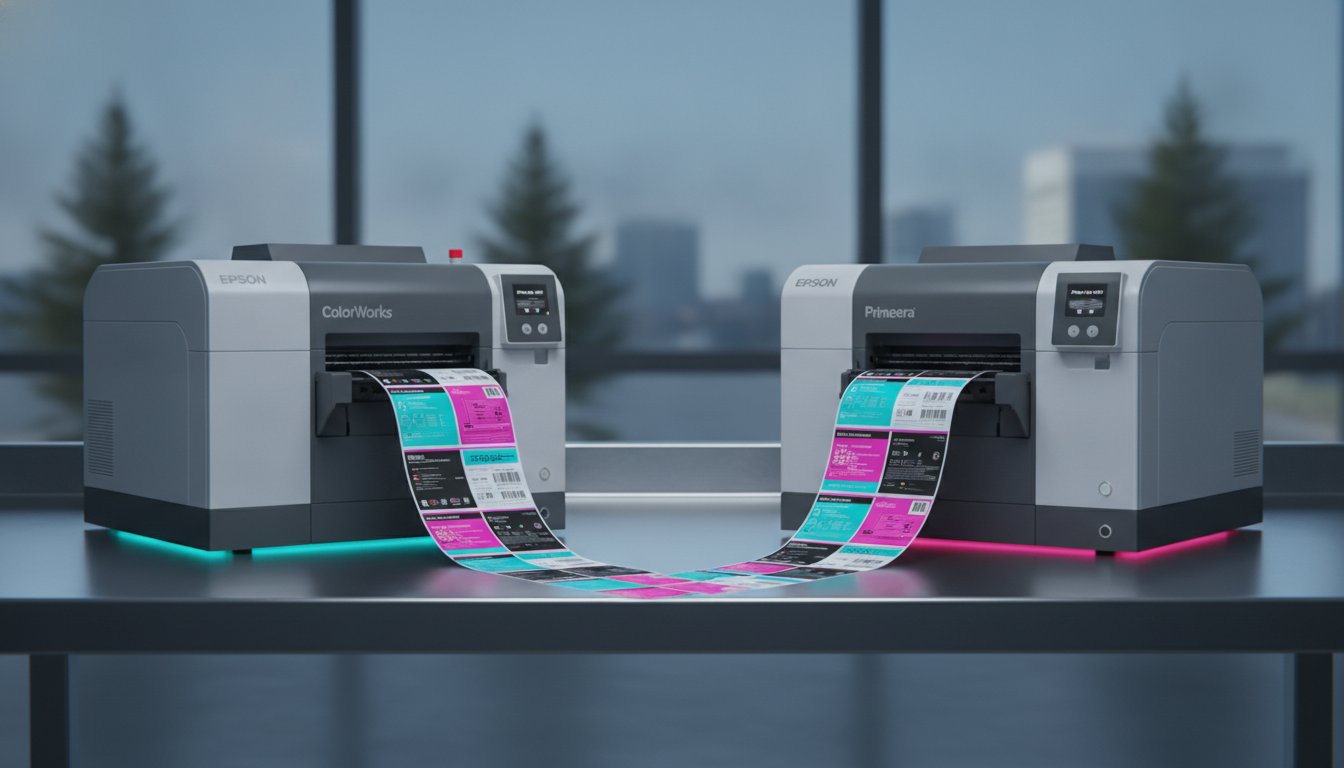
Is the most expensive industrial printer always the smartest investment for your production line? While it's tempting to equate a higher price tag with better performance, your ROI depends on how a machine handles your specific logistical hurdles. If you're tired of high third-party printing costs or labels that fail in cold, wet environments, you need a solution that balances durability with fiscal responsibility. When you compare Epson C6500 and Primera LX4000 colour label printer units, you quickly realize that while both are wide-format powerhouses, they serve very different operational roles.
We understand that choosing between these two leaders can feel like a complex diagnostic process. This article provides the clarity you need by breaking down the technical deltas between the Epson C6500 and the Primera LX4000. We'll examine how the Epson’s industrial ZPL integration stacks up against the Primera’s dual-ink architecture and "Big Ink" system. By the end of this comparison, you'll know exactly which printer offers the operational seamlessness and long-term value your Canadian business requires to take full control of its labelling process.
Key Takeaways
- Identify the primary hardware differences to determine which machine fits your production volume and specific environmental requirements.
- Discover how to compare Epson C6500 and Primera LX4000 color label printer models based on print speed and resolution to maximize your daily throughput.
- Evaluate the Primera LX4000’s dual-ink flexibility against the Epson C6500’s dedicated pigment system for GHS BS5609 chemical labelling compliance.
- Learn how the Epson C6500’s ZPL II emulation allows for a seamless transition when replacing legacy black-and-white thermal printers.
- Analyze long-term ROI by examining ink tank capacities and the operational benefits of internal label unwinders for dusty warehouse environments.
The 2026 Wide-Format Showdown: Epson C6500 vs. Primera LX4000
Wide-format colour labelling has become a cornerstone of modern Canadian manufacturing and distribution. As production cycles shorten, businesses are moving away from the logistical delays of third-party print houses to gain better control over their inventory. In 2026, the market requires more than just a clear image. It demands extreme durability for cold storage and a significantly reduced cost-per-label to protect bottom-line margins. Label printers in the wide-format category are essential for producing 8-inch wide labels for chemical drums, large-format food packaging, and bulk shipping containers.
The Baseline: What Both Printers Deliver
Before we look at the specific differences, it's helpful to understand the common ground these machines share. Both the Epson C6500 and the Primera LX4000 represent the high-performance tier of inkjet technology. They offer high-resolution output that ensures fine text and complex barcodes remain legible under industrial scrutiny. When you compare Epson C6500 and Primera LX4000 color label printer hardware, you'll find they both prioritize professional-grade results.
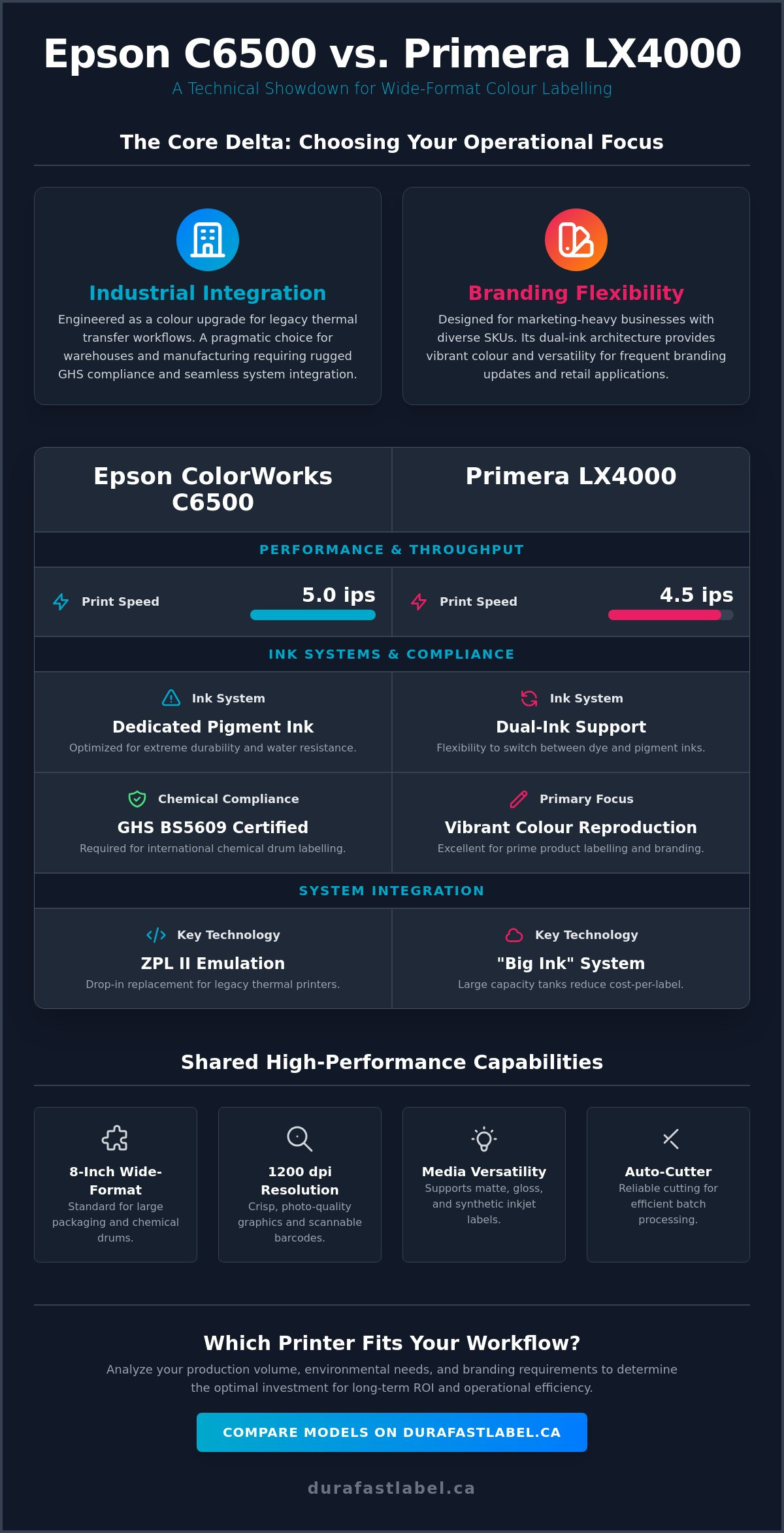
- Wide-Format Capacity: Both units handle media up to 8 inches wide, which is the standard for large-scale branding and secondary packaging.
- Maximum Resolution: With capabilities reaching 1200 dpi, both machines produce crisp, photo-quality graphics that rival commercial presses.
- Integrated Auto-Cutters: Each printer features a reliable mechanical cutter to handle varied label lengths, allowing for efficient batch processing.
- Media Versatility: They are fully compatible with a broad selection of inkjet labels, including matte, gloss, and synthetic materials.
The Core Delta: Industrial Integration vs. Branding Flexibility
The main difference between these two models lies in their intended operational environment. The Epson C6500 is engineered as a direct colour upgrade for legacy black-and-white thermal transfer workflows. It utilizes ZPL II emulation, allowing it to drop into existing systems with minimal software reconfiguration. It's the pragmatic choice for warehouses that need industrial speed and GHS-compliant durability for chemical labelling. It prevents disruption by mimicking the languages your existing systems already speak.
Conversely, the Primera LX4000 targets marketing-heavy businesses with diverse SKU requirements. While it matches the Epson in width, its architecture focuses on ink versatility. It's designed for companies managing a high volume of unique product lines where vibrant colour reproduction is just as important as the data on the tag. If your workflow involves seasonal product changes or frequent branding updates for boutique retail items, the Primera’s dual-ink support offers a level of flexibility that the more rigid Epson system does not. Choosing the right technology requires a diagnostic look at your industry. A food producer might prioritize the Primera’s colour pop, whereas a chemical manufacturer will value the Epson’s rugged integration.
Print Performance and Mechanical Differentiators
How do you measure the true efficiency of a label printer? It starts with mechanical throughput and the ability to integrate into your current floor plan. When you compare Epson C6500 and Primera LX4000 color label printer models, the mechanical delta becomes apparent in how they handle high-volume demands. Both utilize advanced Digital printing technology, but their physical configurations solve different operational hurdles. While the Epson is built for the rigours of a traditional production floor, the Primera offers a compact, self-contained design that prioritizes media protection.
Speed and Throughput: Ips Benchmarks
Print speed is measured in ips (inches per second). This metric determines how quickly your team can clear a print queue. The Epson C6500 delivers a consistent speed of up to 5 ips, even when maintaining high resolution. This makes it a reliable workhorse for businesses that cannot afford bottlenecks. The Primera LX4000 is slightly slower at a maximum of 4.5 ips. However, it focuses on maximizing throughput without sacrificing colour depth. In on-demand environments, the "first label out" time is often more critical than raw speed. The Epson typically excels here, initiating the print job almost instantly to keep your shipping or packaging lines moving without pause.
Software and Emulation: ZPL vs. Standard Drivers
Why is ZPL II emulation the deciding factor for many industrial users? For decades, warehouses have relied on black-and-white thermal printers that communicate via Zebra Programming Language (ZPL). The Epson C6500 is designed as a "drop-in" replacement for these units. It understands the legacy code, allowing you to add colour to your labels without rewriting your entire software backend. This creates a level of operational seamlessness that few other inkjet printers can match.
The Primera LX4000 takes a different path by offering robust, user-friendly drivers for both Windows and Mac. This makes it an ideal choice for creative teams who use standard design suites. Both machines are fully compatible with professional barcode software like BarTender and Loftware, ensuring your data remains accurate and compliant. If you aren't sure which software environment fits your existing infrastructure, our team can help you evaluate your current workflow.
The physical design also impacts long-term reliability. The Primera LX4000 features an internal label unwinder. This enclosed design protects your media from environmental debris and dust, which is a significant benefit in less-than-pristine warehouse conditions. In contrast, the Epson C6500 often utilizes an external setup for larger rolls. Regarding maintenance, the Epson is known for its highly efficient automated cleaning cycles that minimize ink waste. The Primera LX4000 utilizes a reusable printhead system paired with its "Big Ink" tanks, aiming to reduce the frequency of hardware replacements over the life of the machine.
Ink Systems and Media Compatibility: Pigment vs. Dual Support
How do you ensure your branding survives the journey from the warehouse to the customer's doorstep? The choice of ink technology is the primary factor in label longevity. When you compare Epson C6500 and Primera LX4000 color label printer systems, the delta is found in how they handle pigment and dye formulations. While the Epson is a dedicated pigment powerhouse, the Primera introduces a dual-ink architecture that allows you to swap between dye and pigment depending on the job at hand. This flexibility is a game-changer for businesses that produce both industrial shipping tags and high-end retail packaging.
Durability and Compliance: GHS and Beyond
For businesses in the chemical or industrial sectors, durability isn't just a preference; it's a regulatory requirement. The Epson C6500 uses a dedicated pigment ink system designed specifically for GHS BS5609 compliance. When paired with the correct synthetic media, these labels can withstand saltwater immersion, extreme UV exposure, and harsh abrasion. This makes it the baseline choice for producing weatherproof UL certified labels.
The Primera LX4000 also offers pigment ink support, which provides excellent resistance on synthetic media for outdoor use. However, the real advantage for Canadian retailers lies in its support for water-enhanced dye inks. These inks deliver the vibrant colour "pop" required for prime product branding while offering better resistance to condensation and moisture than standard dyes. If you're labelling frozen foods or beverages that face heavy condensation, this specific ink type prevents the smudging that often plagues cheaper inkjet solutions.
The "Big Ink" Advantage: Primera’s Cost-Efficiency
One of the most significant evolutions in 2026 is the shift toward larger ink reservoirs to reduce user intervention. The Primera LX4000 features a "Big Ink" system, utilizing large, individual tanks for Cyan, Magenta, and Yellow. Because these are separate tanks rather than a single tri-colour cartridge, you only replace the specific colour that has been depleted. This significantly reduces ink waste and lowers your overall cost-per-label.
In comparison, the Epson C6500 utilizes individual cartridges that are engineered for high-volume industrial throughput. While both systems avoid the waste of tri-colour bundles, the Primera’s reusable printhead design and tank volume are specifically balanced for mid-to-high volume users looking for the best fiscal ROI. By choosing a system with high ml capacity, you minimize the frequency of downtime, ensuring your production line remains operational during peak seasonal demand. This pragmatic approach to ink management allows you to focus on growth rather than constant maintenance.
Operational Efficiency: Cost-Per-Label and Long-Term ROI
Why does a lower purchase price often lead to higher operational regret? When evaluating wide-format equipment, the initial invoice is only the starting point of your fiscal journey. Beyond the upfront investment, businesses must realize how label waste and maintenance downtime erode profit margins over time. To accurately compare Epson C6500 and Primera LX4000 color label printer units, you must look at the total cost of ownership through the lens of your specific production volume. Both machines offer paths to fiscal responsibility, but they achieve it through different mechanical strategies.
Calculating Your Total Cost of Ownership (TCO)
The most significant variable in your TCO is ink consumption. High-coverage designs with dense graphics will deplete tanks faster, making the cost-per-ml a critical metric. The Primera LX4000’s "Big Ink" tanks are designed for high-volume efficiency, while the Epson C6500 uses industrial-grade cartridges that prioritize longevity. In mixed-use facilities that currently rely on black-and-white units, comparing the cost of thermal ribbons to inkjet ink is a vital part of the fiscal audit. While inkjet eliminates the need for ribbons, it requires a strategic approach to media. Purchasing blank labels for sale in bulk quantities can significantly offset the cost of consumables, providing a better return on every print job.
Don't overlook the "hidden" costs of printhead maintenance. The Epson C6500 features an industrial build where the printhead is designed to last the life of the machine under normal conditions. The Primera LX4000 utilizes a user-replaceable, modular printhead. While this means an occasional additional cost for the part, it also means your team can perform the replacement on-site without waiting for a technician. This prevents the disruption of a multi-day production halt. If you're unsure which maintenance model fits your team's technical capacity, you should consult with our experts for a personalized cost breakdown.
Environmental Suitability: Dusty Warehouses to Frozen Foods
The physical environment of your facility directly impacts the lifespan of your hardware. In many Canadian warehouse environments, environmental debris and dust are constant challenges. This is where the ROI of an internal unwinder becomes clear. By keeping the label roll enclosed, the Primera LX4000 prevents dust from settling on the media surface before it reaches the printhead. This simple design choice reduces the frequency of automated cleaning cycles and extends the life of the mechanical components.
For businesses involved in cold storage or frozen foods, the ROI is measured in label performance. Inks must resist condensation and smudging as products move through different temperature zones. The Epson C6500’s pigment system is particularly adept at maintaining integrity in these conditions. When you pair the right ink with a durable synthetic substrate, you ensure that your branding remains professional from the freezer to the retail shelf. Selecting the correct media pairing isn't just about aesthetics; it's a pragmatic step to maximize your hardware investment and prevent costly re-labelling projects.
Making the Final Call: Which Printer Fits Your Workflow?
Which machine ultimately secures the best ROI for your production line? Deciding to compare Epson C6500 and Primera LX4000 color label printer units reveals that while they share a baseline of 8-inch media width and 1200 dpi resolution, their operational deltas are significant. Your choice should depend on whether you prioritize industrial integration or branding versatility. Both printers empower you to take control of your production, but they serve different master strategies. DuraFast Label Company Canada acts as your strategic partner in this transition, ensuring you select the hardware that prevents disruption and maximizes your fiscal resources.
The Epson C6500 Verdict: The Industrial Workhorse
You should choose the Epson C6500 if your facility requires 24/7 reliability and must maintain a strict connection to legacy systems. This printer is the pragmatic resolution for warehouses that already utilize Zebra Programming Language. Because it offers ZPL II emulation, it acts as a seamless colour upgrade for your existing fleet. It's the diagnostic choice for logistics, heavy manufacturing, and GHS-compliant chemical labelling where durability is non-negotiable. To achieve a complete facility solution, this unit is best paired with other industrial label printers that handle your secondary shipping and inventory needs. It's built for longevity and high-speed throughput in environments where every second of uptime counts.
The Primera LX4000 Verdict: The Branding Specialist
The Primera LX4000 is the superior choice if your business thrives on marketing-heavy flexibility and high-SKU diversity. Does your product line include craft beverages, gourmet foods, or health and beauty items? If so, the LX4000’s dual-ink architecture provides the highest possible colour vibrance for retail shelves while maintaining the ability to switch to pigment for moisture resistance. Its internal unwinder and "Big Ink" system are designed for entrepreneurs who need to pivot quickly between seasonal designs without wasting expensive consumables. For those looking for even higher speed alternatives in this category, our VIPColor VP550 Memjet Color Label Printer guide offers additional insights into high-throughput branding technology.
DuraFast Label Company Canada is here to support your move toward in-house colour label production. We realize that the logistical hurdles of third-party printing can stifle your growth. By bringing this process under your own roof, you eliminate slow turnaround times and gain total control over your inventory. Whether you need the industrial grit of the Epson or the creative versatility of the Primera, we provide the expertise and the media to ensure your labels perform exactly as promised. Taking control of your production is a curative step for your business; we're here to help you make it with confidence.
Take Control of Your In-House Labelling Strategy
Selecting the ideal hardware is a diagnostic process that determines your operational seamlessness for years to come. Whether your facility requires the rugged ZPL II emulation of the Epson C6500 or the vibrant "Big Ink" efficiency of the Primera LX4000, the goal is to take control of your production and eliminate third-party delays. When you compare Epson C6500 and Primera LX4000 color label printer models, it's clear that both units offer a definitive path to high-resolution, in-house success.
DuraFast Label Company Canada acts as your strategic partner throughout this transition. As an authorized Canadian dealer for both Epson and Primera, we maintain an extensive inventory of labels and ink in stock to prevent disruption to your workflow. Our expert technical support is dedicated to helping Canadian businesses maximize their ROI and maintain high performance in any environment. Don't let inconsistent quality or slow turnaround times hold your brand back.
Browse our full range of Colour Label Printers and let us help you find the perfect fit for your specific logistical challenges. We're ready to help you achieve better results today.
Frequently Asked Questions
Does the Epson C6500 support both dye and pigment inks?
No, the Epson C6500 is a dedicated pigment ink printer. This specialization ensures that every label produced meets high standards for industrial durability and GHS BS5609 compliance. While it doesn't offer the ink-swapping flexibility of some other models, its pigment system provides superior resistance to chemicals, UV exposure, and heavy abrasion in harsh warehouse environments.
What is the main difference between an internal and external label unwinder?
The main difference lies in environmental protection and roll capacity. An internal unwinder, such as the one found on the Primera LX4000, keeps the label roll enclosed within the printer housing to prevent dust and environmental debris from contaminating the media. External unwinders typically accommodate much larger label rolls, which reduces the frequency of media changes during high-volume industrial production runs.
Can I use the Primera LX4000 for GHS-compliant chemical labels?
Yes, the Primera LX4000 is capable of producing GHS-compliant labels when it's configured with pigment ink and paired with certified synthetic media. This combination ensures the labels survive saltwater immersion and harsh handling as required by BS5609 standards. It's an excellent solution for businesses that need a single machine to handle both vibrant retail branding and rugged chemical labelling.
How does ZPL emulation benefit my existing labelling workflow?
ZPL emulation allows the Epson C6500 to function as a direct colour replacement for legacy black-and-white thermal printers. It interprets the same programming language used by your existing warehouse management software, which prevents the need for costly software overhauls. This feature is a primary reason many facilities choose to compare Epson C6500 and Primera LX4000 color label printer units during an industrial technology refresh.
Which printer has a lower cost-per-label for high-coverage designs?
The Primera LX4000 often delivers a lower cost-per-label for designs with high ink coverage due to its "Big Ink" system. The large individual ink tanks allow you to replace only the specific colour that has been depleted, which minimizes waste. While the Epson C6500 is also highly efficient, the Primera’s tank architecture is specifically engineered to maximize fiscal ROI for marketing-heavy labels with dense graphics.
Are the printheads on the Epson C6500 and Primera LX4000 user-replaceable?
The Primera LX4000 features a modular printhead that's designed to be user-replaceable, allowing your team to perform maintenance on-site without a technician. In contrast, the Epson C6500 utilizes a permanent PrecisionCore printhead intended to last the life of the machine. While the Epson head is built for extreme industrial longevity, the Primera’s modular design ensures that any eventual hardware wear doesn't result in extended downtime.
What is the maximum label width for the Epson C6500 and Primera LX4000?
The Epson C6500 supports a maximum print width of 8.34 inches, while the Primera LX4000 offers a maximum width of 8.25 inches. Both machines are top-tier choices for wide-format applications, such as labelling chemical drums, large food pails, and secondary shipping containers. These widths provide the necessary surface area for complex GHS data and high-impact branding graphics on large-scale packaging.
Do these printers work with both Windows and Mac operating systems?
Both printers are fully compatible with Windows and Mac operating systems, ensuring they fit into almost any existing IT infrastructure. When you compare Epson C6500 and Primera LX4000 color label printer drivers, both models offer robust support for professional design suites. They also integrate seamlessly with industry-standard barcode software like BarTender and Loftware NiceLabel to ensure accurate data management across your entire production line.