Epson C6000 Matte Synthetic Label Rolls: How to Choose the Right Roll
20th Oct 2026
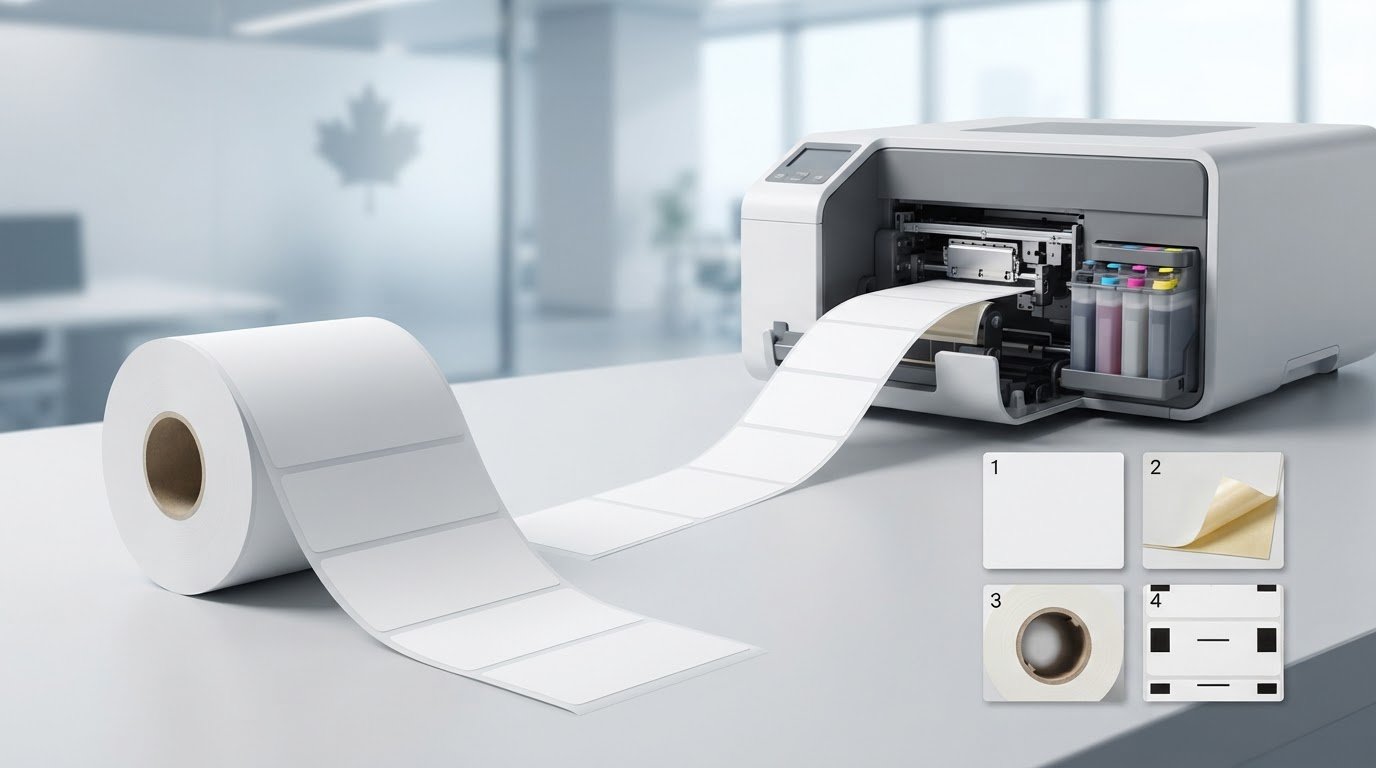
Does a matte finish mean a roll is automatically right for your Epson C6000? Not necessarily. Choosing epson c6000 matte synthetic label rolls means matching the material, adhesive, roll format and intended use, not just the surface finish.
To decide whether synthetic stock suits your product or environment, compare the exact roll specifications with your printer requirements and how the label will be used. Matte paper and matte synthetic labels may look similar, but they have different facestocks, and neither finish tells you how the label will perform.
This guide covers the key checks, from facestock and adhesive to roll compatibility and sample testing. It also explains how to compare Epson C6000 label options from DuraFast Label Company Canada, a Canadian supplier of Epson C6000 labels and inkjet supplies.
Key Takeaways
- Choose epson c6000 matte synthetic label rolls by matching the material, adhesive and application, not just the matte finish.
- Assess facestock, printable surface or coating, and adhesive separately. Synthetic stocks can differ in each of these specifications.
- Use your exact Epson C6000 model and its product documentation to match label size, core, roll direction and sensing method.
- Before scaling production, print a sample on the intended stock and evaluate artwork, small text, barcodes, colour and ink coverage.
- Have your printer model, label dimensions and roll-format requirements ready when comparing DuraFast Label Company Canada’s Epson C6000 labels.
Epson C6000 Matte Synthetic Label Rolls: What Buyers Need to Know
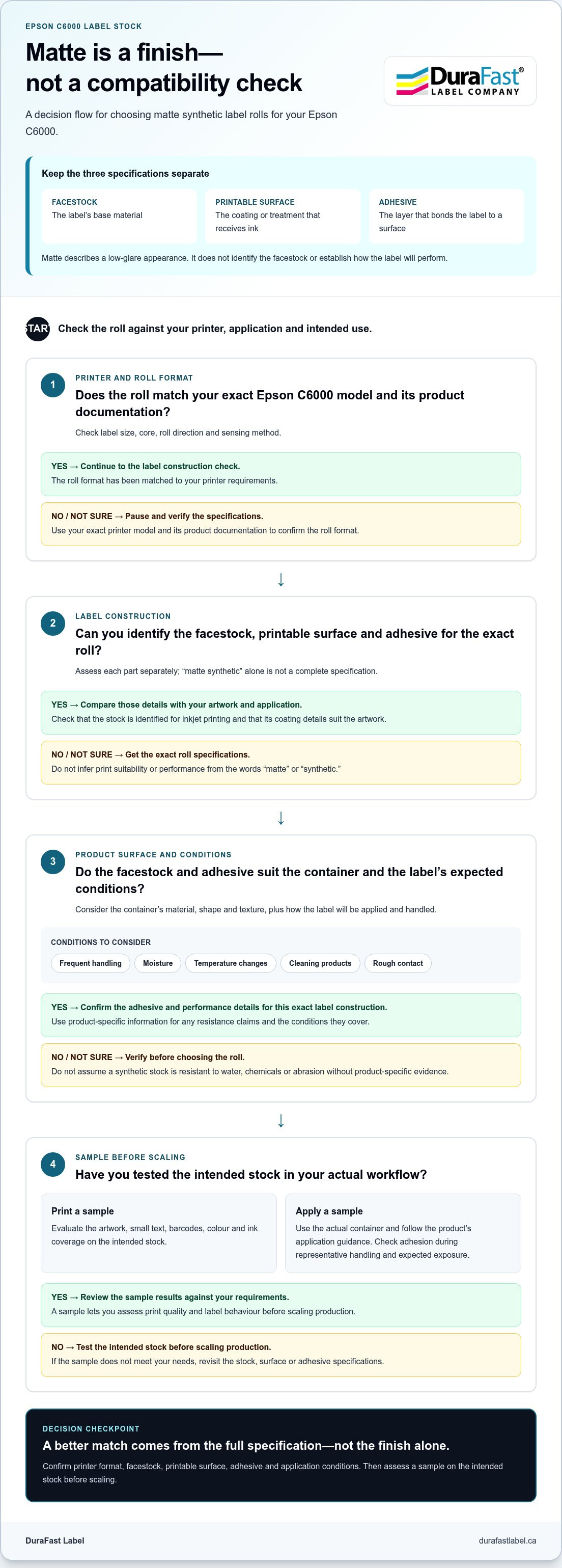
When comparing epson c6000 matte synthetic label rolls, separate three features that are easy to confuse: finish, facestock and adhesive. Finish describes the surface appearance, facestock is the label’s base material, and adhesive is the layer that bonds it to a surface. A matte synthetic roll has a low-glare finish and a synthetic facestock, but those details alone don’t tell you how it will print or perform in your application.
Matte finish versus synthetic facestock
Matte describes how a surface looks and reflects light, not what it’s made of. Paper and synthetic facestocks can both have matte surfaces, so matte paper and matte synthetic labels are different material choices. Synthetic paper can be made from materials such as synthetic resin; synthetic paper offers background on this broad category, but individual label constructions vary.
Neither “paper” nor “synthetic” guarantees a particular level of durability. Performance depends on the specific material and construction, as well as the conditions the label will face. The word “synthetic” by itself doesn’t establish resistance to water, chemicals or abrasion. Look for product-specific information on those properties rather than assuming all synthetic stocks behave alike.
The printable surface matters too. A coating or other surface treatment can affect how ink is received and how printed details appear. A matte finish doesn’t guarantee that every stock will produce the same colour, text or image quality on an Epson C6000. Check the details for the exact label stock when assessing print suitability.
When a matte synthetic label may suit a workflow
A matte surface may suit product information or branding when you want a subdued, low-glare appearance. If you are extending your visual branding from on-shelf packaging to a physical retail space, commercial solutions like custom shop signs uk can help establish a unified brand identity across touchpoints. Synthetic facestock may also be worth considering when the label’s base material needs to suit the product’s handling or environment. These are starting points, not performance guarantees. The stock’s stated characteristics and adhesive still need to match the conditions of use.
Consider the label’s full life cycle. Will it go on a clean, dry package, or be handled frequently? Will it encounter moisture, temperature changes, cleaning products or rough contact? These conditions can affect both facestock and adhesive selection. A material may suit the package while its adhesive fails to bond well to the surface.
For specialized workflows, start with the item being labelled. For example, inkjet card grading labels serve a different labelling need, illustrating why stock selection should begin with the application. DuraFast Label Company Canada’s Epson C6000 labels give you a relevant category to compare against your requirements. Match the label’s documented construction and intended use to your printer and workflow instead of treating “matte synthetic” as a complete specification.
How Synthetic Facestock and Adhesive Affect Epson C6000 Label Performance
A successful label depends on more than its facestock. For epson c6000 matte synthetic label rolls, assess three components separately: the facestock that forms the label’s base, the printable surface or coating that receives ink, and the adhesive that bonds the label to the product. Each affects a different part of the job, so suitable facestock still needs a compatible printable surface and adhesive.
Synthetic materials aren’t one uniform performance class. A material name alone doesn’t tell you how a label will print, conform to a container or hold up in its environment. Claims about water, oil, chemical, UV, abrasion or temperature resistance require product-specific evidence, such as specifications for the exact facestock, coating and adhesive, plus any stated test conditions. Don’t infer these properties from the word “synthetic.”
Compare synthetic label materials without assuming identical performance
Polypropylene, polyethylene and polyester are examples of synthetic material families, not a claim that each is available in a particular Epson C6000 roll. Their construction and printable surfaces can vary. A label’s stiffness and conformability may affect how it sits on a flat carton compared with a curved bottle or a textured container. Review the details for the specific roll before drawing conclusions about its handling or print suitability.
Choose adhesive for the surface and use conditions
Start adhesive selection with the container: its material, shape and texture all matter. Application conditions matter too, including the temperature of the surface when the label is applied and the environment it will encounter afterward. Permanent, removable and specialty adhesives describe different product options, but exact behaviour depends on the adhesive specification. Match the documented adhesive to the surface and intended use.
A small trial can reveal a mismatch before you adopt a roll for regular production. Apply the label to the actual container, following the product’s application guidance. Check whether it adheres as required and stays in place during representative handling. If it will face moisture, cleaning, temperature changes or other exposure, test it under expected conditions and compare the result with the roll’s stated performance claims.
- Facestock: Does the base material suit the product’s shape and handling needs?
- Printable surface: Is the stock identified for inkjet printing, and are its coating details suitable for your artwork?
- Adhesive: Does the adhesive specification address the container surface and application conditions?
- Performance evidence: Are resistance claims stated for the specific label construction and conditions you expect?
These checks turn a broad material description into a practical purchasing decision. To discuss label requirements for your workflow, talk with DuraFast Label Company Canada about your label application.
Epson C6000 Matte Synthetic Rolls: A Compatibility Checklist
A printer-family name alone doesn’t prove that every roll will work. Before ordering epson c6000 matte synthetic label rolls, identify your exact Epson C6000 variant and compare the roll specifications with that model’s product documentation. Label dimensions, roll orientation and sensing requirements can affect whether stock feeds and prints as intended.
Check printer model and roll configuration
Start with the model code on the printer’s identification label or in its documentation. Compare the specific roll listing with the printer requirements. Don’t rely only on a broad “C6000 compatible” description; the exact variant and roll configuration matter.
Use this table to gather information before buying. Enter details from the printer documentation and the exact label listing rather than assuming a specification based on another roll.
| Specification | Printer requirement | Roll listing |
|---|---|---|
| Model | Record the exact model code | Check the models named as compatible |
| Label size | Note supported media dimensions | Record label width and dimensions |
| Core | Check the required core size | Record the roll core size |
| Roll direction | Check the required orientation | Confirm the unwind direction |
| Sensing method | Review sensor requirements | Check for matching marks, gaps or stock type |
Also verify roll width and whether the printer setup calls for die-cut labels or continuous stock. The sensor must detect the label format as expected. If the documentation and product listing use different terms, compare the actual requirements instead of treating similar wording as confirmation.
Match label size and shape to the artwork
Physical fit is only part of the decision. The label’s dimensions and shape define the usable space for your design and influence how it sits on the product. A rectangular layout may suit a broad, flat area, while a circular label may suit a different presentation. Neither shape is automatically right: consider the available surface and how customers will read the information.
Before selecting a roll, check that the artwork fits inside the label boundary. Leave suitable margins, preserve any required barcode quiet space, and keep small text legible at the intended print size. A design can fit the label file and still feel crowded if essential content sits too close to the edge or the label’s placement on a curved container affects its appearance.
- Confirm the model: Use the complete printer model code, not just the series name.
- Compare the roll: Match label dimensions, core, orientation and sensing details against product documentation.
- Review the design: Check that the shape and usable area accommodate text, graphics and barcode space.
Once each field aligns, you’ll have a clearer basis for judging whether a roll fits your printer and workflow. Use verified dimensions from the specific roll listing. Don’t substitute a familiar size or assume another C6000 roll’s configuration applies.
Test Matte Synthetic Label Rolls Before Scaling Production
A roll can meet its listed specifications and still need to prove itself in your workflow. Before committing to a production run, test the exact stock with your Epson C6000, artwork, packaging and application method. This can reveal print or application issues while there’s still time to adjust.
Follow a simple sequence:
- Confirm specifications. Check the roll’s compatibility and material details against your printer documentation and the label supplier’s instructions.
- Print a representative sample. Use the intended artwork and print settings on the actual stock.
- Apply the label. Put the sample on the real container using the planned production method.
- Evaluate the result. Inspect the print, adhesion and fit under conditions that reflect the label’s expected use.
Run a representative print and application test
Choose artwork that reflects the job, including small text, fine graphics, barcodes, colour and areas with heavier ink coverage. Check whether text is readable, details are distinct, and the colour and surface appearance suit your needs. A barcode’s appearance alone doesn’t prove it will scan reliably, so assess it using your normal scanning process where applicable.
Apply samples to the actual packaging surface, following the label supplier’s instructions. Check whether the label lies flat and fits the container. Record issues such as lifting edges, wrinkles, smearing or poor alignment, along with the stock and print settings used. These notes make it easier to compare options or troubleshoot before scaling up.
Review results against the real operating environment
Think beyond the moment of printing. Consider how the labelled product will be handled, stored and transported, and what conditions it may encounter throughout its life cycle. If moisture or chemical exposure is part of the application, assess it against documented capabilities for the specific label construction and suitable test conditions. Don’t assume the material name alone proves resistance.
Keep a brief record of the sample, settings, application surface and observations. This gives you a practical reference if you revisit the stock choice or adjust the design. A test is most useful when it reflects the label’s full journey, from printing and application through expected handling and storage.
Sample testing connects roll specifications to actual application needs. For epson c6000 matte synthetic label rolls, evaluate the printed label on the intended package rather than relying on a description alone. Once the sample meets your documented requirements, you’ll have a stronger basis for production. Discuss your Epson C6000 label requirements with DuraFast Label.
Find Epson C6000 Matte Synthetic Label Rolls for Your Application
A useful roll specification brings the printer, label and application into one clear picture. Before comparing options, gather the details that affect fit and performance: the exact printer model, finished label dimensions, roll format, facestock and adhesive requirements. This narrows the choice without treating “matte synthetic” as a complete product specification.
Prepare a clear label-roll specification
Start with the full model code shown on your printer or in its documentation. Note the finished label width and height, shape, and any roll-format requirements. Use the specific roll listing and printer documentation to establish details such as core, roll direction and sensing method. Don’t estimate these from a label’s appearance or a general series name.
Next, describe the package the label will be applied to. Include its surface material and shape, and note any texture or application conditions that could affect adhesion. Consider the label’s expected handling, storage and exposure, then use product-specific information to identify the facestock and adhesive requirements.
Separate what the label must do from what you’d prefer it to look like. Printer fit, readable content and an adhesive suited to the packaging surface are practical requirements. Matte appearance or a particular label shape may be preferences, unless the presentation or available application area makes them essential.
- Printer: Record the exact Epson C6000 model and relevant media requirements.
- Label: Specify finished dimensions, shape and the roll format required by the printer.
- Material: Identify the facestock and any documented print-surface details relevant to the job.
- Application: Describe the package surface, handling and expected environmental conditions.
- Adhesive: State the bonding needs based on the actual surface and application conditions.
Get help matching supplies to your workflow
DuraFast Label is a Canadian source for Epson C6000 labels and printing supplies. Explore the inkjet labels category, then use each roll’s details to assess printer fit, material and intended use. A product’s finish or facestock alone doesn’t establish compatibility or performance.
For a focused comparison, have your printer model and label specification ready. Assess Epson C6000 label options against the dimensions, roll configuration and application requirements you’ve identified. A clear specification keeps the decision centred on your workflow and makes it easier to compare the relevant details.
Make Your Roll Choice a Repeatable Part of the Workflow
Once you’ve selected a suitable stock, keep its product details and approved print setup together as a purchasing reference. This makes future reorders clearer, helps colleagues follow the same process, and gives your team a consistent starting point if the packaging or application changes.
For epson c6000 matte synthetic label rolls, treat the choice as part of a working specification, not just a finish preference. DuraFast Label offers Epson C6000 labels and serves customers nationally across Canada, giving businesses a source for supplies as they refine their labelling workflow.
Ready to compare options for your application? Contact DuraFast Label about your Epson C6000 label needs with your printer model, roll requirements and intended use.
Frequently Asked Questions
Do Epson C6000 printers use matte synthetic label rolls?
An Epson C6000 can use a matte synthetic roll when that specific roll suits the exact printer variant and format. Keep the roll’s product details alongside your printer model information so you can compare them when reordering. A familiar C6000 label description isn’t enough on its own, particularly if you’re considering a different size or construction.
What is the difference between matte paper and matte synthetic labels?
They may have a similar low-glare appearance, but their base materials differ. A matte paper label and a matte synthetic label can behave differently during application or handling. Choose based on the stock’s stated properties and your product’s needs, not appearance alone. A sample on the actual package can help you assess the difference.
Are matte synthetic labels waterproof?
Not necessarily. “Synthetic” alone doesn’t establish that a roll is waterproof; its behaviour depends on the specific construction. If a labelled item may get wet during storage or use, look for product specifications that address the relevant exposure. Test the selected label on its intended packaging where practical, and don’t treat a general material description as evidence of water resistance.
How do I check whether a label roll fits my Epson C6000 printer?
Use the exact model code and compare it with the roll’s specifications and the printer documentation. Save or photograph the printer’s identification information and keep it with the details of rolls you’re considering. Check dimensions and format, along with other listed configuration requirements. If a key detail differs, don’t assume the roll will feed correctly.
Can Epson C6000 printers print on synthetic labels?
They can print on synthetic labels when the specific stock is intended for inkjet printing and matches the printer’s requirements. The printable surface matters: a stock’s coating can affect how ink appears, even when the facestock is synthetic. Follow the applicable printer and label guidance for setup, then test your artwork on a sample before using the stock for a regular job.
Are matte labels better for product packaging than glossy labels?
Neither finish is universally better. The right look depends on your package design and how the label will be viewed. Compare samples on the product under the lighting where customers or staff will typically see it. This helps you judge glare, contrast and how well the design fits the packaging. Consider the material and adhesive separately from the finish.
What should I test before ordering Epson C6000 synthetic label rolls?
Print and apply a sample that reflects the real job rather than testing only a blank label. Include the smallest text and a representative barcode, then check the sample on the intended package after handling it as the product normally would be. Keep an approved sample and its roll details as a reference for future orders. Assess any resistance requirement against the roll’s stated capabilities.