Epson C4000 vs Primera LX500: Key Printer Differences
25th Jul 2026
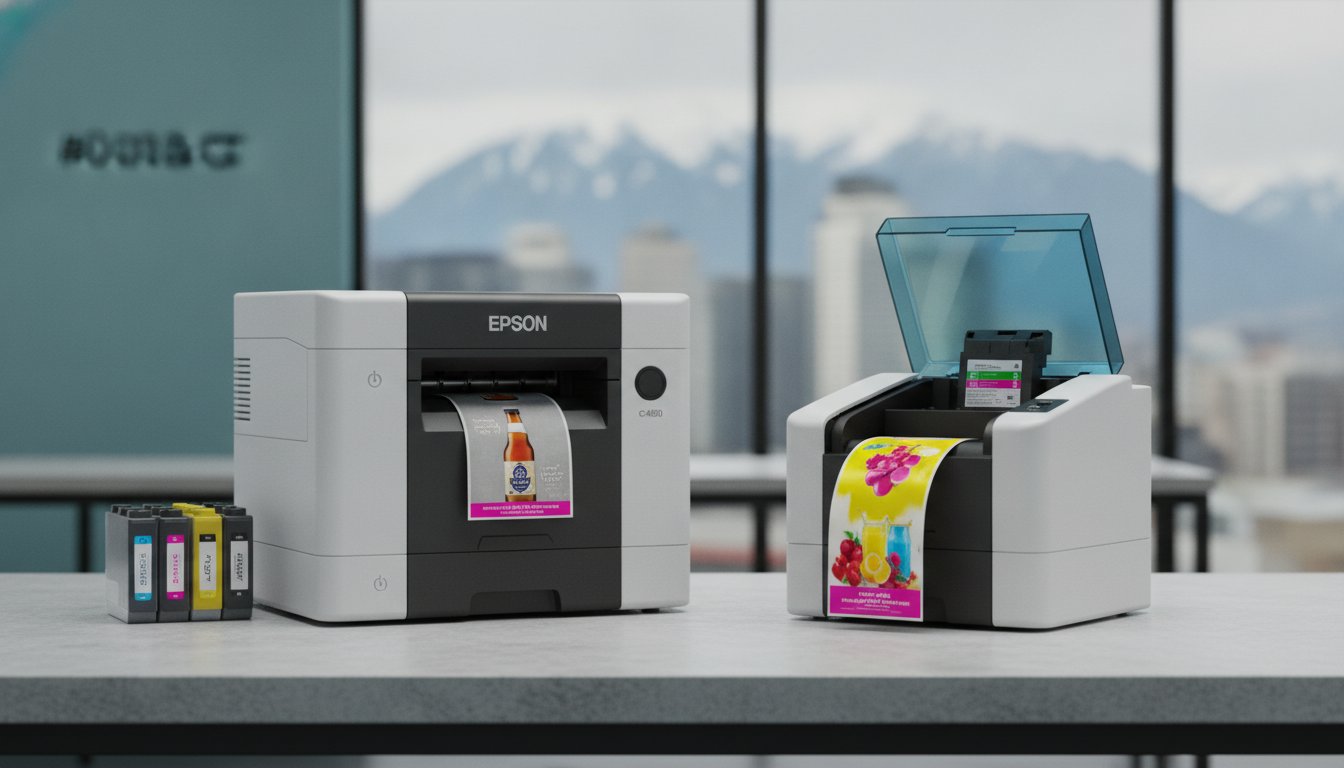
Could a lower upfront purchase price actually cost your business more over the next twelve months? While the initial investment is a natural starting point for many, business owners often realize that the EPSON c4000 and Primera Lx500 printer differences in ink consumption and durability play a much larger role in their long-term bottom line. If you've struggled with labels smudging in damp environments or found yourself frustrated by slow turnaround times for small batches, you're likely ready to bring your production in-house to regain control over your workflow.
This comparison will help you determine which model aligns with your specific volume and environment by comparing technical metrics like the C4000’s 4 ips speed against the LX500’s 2.5 ips output. We'll explore how the Epson’s four individual pigment ink cartridges compare to Primera’s tri-colour dye system, ensuring you choose a solution that delivers both moisture resistance and fiscal responsibility for your growing brand.
Key Takeaways
- Identify how print speed impacts your daily workflow by comparing the Epson C4000’s 4 ips output against the Primera LX500’s entry-level performance.
- Learn why ink chemistry is vital for your product’s environment, focusing on the durability of Epson’s pigment inks versus the high vibrancy of Primera’s dye-based system.
- Evaluate long-term ROI by analyzing the EPSON c4000 and Primera Lx500 printer differences in ink tank design, specifically individual versus tri-colour cartridges.
- Determine the best hardware fit for your workspace by understanding the operational impact of internal label unwinders versus external configurations.
- Discover which model supports specialized media like GHS-compliant or weatherproof labels to ensure your branding remains professional in damp conditions.
Understanding the Desktop Colour Labelling Landscape
Why do so many Canadian SMEs continue to struggle with the high costs and slow turnaround times of outsourced printing? The shift toward in-house operational control is not just a trend; it's a strategic move to eliminate logistical hurdles. By investing in professional colour label printers, businesses can print exactly what they need, exactly when they need it. This transition allows for greater agility in a competitive market where product changes happen overnight.
When evaluating your options, the market generally divides into two distinct tiers. The Primera LX500 is often viewed as the entry-level specialist, perfect for boutiques with very low volumes. Conversely, the Epson C4000 is the mid-range workhorse designed for consistent, daily production. Understanding the EPSON c4000 and Primera Lx500 printer differences is crucial because "cheap" hardware can often lead to high long-term costs if the device is misaligned with your actual print volume. A foundational label printer overview shows that while both units produce high-quality output, their internal mechanics and ink delivery systems serve very different business goals.
The Problem with Standard Office Printing
Can a standard office inkjet handle your product packaging? Usually, the answer is no. Standard office printers lack the environmental resilience required for labels that face moisture, abrasion, or temperature shifts. If your labels smudge in a damp fridge or fade under retail lights, your brand reputation suffers. In-house production with dedicated hardware provides the fast turnaround time necessary for modern inventory management. It gives you total brand control without waiting for a third-party shop to fit you into their schedule.
Epson vs. Primera: A Heritage of Reliability
Both brands carry a strong reputation, but they focus on different technical strengths. Epson ColorWorks has long been a leader in pigment ink technology, prioritizing durability and industrial performance. Primera has built its name on high-resolution, dye-based boutique labels where vibrancy is the primary goal. As we move deeper into this comparison, we will focus on specific metrics like print speeds measured in "ips" and ink capacities in "ml." These technical details determine whether a printer is merely a tool or a true strategic asset for your production facility.
Key Hardware and Performance Differences
How much space do you have on your production bench? The physical design of these two machines reveals a lot about their intended use. The Epson C4000 features an internal label unwinder, which keeps the footprint compact and protects your media from dust or environmental debris. In contrast, the Primera LX500 is a smaller, lighter unit, but its media handling is more constrained. One of the most significant EPSON c4000 and Primera Lx500 printer differences lies in their connectivity. While the LX500 relies on a standard USB connection, the C4000 offers optional Wi-Fi and native ZPL II support. This allows you to integrate the Epson into modern warehouse environments or SAP workflows without complex workarounds.
Throughput and Operational Efficiency
If your daily production requires more than a few dozen labels, print speed becomes a critical metric. The Epson C4000 delivers a print speed of up to 4 ips (inches per second). The Primera LX500 reaches a maximum of 2.5 ips. While a 1.5 ips difference might seem minor, it adds up quickly during a 500-label run. The Epson also includes a high-speed auto-cutter as a standard feature. This streamlines the apply-and-go workflow; the LX500 often requires manual tearing or an external finisher. If you're unsure which hardware configuration fits your specific bench space, you can reach out to our technical team for a layout consultation.
You might notice the Primera boasts a resolution of 4800 dpi, while the Epson sits at 1200 dpi. Does this matter? For boutique labels with microscopic text or intricate photography, the higher dpi is beneficial. However, for most industrial and retail applications, Epson’s 1200 dpi combined with its PrecisionCore technology provides professional, sharp results that are indistinguishable to the naked eye for most consumers.
Media Compatibility and Handling
The Epson C4000 supports a maximum media width of 4.25 inches, slightly edging out the 4-inch limit of the LX500. It also handles 4-inch diameter rolls more efficiently within its protective casing. To ensure your hardware performs at its peak, using high-quality labels for inkjet is essential to prevent head clogs and ensure colour accuracy. Using the right media allows you to maintain consistent quality even in dusty environments where exposed rolls might otherwise fail.
Ink Chemistry: Pigment vs. Dye Technology
Does your product's lifecycle involve exposure to moisture, sunlight, or abrasive handling? If so, the choice between pigment and dye technology is the most critical decision you will make. The EPSON c4000 and Primera Lx500 printer differences in ink chemistry dictate whether your branding remains professional or becomes unreadable under stress. Epson’s pigment ink consists of solid particles that sit on the surface of the media, creating a resilient bond. In contrast, Primera’s dye ink is a liquid solution that soaks into the fibres of the label, providing exceptional vibrancy but limited resistance to environmental factors.
Durability testing reveals that pigment inks are significantly more stable when exposed to UV light and harsh chemicals. If your labels sit in a sunny retail window or are handled frequently, dye-based inks may begin to fade or bleed over time. For Canadian manufacturers who must adhere to GHS and WHMIS standards, the Epson C4000 is the clear choice. It produces labels that can withstand the rigours of chemical exposure without losing vital safety information. While dye inks offer a stunning visual appeal for high-end boutique products, they lack the industrial stamina required for heavy-duty applications.
Epson’s Pigment Advantage for Harsh Environments
How do your labels handle condensation for frozen foods or damp storage conditions? While some manufacturers promote "water-enhanced dye inks," these still fall short of the industrial durability provided by true pigment. For businesses dealing with "wet labels" in the beverage or craft beer sectors, pigment is the only reliable choice to prevent ink runoff. The Epson C4000 is specifically designed for GHS BS5609 compliance, ensuring that hazardous material labels remain legible even after immersion in saltwater. This level of resilience ensures your operational seamlessness remains intact regardless of the shipping environment.
Primera’s Dye Ink for Graphic Excellence
Are you producing boutique items where photo-quality colour and a massive colour gamut are the primary requirements? Primera’s dye-based system excels at creating smooth gradients and saturated tones that make graphics pop on a retail shelf. However, this visual excellence comes with a risk of smudging during high-speed handling or if the labels are introduced to moisture. If you require the vibrancy of dye but need extra protection, pairing the LX500 with weatherproof UL certified labels can help mitigate some of these durability concerns. This allows you to achieve high-vibrancy results while providing a necessary layer of protection against the elements.
Calculating Total Cost of Ownership (TCO) and ROI
Is the cheapest printer actually the most affordable? In the labelling industry, the "razor and blade" business model is prevalent. A lower entry price often hides higher ongoing consumable costs. The EPSON c4000 and Primera Lx500 printer differences in ink management are the primary drivers of long-term ROI. While the LX500 requires a smaller initial investment, high-volume users will realize that the cost-per-label is often higher than that of the C4000. This is because the initial purchase price is only a small fraction of the total expenditure over the equipment's lifespan.
Ink Volumes and Replacement Frequency
Epson’s system utilizes four individual CMYK cartridges. This design ensures you never waste yellow ink just because your cyan is empty. For businesses with colour-heavy designs, this individual tank system provides substantial savings over time. In contrast, Primera’s tri-colour cartridge must be replaced when any single colour runs out. This frequently leads to discarding usable ink, which is a hidden cost many startups fail to calculate during their initial research. To maintain your production efficiency, stocking high-quality Epson ink cartridges is a strategic necessity for managing your operational budget effectively.
Maintenance and Equipment Longevity
Epson features a permanent PrecisionCore printhead, whereas Primera integrates the printhead into the ink cartridge itself. While Primera’s approach means you get a fresh printhead with every ink change, it also contributes to the higher cost of each cartridge. Epson’s permanent head requires a maintenance box to collect waste ink during cleaning cycles, which is a separate consumable to track. Protecting these sensitive components from environmental debris like dust or adhesive residue is essential for maximizing longevity. If you're also considering thermal options for your warehouse, our Comprehensive Guide to Thermal Label Printers provides a useful baseline for maintenance expectations across different printing technologies.
For businesses printing several hundred labels a week, the Epson C4000 offers a much faster ROI. The lower cost-per-ml of ink eventually offsets the higher hardware price, making it the more fiscally responsible choice for scaling operations. If you need a detailed cost-per-label analysis for your specific artwork and volume, contact our consultants to receive a personalized ROI projection based on your unique production requirements.
Choosing Your Printer: Prescriptive Business Scenarios
How do these technical specifications translate into your daily operations? Selecting the right hardware requires a clear understanding of your current volume and your long-term growth objectives. While we've detailed the EPSON c4000 and Primera Lx500 printer differences in ink chemistry and throughput, the final decision should be based on your specific business environment. Whether you're a small-scale artisan or an industrial manufacturer, matching the printer's capabilities to your product's lifecycle is the only way to ensure a positive ROI.
When to Invest in the Epson C4000
Do you plan on scaling your production within the next year? If your answer is yes, the Epson C4000 is the more strategic investment. This model is specifically designed for growing manufacturers who require durable, moisture-resistant shipping and product labels. It's the "better choice" for future-proofing because it handles the transition from 100 to 5,000 labels per month without straining the hardware. You should choose the C4000 if your business falls into these categories:
- Industrial or Chemical Facilities: The pigment ink system is a necessity for GHS and WHMIS compliance, ensuring safety data remains legible even after chemical exposure.
- Food and Beverage Producers: If your products are introduced to water, ice, or condensation in refrigerated environments, pigment ink prevents the smudging common with dye-based systems.
- Enterprise Environments: The C4000 integrates seamlessly with complex ERP systems and warehouse workflows using ZPL II support and robust Mac or Windows drivers.
When the Primera LX500 is the Better Choice
Is your primary focus on high-vibrancy boutique branding with very low weekly volumes? The Primera LX500 remains a popular entry-level specialist for startups where the lower hardware entry price is the main driver. It's particularly effective for temporary event stations or small retail counters where desk space is limited. This unit is an excellent fit for the following scenarios:
- Boutique Artisans: If you produce high-end dry goods like candles or dry spices where water resistance isn't a factor, the dye-based vibrancy will make your graphics pop on the shelf.
- Jewellery Retailers: The high-resolution output is perfect for printing jewellery and ring labels, where microscopic text and sharp logos are required on very small formats.
- Limited Budgets: For innovators who need professional colour labels but aren't yet ready for the higher initial investment of a mid-range workhorse.
Ultimately, the choice between these two machines depends on your need for environmental resilience versus upfront affordability. While the LX500 serves the boutique startup well, the Epson C4000 provides the industrial reliability and lower cost-per-label that most Canadian businesses need to maintain operational seamlessness as they grow. If you're still undecided on which model fits your production bench, our team can provide sample prints to help you realize the difference in person.
Optimizing Your Production Workflow
Choosing the right hardware is a pivotal step in gaining total control over your brand's packaging. We've analyzed how the EPSON c4000 and Primera Lx500 printer differences affect your long-term fiscal responsibility; specifically the contrast between individual pigment cartridges and tri-colour dye systems. If your labels must withstand moisture or condensation, the Epson's industrial durability is a necessity. For artisans focused on high-vibrancy graphics for dry goods, the Primera provides an accessible starting point without compromising on visual quality.
As an authorized Epson and Primera partner, DuraFast Label Company Canada provides specialized Canadian labelling expertise to guide you through these technical decisions. We support your growth with an extensive inventory of media and fast national shipping across Canada to prevent any production downtime. Your choice today defines your operational efficiency tomorrow, so it's vital to select a machine that scales with your ambitions. Don't let logistical hurdles limit your brand's potential.
Are you ready to bring your label production in-house? Browse our full range of Colour Label Printers for Canadian Businesses to discover the ideal solution for your unique requirements. We look forward to helping you achieve professional results with every print run.
Frequently Asked Questions
What is the main difference between pigment and dye ink for label printing?
The main difference between pigment and dye ink is the level of environmental durability versus colour vibrancy. Pigment ink, utilized by the Epson C4000, consists of solid particles that rest on the label surface to provide superior resistance to water, chemicals, and UV light. Dye ink, found in the Primera LX500, is a liquid that penetrates the media fibres to produce exceptionally vivid colours that are ideal for high-end boutique applications where moisture is not a factor.
Can the Epson C4000 print on gloss labels as well as matte?
Yes, the Epson C4000 can print on both gloss and matte media depending on the specific black ink cartridge you select during the initial setup. You can choose either the Gloss Black (BK) or Matte Black (MK) ink model to optimize results for your preferred media type. This flexibility ensures your labels maintain a professional finish whether you require a high-shine retail look or a durable industrial matte texture for shipping or storage.
Is the Primera LX500 compatible with Mac and Windows?
The Primera LX500 is fully compatible with both Mac and Windows operating systems. It supports Windows 8, 10, and 11, along with macOS versions ranging from 10.13 to 13 (Tahoe). This cross-platform support allows you to integrate the printer easily into your existing office setup without needing to switch hardware or software environments, ensuring operational seamlessness for your team.
How much does the ink cost per label for the Epson C4000?
Ink cost per label for the Epson C4000 depends heavily on your specific artwork's ink coverage and the label dimensions. Because the C4000 uses four individual ink tanks, you only replace the specific colour that has been depleted, which significantly reduces waste. Understanding the EPSON c4000 and Primera Lx500 printer differences in ink management is key, as individual tanks generally offer a lower cost-per-ml than tri-colour cartridges over the equipment's lifespan.
Does the Primera LX500 include a built-in label cutter?
No, the Primera LX500 does not include a built-in automatic label cutter as a standard feature. It utilizes a manual tear-off bar for separating labels after a print job is finished. If your production workflow requires an automated cutting solution to save time, the Epson C4000 features a high-speed internal auto-cutter that can be programmed to cut after each label or at the end of a batch.
Which printer is better for GHS chemical labelling compliance in Canada?
The Epson C4000 is the better choice for GHS chemical labelling compliance in Canada. Its pigment ink technology is designed to meet the BS5609 standard for maritime durability, ensuring that vital safety and WHMIS information remains legible even when exposed to saltwater or harsh chemicals. The dye-based ink in the Primera LX500 lacks the chemical resistance required for these strictly regulated industrial environments.
What is the maximum label width for the Epson C4000 compared to the LX500?
The maximum label width for the Epson C4000 is 4.25 inches, while the Primera LX500 is limited to 4 inches. While this 0.25-inch difference seems minor, it provides the Epson with more flexibility for standard shipping labels or wide-format product branding. This extra width allows you to accommodate a broader range of packaging sizes without needing to invest in a second machine.
Are these printers suitable for high-volume industrial use?
Neither of these units is intended for high-volume, 24/7 industrial production. The Epson C4000 is a mid-range workhorse suitable for small to medium batches of up to several thousand labels per month, whereas the Primera LX500 is an entry-level specialist for startups with lower volume needs. If your facility requires tens of thousands of labels daily, you should explore our industrial-class colour label printers designed for heavier duty cycles.