Choosing the Right Zebra ZD421 Ribbon Cartridge
18th Nov 2026
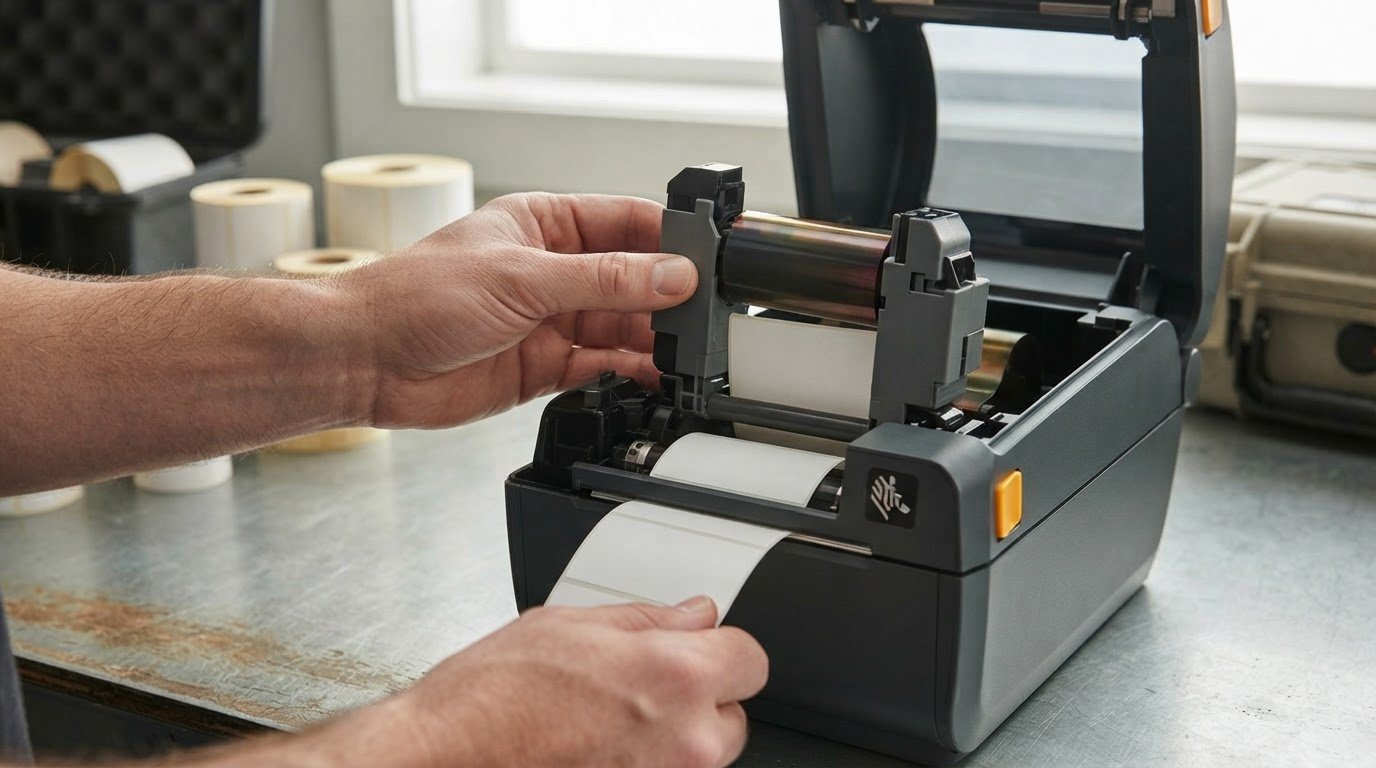
The right Zebra ZD421 ribbon cartridge starts with knowing which printer you have: the ZD421c uses cartridge-style ribbons, while the ZD421t uses ribbon rolls. A cartridge also has a straightforward loading process: slide it into the ribbon transport until it sits nearly flush and locks into place, then close the printer.
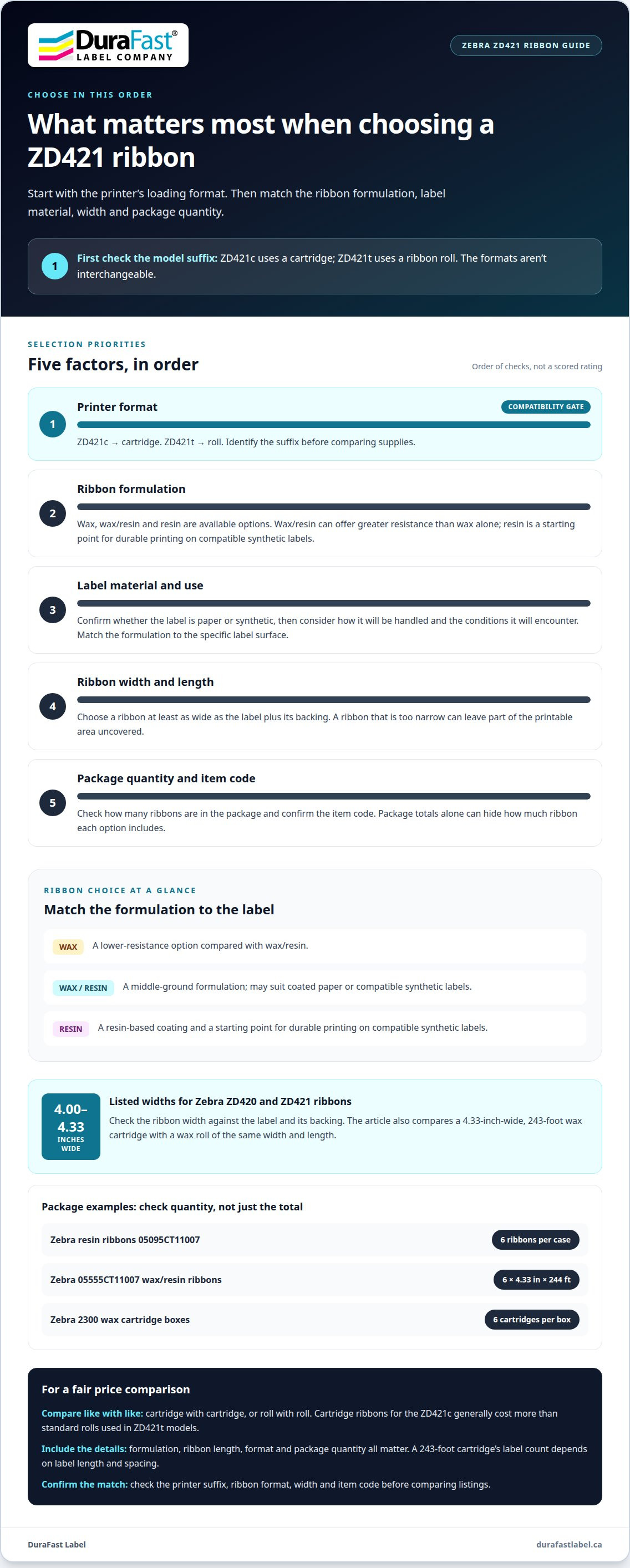
Choosing the right ribbon is about more than fitting it into the printer. The formulation needs to suit your label material and the conditions the label will face, and cartridge and roll options can differ in cost. A mismatch can affect print results, so it’s worth identifying your printer type before choosing a ribbon.
This guide compares cartridge and roll ribbon prices in Canada, explains when wax, wax/resin or resin formulations suit paper and synthetic labels, and walks through inserting a cartridge. You’ll also learn the key differences between the ZD421c and ZD421t so you can choose a compatible ribbon and load it with confidence.
Key Takeaways
- Identify whether you have a ZD421c or ZD421t before selecting ribbon: the printer type determines whether you need a cartridge or a roll.
- Compare wax, wax/resin and resin options against your label material and the conditions the label will face.
- Choose a ribbon that fits the printer and is wide enough to cover the label and its backing.
- Load a cartridge by sliding it into the ribbon transport until it locks nearly flush, then close the printer.
- Use the article’s compatibility and price comparisons to narrow down the right ribbon format for your printing setup.
Cartridge and roll ribbon prices
A cartridge ribbon is a preloaded ribbon unit designed for cartridge-style printers. A roll ribbon is a separate spool installed in a roll-based printer. The ZD421c uses cartridges, while the ZD421t uses rolls, so compare prices only after identifying the printer format.
For the same 4.33-inch width and 243-foot length, a wax cartridge and a wax roll provide a useful format comparison. Wax/resin and resin are also available in both formats. Cartridge-based ribbons for the ZD421c generally cost more than standard rolls used in ZD421t models. That difference matters when estimating ongoing supply costs, but the formats aren’t interchangeable.
A listed price applies to a specific ribbon product or package. For a useful comparison, consider the formulation, ribbon length, format and package quantity together. A case may contain several ribbons, while another listing may be for one roll. Comparing package totals alone can hide how much ribbon each option includes.
Box quantity describes how many ribbon units come in one package. A case of Zebra resin ribbons 05095CT11007 contains 6 ribbons. The Zebra 05555CT11007 wax/resin ribbons are supplied as 6 ribbons, each measuring 4.33 inches by 244 feet. Zebra 2300 wax cartridge boxes also contain 6 cartridges; each cartridge measures 110 mm wide by 74 m long. Check the item code and package count when planning replenishment.
How many labels can a ZD421 ribbon cartridge print? There isn’t one fixed label count: it depends on label length, spacing and ribbon length. A 243-foot cartridge provides a known ribbon length, but label dimensions determine how many impressions that length can cover.
Ribbon width also affects fit and material use. Zebra ZD420 and ZD421 ribbons are listed at 4.00-4.33 inches wide. Choose a ribbon at least as wide as the label plus its backing. A ribbon that is too narrow can leave part of the printable area uncovered; an unnecessarily wide ribbon uses more material than the label requires.
Keep format-specific comparisons separate from other ribbon applications. Autobag ribbons belong to a different equipment comparison, so their package details don’t establish ZD421 compatibility or costs. For ZD421 budgeting, compare cartridge with cartridge or roll with roll, then account for formulation and package quantity.
Wax/resin ribbons for paper and synthetic labels
A wax/resin ribbon combines wax and resin coatings for thermal transfer printing. It can suit applications that need greater resistance than wax alone while remaining compatible with certain label materials. For example, consider it for coated paper or compatible synthetic labels. Choose based on the label surface and how it will be used.
A wax/resin ribbon is a middle-ground option between wax and resin formulations. Wax/resin ribbons are available for the ZD421t and ZD420t as rolls, while cartridge formats are used with compatible cartridge models. The Zebra 05555CT11007 is a wax/resin option for ZD420 and ZD421 cartridge printers. Match its format and item code to the printer before ordering.
A resin ribbon uses a resin-based coating to print on synthetic labels. It is a starting point when printed information needs more durability than routine, lower-demand applications require. Because synthetic materials vary, match the ribbon to the specific label surface. Also consider how the label will be handled and the conditions it will encounter.
The Zebra 5095 resin ribbon is a resin option for ZD420 and ZD421 cartridge printers. Its listed size is 4.33 inches by 244 feet. That gives the cartridge a defined width and length for planning supply use. Pair the ribbon with a compatible synthetic label, and ensure its width covers the label and backing.
Choose a wax/resin ribbon by starting with the label face stock, then considering how the printed label will be handled. A paper label used for routine identification may need a different formulation from a synthetic label that receives repeated contact. Resin can support a more durable print on compatible synthetic material, while wax/resin may suit other label and use combinations.
Before choosing, use this simple sequence:
- Identify whether the ZD421 uses a cartridge or roll format.
- Confirm the label material, such as paper or synthetic stock.
- Choose wax/resin for a balanced formulation or resin for durable synthetic labels.
- Match ribbon width to the label and backing, then confirm the item code.
These steps help narrow the choice without treating all synthetic labels as identical. A ribbon’s formulation, width and printer format work together; an incorrect match can affect printing results. For broader comparisons of thermal transfer ribbons, consider the material being printed and the demands placed on the finished label. If you need help with a specific pairing, contact the team about ribbon and label compatibility.
ZD421-compatible thermal transfer ribbon formulations
Thermal transfer printing uses heat to transfer ink from a ribbon onto a label. For the ZD421, compatibility depends first on printer format, then on ribbon formulation and size.
Roll-Based and Cartridge Ribbon Compatibility
Ribbon-format compatibility means matching the ribbon type to the printer’s loading system. The ZD421t uses ribbon rolls, while the ZD421c uses cartridges. These formats aren’t interchangeable, even when both ribbons share a formulation or similar dimensions. Identify the model suffix before selecting supplies.
The ZD421t uses rolls with a 1/2-inch core. Cartridge-style ribbons are used in compatible ZD421c printers; their yellow frame is visible when the printer opens. Match the format before comparing wax, wax/resin or resin options. A mismatch between ribbon and printer can cause printing issues and subpar results.
Genuine Zebra and Third-Party Ribbons
Genuine Zebra ribbons are branded supplies, while third-party ribbons are made by other manufacturers. The available compatibility facts identify ribbon formats and formulations, but don’t establish a general print-quality ranking between these brands. For either choice, confirm compatibility with the ZD421c cartridge system or ZD421t roll system, and match the ribbon to the label material.
Printer format and ribbon formulation matter more than brand alone. A ribbon may fit the loading system but still be unsuitable for the label. Check the printer model, item code, ribbon width and label surface when comparing options. These details help establish compatibility without assuming that different ribbons perform the same way.
Compatible Ribbon Cartridge Part Numbers
A compatible ribbon cartridge part number identifies a cartridge supply for a printer model. For ZD420 and ZD421 cartridge printers, 05095CT11007 is a resin ribbon, and 05555CT11007 is a wax/resin ribbon. The wax ribbon code is 02000CT11007. These codes help distinguish formulations when selecting a replacement.
How do third-party ribbons compare with genuine Zebra ribbons for the ZD421? Brand alone doesn’t establish compatibility or print performance; the printer format, formulation and label material remain key factors. What ribbon cartridge part numbers are compatible with the Zebra ZD421? The listed cartridge codes include 05095CT11007, 05555CT11007 and 02000CT11007 for compatible ZD420 and ZD421 cartridge printers.
How can you tell whether your ZD421 is direct thermal or thermal transfer? The ZD421t and ZD421c are thermal-transfer configurations, using rolls and cartridges respectively. Direct thermal printing doesn’t use a ribbon, so a ribbon isn’t needed for that printing method.
Common ribbon-selection mistakes include choosing the wrong format or a formulation that does not match the label. Check the printer model and item code, then make sure the cartridge or roll is seated correctly. Confirm that the ribbon is wide enough to cover the label and its backing. These steps help address common compatibility and loading problems without guessing at error codes.
Inserting the cartridge into the ribbon transport
A ribbon cartridge is the removable unit that holds ribbon for a compatible ZD421 printer. It fits into the ribbon cartridge slot on the printer’s ribbon transport. Loading involves sliding the cartridge into that slot, seating it until it locks, and closing the printer. The steps are simple, but correct seating matters: the cartridge should sit nearly flush with the transport’s front.
Before loading, confirm that the printer accepts a cartridge. The ZD421c is the cartridge-style model; the ZD421t uses ribbon rolls instead. A roll won’t load into the cartridge slot, and a cartridge isn’t the roll-based format. Once you have the matching cartridge, locate the ribbon transport and its cartridge slot inside the printer.
Follow these steps for the ZD421c:
- Open the printer and locate the ribbon transport’s cartridge slot.
- Align the cartridge with the slot, then slide it into the transport.
- Push the cartridge inward until it sits nearly flush at the front.
- Confirm it locks into place, then close the printer.
During loading, check that the cartridge locks into place. If it still sits proud of the transport’s front, it has not reached the nearly flush position. Push it into the slot until it locks. Closing the printer is not a substitute for seating the cartridge properly.
The ZD421 automatically reads information stored on the ribbon cartridge. This means the cartridge communicates its stored ribbon information to the printer after installation. The loading sequence remains physical: insert the correct cartridge, push until it locks, and close the printer. Automatic reading doesn’t make cartridge and roll formats interchangeable.
If the cartridge doesn’t lock, pause before closing the printer. Check that you’re using a cartridge-style ribbon for the ZD421c, not a roll intended for the ZD421t. Then align the cartridge with the slot and slide it in again. A correctly seated cartridge should be nearly flush with the ribbon transport’s front and locked in place.
After closing the printer, keep the model distinction in mind for the next replacement. The ZD421c uses cartridges, while the ZD421t uses rolls. Matching the ribbon format to the printer avoids forcing the wrong supply into the transport. For the cartridge model, the practical sequence is consistent: slot, slide, push until locked, then close.
Does the Zebra ZD421 use a ribbon cartridge or a ribbon roll?
The Zebra ZD421 is available in cartridge and roll-based thermal-transfer configurations. The model suffix identifies the format: ZD421c uses cartridges, while ZD421t uses ribbon rolls. Match the ribbon format to that suffix before ordering, because the two supplies aren’t interchangeable.
A cartridge is a preloaded ribbon unit that fits the printer’s ribbon transport. A roll is a separate ribbon spool installed in a roll-based printer. The ZD421c uses the cartridge slot; the ZD421t takes ribbon rolls with a 1/2-inch core. This distinction affects both the supply you buy and how you load it.
The printer’s appearance can also help identify its format. Opening a ZD421c reveals a yellow-framed cartridge ribbon. The ZD421t instead uses the roll system, rather than a cartridge fitted into that transport. If the model suffix isn’t visible, this physical difference can help distinguish which format the printer accepts.
Use this quick identification sequence:
- Read the model suffix on the printer: “c” indicates cartridge format, while “t” indicates roll format.
- Open the printer and look for the yellow-framed cartridge in a ZD421c.
- For a ZD421t, select a ribbon roll with a 1/2-inch core.
- Match the ribbon formulation and width to your printing needs.
Ribbon capacity differs by configuration. ZD421 printers have a maximum ribbon capacity of 300 metres, while cartridge ribbons and roll ribbons use their respective printer formats. Don’t assume that the shared ZD421 name means every ribbon fits every model. The suffix is the practical starting point for choosing supplies.
A listed ZD421 printer doesn’t include a ribbon cartridge; it must be purchased separately. That matters when planning a setup or replacing supplies: a ZD421c requires its cartridge, while a ZD421t requires a compatible roll. Selecting the right format first prevents ordering a supply that won’t load into the printer.
After identifying the format, choose among wax, wax/resin and resin formulations based on the label material and intended use. Then confirm the ribbon’s width and item code match the printer configuration. For a ZD421c, insert the cartridge into the ribbon transport until it locks nearly flush. For a ZD421t, use its roll-based ribbon system instead.
If you’re selecting supplies for a ZD421 and need help matching the format, contact the team about compatible ribbon options.
DuraFast Label Company Canada offers Zebra ZD421 ribbon cartridges for compatible printers. The right choice depends on your printer format, ribbon formulation and label material. Match the ZD421c with a cartridge, or the ZD421t with a ribbon roll, before selecting wax, wax/resin or resin. This helps narrow the supply choice to the printer and job at hand.
If you’re comparing ribbon options or choosing a Zebra printer for your labelling workflow, DuraFast offers Zebra Label Printers as well as VIPColor, Afinia and Toshiba Label Printers. When discussing your requirements, share your printer model and label material so the ribbon format and formulation can be considered together.
Contact DuraFast Label Company Canada to discuss the right ribbon option for your ZD421.
Make your next ribbon choice with confidence
Use the Zebra ZD421 ribbon cartridge decision as a prompt to review your wider labelling setup. When you reorder, keep the printer model and label material together in your purchasing notes. That simple habit can help your team select a matching ribbon format and formulation next time.
DuraFast Label Company Canada offers Zebra ZD421 ribbon cartridges, along with VIPColor and Afinia label printers. If your needs extend beyond ribbon selection, those printer options may help you consider the equipment side of your workflow as well. The right choice depends on the labels you produce and the printing requirements you need to meet.
Bring your ZD421 model and label material into the conversation to make the next step more focused. Contact DuraFast Label Company Canada to discuss a suitable ribbon option. With the format and label requirements in view, you can move ahead with a clearer plan for your printing supplies.
Frequently Asked Questions
Which Zebra ZD421 models support ribbon cartridges?
The ZD421c is the ZD421 model that uses ribbon cartridges; the ZD421t uses rolls. The related ZD420c also uses cartridge-style ribbons. The model suffix is a useful identifier when ordering supplies for multiple printers. For example, a purchasing record that pairs each printer’s full model name with its ribbon format can help prevent cartridge and roll orders from being mixed up.
How do I install or replace a ribbon on a Zebra ZD421?
For the ZD421c, open the printer, align the cartridge with the ribbon transport slot, and slide it in. Push until it sits nearly flush and locks, then close the printer. If replacing a cartridge, use the same loading sequence for the replacement. If it won’t lock, stop and confirm you have a cartridge for the ZD421c, rather than a roll for the ZD421t.
What ribbon types and widths work with the Zebra ZD421?
Compatible ZD421 thermal-transfer ribbons include wax, wax/resin and resin formulations, with the printer format determining cartridge or roll style. Listed ZD420 and ZD421 ribbon widths range from 4.00 to 4.33 inches. Choose a formulation for the label material and intended use, then ensure the ribbon covers the label and its backing. The item code helps distinguish formulation and compatible format.
What is the price of compatible ZD421 ribbon cartridges in Canada?
Cartridge prices vary by formulation and product package. Wax, wax/resin and resin are distinct options, so compare cartridge products with other cartridges rather than with roll prices. Package quantity and ribbon length also affect the value of a listing. For a clear comparison, note the item code, formulation, format and package contents together.
Where can I buy genuine Zebra ZD421 ribbon cartridges in Canada?
DuraFast Label Company Canada offers Zebra ribbons, including ZD421 cartridge ribbons, for Canadian buyers. Select the cartridge format for a ZD421c, and use the product description and item code to distinguish the formulation you need. If you’re sourcing supplies for several printers, keep each model suffix with its reorder details. This makes it easier to choose the matching cartridge when replenishing your label-printing supplies.