Choosing the Right Barcode Label Software: The Ultimate 2026 Guide for Canadian Businesses
1st Jun 2026
What if the most sophisticated printer in your facility is currently nothing more than a high-priced paperweight because of a single software mismatch? It's a common frustration for many Canadian business owners who realize that hardware is only half the battle. You likely agree that manual data entry errors and "no-scan" labels are more than just a nuisance; they're a direct threat to your operational efficiency and your ability to meet strict GS1 or GHS compliance standards. This is why choosing the right barcode label software is the most critical decision you'll make for your production line this year.
Our guide promises to help you master these complexities, ensuring your investment in brands like VIPColor or Zebra delivers the seamless integration your business deserves. We will walk you through the latest 2026 updates, including the rollout of BarTender 12 and the essential industry shift toward 2D barcodes. By the end of this article, you'll have a clear roadmap to modernize your labelling workflow with total confidence and precision.
Key Takeaways
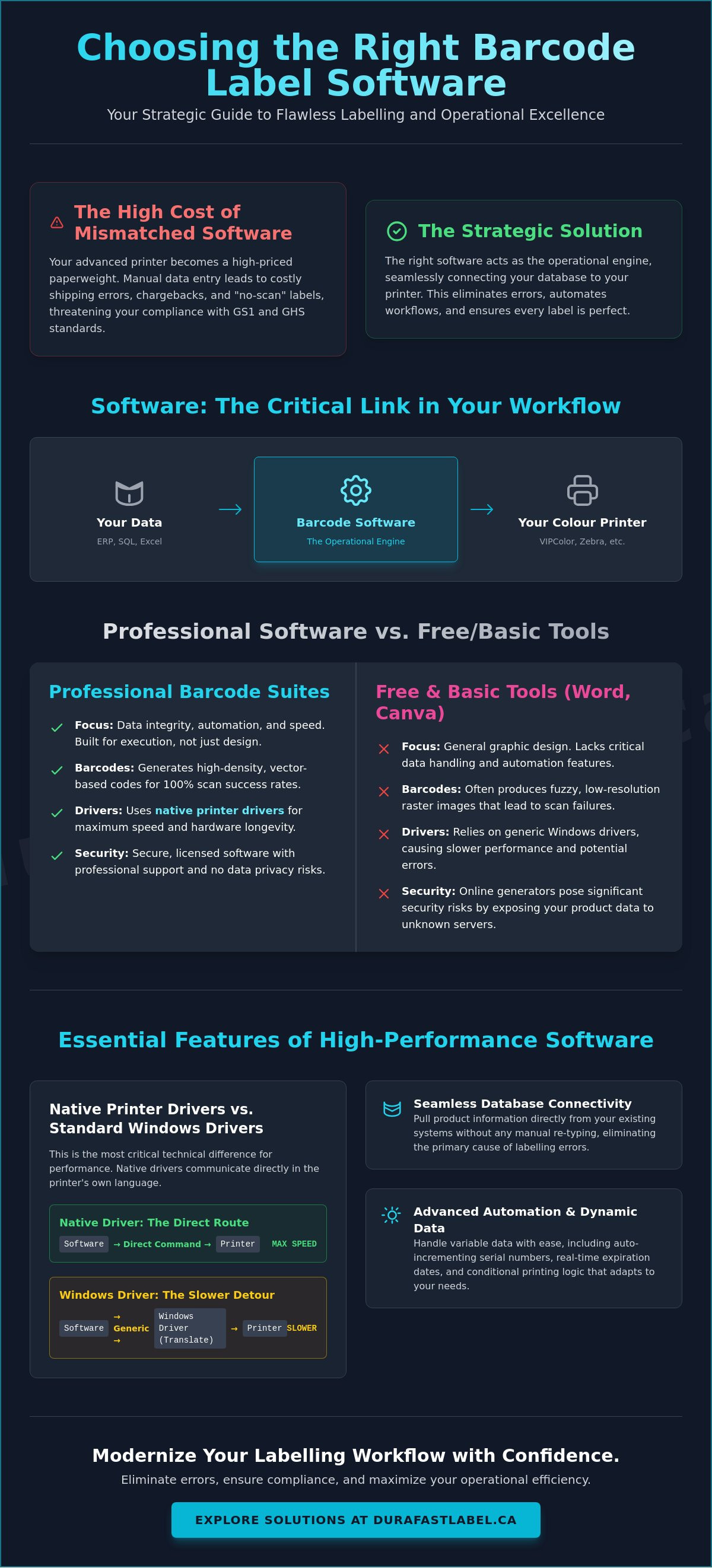
- Understand how the right software acts as the operational engine connecting your database to your colour label printer to eliminate costly manual entry errors.
- Learn the technical differences between native printer drivers and standard Windows drivers to ensure your hardware maintains peak performance and speed.
- Evaluate the unique advantages of BarTender, Loftware NiceLabel, and Teklynx to determine which platform best supports your specific compliance and integration needs.
- Implement a proven five-step framework for choosing the right barcode label software by auditing your current data sources and hardware inventory.
- Discover how to achieve 100% scan success rates and maintain GHS or GS1 compliance through automated labelling workflows.
Why Choosing the Right Barcode Label Software is a Strategic Business Decision
Is your labelling process a bottleneck or a catalyst for growth? Many Canadian business owners view software as an afterthought to their hardware purchases. In reality, the software serves as the critical nervous system connecting your central database to your colour label printer. If this link is weak, your entire production line suffers. Choosing the right barcode label software isn't merely a technical box to check; it's a strategic move to ensure that every pallet, box, and individual product is traceable and compliant.
The high cost of "cheap" software often reveals itself through manual workarounds. When employees have to manually type SKU numbers or expiry dates, the probability of a shipping error skyrockets. These mistakes lead to chargebacks, returned shipments, and damaged retailer relationships. By 2026, Canadian logistics demand more than static images. With the global industry moving toward dynamic 2D barcodes, your software must be capable of translating real-time data into scannable reality instantly. For those seeking a foundational overview of barcodes and their technical requirements, understanding this data-to-print relationship is essential. A robust software choice allows you to scale from a single desktop station to industrial label printers across multiple sites without rewriting your entire workflow.
The Shift from Design to Execution
Professional barcoding suites differ from standard graphic design tools because they prioritize data integrity over visual flourishes. While a design app focuses on "how it looks," professional software focuses on "how it works." This distinction significantly reduces the "click-to-print" time in high-volume warehouses. By using native drivers, the software communicates directly with the hardware. This efficiency ensures that your thermal printheads aren't overworked by inefficient print commands, which effectively extends the lifespan of your hardware investment.
Addressing the 'Free Software' Myth
Can you use Microsoft Word or Canva to print a barcode? Technically, you can, but it's often a recipe for logistical disaster. These programs don't generate the high-density, vector-based barcodes required for 100% scan success rates. Instead, they often produce fuzzy images that fail at the shipping dock. Free online generators also pose significant security risks, as you're often uploading proprietary product data to unknown servers. Choosing the right barcode label software means moving from "good enough" to a professional perpetual or subscription license that offers the security, automation, and technical support your business needs to thrive.
Essential Features: From Simple Design to Complex Database Integration
What features truly define a high-performance labelling system? While a user-friendly WYSIWYG interface is the functional baseline, choosing the right barcode label software requires looking under the hood. You need to ensure that what you see on the screen is exactly what prints on the label, down to the millimetre. This reliability depends heavily on native printer drivers. Unlike standard Windows drivers, native drivers communicate in the printer's specific language. This maximizes throughput and reduces the risk of data corruption during high-volume runs. When your print speed stays high and your data stays accurate, your entire facility operates more smoothly.
For those looking to maintain this level of professionalism throughout their physical workspace, Wall & Ink offers insights into specialized wall printing and surface preparation for high-impact branding.
Connectivity is the next pillar of a professional setup. Your software should act as a seamless window into your existing data. Whether your product information lives in a simple Excel sheet, a robust SQL database, or a complex Canadian ERP system, the software must pull that information without manual intervention. This automation is what transforms a simple design tool into a strategic operational engine. It eliminates the need for staff to re-type information, which is the primary cause of labelling errors in the supply chain.
Dynamic Data and Automation
Modern automation goes beyond just pulling product names. It involves variable data, such as auto-incrementing serial numbers or real-time expiration dates that update the moment a print job starts. Conditional printing takes this a step further by changing specific label elements, such as warning icons or language translations, based on the data in your system. Tools like NiceLabel PowerForm allow you to create simplified, custom interfaces for warehouse staff. This prevents them from accidentally altering the master template while still allowing them to input the few variables they need to get the job done correctly.
Compliance and Industry Standards
For Canadian manufacturers, compliance isn't optional. You must adhere to global barcode standards to satisfy major retailers like Loblaw, Sobeys, or Canadian Tire. If you're handling chemicals, your software must support WHMIS and GHS requirements, often printed on durable industrial labels to withstand harsh environments or chemical exposure. Future-proofing also means looking at RFID encoding capabilities, which are becoming standard for enterprise-level tracking and inventory management. If you're unsure which features align with your specific hardware, speaking with a labelling consultant can help clarify your technical requirements before you invest.
Comparing the Giants: BarTender, NiceLabel, and Teklynx
How do you distinguish between the market leaders when every brochure claims to be the best? Choosing the right barcode label software requires a look at the specific architecture of each platform. While some focus on desktop ease of use, others are built for enterprise-level cloud distribution. Understanding these differences is the first step toward ensuring your software doesn't become a bottleneck as your production scales.
Most professional suites offer tiered editions: Starter, Professional, and Enterprise. A Starter edition is often sufficient for basic, manual printing. However, if you need to pull data from an Excel sheet or SQL database, the Professional level is usually the baseline requirement. For businesses that require full automation or centralized control across multiple Canadian sites, the Enterprise edition provides the necessary administrative tools to keep your operations synchronized.
BarTender: The Versatile Workhorse
Why is BarTender often considered the industry standard? It's largely due to Seagull Scientific's commitment to high-performance printer drivers. These drivers allow hardware like the VIPColor VP550 Memjet printer to operate at its maximum rated speed without data lag. With the release of BarTender 12 in February 2026, the suite has introduced even more "Intelligent Templates." These templates use conditional logic to handle hundreds of label variations within a single file. This reduces the total number of files you need to manage and prevents the "template bloat" that often leads to version control errors.
NiceLabel: The Cloud-First Innovator
If your business operates across multiple provinces, Loftware NiceLabel offers a modern, cloud-ready architecture. It's designed to centralize management, allowing a manager in Toronto to update a master template and have it instantly available for a warehouse team in Vancouver. It's important to realize that NiceLabel no longer offers perpetual licenses for new customers, focusing instead on a subscription model that ensures you always have the latest security updates. Their PowerForm tool is particularly valuable for creating custom printing interfaces that non-technical users can navigate without risk of altering the master design.
Teklynx: Precision for Regulated Industries
For businesses in highly regulated sectors like pharmaceuticals or chemical manufacturing, Teklynx remains a formidable contender. Their LABELVIEW and CODESOFT platforms are built for precision and deep integration. They're regularly updated to meet the latest GS1 specifications and new RFID requirements. This makes Teklynx a reliable choice for environments where compliance is the primary driver of the labelling process.
A 5-Step Framework for Selecting Your Ideal Barcoding Solution
How do you transition from researching software brands to making a final purchase? Choosing the right barcode label software requires a methodical approach that balances your current technical needs with your future business goals. Following a structured framework ensures you don't overlook critical integration points that could cause production delays. It's about finding the specific fit for your unique operational environment.
- Audit your data source: Does your product information live in a local Excel file, a cloud-based ERP like SAP or Oracle, or is it still entered manually by staff?
- Identify your hardware landscape: List every printer in your facility, from mobile Zebra units to high-volume VIPColor systems, to ensure driver compatibility.
- Determine compliance needs: Do you require GHS chemical safety markings, GS1 shipping standards, or specialized horticulture labels designed for outdoor durability?
- Assess your user environment: Consider the technical skill level of the staff clicking "Print" on the warehouse floor and whether they need a simplified, custom interface.
- Evaluate your growth trajectory: Choose a solution that can manage five printers today and fifty tomorrow without requiring a complete system overhaul.
Matching Software to Hardware
Professional software must support the high-resolution requirements of inkjet colour label printers to ensure vibrant, accurate output that matches your brand standards. Some suites offer superior performance for thermal transfer technology, while others excel at specialized tasks like the built-in digital cutting found on the Primera LX610. You don't want to discover a driver incompatibility after you've already committed to a license. It's vital to verify that your software can handle the specific media and ink combinations your hardware uses.
Total Cost of Ownership (TCO)
The 2026 market offers a mix of perpetual licenses and annual subscriptions. While a one-time fee might look attractive for budget planning, subscription models often include essential technical support and version updates that protect your workflow from operating system changes. You should also factor in the ROI that comes from reducing label waste. Better software-driven calibration and precision mean fewer discarded labels and more efficient use of your ribbons and ink. If you're ready to align your software with your specific production goals, reach out to our consultation team for expert guidance on your next steps.
Maximizing Operational Efficiency with DuraFast Label Solutions
Why settle for a software vendor that has never touched a physical printer? At DuraFast Label Company Canada, we believe that choosing the right barcode label software is only half the battle. The true value lies in how that software interacts with your industrial label printers. We act as a strategic partner, ensuring that your digital designs translate perfectly into physical assets that survive the rigours of the Canadian supply chain. Our team understands that a software setting for heat or speed can be the difference between a crisp barcode and a smudged, unreadable mess.
Efficiency also depends on the physical media you use. Pairing high-quality blank labels with optimized software templates prevents jams and reduces ink or ribbon waste. We help you calibrate your system so that every print job is as cost-effective as possible. This holistic view of your production line is what allows our clients to achieve 100% scan success rates while maintaining strict fiscal responsibility.
Your Strategic Partner in Canada
Canadian businesses face unique logistical challenges, from bilingual requirements to fluctuating climate conditions that affect adhesive performance. Accessing local expertise means you aren't just buying a license; you're gaining a consultant who understands the Canadian regulatory environment. We often bundle software with printer purchases to provide a turnkey experience. This "out of the box" approach ensures your team can start printing compliant labels on day one without troubleshooting driver conflicts or database errors. Our support continues long after the initial setup, ensuring your labelling remains uninterrupted when software updates or hardware changes occur.
Ready to Optimize Your Labelling?
Are you ready to move beyond manual entry and embrace full automation? Whether you are in retail, chemical manufacturing, or food production, we provide personalized recommendations tailored to your industry's specific standards. Choosing the right barcode label software requires verifying that your data flows correctly from your ERP to the printer. It's critical to test your barcode scan rates and data workflows before committing to a full production run. We encourage our clients to request a software trial to ensure the integration with their database is flawless. Explore our full range of barcode software and professional printers today to see how we can streamline your operations.
Future-Proofing Your Canadian Supply Chain
Mastering your labelling workflow is no longer just about aesthetics; it's about building a resilient, data-driven operation. You now understand that choosing the right barcode label software serves as the vital bridge between your central database and your industrial hardware. By prioritizing native drivers, automation, and compliance with GS1 or WHMIS standards, you protect your business from costly shipping errors and hardware downtime. This strategic alignment ensures your facility remains competitive throughout 2026 and beyond. Furthermore, maintaining a well-equipped workspace with essentials from Mega Office Supplies can further support the administrative efficiency that surrounds your labelling operations.
As an authorized partner for Loftware, BarTender, and Teklynx, DuraFast Label Company Canada provides the local expertise needed to navigate these technical decisions. We've offered expert Canadian-based support since 2012, helping businesses pair professional software with our comprehensive inventory of printers and consumables. Our team is ready to help you translate these insights into a turnkey solution that grows with your enterprise. Browse our Barcode Software and Industrial Printers today to find the perfect fit for your specific production needs. We look forward to empowering your next stage of operational growth.
Frequently Asked Questions
Can I use the same barcode software for different printer brands?
Yes, professional suites like BarTender or NiceLabel are designed to be hardware-agnostic. They support a wide range of manufacturers, including Zebra, VIPColor, and Honeywell, through specialized native drivers. This capability allows you to manage a diverse fleet of printers, including desktop units sourced from specialists like DymoOnline, from a single, centralized design interface, which simplifies your internal training and workflow.
What is the difference between a perpetual license and a subscription for label software?
A perpetual license involves a one-time purchase that grants you ownership of that specific software version indefinitely. In contrast, a subscription model requires an annual fee to maintain access. It's important to realize that while perpetual licenses seem cost-effective, subscriptions often include mandatory security updates and technical support that are essential for long-term operational stability.
Do I need special software to print GHS-compliant chemical labels in Canada?
You specifically need software that supports GHS pictograms and WHMIS 2015 standards. Professional barcoding suites include built-in libraries of these symbols and can automatically adjust signal words based on your chemical database. Choosing the right barcode label software ensures that your labels remain compliant with Health Canada regulations without requiring manual graphic design work.
How do I link my Excel spreadsheet to my barcode label software?
You can link your data by using the software's database connection wizard to select your Excel file as the primary source. Once connected, you map specific columns, such as SKU or Price, to the corresponding fields on your label template. This automation ensures that your printer pulls real-time information directly from your spreadsheet, which eliminates the risk of manual typing errors.
Is cloud-based label software better than on-premise installation?
Cloud-based solutions are generally superior for Canadian businesses with multiple locations because they allow for centralized template management and remote print monitoring. On-premise installations remain a reliable choice for facilities with strict internal security protocols or those operating in areas with inconsistent internet access. The best choice depends on your specific infrastructure and how you intend to scale your production.
Can barcode software help me manage RFID tags?
Yes, professional and enterprise editions of major software suites include RFID encoding capabilities. These tools allow you to program the RFID chip while simultaneously printing the visual barcode and text on the label surface. This dual-action process is essential for modern supply chain tracking and high-density inventory management where physical line-of-sight scanning isn't always possible.
What happens if my barcode software doesn't have a driver for my specific printer?
You can often use a generic Windows driver, though this usually results in slower print speeds and less control over specific hardware features like built-in cutters. If a native driver isn't available, check with a specialist vendor like DuraFast to see if a manufacturer-developed driver exists. Choosing the right barcode label software often involves verifying that the software developer regularly updates their driver library for new hardware models.
How much does professional barcode label software typically cost in Canada?
The cost varies significantly depending on whether you require a basic starter edition or a full enterprise-grade automation suite. Factors such as the number of users and the total count of connected printers also influence the final investment. Since professional software is a long-term operational tool, you should contact a local reseller for a quote that reflects your specific volume and integration requirements.