Choosing the Best 4x8 UPS Labels for Your Thermal Printer
9th Aug 2026
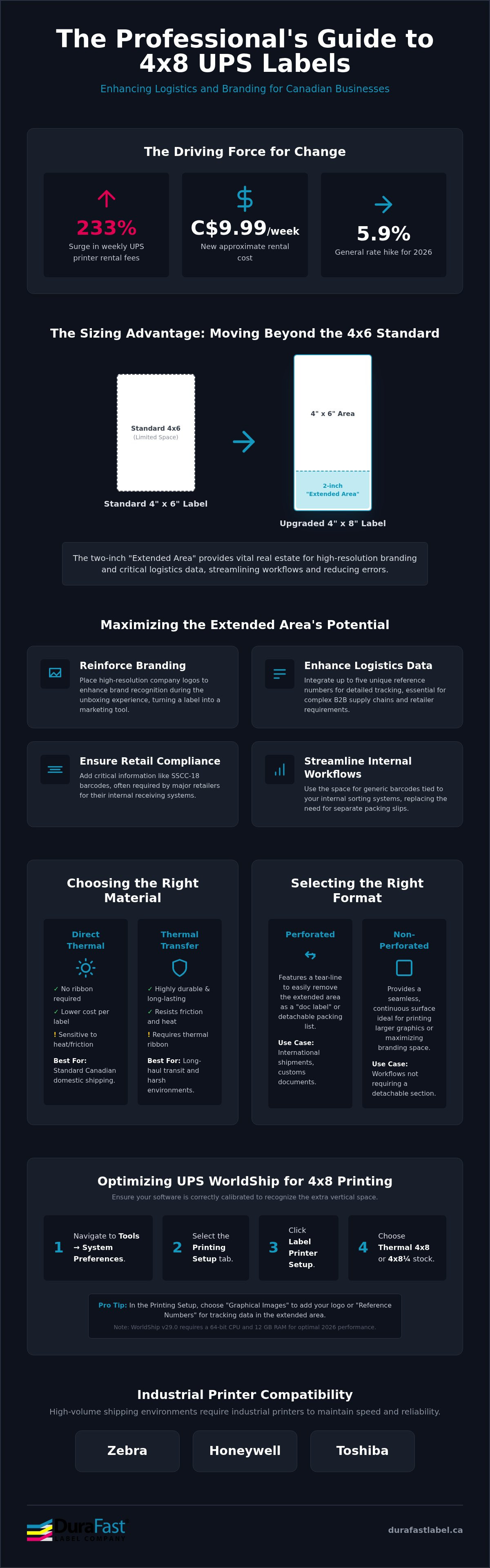
Did you know that the weekly fee for renting a UPS printer has surged by 233 percent to nearly C$9.99? This significant increase, combined with the 2026 general rate hike of 5.9 percent, makes it the ideal time for Canadian businesses to invest in their own industrial hardware. The main difference between standard labels and a 4x8 ups format is the ability to reclaim space for high-resolution branding and essential logistics data. You likely find that standard 4x6 stickers lack the room for the company logos or complex reference numbers your team needs to prevent shipping errors.
Are you struggling with inconsistent print quality or confusing configuration settings? These technical hurdles often prevent companies from maximizing their operational resources. This article will teach you how to leverage these larger thermal labels to enhance your brand presence and improve tracking accuracy. We will guide you through the configuration of WorldShip version 29.0 and help you identify the best industrial printers to ensure high scan rates despite the rigours of the supply chain. If you want to eliminate cross-border delays and optimize your production, this guide provides the professional solutions you need.
Key Takeaways
- Learn how the two-inch "Extended Area" allows you to integrate company logos and additional reference numbers for enhanced logistics tracking and branding.
- Discover the specific settings required to configure UPS WorldShip version 29.0 for 4x8 stock dimensions to ensure professional print alignment and scannability.
- Identify why high-volume shipping environments require industrial printers from Zebra or Honeywell to maintain high print speeds (ips) and reliable performance.
- Compare direct thermal versus thermal transfer materials to select the most durable and cost-effective 4x8 ups labels for your specific Canadian shipping needs.
- Understand the operational advantages of sourcing thermal stock within Canada to avoid cross-border delays and minimize your warehouse downtime.
Understanding the 4x8 UPS Label: Why Move Beyond 4x6?
While the standard 4x6 shipping sticker is ubiquitous in e-commerce, the 4x8 ups label format offers a significant upgrade for enterprises managing complex supply chains. This format, which sometimes measures exactly 4x8 1/4 inches, includes a dedicated two-inch "Extended Area" at the bottom of the label. This extra space is not merely for aesthetics; it provides a vital zone for data that the carrier's mandatory shipping information cannot accommodate. By moving beyond the smaller standard, you gain the real estate necessary to streamline warehouse workflows and reduce manual documentation errors.
When selecting your media, it is essential to understand the underlying technology of Direct Thermal vs. Thermal Transfer printing. Direct thermal stock is often the preferred choice for standard Canadian domestic shipping because it eliminates the need for ribbons, lowering your cost per label. However, thermal transfer materials offer the longevity required for long-haul transit where labels may be exposed to friction or heat. Choosing the right material ensures that every barcode remains crisp and scannable from the moment it leaves your facility until it reaches the final destination.
The Strategic Value of the Extended Area
Perforated vs. Extended Area Labels
Depending on your fulfilment process, you may choose between perforated and non-perforated stock. Perforated labels feature a tear-line that allows the extended area to be easily removed as a "doc label" or a detachable packing list. This is a common requirement for international shipments where physical documentation must be handled by customs brokers or warehouse receivers. If your workflow does not require a detachable section, non-perforated stock provides a seamless surface for larger graphics. You can find a variety of these configurations in our collection of labels for direct thermal printers, ensuring your stock matches your specific UPS service requirements.
Optimizing UPS WorldShip for 4x8 Thermal Printing
Configuring your shipping software is just as vital as selecting the right hardware. To get the most out of your 4x8 ups stock, you must ensure WorldShip is correctly calibrated to recognize the extra vertical space. If your settings aren't aligned, you'll end up wasting expensive media or producing labels that the driver cannot scan. WorldShip version 29.0, which requires a 64-bit CPU and 12 GB of RAM for optimal 2026 performance, provides specific options for utilizing that 2-inch extended area, whether you want to prioritize branding or data.
Within the Printing Setup tab, you can decide how the extended area is utilized. Many businesses choose "Graphical Images" to upload a company logo, which serves as a key branding advantage. Alternatively, you can select "Reference Numbers" to populate the space with up to five unique identifiers. This is where you realize the strategic value of the larger format. For detailed instructions on basic label creation and management, you can consult the official UPS shipping label guide.
Step-by-Step WorldShip Configuration
To begin, navigate to the "Tools" tab on the top menu bar and select "System Preferences." Once the window opens, click on the "Printing Setup" tab. You will see a list of printers; select your thermal unit and click the "Label Printer Setup" button. In the "Label Stock Dimensions" dropdown menu, you must select "Thermal 4x8" or "Thermal 4x8 1/4" to match your physical roll. Applying these settings to the specific printer grid ensures that every label prints with consistent margins. If you find the software menu confusing, our team can help you configure your WorldShip settings for optimal performance.
Troubleshooting Common Alignment Issues
Are you experiencing "skipped" labels during high-speed runs? This often happens when the printer's sensor doesn't recognize the gap or perforation on the 4x8 format. You can resolve this by recalibrating the printer through its internal menu or the Windows driver settings to ensure it detects the top-of-form correctly. Additionally, adjust the darkness and print speed (measured in ips) to find a balance between clarity and throughput. High-volume 4x8 labels often require a slightly slower speed to maintain high scan rates for dense barcodes. Always clear the print buffer after making these changes to realize the configuration updates immediately and prevent wasted stock.
Industrial Printer Compatibility: Zebra, Honeywell, and Toshiba
While compact desktop models are suitable for occasional shipping, they often struggle with the physical demands of 4x8 ups media. Industrial printers are engineered with more powerful motors to pull heavy, large-diameter rolls without overheating or losing registration. If you attempt to use a desktop unit for high-volume batches, you'll likely face motor fatigue or inconsistent print alignment. Industrial hardware ensures that your 8-inch labels are processed with the precision required for high-speed logistics, making them a strategic investment for growing Canadian businesses.
The main difference between desktop and industrial units lies in their durability and media capacity. Industrial models can house a full 8-inch outer diameter roll internally, protecting the stock from warehouse dust and debris. This environmental resilience is crucial for maintaining a high scan rate on every parcel that leaves your facility. By choosing the right hardware, you eliminate the frequent downtime associated with media changes and printer errors.
Zebra Thermal Printers for UPS
Zebra is a staple in the logistics industry for a reason. The Zebra ZT411 is particularly reliable for industrial environments where you need to print thousands of 8-inch labels daily. Setting up these units for WorldShip is straightforward because UPS provides native drivers for most Zebra models, ensuring seamless integration. To maintain peak performance, you should clean the printhead regularly with isopropyl alcohol. Since 4x8 stock covers a larger surface area, any environmental debris on the head will cause streaks that render your barcodes unreadable and may lead to carrier surcharges.
Honeywell and Toshiba Alternatives
Are you operating in a dusty warehouse or a facility with fluctuating temperatures? Toshiba industrial units are often a better choice for these environments due to their rugged internal components and specialized printhead technology. Honeywell also offers robust handling for 4x8 perforated stock, ensuring that the tear-line remains intact until you're ready to remove the label. When choosing between models, consider the footprint of your workstation. Printers with internal label unwinders keep the media protected and save space, whereas external unwinders allow for even larger rolls but require a larger physical area.
Realizing Efficiency with High-Speed IPS
In a busy Canadian shipping centre, every second counts. Industrial printers typically offer print speeds ranging from 10 to 14 ips (inches per second), which significantly reduces bottlenecks during peak hours. However, you must balance speed with clarity. Printing at maximum speed can sometimes lead to blurred edges on dense barcodes, making it difficult to meet global supply chain standards for scannability. By selecting the right hardware and calibrating your ips settings, you ensure that your labels are both fast to produce and easy to track. If you're ready to upgrade your facility, you can explore our full range of thermal label printers to find the perfect fit for your volume requirements.
Choosing the Right Materials: Direct Thermal vs. Thermal Transfer
The choice between direct thermal and thermal transfer defines the longevity of your shipping data. While your 4x8 ups hardware can likely handle both, the environment your packages face dictates which material is the better choice. Direct thermal is exceptionally cost-effective for standard domestic shipping, but it lacks the chemical and heat resistance required for more demanding logistical paths. If your labels are failing to scan at the destination, the culprit is often the material selection rather than the printer itself.
Environmental debris and dust can also impact label longevity. In a busy warehouse, unprotected rolls of 8-inch media can collect grit that interferes with the print quality. Using industrial printers with internal unwinders helps mitigate this, but selecting the right surface material is the final step in ensuring your barcodes remain crisp and scannable throughout the entire supply chain.
Direct Thermal Labels for UPS
Direct thermal labels use a heat-sensitive coating that blackens when it passes under the printhead. This technology is the standard for short-term shipping because it simplifies your inventory by removing the need for ribbons. However, you must consider the Canadian climate. In high-heat summer environments or under intense UV exposure, these labels can "fade" or turn entirely black, rendering your tracking numbers useless. If your shipments are destined for standard courier routes with quick delivery times, you can browse our high-quality labels for direct thermal printers to maintain operational efficiency.
Thermal Transfer and Ribbon Selection
When your parcels are introduced to water, moisture, or heavy abrasion during long-haul transit, thermal transfer stock becomes a necessity. This process utilizes a ribbon to create a permanent bond between the ink and the label surface. Selecting the right ribbon is critical; a mismatch can lead to smudging that causes carrier delays. You can choose between wax for standard paper, wax-resin for increased smudge resistance, or full resin for the most extreme conditions. For a deeper dive into matching these consumables, read our thermal transfer ribbons Canada guide.
Material Resilience in Cold Storage
Shipping frozen foods or pharmaceuticals requires labels that can withstand condensation and sub-zero temperatures. Standard adhesives often fail when moisture builds up as a package moves from a cold warehouse to a warm delivery truck. To ensure your 4x8 ups labels organize your inventory correctly, you may need synthetic materials paired with specialized cold-temperature adhesives. While some businesses look at water-enhanced dye inks for colour coding, thermal transfer remains the industrial benchmark for durability in these harsh conditions. If you're unsure which material fits your unique environment, contact our labelling experts for a professional consultation.
Maximizing Logistics with DuraFast Label Solutions
Sourcing your 4x8 ups media from within Canada is a strategic decision that directly impacts your operational uptime. When you rely on domestic inventory from DuraFast Label Company Canada, you eliminate the unpredictability of cross-border customs delays and fluctuating exchange rates that often disrupt supply chains. By maintaining a local source for your consumables, your business can adopt a leaner inventory model without the risk of running out of essential shipping stock during peak periods. We act as a strategic partner, ensuring that your logistical hurdles are met with high-quality, accessible solutions.
The main difference between a standard vendor and a strategic partner lies in the depth of technical expertise provided after the sale. While earlier sections detailed the software settings and material science of thermal printing, implementing these solutions at scale requires a diagnostic approach. DuraFast Label Company Canada provides the professional guidance necessary to align your specific hardware configurations with your business growth objectives. This supportive relationship allows you to focus on distribution while we manage the technical integrity of your labelling process.
Customizing Your Shipping Workflow
While the standard UPS template is sufficient for many, high-volume enterprises often require the advanced capabilities of professional design software. Integrating Loftware or Bartender with your 4x8 ups output allows for sophisticated data automation that goes beyond simple address labels. You can pull variable data from your ERP system to populate the extended area with custom packing lists or promotional messages tailored to the recipient. As your shipping volume increases, scaling from desktop units to industrial production becomes a necessity. We help you bridge this gap by introducing high-speed label dispensers and rewinders that automate the application process, reducing the manual labour required to move parcels through your facility.
The DuraFast Label Company Canada Advantage
DuraFast Label Company Canada is an authorized reseller for Zebra, Honeywell, and Toshiba, providing you with authoritative support for the industry’s most reliable hardware. We maintain an extensive inventory of blank labels for sale, including various 4x8 configurations designed for both direct thermal and thermal transfer applications. This local availability ensures that your warehouse remains productive regardless of market fluctuations. Our expertise extends to helping you troubleshoot complex WorldShip configurations, ensuring your labels meet high scan rates and professional standards. Contact our experts for a custom 4x8 UPS label consultation to realize a more efficient and branded shipping workflow today.
Optimizing Your Canadian Logistics Strategy
Transitioning to a larger label format is a strategic move that pays dividends in both brand visibility and operational efficiency. By utilizing the 2-inch extended area on 4x8 ups stock, you transform a standard shipping sticker into a powerful data tool. Success depends on pairing this media with industrial-grade hardware from Zebra, Honeywell, or Toshiba to ensure consistent scannability and high-speed throughput. Whether you require cost-effective direct thermal rolls or durable thermal transfer materials for harsh environments, the right selection prevents costly supply chain disruptions.
As an authorized partner for leading printer brands, DuraFast Label provides the Canadian-based stock and technical expertise you need to configure WorldShip correctly. We help you eliminate cross-border delays and technical bottlenecks so you can focus on scaling your production. Request a custom quote for 4x8 UPS labels and thermal printers to secure your warehouse supplies today. Taking control of your distribution process is the first step toward achieving professional, reliable results for your business.
To further optimize your supply chain with reliable domestic shipping, visit Sameday Express Inc. for professional courier solutions tailored to the Canadian market.
Frequently Asked Questions
Can I use 4x8 labels on a printer designed for 4x6 labels?
You can use these labels if your printer's firmware and driver support a maximum printable length of at least eight inches. While most 4-inch thermal printers handle the width, compact desktop models often lack the motor strength to pull heavy 8-inch rolls. You should verify your printer's specifications or use an external label unwinder to prevent motor fatigue and ensure consistent registration during high-volume production runs.
What is the benefit of the extended area on a 4x8 UPS label?
The primary benefit is the additional two inches of vertical space used for supplemental shipping data or branding. This "Extended Area" allows you to integrate company logos, up to five unique reference numbers, or internal warehouse barcodes. Using this format helps you organize complex B2B shipments more effectively than standard 4x6 stickers, which lack the surface area for detailed logistics information.
How do I change the label stock dimensions in UPS WorldShip?
You change these settings by navigating to the Tools menu and selecting System Preferences. Click on the Printing Setup tab, highlight your thermal printer, and select the Label Printer Setup button. From the Label Stock Dimensions dropdown, choose either "Thermal 4x8" or "Thermal 4x8 1/4" to match your media. Always apply these changes to the specific printer grid to ensure your margins align perfectly.
Do 4x8 UPS labels require a thermal transfer ribbon?
It depends entirely on whether you are using direct thermal or thermal transfer stock. Direct thermal labels don't require a ribbon because they use heat-sensitive paper, making them a cost-effective choice for standard domestic shipping. However, if you require a 4x8 ups label that won't smudge or fade during long-haul transit across Canada, thermal transfer stock paired with a wax-resin ribbon is the better choice.
Can I print my company logo on a 4x8 UPS thermal label?
Yes, you can print high-resolution logos by configuring the Extended Area Usage settings in WorldShip. Within the Label Printer Setup window, select "Graphical Image" for the extended area to upload your branding. This professional touch increases brand recognition the moment your package arrives. It's a strategic way to utilize the extra space while maintaining the scannability of the mandatory carrier barcodes and shipping data.
What is the difference between perforated and non-perforated 4x8 labels?
The main difference is the presence of a tear-line between the shipping information and the extended area. Perforated stock allows you to detach the bottom two inches, often used as a "doc label" or packing slip for international documentation. Non-perforated labels are a single continuous sheet. These are ideal when you want to keep branding or additional tracking barcodes permanently attached to the parcel throughout the delivery process.
Are 4x8 labels compatible with UPS CampusShip or only WorldShip?
They are compatible with both platforms, though WorldShip version 29.0 provides more granular control over the extended area content. In CampusShip, you can select the 4x8 dimensions within your printing preferences under the "Label Printing" section. While CampusShip supports the larger format, businesses requiring complex data integration or custom logos typically find that WorldShip offers the professional flexibility needed for industrial-scale logistics and tracking.
How do I prevent 4x8 labels from jamming in my Zebra printer?
You prevent jams by ensuring your media sensors are clean and correctly aligned with the label gap or perforation. Using an industrial Zebra ZT series printer with an internal unwinder protects your 4x8 ups rolls from environmental debris that causes friction. If you're using a desktop unit, an external unwinder reduces the strain on the motor. Regular calibration through the driver settings ensures the printer recognizes the top-of-form accurately.