Best Heavy-Duty Barcode Printers for Warehouses
5th Nov 2026
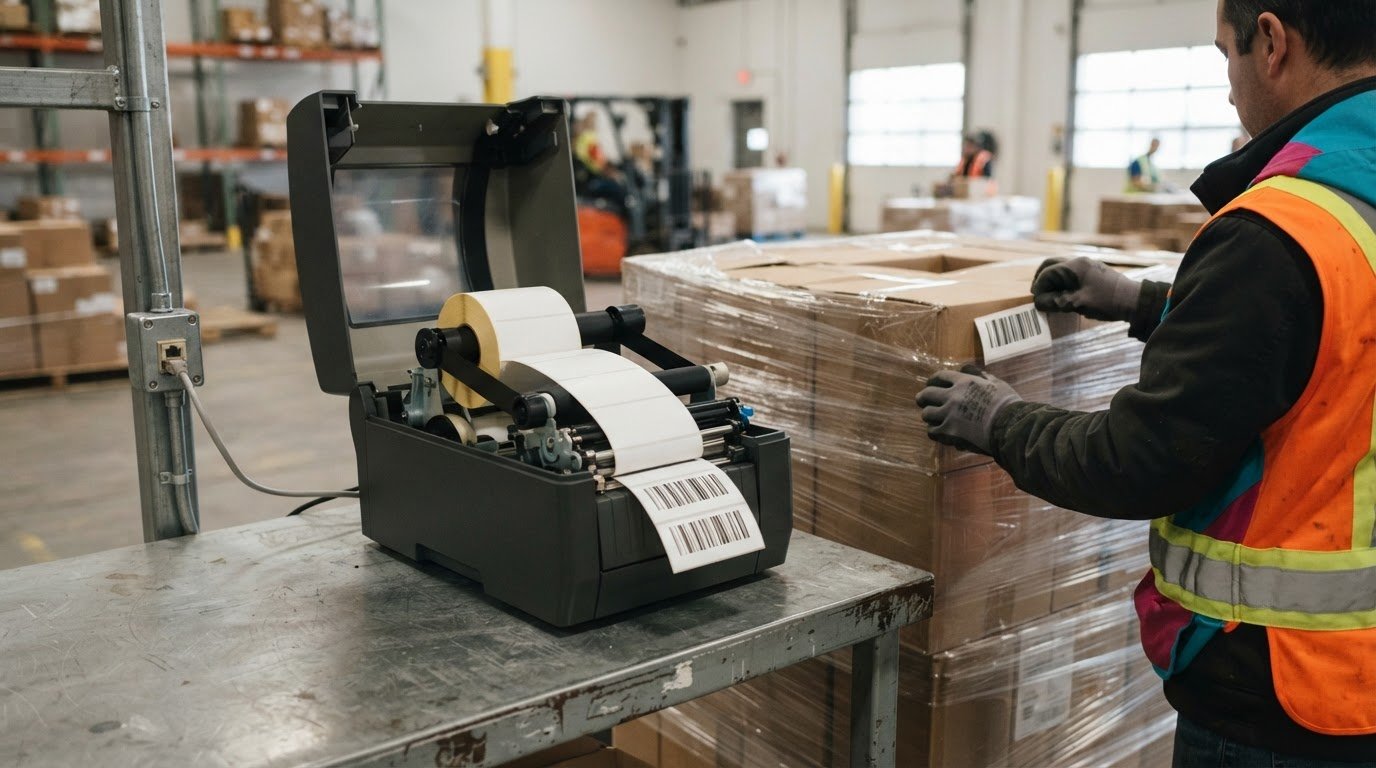
A warehouse printer should be chosen for its workload, not just its label. A heavy-duty thermal transfer barcode printer for a warehouse can suit operations producing thousands of labels per day, especially when labels must withstand handling over time. Four-inch widths cover most shipping and bin labels, while 6- to 8-inch widths can suit regular pallet or larger compliance labels.
Print speed matters, but choosing a heavy duty thermal transfer barcode printer for warehouse use also means matching the printer to your label volume, media, connectivity and distribution workflow. The right fit handles peak demand without adding capacity your operation does not need.
This guide explains how to assess duty cycle and label width, when thermal transfer makes sense, and how connectivity affects warehouse workflows. It also introduces the GoDEX ZX, EZ, GX and RT200i series so you can see how different printer options may fit your operation.
Key Takeaways
- Match printer capacity to your daily label volume and operating conditions; warehouse workloads can reach thousands of labels per day.
- Choose print width around the labels you use: 4-inch models suit most shipping and bin labels, while 6- to 8-inch widths can handle larger pallet and compliance labels.
- Use thermal transfer for labels that need to withstand ongoing handling, and consider direct thermal for shorter-life applications.
- Decide whether Ethernet or wireless connectivity best supports your fixed printer stations and satellite work areas.
- Compare the GoDEX ZX, EZ, GX and RT200i series by workload and label format to narrow down a suitable warehouse option.
How many labels can an industrial barcode printer handle per day?
Warehouse teams may print shipping, bin, pallet and compliance labels throughout the day. Rather than rely on one daily label count, match the printer’s duty cycle to peak workload, then consider label size, print speed, shift patterns and roll-change frequency. A printer running near its limit during busy shifts may not be suitable, even if its listed speed looks adequate.
Start with label width and format. Four-inch printers cover most shipping and bin labels, while 6- to 8-inch widths can suit regular pallet or large compliance labels. For example, a standard shipping format may fit a 4-inch printer, but a wide pallet label can need more print width. Choose a format that accommodates required text and barcodes without shrinking them until they’re difficult to scan. The printer, label stock and ribbon must all support the selected width and format.
Thermal transfer also depends on a compatible ribbon and label material. Match the ribbon type and width to the media and printer, then confirm the combination prints clear text and readable barcodes. Warehouse labels exposed to handling over time are often better suited to thermal transfer; direct thermal is commonly used for shorter-life labels. You can explore thermal transfer labels for media options. Test the chosen combination in the actual workflow, such as on a handled bin or a pallet moving through distribution.
To compare Zebra, Honeywell, SATO and TSC industrial thermal transfer printers, assess specific models against your daily workload, print width, supported media and ribbon, connectivity and maintenance needs. A brand name alone does not show whether a printer fits your label format or volume.
Plan for maintenance issues that can affect print quality or interrupt output, including dust, adhesive residue, worn printheads, poor ribbon tracking and incorrect media loading. Follow the model’s cleaning instructions, keep the print path clear and replace worn components as needed. Maintenance schedules vary by printer.
What Canadian warranty, service and support options are available? Coverage, repair arrangements and technical support depend on the printer’s manufacturer and purchase terms. Compare those terms alongside workload and media compatibility before choosing a model.
- Estimate peak output: include labels printed across shifts and during busy periods.
- Match width to use: choose 4 inches for most shipping and bin labels, or consider 6- to 8-inch widths for larger formats.
- Test the complete setup: check that printer, label stock and ribbon produce readable results in warehouse conditions.
Thermal Transfer or Direct Thermal - Which Should Your Warehouse Use?
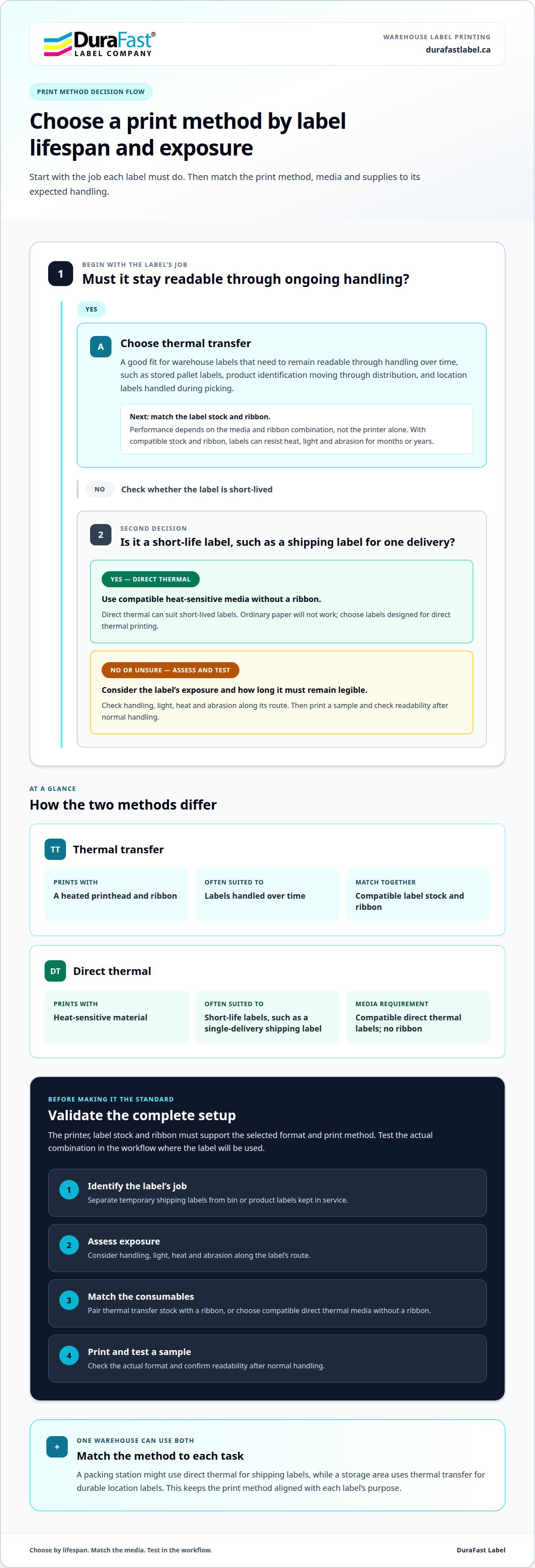
Choose the print method based on how long each label must remain readable and the conditions it will face. Thermal transfer uses a heated printhead and ribbon to transfer ink onto label stock. Direct thermal prints on heat-sensitive material without a ribbon. This affects supplies, media choices and how labels perform during storage and distribution.
Thermal transfer suits warehouse labels that need to stay readable through handling over time. With compatible label stock and ribbon, labels can resist heat, light and abrasion for months or years. This can matter for stored pallet labels, product identification moving through distribution, and location labels handled during picking. Performance depends on the media and ribbon combination, not the printer alone.
Direct thermal can suit short-lived labels, such as shipping labels for a single delivery. The print forms on heat-sensitive material, so there is no ribbon to load or match. The media itself is essential: ordinary paper will not work with direct thermal printing. Choose labels designed for the printer and consider how long they need to remain legible during transport and processing.
Use this decision process for each label type in your operation:
- Identify the label’s job: distinguish a temporary shipping label from a bin or product label kept in service.
- Assess exposure: consider handling, light, heat and abrasion along the label’s route.
- Match consumables: select thermal transfer stock and ribbon together, or compatible direct thermal media without ribbon.
- Test a sample: print the actual format and check readability after normal handling.
Some warehouses use both methods. A packing station might print direct thermal shipping labels, while a storage area uses thermal transfer for durable location labels. This approach can keep the consumables aligned with each task instead of forcing one print method onto every workflow. For thermal transfer applications, thermal transfer label options can help you consider suitable media formats.
Before standardizing supplies, test each label on its intended surface and through its actual handling route. A barcode that scans after printing may become difficult to read if the label stock or ribbon is unsuitable. Confirm that the printer supports the selected method, then document the media and ribbon combination for repeat orders. This helps warehouse teams keep a consistent setup for shipping, storage and product identification without mixing incompatible supplies.
Do warehouse barcode printers need Ethernet connectivity?
Ethernet suits a fixed printer station receiving jobs over a warehouse network. It can connect the printer with warehouse management systems (WMS), enterprise resource planning (ERP) systems and automated logistics workflows. Not every station needs Ethernet, so choose connectivity based on printer location, job source and how operators release labels.
For high-volume operations, prioritize a suitable duty cycle and sustained output. Warehouse printers may produce thousands of labels per shift, so choose an industrial model designed for that workload. Industrial printers commonly have metal frames and support larger label rolls, helping sustain output and reduce interruptions for roll changes. A network connection can route jobs to a shared station, but it cannot compensate for a printer that is not suited to the volume.
Ethernet can work well on a central packing line where several workstations send jobs to one printer. A wired connection can also be managed alongside other fixed equipment. USB may suit a printer serving one nearby computer. Wi-Fi can fit a satellite station where network cabling is impractical, while Bluetooth is often used with mobile printers. Interfaces vary by model, so match the printer’s actual connectivity to your network design.
Satellite operations may need a different workflow. A printer near a receiving dock, picking zone or remote packing bench may need local access rather than a central queue. Consider where staff create labels, how jobs reach the printer and what happens if the network connection drops. A wireless mobile printer may suit printing near goods, while a fixed industrial printer may be better for a dedicated, high-volume station.
Before choosing a connection, map the label journey from the WMS or ERP to the printer. Identify which stations submit jobs, whether printers are shared and whether automated equipment must trigger printing. Then compare the interfaces on the models you are considering. Ethernet, USB, Wi-Fi and RFID are among the options used for warehouse integration, but a printer will not necessarily include every interface.
- Central, steady output: consider Ethernet for a fixed shared station and size the printer for thousands of labels per shift.
- Single workstation: consider USB when one nearby computer sends print jobs.
- Satellite or mobile use: consider Wi-Fi or Bluetooth where wireless access fits the workflow.
Ethernet is useful for networked warehouse stations, but it is not a universal requirement. Choose an interface that connects each printer to its job source, and make sure the printer can handle the operation’s volume and sustained printing demands.
Industrial printers for warehouse and distribution work
Choose a printer type to match each station, from office label runs to production-line output. Compare operating conditions, daily volume and ownership costs before selecting equipment.
Industrial printers for warehouse conditions
Industrial thermal printers are built for demanding workloads and warehouse environments, where labels support receiving, picking, packing and dispatch. A printer serving a busy distribution line should be designed for sustained output, not occasional office use. Some industrial printers are described as suitable for 24/7 production lines, so duty cycle matters alongside print speed. Look for a model that fits the required label format and media, and consider whether its construction suits the station’s exposure to dust and frequent handling. A fixed packing bench has different demands from a printer placed beside an active production line.
For a heavy duty thermal transfer barcode printer for warehouse operations, match the duty cycle to actual shifts and peak periods. This helps avoid a printer that falls short during the busiest part of the operation.
Desktop, mobile and industrial differences
Desktop printers suit moderate-volume office tasks, often a few hundred labels per day. Some models are rated for only a few hours of daily operation, making them unsuitable for continuous warehouse output. Industrial printers are intended for higher volumes and demanding use, making them a fit for fixed stations printing shipping, pallet or location labels throughout shifts. Mobile printers serve another purpose: staff can print near goods or work areas instead of returning to a shared desk. Choose based on where labels are created, how often they are printed and whether operators move between locations.
For example, an office may use a desktop printer for occasional inventory labels, while a distribution line needs an industrial printer for ongoing output. A mobile printer can complement either setup for work away from fixed stations. In larger packing and dispatch environments, automated pallet wrapping systems from specialists like Phoenix Handling Solutions Limited often operate alongside these industrial printers to ensure pallets are properly secured and labelled for transit.
Industrial printer prices
Industrial printer pricing depends on the capabilities and configuration your operation needs. Consider duty-cycle suitability, print width, resolution, connectivity and compatibility with the required label media. A higher-capacity setup may be unnecessary for occasional inventory labels, while a busy distribution line may need equipment designed for sustained production. Include ribbons and label stock in your purchasing plan because media requirements affect ongoing costs. Compare configurations against your workflow, not just the initial purchase price.
Build a practical comparison using the same workload and label formats for each model. Record the required interfaces, print resolution and media compatibility, then assess each printer against those needs. This makes desktop and industrial options easier to compare and keeps the decision grounded in warehouse use.
GoDEX ZX, EZ, GX and RT200i printer series
GoDEX’s ZX, EZ, GX and RT200i series offer models to compare against warehouse workload and label formats. The strongest fit depends on the specific model, required print width and expected operating demands, not the series name alone.
The GoDEX ZX Series is designed for continuous, high-volume warehouse printing. Its all-metal frame and printhead mechanism suit sustained workloads. Consider the ZX for a fixed station supporting ongoing distribution output, and match the model to your label format and workflow. Durable construction can matter in busy work areas, but the printer’s capabilities still need to fit the labels and operation.
GoDEX EZ Series models include support for label formats up to 6 inches wide. That makes the series worth considering when a warehouse regularly prints wider formats, including some pallet or compliance labels. Confirm the chosen model’s print width against the actual label dimensions and layout. A format that fits comfortably can preserve space for required text and barcodes without forcing a redesign.
For the GoDEX GX and RT200i series, compare the individual models against the same operating requirements rather than assuming that series names indicate equivalent capacity. Start with your label widths, daily volume, print method and connection needs. Then assess the model’s fit for its location, whether it serves a central packing station or a more specialized workflow. This keeps the comparison focused on the task instead of unsupported assumptions about a product family.
Use a consistent selection checklist across all four series:
- Workload: decide whether the printer serves continuous high-volume output or a less demanding station.
- Label format: match printer width to the widest regular label, including pallet and compliance formats.
- Media and print method: confirm the model supports the label stock and thermal transfer setup your operation uses.
- Connectivity: align available interfaces with the warehouse network and print-job source.
- Placement: consider the station’s conditions and access for loading media and routine maintenance.
A practical takeaway: start with the ZX when continuous, high-volume use is central, and consider EZ models when formats up to 6 inches are needed. Compare GX and RT200i models by their documented specifications against the same checklist. That approach narrows the options without treating every GoDEX series as interchangeable.
To discuss which GoDEX printer specifications fit your warehouse workflow, connect with our team about printer selection.
DuraFast Label Company Canada: VIPColor Label Printers
DuraFast Label Company Canada offers VIPColor Label Printers for operations that need colour product labels alongside warehouse barcode identification. The VP500, VP610 and VP700 use Memjet Technology and standard Memjet dye inks. The VP550, VP660 and VP750 use Memjet water-enhanced dye inks, which are better suited to wet labels or labels exposed to water or condensation. These colour label printers are a different option from thermal transfer barcode printers, not a replacement for them.
DuraFast also offers Afinia, Toshiba and Honeywell Label Printers. The right fit depends on your labels, print method and workflow. For help exploring these printer options, contact DuraFast Label Company Canada.
Make Your Printer Choice Work for the Next Shift
Turn your warehouse requirements into a clear equipment brief. Note the label formats, operating conditions, print volume and connection points the printer must support. This gives your team a practical basis for comparing models and planning for changing distribution needs.
Choose a heavy duty thermal transfer barcode printer for warehouse work based on the job it will perform, not specifications that do not affect your workflow. If your operation also needs colour product labels, consider DuraFast's industrial color label printers and specialized marking systems alongside barcode printing equipment.
For help narrowing down printer options for your operation, contact DuraFast Label Company Canada. A well-matched setup can support more consistent labelling as your warehouse moves forward.
Frequently Asked Questions
Why buy this printer?
A heavy duty thermal transfer barcode printer for warehouse use is designed for sustained label production and durable identification. It can suit shipping, inventory, pallet-handling and storage-location labels. The benefit is equipment matched to the workload and label lifespan, rather than relying on an office printer for ongoing distribution tasks. Match the model to your label formats, print volume and operating environment.
Which industrial barcode printers support high-volume warehouse printing and continuous operation?
The GoDEX ZX Series is designed for continuous, high-volume warehouse printing and features an all-metal frame and printhead mechanism. For other industrial models, compare the manufacturer’s intended workload and the conditions at the station. Check supported label formats, media requirements and connectivity against your workflow. The printer should suit both the volume and the way staff or automated equipment submit jobs.
What print speed, resolution, and monthly duty cycle should a warehouse barcode printer have?
Choose a speed and duty cycle that can meet peak output without making normal shifts depend on running the printer continuously at its limit. Consider how many labels each station produces, how many shifts use it and whether jobs arrive in bursts. Select resolution according to barcode size and information density. A suitable balance supports readable labels while keeping output aligned with actual demand.
What are current prices for industrial thermal transfer barcode printers in Canada?
Current Canadian prices vary by printer model and configuration. Compare models against the same requirements for print width, resolution, connectivity and workload, then review current prices in Canadian dollars. Include compatible label stock and thermal transfer ribbons in your purchasing plan. This gives a clearer comparison than purchase price alone, since media choice affects ongoing supply needs.
Which barcode label sizes, materials, and ribbon types are compatible with warehouse printers?
Compatibility depends on the printer’s supported width, media path and thermal transfer requirements. Match roll or fanfold format, label dimensions and stock material to the model, then choose a ribbon compatible with both the printer and label material. For a warehouse bin label that will remain in use, consider the surface and handling conditions. Confirm the full media combination against the model specifications before standardizing supplies.
What connectivity options and warehouse software integrations should an industrial label printer support?
Choose interfaces that connect the printer to the systems and workstations creating label jobs. Ethernet, USB, Wi-Fi and RFID are options used for warehouse printer integration, but availability depends on the model. Check that the planned connection supports the workflow between your WMS or ERP and label-printing software such as BarTender. A central packing station may need a different setup from a satellite printer near receiving or picking.
How do I choose between 203 dpi, 300 dpi, and 600 dpi for warehouse barcode labels?
Choose resolution according to the label layout and the size of its smallest barcode or text. A simpler label with larger elements may not need the same detail as a compact label with dense information. Zebra’s ZT411 offers resolutions from 203 dpi to 600 dpi, while the ZT411L offers 203, 300 or 600 dpi options. Test a sample at the intended size and confirm reliable scanning in your workflow.
How do Zebra, Honeywell, SATO, and TSC industrial thermal transfer printers compare?
Compare specific models by daily workload, print width, supported media and ribbon, connectivity, and maintenance needs. A brand name alone does not show whether a printer suits your label format or volume.