Best File Folder Labels: Simple Solutions for Smarter Office Organization
21st Jan 2026
Key Highlights
-
Effective organization starts with clear and legible file folder labels, which transform messy paper piles into a functional filing system.
-
The best file folder labels are durable, ensuring they won’t smear, fade, or peel off your manila folders over time.
-
Choosing the right adhesion is key; permanent labels are for long-term archives, while removable labels allow for easy updates.
-
Using a consistent template and a readable font for your labels makes finding documents quicker and less of a chore.
-
Color-coding with assorted label colors can visually separate categories, making your filing system even more intuitive.
-
Printing your own labels with a dedicated printer provides a professional look that handwritten labels can't match.
Paper clutter can slow you down faster than you realize. When folders aren’t clearly labeled, even simple tasks, like finding an invoice or a client document, can turn into time-wasting scavenger hunts. A messy filing system doesn’t just look bad; it disrupts your workflow and adds unnecessary frustration to your day.
The right file folder labels change that instantly. With clear, consistent labeling, your drawers become easier to navigate, categories stay tidy, and you can locate what you need in seconds. It’s a small upgrade that creates a big shift in how efficiently you work, whether you’re updating your personal tax documents or organizing your office paperwork.
In this guide, we’ll walk you through the best file folder labels available today, what features matter most, and practical ideas to build a smarter, stress-free filing system. If you’re ready to trade clutter for clarity, you’re in the right place.
What Are File Folder Labels and Why Are They Important for Organized Workspaces?
File folder labels are small adhesive tags or inserts placed on folder tabs to identify what each folder contains, helping you sort, find, and manage documents quickly. They bring structure to any workspace, whether at home or in an office, by reducing clutter, preventing misfiled papers, and making your filing system easy to navigate.
Clear, consistent labels save time, eliminate guesswork, and create a workspace where everything has a place. Here are some additional benefits:
-
Help you identify documents instantly without opening each folder
-
Prevent misfiling and reduce time spent searching for papers
-
Keep workspaces tidy, professional, and easy to maintain
-
Support efficient workflows and faster decision-making
-
Make large filing systems easier to categorize and scale
What are the Top Features to Look for in the Best File Folder Labels?
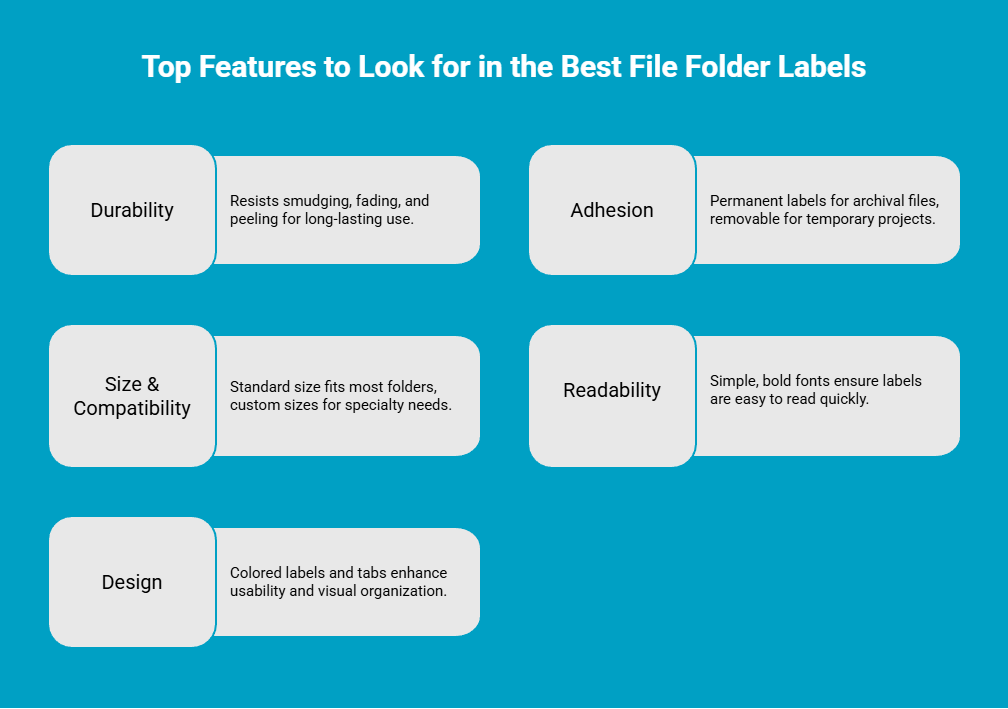
When you start shopping for file folder labels, you’ll quickly notice they vary widely in quality. A label that curls, smudges, or peels can break your entire system. That’s why focusing on the right features helps you build a filing setup that stays neat and functional. Here are 5 such features:
1. Durability (Won’t smear, fade, or peel)
Durability is one of the most important features in a file folder label because your folders are handled constantly. A good label should resist smudging, fading, and peeling so the text stays sharp and the label stays firmly in place.
Look for labels that stay flat, don’t curl at the edges, and are compatible with your printer type to avoid ink issues from the start. Choosing durable labels ensures your filing system remains clear and reliable over time.
2. Adhesion (Permanent vs. Removable File Folder Labels)
The adhesive type determines how flexible your filing system can be. Permanent labels are ideal for long-term or archival files because they bond tightly and don’t come off easily.
Removable labels, however, are perfect for temporary projects or reusable folders since they peel away cleanly without leaving residue. If you often update categories, removable or repositionable options give you the freedom to adjust your system without damaging your folders.
3. Size & Compatibility (Standard file folder label size vs. custom)
Choosing the right label size ensures your filing system looks uniform and easy to scan. Standard labels (2/3" x 3 7/16") fit most top-tab folders and offer enough space for clear text without overwhelming the tab.
However, custom sizes can be useful for binders, sub-tabs, or specialty folders that need more or less space. Matching the label dimensions to your folder type helps maintain a professional, organized appearance across your entire setup.
4. Readability (Best font for file folder labels)
Readability makes or breaks the effectiveness of your filing system. Labels should be easy to read at a glance, which means using simple, bold fonts like Arial, Helvetica, or Calibri in a clean 10–12 pt size. Avoid decorative fonts or handwritten text that can look cramped or unclear.
Consistently printed labels also create a uniform look, making it quicker and easier to scan through drawers and find what you need without frustration.
5. Design (Colored file folder labels, file folder label tabs)
Design enhances the usability of your filing system by adding visual cues. Colored labels help you instantly identify categories, making it easier to group related folders and navigate large collections. Many labels also come in opaque finishes that let you cover old text cleanly.
If you use hanging folders, plastic insertable tabs with paper inserts provide a convenient, reusable option. Thoughtful file folder label design choices make your entire system more intuitive and visually organized.
How to Design and Print Perfect Labels?
Printing your own file folder labels at home or in the office is the best way to achieve a professional and uniform look. With a dedicated label printer, you can move beyond messy handwriting and create crisp, clear file folder labels every time. Seiko smart label printers are an excellent tool for this job, offering speed, convenience, and high-quality results.
How to Use Seiko SLP-620, 650, or 650SE for Perfect Labels?
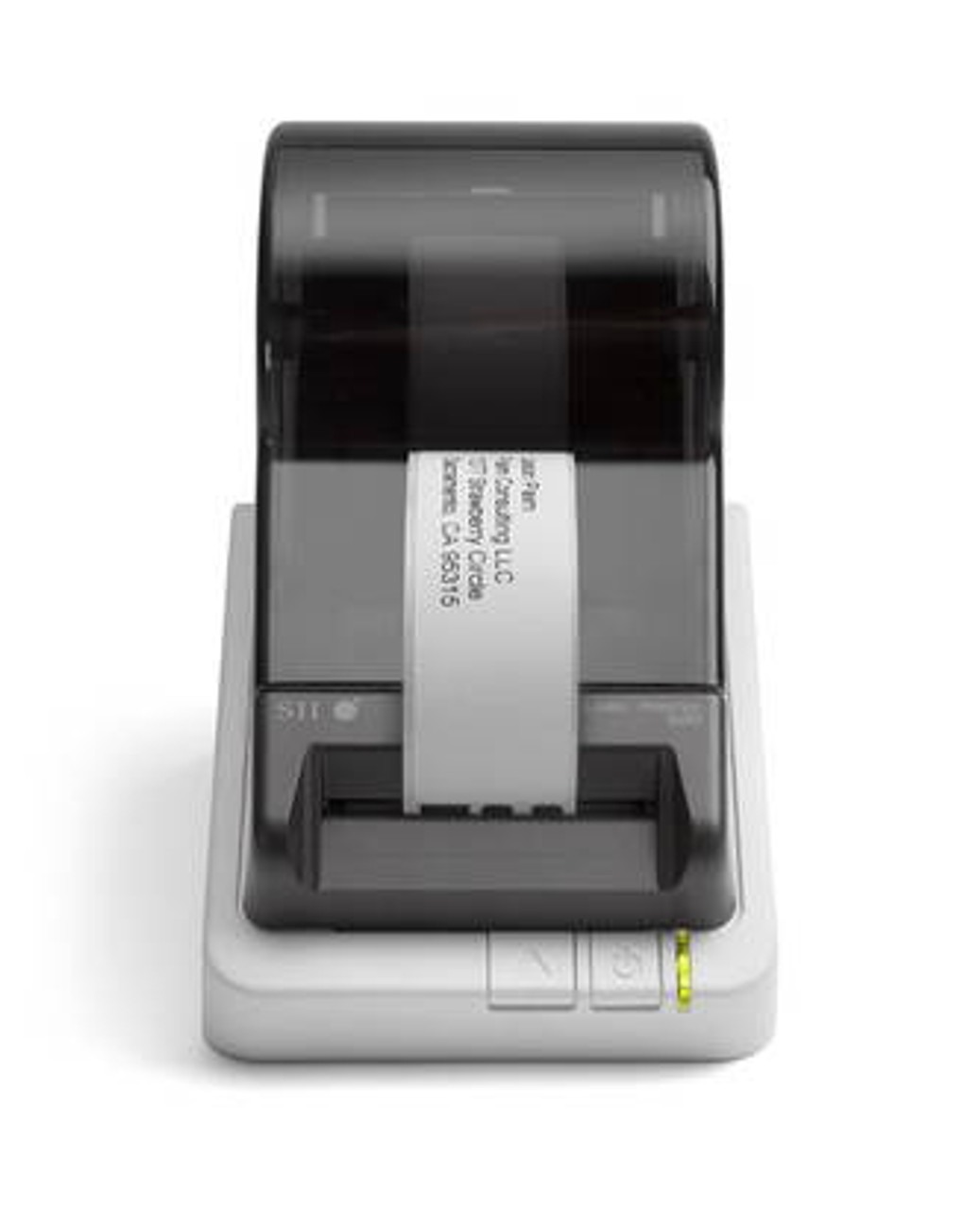
The Seiko SLP-620, 650, and 650SE come in a compact design, offer simple software, and provide a jam-free label creation process that is effortless, even for first-time users. Whether you’re organizing an office or managing inventory, these printers deliver consistently sharp, professional results. Follow the steps below to print perfect labels using these printers:
-
Install the Smart Label Software (SLS): Download and install Seiko’s SLS on your computer to access templates and printing controls.
-
Load the label roll correctly: Open the printer, place the roll inside, and ensure the labels feed straight so the sensor detects each one properly.
-
Select your label type: Choose the appropriate template—file folder labels, address labels, barcodes, or specialty tags—within the software.
-
Enter your text or data: Type your content, adjust font and spacing, and preview the label to ensure proper alignment.
-
Match printer settings to label size: Confirm the software settings match the exact dimensions of your label roll for accurate printing.
-
Print and check the first output: Print a test label to verify clarity and alignment before running a full batch.
-
Use Seiko-compatible label rolls for best results: High-quality rolls ensure smooth feeding, crisp text, and long-lasting labels.
Tips on Choosing the Best Font for Readability and Professionalism
Choosing the right font is just as important as choosing the right label because it affects both readability and the overall professionalism of your filing system. A clean, consistent font style helps you scan folders quickly and makes your workspace look more organized. By standardizing your font choices, you create a filing setup that feels polished, cohesive, and easy to maintain.
-
Go sans-serif for clarity: Stick to fonts like Arial, Helvetica, or Calibri for a clean, modern look that stays readable even at smaller sizes.
-
Keep font size consistent: A 10–12 pt size offers the perfect balance between visibility and space on the tab.
-
Avoid all caps: All caps can slow down reading and look harsh; use sentence case or title case for a smoother, more polished appearance.
-
Test before printing: Print a sample label to check spacing, legibility, and how well the font holds up once applied.
-
Match fonts across systems: Use the same font on printed labels, digital folder names, and templates to maintain a cohesive workflow.
What Are Some Practical File Folder Label Ideas for Office and Home Use?
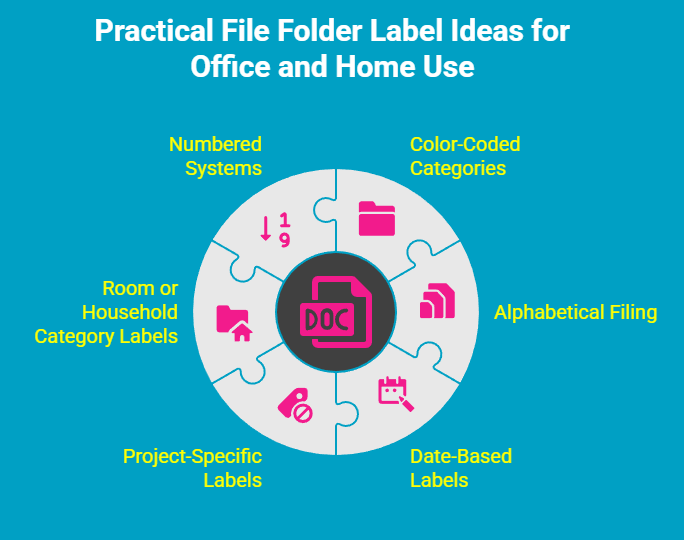
File folder labels can bring structure and clarity to even the busiest environments. Whether you’re handling project documents at work or managing bills and household papers at home, the right labeling approach helps reduce clutter, speeds up retrieval, and keeps your system easy to maintain. Here are some practical labeling ideas that work well across both office and home setups:
1. Color-Coded Categories
Color-coding is one of the simplest yet most effective ways to organize folders visually. Assigning specific colours to categories, such as green for finances, blue for personal documents, or red for high-priority items. This helps you instantly understand what a folder contains without reading the label. It is especially useful for large filing drawers, making patterns clear at a glance and reducing the time you spend searching through stacks of folders.
2. Alphabetical or A–Z Filing
An alphabetical system is perfect for organizing names, clients, departments, vendors, or ongoing accounts. Labeling folders from A–Z creates a predictable, intuitive order that anyone can follow, which is helpful in shared workspaces or family filing systems. It also allows new folders to be added easily without disrupting the entire setup, making it ideal for files that grow over time.
3. Date-Based or Monthly Labels
Using dates as your labeling method keeps time-sensitive paperwork neatly ordered. Whether you file items by year, quarter, or month, this structure makes it much simpler to track cycles, store archives, and clean out outdated documents. It works well for things like invoices, receipts, reports, medical records, and school papers, or anything you need to reference chronologically.
4. Project or Task-Specific Labels
For work settings with multiple active tasks, labeling folders based on project names, phases, or teams ensures everything related stays together. This makes it easier to monitor progress, file meeting notes, store reference materials, and quickly hand off work to colleagues. It’s equally helpful at home for planning events, organizing renovations, or managing personal goals.
5. Room or Household Category Labels
In home settings, labeling folders by room or household category can simplify paperwork management. You can group documents like appliance manuals, warranties, school forms, travel plans, and medical records according to their purpose. This approach keeps everyday paperwork easy to locate and helps everyone in the household understand where documents should go.
6. Numbered Systems for Large Collections
A numbered filing system paired with a master index is ideal when you have hundreds of files or multiple subject areas. Each folder is assigned a number, and the index provides details on what each number represents. This eliminates long folder names, keeps your system clean, and allows you to reorganize or expand your collection without renaming everything from scratch.
File Folder Labels You Can Print with Seiko SLP-620 and SLP-650 Printers
One of the biggest advantages of using Seiko Smart Label Printers is the ability to print professional file folder labels on demand using compatible direct thermal label rolls. These labels are designed to feed smoothly, print cleanly, and stay legible even with frequent handling.
At DurafastLabel.ca, you can find a dedicated range of Seiko-compatible file folder labels that work seamlessly with the SLP-620, SLP-650, and SLP-650SE printers.
Here are some commonly used file folder label options you can print with these Seiko models:
1. Standard White File Folder Labels
These are ideal for everyday office filing and long-term document storage. They offer a clean, professional appearance and excellent contrast for black text, making them easy to scan at a glance. They are well-suited for client files, accounting records, and administrative paperwork.
2. Clear File Folder Labels
Clear file folder labels are useful when you want a subtle, minimal look or need to overlay existing folder colours without blocking them. When printed with a Seiko printer, the text appears crisp and precise, provided the folder colour underneath offers enough contrast.
3. Removable File Folder Labels
Removable file folder labels are perfect for folders that change categories over time. They allow you to update labels without tearing the folder or leaving adhesive residue behind. This option works especially well for project-based filing or shared office systems.
4. Coloured File Folder Labels
Coloured file folder labels help create visual structure through colour coding. You can assign colours by department, document type, or priority level, making large filing systems easier to navigate. Seiko printers handle these labels cleanly while maintaining sharp text clarity.
5. File Folder Label Tabs
Label tabs designed for top or end tab folders help maximise space while keeping text readable. These are useful when drawer space is tight or when folders need to be scanned from different angles.
All of these label types are available as Seiko direct thermal file folder labels, meaning no ink or toner is required. This keeps printing fast, clean, and cost-effective while maintaining consistent output quality.
Where Can You Buy Reliable Seiko Smart Label Printers and Label Rolls?
If you’re looking for reliable Seiko Smart Label Printers and high-quality label rolls, DurafastLabel.ca is one of the best places to buy them in Canada. We offer the full range of Seiko printers, including the popular SLP models, along with compatible label rolls that deliver crisp, smudge-free results every time.
We are also known for our fast shipping, competitive pricing, and expert support, making it easy to find exactly what you need for your labeling setup. Whether you're upgrading your office equipment or restocking supplies, our wide selection ensures you get genuine, dependable Seiko products that keep your workflow running smoothly.
Have questions or need help choosing the right model? Contact us today.
Conclusion
Effective file folder labeling is an essential step towards a more organized workspace, whether at home or in the office. By choosing high-quality labels that are durable, easy to read, and compatible with your needs, you can streamline your filing system and enhance productivity. With the right tools, such as Seiko label printers, creating customized labels becomes a breeze. Remember, a well-organized space not only saves time but also reduces stress. So, take the time to invest in the best file folder labels and enjoy the benefits of a tidier, more efficient environment. Happy organizing!
Frequently Asked Questions
What is the standard size for file folder labels?
The standard file folder label size is 2/3 inch in height by 3 7/16 inches in width. This dimension is specifically designed to fit perfectly on the 1/3-cut tabs of most standard letter-size manila and plastic file folders without overlapping.
Can I use clear labels on colored folders?
You can use clear labels on colored folders, but it may not always be the best choice for readability. Black text printed on a clear label can be hard to see against a dark-colored folder.
How do I remove self-adhesive labels cleanly?
To ensure clean removal, it is best to use "removable" self adhesive file folder labels from the start. These are designed to peel off without tearing the paper or leaving sticky residue, which is ideal if you plan to update your filing system.