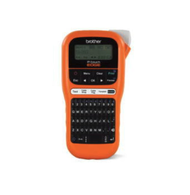
How to Label Ethernet Cables for a Clean Network
27th Mar 2026
Key Highlights
-
Poor Ethernet cable labelling increases downtime, errors, and maintenance effort
-
Clear, durable labels are critical for managing dense and growing networks
-
Professional label makers ensure consistent, readable, long-lasting identification
-
The right label type improves visibility and prevents peeling or misidentification
-
Standardized labelling speeds up installation and troubleshooting
-
Genuine supplies help maintain clean, reliable network environments
Ethernet cable labelling is often treated as a minor task during network installations, until problems arise. When cables are unlabeled or poorly identified, simple changes can turn into time-consuming disruptions. Technicians spend unnecessary time tracing connections, troubleshooting becomes slower, and the risk of disconnecting the wrong cable increases. In offices, data centres, and industrial environments, these issues can quickly lead to downtime, confusion, and higher maintenance costs.
As networks become more complex and densely packed, clear cable identification is no longer optional. IT teams need to recognize ports instantly, follow logical naming systems, and make updates without interrupting live systems. Handwritten tags fade, inconsistent labels peel, and ad hoc naming conventions fail to scale as infrastructure grows.
This guide explains how to label Ethernet cables correctly using durable label types, practical techniques, and recognized industry standards. It also outlines professional approaches that help maintain organized, efficient, and reliable network environments over time.
What Are the Challenges of Labelling Ethernet Cables Without the Right Tools?
Labelling Ethernet cables without proper tools often leads to problems that only become visible when the network needs to be changed, repaired, or expanded. What may look acceptable during installation can quickly turn into a source of confusion once cables are moved, added, or traced under pressure. Without durable labels and a consistent system, networks become harder to manage over time.
Common challenges teams face include:
-
Cable tracing delays during moves, adds, and changes
Unclear or missing labels force technicians to manually trace cables end to end, increasing labour time and the risk of errors in live environments. -
Slower and riskier troubleshooting
In dense racks or patch panels, poor labelling makes it difficult to identify the correct port or connection, raising the chances of unplugging the wrong cable and causing downtime. -
Disorganized cable bundles that affect maintenance
Inconsistent labelling often leads to tangled cabling, restricted airflow, and longer maintenance windows, especially in server rooms and network closets. -
Higher risk of accidental disconnections
When cables are not clearly identified, routine tasks such as testing or reconfiguration can interrupt critical connections unintentionally. -
Unprofessional appearance and audit challenges
Handwritten or improvised labels fade, peel, or become unreadable over time, making networks look poorly maintained and harder to document during audits.
Without proper labelling tools, these issues compound as the network scales. Structured cabling best practices consistently show that unclear or inconsistent labels increase mean time to repair and introduce avoidable operational risk, particularly in environments where uptime, accuracy, and accountability are essential.
How to Label Ethernet Cables Using a Brother P Touch Label Maker?
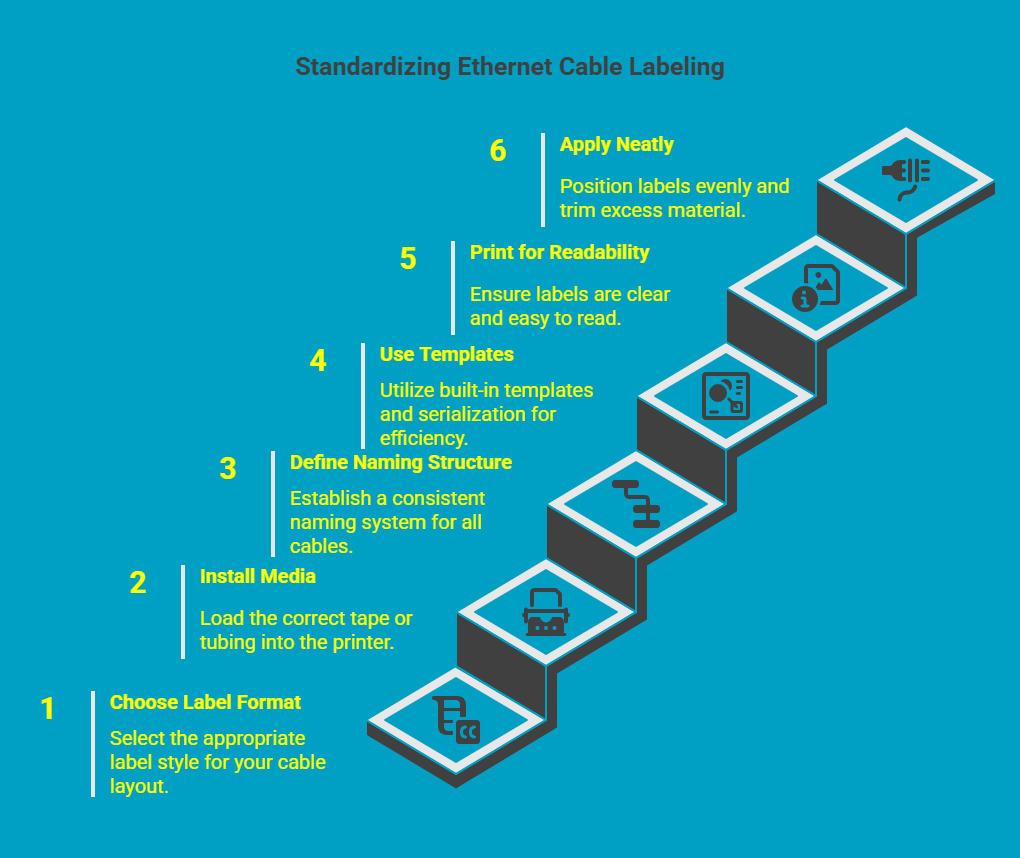
Using a Brother P-touch label maker allows you to create clear, consistent cable identification that holds up during daily network operations. A structured approach ensures labels remain readable, durable, and easy to trace over time.
Step 1: Choose the Right Label Format
Start by selecting a label style that fits your cable layout and visibility needs. Wrap labels are ideal for standard CAT5 and CAT6 patch cords, while flag labels work better in dense racks where quick identification is required. For permanent or rugged installations, heat shrink offers added protection.
Step 2: Install the Correct Tape or Tubing
Load the appropriate media into the printer. TZe Flexible ID tape conforms smoothly around round Ethernet cables without lifting. HSe's heat shrink tubing is better suited for long-term or industrial environments where durability is critical.
Step 3: Define a Consistent Naming Structure
Decide what information each label should display, such as rack number, patch panel, port ID, or destination. Keeping the same structure across all cables improves clarity and simplifies future maintenance.
Step 4: Use Built-In Templates and Serialization
Select preloaded port ID or cable templates on the label maker. Enable serialization to automatically increment numbers, reducing manual input and improving accuracy across large installations.
Step 5: Print for Clear Readability
Choose a legible font size and strong contrast so labels can be read easily in low-light server rooms. Avoid overcrowding text, which can make labels harder to scan at a glance.
Step 6: Apply and Finish Neatly
Wrap or position the label evenly on the cable, ensuring it sits flat without bubbles or gaps. Trim excess material for a clean finish that supports airflow and keeps cable bundles organized.
Following these steps helps standardize Ethernet cable labelling across your network. With features like hotkeys and serialization, Brother P touch EDGE models make the process faster while maintaining professional, long-lasting results.
What Is the Best Way to Label Ethernet Cables for Long Term Durability?
The most effective way to label Ethernet cables is to choose labelling methods that align with the installation environment, cable size, and expected lifespan. Durability is not only about how long a label lasts, but also how well it remains readable and secure as the network grows and changes.
Choose the Right Label Format for the Installation
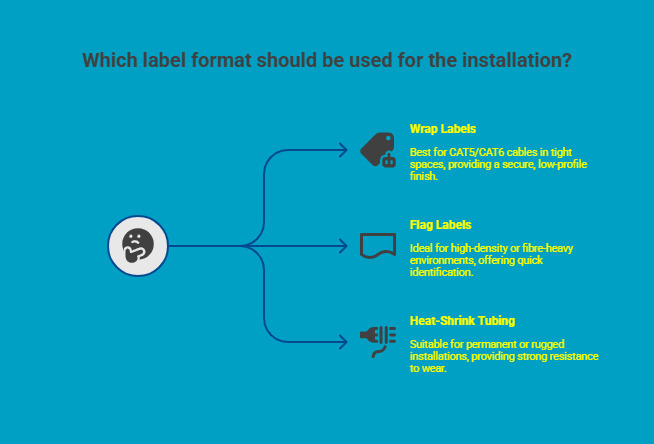
Different label formats serve different operational needs. Selecting the right one upfront helps prevent peeling, fading, or misidentification later.
-
Wrap labels are well-suited for CAT5 and CAT6 Ethernet cables used in patch cords and racks. They wrap fully around the cable, creating a low-profile finish that stays secure in tight bundles.
-
Flag labels improve visibility in high-density or fibre-heavy environments. The extended label face allows quick identification without moving cables or disrupting airflow.
-
Heat-shrink tubing is ideal for permanent or rugged installations. Once applied, it forms a tight seal around the cable and offers strong resistance to wear and environmental stress.
Prioritize Label Material for Long-Term Performance
Beyond format, the material of the label plays a major role in longevity. Laminated labels are widely recommended by cabling professionals because they are designed to withstand common data centre conditions.
-
Resistant to moisture and humidity
-
Protected against abrasion from cable movement
-
Stable under temperature fluctuations
These characteristics make laminated labels a dependable choice for server rooms and structured cabling systems where labels must remain legible over time.
By combining the right label format with durable materials, Ethernet cable labelling remains clear, consistent, and reliable throughout the life of the network.
What Ethernet Cable Labelling Standards Should You Follow for Organized Networks?
Clear Ethernet cable labelling depends on structure, not individual preference. In organized networks, labels follow a consistent system so cables, ports, and connection points can be identified quickly by anyone working on the infrastructure. This becomes especially important as networks expand, teams change, or maintenance work is handed over between technicians.
Instead of relying on informal naming or visual cues, professional environments use structured labelling practices that prioritize clarity and repeatability. These practices ensure every label communicates the same type of information, regardless of where it appears in the network.
Key labelling principles used in well-organized networks include:
-
Consistent naming conventions that clearly identify cables and ports using a standard format across the entire network
-
Accurate patch panel and outlet identification that reflects rack positions and physical layouts
-
Logical visual differentiation using colours or symbols to separate network functions, zones, or services
-
Aligned documentation practices so physical labels match network diagrams, port maps, and records
When these standards are applied consistently, networks become easier to maintain and scale. Troubleshooting is faster, changes carry less risk, and handovers between internal teams or external vendors happen with far less friction.
What Types of Ethernet Cable Labels Are Available and When Should You Use Them?
Different network environments require different labelling approaches. Choosing the right Ethernet cable label depends on cable size, installation density, visibility needs, and how permanent the setup is, as using the wrong label often leads to peeling, poor readability, or rework over time.
|
TZe Flexible ID (CAD) |
Best Used For |
Tape Type |
Typical Applications |
|---|---|---|---|
|
Wrap labels |
Small diameter CAT5 and CAT6 cables needing a tight, low-profile fit |
TZe Flexible ID |
Office networks, patch panels, server racks |
|
Flag labels |
Thin data and fibre cables requiring easy visual identification |
TZe Flexible |
Data centres, high-density rack environments |
|
Heat shrink |
Permanent installations exposed to heat or movement |
HSe tubing |
Industrial sites, electrical rooms, field setups |
|
Cable label tags |
Temporary or removable identification |
Plastic tag |
Testing environments, short-term network changes |
Choosing the correct Ethernet cable label type improves readability, prevents slippage or peeling, and helps maintain a clean, easy-to-manage network as it scales.
What Tools Do You Need to Print Professional Quality Ethernet Cable Labels?
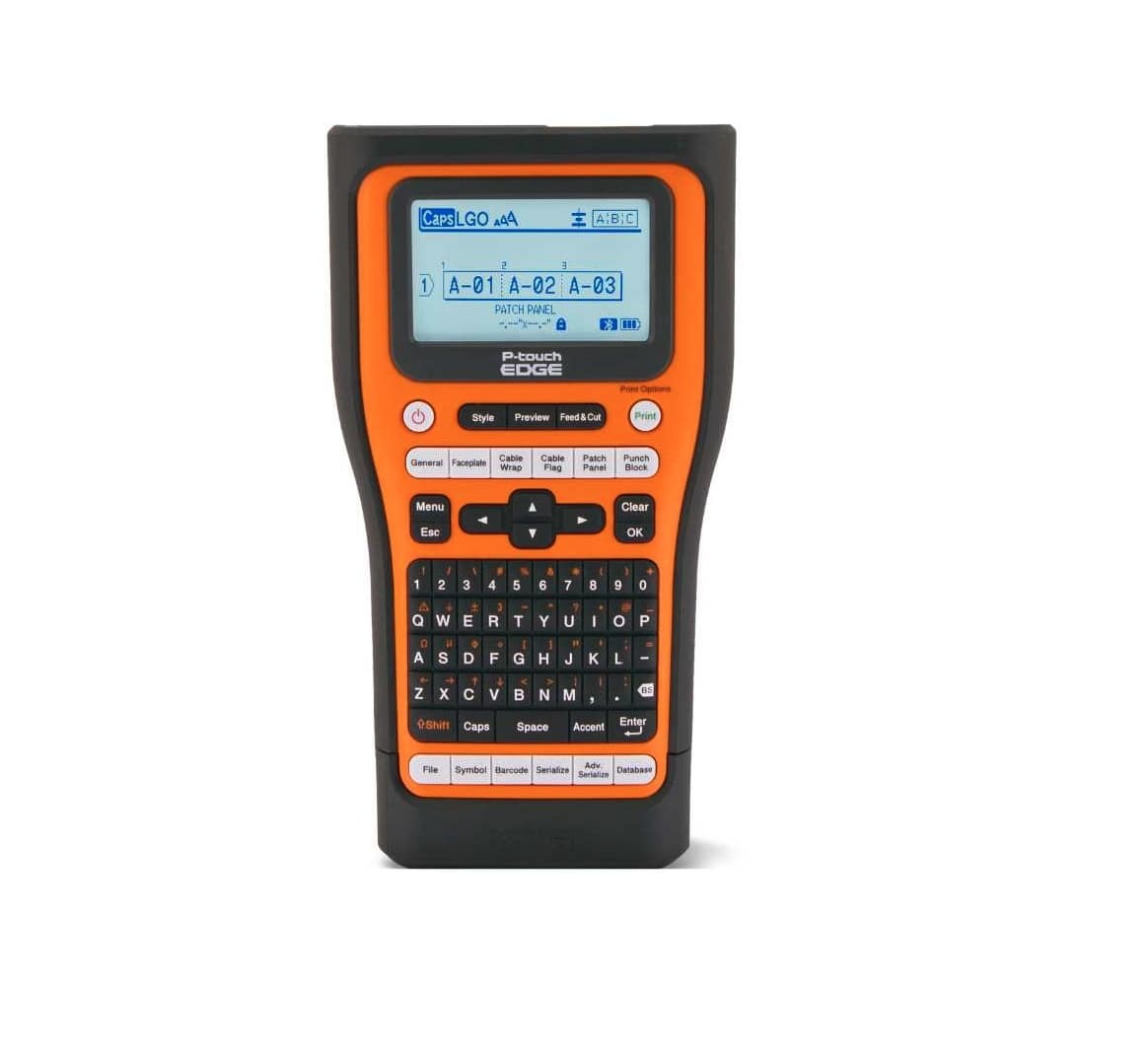
Professional Ethernet cable labelling requires a dedicated Ethernet cable label maker designed for network environments that can handle materials like polyester. General office printers and handwritten tags lack the durability and precision needed for round cables, dense racks, and long-term use.
Purpose-built benchtop label makers support consistent formatting and faster workflows by eliminating manual input errors and rework. They are designed to print labels that stay legible in server rooms, wiring closets, and field installations with quality ink.
Key capabilities to look for include:
-
Built-in cable and port templates for standardized labelling
-
Laminated label output that resists heat, moisture, and abrasion
-
Portable designs for on-site labelling and industrial barcode scanners.
The Brother P touch EDGE series is commonly used for Ethernet and data communication labelling due to its support for flexible ID tapes and heat shrink tubing.
Common models include:
-
PT E110 for basic labelling tasks
-
PT E510VP for professional network teams
-
PT E560BTVP for mobile and advanced workflows
These printers integrate with PC software and mobile apps, enabling reusable templates, serialization, and consistent labelling across multiple locations.
How Can an Ethernet Cable Label Printer Improve Installation and Maintenance Efficiency?
An Ethernet cable label printer improves efficiency by bringing consistency to network installations from the start. Labelling cables as they are installed reduces errors and prevents confusion during future changes.
During setup, predefined templates and serialized numbering allow technicians to work faster while keeping labels uniform across cables, ports, and patch panels. This creates clear documentation that stays aligned with the physical network.
Maintenance is also faster and more reliable, providing greater portability. Clear, durable labels eliminate manual cable tracing, helping technicians identify connections quickly and resolve issues with minimal disruption, ultimately reducing labour expenses. Network operations studies show that consistent cable labelling can reduce fault resolution time by up to thirty percent.
Key benefits include:
-
Faster installations with standardized templates
-
Quicker troubleshooting through clear cable identification
-
More accurate, up-to-date network documentation
-
Consistent visual identification across all locations
A professional Ethernet cable label printer supports organized, scalable networks while reducing downtime and operational risk.
Where Can You Buy Labels for Ethernet Cables and Printing Supplies?
Using genuine labelling supplies is essential for print clarity, adhesion, and long-term durability. Low-quality tapes often peel, fade, or fail in active network environments.
For professional Ethernet cable labelling, commonly used supplies include:
-
TZe Flexible ID tapes for secure wrap and flag labels on Ethernet cables
-
HSe heat shrink tubing for permanent and rugged installations
-
Laminated tapes for faceplates, patch panels, and rack identification
DuraFastLabel.ca supplies genuine Brother P touch EDGE printers and certified labelling materials for Canadian businesses. Their products are tested for compatibility and reliability, helping teams maintain consistent labelling across network installations. For product selection or setup guidance, their support team can assist with choosing the right supplies.
Get the right labelling setup the first time.
Contact us for product recommendations, pricing, and compatibility support.
Conclusion
Effective Ethernet cable labelling is a foundational part of building reliable, scalable networks. With the right label types, tools, and consistent practices, teams can reduce downtime, simplify maintenance, and avoid costly mistakes as infrastructure grows.
Investing in durable labels and purpose-built printers ensures clarity long after installation is complete. For Canadian businesses looking to standardize their network labelling, using certified supplies and expert guidance is a key consideration that helps get it right the first time and keeps networks organized for the long term.
FAQs
What type of label is best for Ethernet cables?
For Ethernet and small-diameter wire, flexible wire labels printed with a cable labelers or wire label maker work best. They conform around the cable, support proper label size, and remain readable across telecommunications systems with a wide variety of wire types, ensuring optimal functionality.
Are wrap labels or flag labels better for network cabling?
Wrap labels suit perfect cable runs and small diameter wire, while flag labels improve visibility around optic cables and dense wire harnesses. The right wire marker for marking depends on space, wiring colour codes, and whether rigid tags would obstruct airflow, as well as meeting any relevant customer specifications.
Do Brother labels withstand heat and humidity in server rooms?
Yes. Laminated wire labels and self-laminating vinyl heat-shrink wire options resist humidity, abrasion, temperature changes, and provide chemical resistance. Unlike inkjet labels or inkjet printers, they are designed for long term durability in data centres and repair of electrical control panels.
How do I print serialized port numbers accurately?
A traditional portable label printer with serialization support can pull spreadsheet data to print wire labels automatically. This everyday workhorse reduces labour expenses, prevents errors, and ensures that it is a better fit for consistent wire labelling across specific objects like patch panels and ports.
Can I create custom templates for repeated network installations?
Yes. Modern cable labellers allow custom templates for telecommunications systems, lab professionals, and SmartID aerospace-style workflows in compliance with ANSI standards. This lowers upfront cost over time by standardizing layouts for larger amounts of data using a single portable device.